TrustRadius: an HG Insights company

Save this comparison

Save this comparison

Add Product

Recommended Comparisons

    Overview
    ProductRatingMost Used ByProduct SummaryStarting Price

    Triggerbee

    N/A
    Mid-Size Companies (51-1,000 employees)
    Triggerbee’s software is used to design and add personalized content to a website, combining web activity, CRM, and marketing data to personalize websites for different visitors. For example, it can be used to replace an entire section with a promotion for returning customers, hide an email signup form for existing email subscribers, or show an NPS survey for your loyalty members, without having to go through agencies or wait for developers. Some key features: CRM…

    $39

    per month Sessions

    Webtrends Optimize

    Score9.7 out of 10
    N/AWebtrends Optimize is a web optimization platform and is offered by the company of the same name. The product competes most often with Adobe Test and Target, Maxymiser, SiteSpect, and Optimizely.N/A
    Pricing
    TriggerbeeWebtrends Optimize
    Editions & Modules
    Starter
    $39
    per month 10 000 Sessions / month
    Growth
    $69
    per month 25 000 Sessions / month
    Brand
    $149
    per month 50 000 Sessions / month
    No answers on this topic
    Offerings
    Pricing Offerings
    TriggerbeeWebtrends Optimize
    Free Trial
    YesYes
    Free/Freemium Version
    NoNo
    Premium Consulting/Integration Services
    YesYes
    Entry-level Setup Fee$500 one-time fee per installationNo setup fee
    Additional Details—There is no tiering and no different prices for different tools. The entire feature set is available to all users as standard at one price, agreed up front.
    More Pricing Information
    Features
    TriggerbeeWebtrends Optimize
    Testing and Experimentation
    Comparison of Testing and Experimentation features of Triggerbee and Webtrends Optimize
    Feature
    Triggerbee
    -
    Ratings
    Webtrends Optimize
    8.3
    1 Ratings
    2% below category average
    a/b experiment testing00 Ratings9.11 Ratings
    Split URL testing00 Ratings8.21 Ratings
    Multivariate testing00 Ratings8.21 Ratings
    Multi-page/funnel testing00 Ratings8.21 Ratings
    Cross-browser testing00 Ratings8.21 Ratings
    Mobile app testing00 Ratings8.21 Ratings
    Test significance00 Ratings8.21 Ratings
    Visual / WYSIWYG editor00 Ratings8.21 Ratings
    Advanced code editor00 Ratings8.21 Ratings
    Page surveys00 Ratings8.21 Ratings
    Visitor recordings00 Ratings8.21 Ratings
    Preview mode00 Ratings8.21 Ratings
    Test duration calculator00 Ratings8.21 Ratings
    Experiment scheduler00 Ratings8.21 Ratings
    Experiment workflow and approval00 Ratings8.21 Ratings
    Dynamic experiment activation00 Ratings8.21 Ratings
    Client-side tests00 Ratings9.11 Ratings
    Server-side tests00 Ratings8.21 Ratings
    Mutually exclusive tests00 Ratings8.21 Ratings
    Audience Segmentation & Targeting
    Comparison of Audience Segmentation & Targeting features of Triggerbee and Webtrends Optimize
    Feature
    Triggerbee
    -
    Ratings
    Webtrends Optimize
    8.2
    1 Ratings
    7% below category average
    Standard visitor segmentation00 Ratings9.11 Ratings
    Behavioral visitor segmentation00 Ratings8.21 Ratings
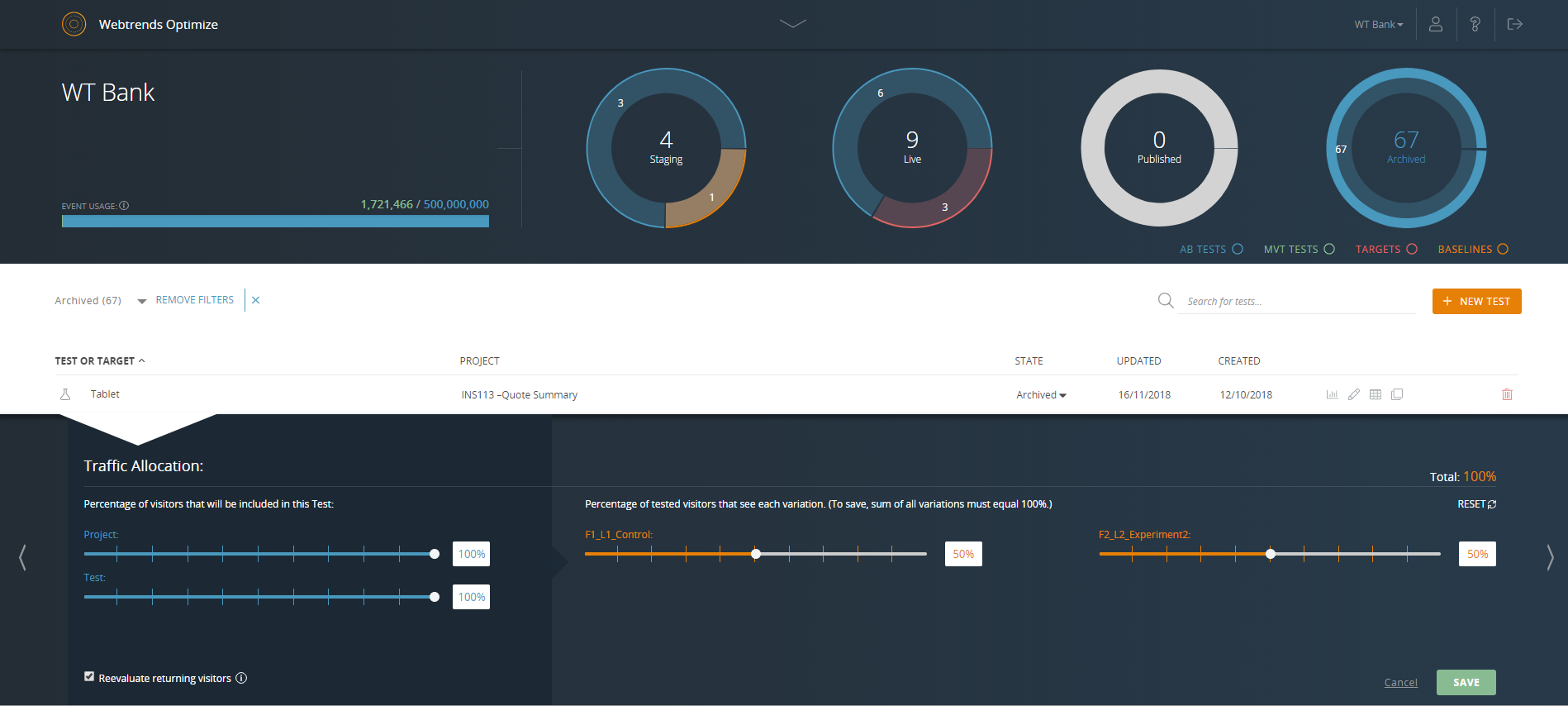
    Traffic allocation control00 Ratings7.31 Ratings
    Website personalization00 Ratings8.21 Ratings
    Results and Analysis
    Comparison of Results and Analysis features of Triggerbee and Webtrends Optimize
    Feature
    Triggerbee
    -
    Ratings
    Webtrends Optimize
    8.1
    1 Ratings
    8% below category average
    Click analytics00 Ratings9.11 Ratings
    Scroll maps00 Ratings7.31 Ratings
    Form fill analysis00 Ratings7.31 Ratings
    Conversion tracking00 Ratings8.21 Ratings
    Goal tracking00 Ratings8.21 Ratings
    Test reporting00 Ratings8.21 Ratings
    Results segmentation00 Ratings8.21 Ratings
    CSV export00 Ratings8.21 Ratings
    Experiments results dashboard00 Ratings8.21 Ratings
    Best Alternatives
    TriggerbeeWebtrends Optimize
    Small Businesses
    No answers on this topic
    Google Optimize
    Score6.7 out of 10
    Medium-sized Companies
    Dynamic Yield
    Score8.9 out of 10
    Wingify Experimentation (formerly AB Tasty)
    Score8.6 out of 10
    Enterprises
    Dynamic Yield
    Score8.9 out of 10
    Google Content Experiments (discontinued)
    Score7.3 out of 10
    All AlternativesView all alternativesView all alternatives
    User Ratings
    TriggerbeeWebtrends Optimize
    Likelihood to Recommend
    -
    (0 ratings)
    7.4
    (17 ratings)
    Likelihood to Renew
    -
    (0 ratings)
    5.3
    (5 ratings)
    Usability
    -
    (0 ratings)
    7.0
    (2 ratings)
    Availability
    -
    (0 ratings)
    10.0
    (1 ratings)
    Performance
    -
    (0 ratings)
    10.0
    (1 ratings)
    Support Rating
    -
    (0 ratings)
    9.1
    (2 ratings)
    Online Training
    -
    (0 ratings)
    6.0
    (1 ratings)
    Implementation Rating
    -
    (0 ratings)
    7.0
    (1 ratings)
    User Testimonials
    TriggerbeeWebtrends Optimize
    Likelihood to Recommend
    Triggerbee
    No answers on this topic
    Webtrends Optimize
    Webtrends optimize is a marketing solution aimed squarely at transactional and eCom based websites. I would only recommend a colleague to engage with the solution once the marketing dept is at a point where their website is fully optimized in regards to SEO and all the other fundamentals in order to truly build upon what Webtrends can offer. This shows you an easier way of measuring your ROI and the money you will invest with the tool-moving forward.
    Incentivized
    Read full review
    Pros
    Triggerbee
    No answers on this topic
    Webtrends Optimize
    • Intuitive test set-up makes for a low learning curve.
    • Ability to create custom data tables which enable exporting of visitor level data for more in-depth analysis outside of the Webtrends Optimize platform.
    • Visual Editor WYSIWYG interface enables non-technical users to easily execute basic tests.
    Read full review
    Cons
    Triggerbee
    No answers on this topic
    Webtrends Optimize
    • The cost is a factor. When you're trying to save money, particularly as a startup (a lot of our clients are up-and-comers) it has to be seen as an investment...but the cost to implement the system is fairly large.
    • There's a bit of a steep learning curve, you can't just dive into the program.
    • It's not impossible but it's not as easy as snapping your fingers to easily implement the program cross-platform.
    Incentivized
    Read full review
    Likelihood to Renew
    Triggerbee
    No answers on this topic
    Webtrends Optimize
    Difficulty was getting business units to take the time and spend the money to test, and then implement, best options.
    Read full review
    Usability
    Triggerbee
    No answers on this topic
    Webtrends Optimize
    Set up of basic tests that do not use segmentation or targeting is an intuitive experience that can be learned quickly by new users. However, as the need for segmentation and other more advanced capabilities arise, the experience begins to degrade.
    Read full review
    Reliability and Availability
    Triggerbee
    No answers on this topic
    Webtrends Optimize
    zero complaints. I'm not aware of it ever failing.
    Read full review
    Performance
    Triggerbee
    No answers on this topic
    Webtrends Optimize
    Zero complaints. It seemed to do its job quickly and accurately.
    Read full review
    Support Rating
    Triggerbee
    No answers on this topic
    Webtrends Optimize
    The support from the team at Webtrends Optimize is unparalleled. There is always someone to consult should there be any issues.
    Read full review
    Online Training
    Triggerbee
    No answers on this topic
    Webtrends Optimize
    Online training was ok. Because every test is a custom test, there's only so much that can be covered in a generic lesson.
    Read full review
    Implementation Rating
    Triggerbee
    No answers on this topic
    Webtrends Optimize
    Implementation was pretty straightforward
    Read full review
    Alternatives Considered
    Triggerbee
    No answers on this topic
    Webtrends Optimize
    Webtrends Optimize can be used for much more complex tests, allows better conversion tracking and data collection. Visual Website Optimizer (VWO) is suitable for smaller, simple projects. Webtrends Optimize comes with an excellent consultancy that could save you a lot of time and resources
    Read full review
    Return on Investment
    Triggerbee
    No answers on this topic
    Webtrends Optimize
    • So far we haven't seen an ROI that we can accurately measure due to only running a couple of tests that haven't resulted in direct, site wide changes. However, we have learnt a lot about how to set up the right processes and documentation.
    Read full review
    ScreenShots

    Triggerbee Screenshots

    Screenshot of Triggerbee's dashboard, which provides an overview of the most important statistics and figures. These offer insight into how campaigns are performing, if NPS and CSAT are rising or falling, how many signups there were in the last 30 days, and track the identification rate and learn how many people can be served with personalized experiences.Screenshot of Triggerbee's drag and drop editor, which allows for ultra-detailed editing down to margins and paddings. It can be used to create banners, embedded website sections, popups, callouts and forms. Mobile editing can be used to make a campaign look perfect on all devices.Screenshot of some of Triggerbee's over 41 targeting rules, used to target anyone based on any conditions. CRM data can be combined with web activity and other marketing data to deliver the right message at the right time, to the right person.Screenshot of audience definition, based on synced CRM data and data collected by Triggerbee. Audiences are used to target specific visitors on the website with personalized content.Screenshot of Triggerbee's detailed customer profile, which is built up over-time with behavioral data. All of the data in the customer profile is synced to a connected CRM.Screenshot of How it looks when defining an audience in Triggerbee.

    Webtrends Optimize Screenshots

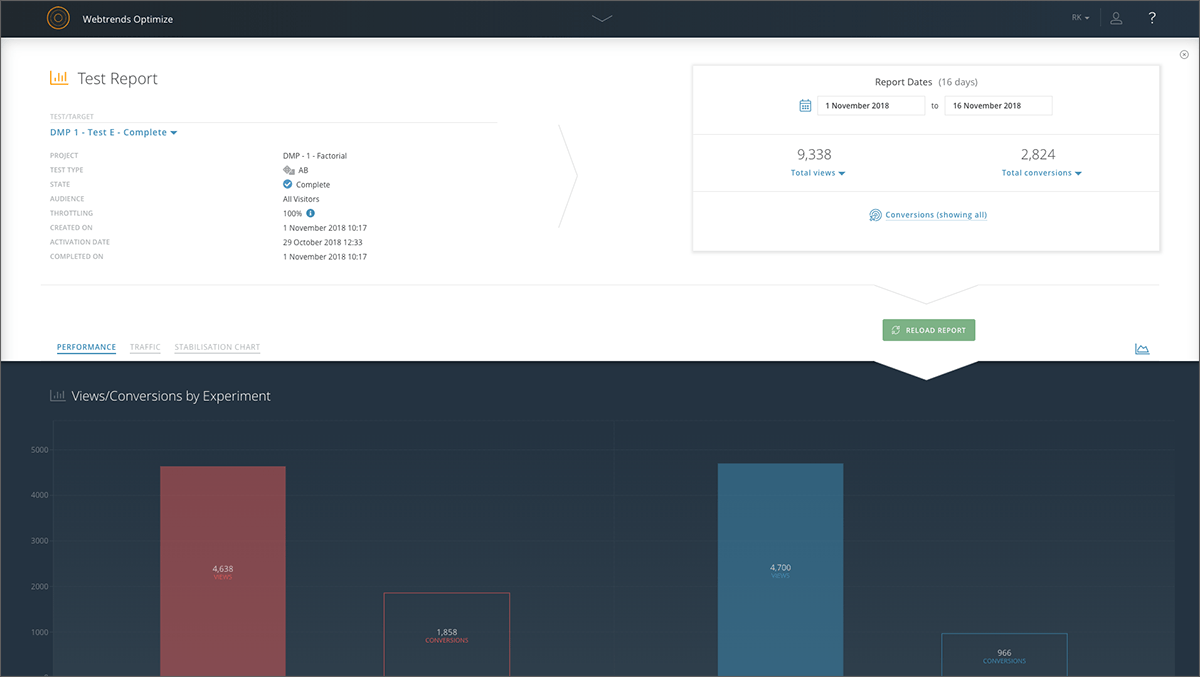
    Screenshot of Reporting dashboard - default viewScreenshot of Specific experiment report - top level overviewScreenshot of Drag & drop segmentation moduleScreenshot of Point & click WYSIWYG Visual EditorScreenshot of Reporting dashboard - specific test or target overviewScreenshot of Reporting dashboard - specific test or target throttle settings