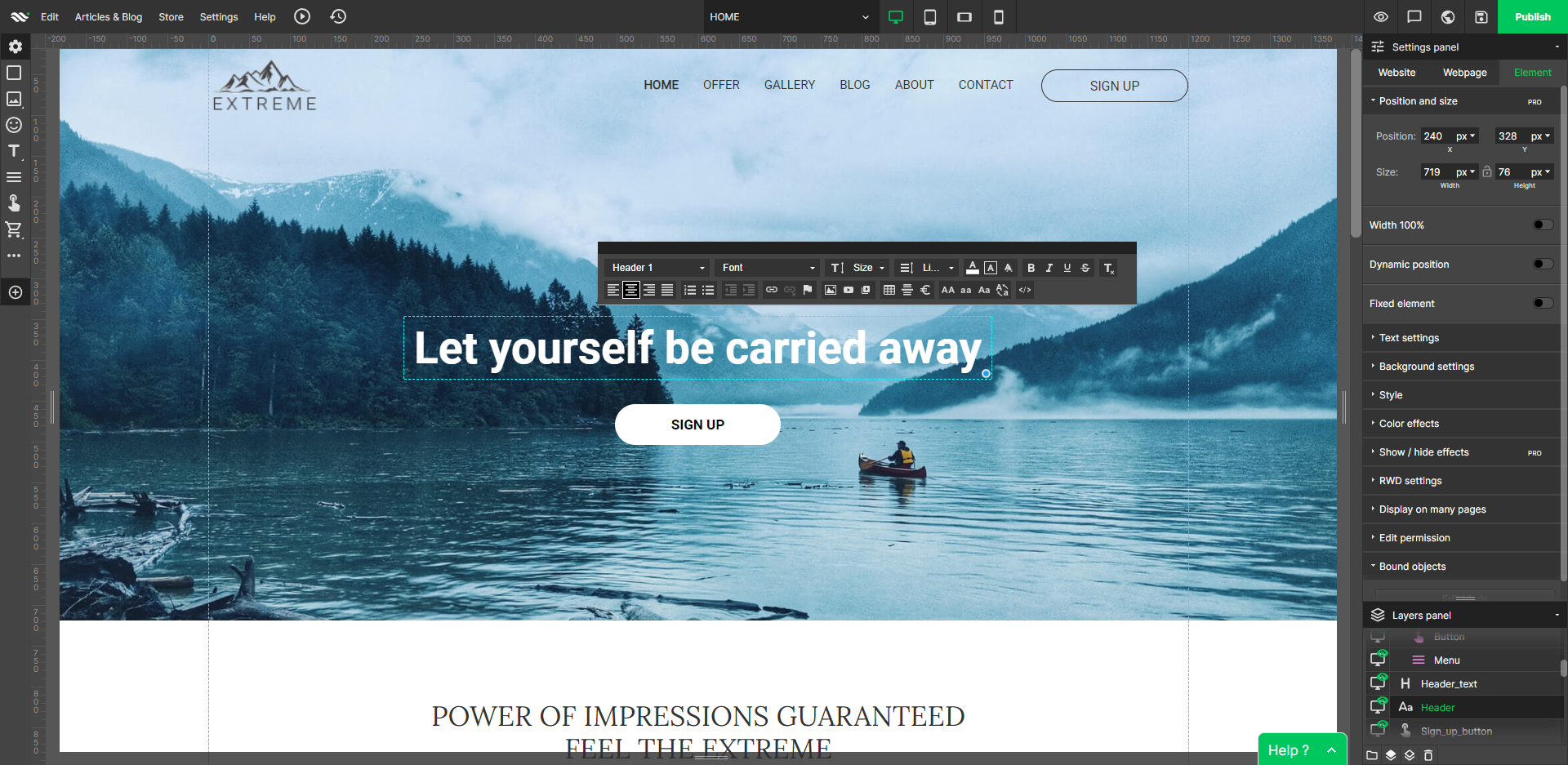
WebWave — an alternative for agencies and freelancers for creating custom websites for clients with the support of CMS. Using CMS with no sacrifices WebWave is a CMS platform that gives a designer precision up to 1 px in every single detail just like in more sophisticated graphic programs such as Photoshop while remaining a drag and drop software. This is to make creating websites much faster without loosing on details. Spend less time talking WebWave…
N/A
WP Engine
Score7.4 out of 10
N/A
WP Engine is a website hosting service built to host WordPress for companies of any size, with features such as daily backups, firewall,SSL, and proprietary caching technology.
$35
per month
Pricing
WebWave
WP Engine
Editions & Modules
No answers on this topic
Startup
$35
per month
Core
$400
per month (annual contract)
Enterprise
Custom
*Per Month
Offerings
Pricing Offerings
WebWave
WP Engine
Free Trial
Yes
Yes
Free/Freemium Version
Yes
No
Premium Consulting/Integration Services
Yes
No
Entry-level Setup Fee
$7 per month
No setup fee
Additional Details
—
Discount available for annual billing on the Startup plan.
Well suited: Small businesses and entrepreneurs: WebWave is an excellent option for small businesses and entrepreneurs who need a professional-looking website without spending a lot of time and money. It's easy to use, customizable, and offers fast load times and responsive design. Less appropriate: Large e-commerce websites: If you're looking to create a large e-commerce website with a vast number of products and advanced features, WebWave may not be the best option. Its e-commerce functionality is limited compared to other website builders, and it may not be able to accommodate the needs of a large-scale online store. Also, if you need much coding, you would rather have it with something that is wordpress-based.
A de minimis incentive was given to thank the reviewer for their time. The incentive was not used to bias or drive a particular response, nor was the incentive contingent on a positive endorsement. More Info
I am an enterprise user of WordPress and host over 7000 sites with WPEngine. Areas that I think they are well suited for include customers that need enterprise-level support and uptime and have more complex needs than a simple blog. They also manage scale well with a variety of isolated install options that you can scale up or down depending on your contract needs. They also provide premier support for enterprises and have highly knowledgable Technical Account Managers that provide a significant value add. If I were to look at where it isn't as appropriate for usage I would focus on the low-end needs and say while they do support small sites, there are options out there for cheaper hosting that lack the support a WPEngine gives you.
A de minimis incentive was given to thank the reviewer for their time. The incentive was not used to bias or drive a particular response, nor was the incentive contingent on a positive endorsement. More Info
WebWave's site builder is the platform's truly innovative feature. I've never come across another service that deploys a layer-based approach in web design, as most of them usually deploy a grid-based system. This is an incredible alteration that ensures WebWave behaves much like a traditional graphic design tool, thereby resulting in an experience that is a lot more intuitive and instinctive. I believe this has the potential to radically change the way people approach no-code web design.
WebWave provides automatic, daily backups and a free SSL certificate for every website. This results in excellent security.
WebWave's support team is first-class! I had some teething-issues in the beginning, but the support team quickly got me back on track.
WebWave's community/forum is an excellent place to vote and request new features. This proves the development team is committed to making WebWave better by listening to their users.
I love the database backups and how quickly & easy it is to restore from an old backup point. This gives me & my clients confidence that any change can be rolled back.
The built in caching & CDN mean that I have to spend less time worrying about the speed of the server & site. The caching has some side-effects that take getting used to (on-page dynamic PHP code sometimes needs to be moved to API endpoints), but this is true for most caching systems.
They have really good support for multiple environments. It's very easy to have separate production & staging environments. It's also very simple to deploy from staging to production, making product launches and large scale website copy changes much easier to coordinate.
A de minimis incentive was given to thank the reviewer for their time. The incentive was not used to bias or drive a particular response, nor was the incentive contingent on a positive endorsement. More Info
Some scope for improvement in UX (colors are not very appealing). It is simple to use but design is a little dated. Especially in the builder section, I'd like to see modern design for buttons and maybe gradients also: as this is where visual motivation is also important
Some edits take effect only after pressing OK. That should be eliminated as it's an unnecessary addition. It's also kind of annoying to do that again and again, which can add up to a lot as we do so many small tweaks while building the website.
Few things (maybe glitches) in design. The rectangle below the footer was uneditable for me. I spent quite some time trying to figure it out so I'm convinced it's a glitch.
I'd like to see WP Engine offer their own monitoring solution. When I say monitoring, I mean specific use cases that may end up being something you could script. This would keep customers from having to pay for additional services like Pingdom, New Relic, etc.
I would like to see some proactive analysis done by WP Engine on their customer sites - at least on their home pages, and offer up suggestions. This kind of goes along with the other example.
Finally, it would be nice to see a "lighter" offering, perhaps a plan that costs $49 for those who want to host only a few sites, or even 1 site.
A de minimis incentive was given to thank the reviewer for their time. The incentive was not used to bias or drive a particular response, nor was the incentive contingent on a positive endorsement. More Info
I was in a situation where I had to bolt Wordpress on to an existing infrastructure that could not support it. If I ever end up in that situation again, please kill me. Other than that reasonably common use case, I don't think it offers a lot of value over robust shared hosting, virtual private server (VPS) or dedicated servers.
From the onboarding and in the days afterward, it was very easy to get into the platform and begin creating important websites and configuring user options. The interface is easy to navigate, and the platform pages load quickly. Since the platform is built for Word plus press, it has features including backup, staging, maintenance mode, and direct WP-Admin login to make configuration and site management faster. We have never had any issues on the billing side of the account.
A de minimis incentive was given to thank the reviewer for their time. The incentive was not used to bias or drive a particular response, nor was the incentive contingent on a positive endorsement. More Info
1. The support person does not seem to understand the issues, and seems like they go off to talk to somebody and revert back every 5 to 10 minutes. It takes up a lot of time. 2. There is a lack of reading material to address simple issues like changing the website name in the dashboard, pasting a code, etc.
A de minimis incentive was given to thank the reviewer for their time. The incentive was not used to bias or drive a particular response, nor was the incentive contingent on a positive endorsement. More Info
Support is generally great. Enterprise support is fantastic, with little to no wait times. I find that chat support can almost always take care of the problem without escalating to a ticket for a higher level of troubleshooting. The chat support for many other hosting providers can only handle basic issues. This is a big bonus for us to get quick and helpful answers.
A de minimis incentive was given to thank the reviewer for their time. The incentive was not used to bias or drive a particular response, nor was the incentive contingent on a positive endorsement. More Info
WordPress is a more flexible and adaptive content management system than Webwave. In addition to the functionalities that are already built-in, I am unable to add any customizable plugins or add-ons. However, in the majority of cases, the inherent features of Webwave are sufficient for developing a website that serves its intended purpose. Webwave also makes it possible for you to add animations and the appearance of each of your design elements, whereas WordPress builders require additional plugins in order for users to access most of such capabilities. Webwave has several essential design features available internally, thus saving money and time.
While we still use GoDaddy for some services, WP Engine definitely has been a major upgrade for our WordPress hosting. In addition to faster load speeds, WP Engine has been more adept at allowing us to manage a high number of websites without straining the system. We have never used Network Solutions for our own hosting needs, but when we do interact with them on behalf of our clients, their systems always seem to be clunky and hard to use, and they often overcharge customers by selling them products they do not need.
A de minimis incentive was given to thank the reviewer for their time. The incentive was not used to bias or drive a particular response, nor was the incentive contingent on a positive endorsement. More Info
A de minimis incentive was given to thank the reviewer for their time. The incentive was not used to bias or drive a particular response, nor was the incentive contingent on a positive endorsement. More Info