
TrustRadius: an HG Insights company

ISL Light

Score8.9 out of 10

150 Reviews and Ratings

What is ISL Light?

ISL Light is remote support and remote access software that enables SMBs and large enterprises to offer fast and efficient support and maintenance for Windows, Mac and Linux computers as well as mobile device support for Android and iOS.

Categories & Use Cases

Media

Screenshot of remote access control in ISL Light.
Screenshot of unattended access setup. Access can be allowed to as many computers as desired.
Screenshot of a connection with a remote client, which can be set up by sending an email or sharing a link.
Screenshot of interactions with the Windows UAC on a remote device.
Screenshot of the dual panel File Manager, used to transfer files.
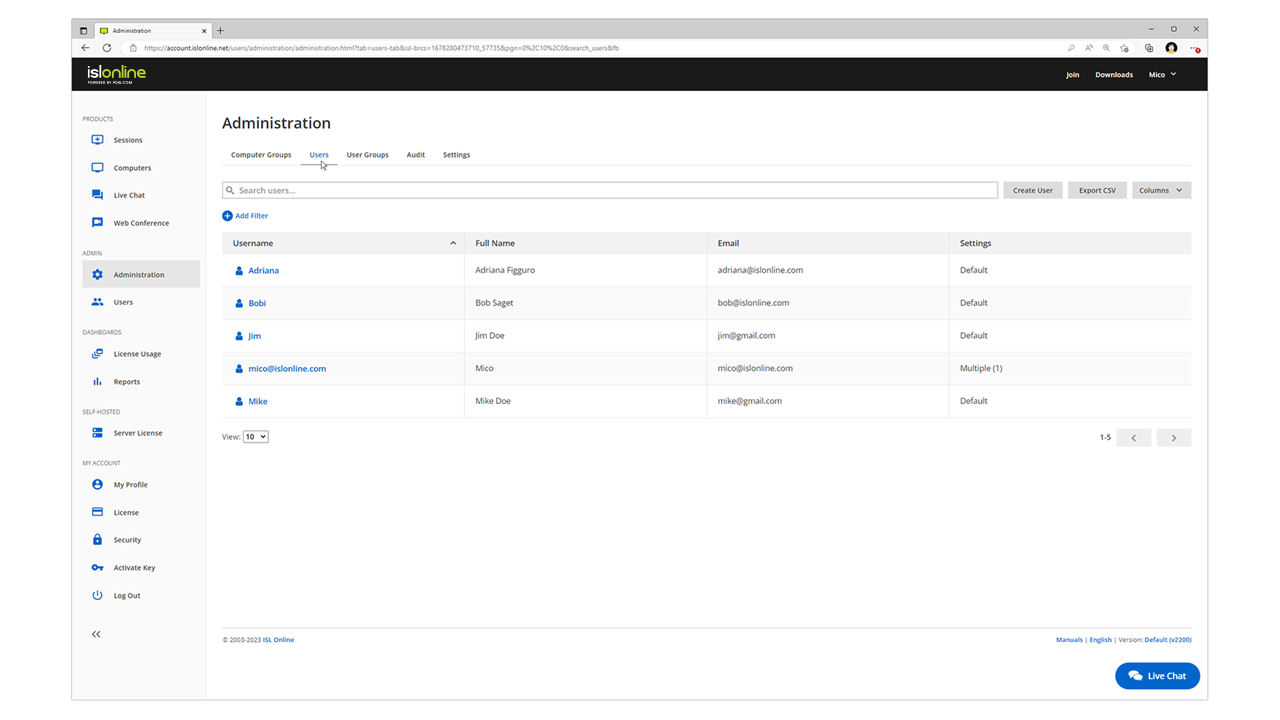
Screenshot of the web console where remote desktop sessions can be managed from a web browser.
Screenshot of Mobile device support

1 / 7

Screenshot of remote access control in ISL Light.

Top Performing Features

  • Remote Active Directory® management

    Remotely unlock user accounts, reset passwords, manage Organizational Units, edit Group Policy, etc.

    Category average: 8.3

  • Screen sharing

    Allows participants to share their computer screens with others in the meeting, enabling collaborative work and presentations.

    Category average: 9.4

  • Over-the-Internet remote session

    Establish secure remote connection with computers outside the network firewall.

    Category average: 9.4

Areas for Improvement

  • Monitoring and Alerts

    Monitor CPU usage, memory utilization to proactively address issues. Receive alerts indicating attention needed.

    Category average: 8

  • Session record

    Ability to record session for training purposes.

    Category average: 7.9

  • Access to sleeping/powered-off computers

    Remote access and troubleshooting of out-of-band computers.

    Category average: 6.4

ISL Light is an easy click and run

Use Cases and Deployment Scope

I personally use ISL Light to give technical support to our clients. It makes helping them much easier. I just tell the client to click ISL Light that we integrated in our application and ISL Light client is ran and I can see and control their screen in order to resolve any situation that th client might have.

Pros

  • ISL Client can be automatically downloaded which makes connecting with clients easier
  • If the client has more screens, I can easily sweitch between them or look at all of them.

Return on Investment

  • Just having ISL Light makes the clients trust our application more

Usability

Alternatives Considered

TeamViewer

Avis ISL Light

Use Cases and Deployment Scope

We use ISL Light for user support purposes, as well as for remote access to devices outside our usual scope.

Nous utilisons ISL Light à des fins de support utilisateurs, ainsi que de prise en main à distances sur des devices en dehors de notre scope habituel.

Pros

  • Remote support - Support à distance
  • Taking control of devices without the user - Prise en main de devices sans l'utilisateur
  • Remote stains - Taches à distance

Cons

  • Multi-screen management - La gestion du multi-écran
  • Organizing devices in the console - L'organisation des devices dans la console

Return on Investment

  • Save time - Gain de temps
  • Technical support satisfaction - Satisfaction techniciens support
  • Satisfied clients- Satisfaction clients

Usability

Alternatives Considered

TeamViewer and AnyDesk

ISL Online -Easy and fast remote access ( Acesso remoto fcil e rpido)

Use Cases and Deployment Scope

We use ISL Online as our primary remote access software. In our company, we have several projects, and the feature we use most is the application's groups, which allow us to organize where access will be granted. I frequently use the silent deployment link; we created a GPO that runs a script that executes this link, along with a script that modifies the records to match the company's settings.

Usamos o ISL Online como Software principal de acesso remoto. Na nossa empresa temos vários empreendimentos e a funcionalidade que mais utilizamos é os grupos dentro do aplicativo, que possibilitam a gente organizar a onde será feito o acesso. Utilizo muito o link de implementação silenciosa, criamos uma GPO que roda um script que executa este link, juntamente com um script que altera os registros para ficar nas configurações da empresa.

Pros

  • Quick Access (Acesso rápido)
  • UAC release configuration (Configuração de liberações de UAC)
  • Set a user to reject access. (Colocar para usuário rejeitar o acesso)
  • On-screen message timer (Temporizador de mensagem na tela)
  • Log in directly when the user is not logged into Windows. (Entrar direto quando usuário não estiver logado no windows)

Cons

  • More features for the Deployment Link (Mais funcionalidades para o Link de implementação)
  • Platform customization in the hands of the admin user. (Personalização da plataforma na mão do usuário admin)
  • To make it clearer that the session has ended. (Mostrar mais nítido que a sessão foi encerrada)

Return on Investment

  • Excellent value for money. (Custo beneficio excelente)
  • Easy configuration (Fácil configuração)
  • It doesn't give false positives on computers. (Não da falso positivo nos computadores)

Usability

Other Software Used

ISL Light

Your remote site avatar

Use Cases and Deployment Scope

As well as sending invitations on demand, the facility for unattended access is godsend for less technical customers needing help (but have to get on to start with!) Connections are fast and ability to have emails sent for start and end of unattended access sessions can be helpful for billing. Slow client connections may drop but automatically reconnect, so best solution for me needs.

Pros

  • Unattended access
  • Reconnect slow client connection
  • Fast performance

Cons

  • Think I've tried, but cannot remember: ability to remote boot into safe made with networking

Return on Investment

  • Saved time going to remote sites, time travelling and travel costs saved
  • Clients love they can call and have someone sorting out a problem in minutes

Usability

Alternatives Considered

TeamViewer

Other Software Used

Avast Business Hub, X1 Search, WhatsApp Business

Letter of Recommendation

Use Cases and Deployment Scope

I have used ISL Light for nearly ten years for a quality remote access solution - you won't be disappointed.

Pros

  • create multiple groups
  • User-friendly software
  • works in all conditions

Cons

  • easy to tranfer file, i dont see the name of directories

Return on Investment

  • It is expensive compared to competitors

Usability

Alternatives Considered

ISL Light