TrustRadius: an HG Insights company

Mailtrack

Score9.5 out of 10

63 Reviews and Ratings

What is Mailtrack?

Mailtrack is a free email tracker for Gmail, boasting over 1,5 million active users.

The vendor states users will Ffollow up with more accuracy, find out the moment emails have been read, track the number of clicks, and how many times a recipient has opened the mail, using only a normal Gmail interface.

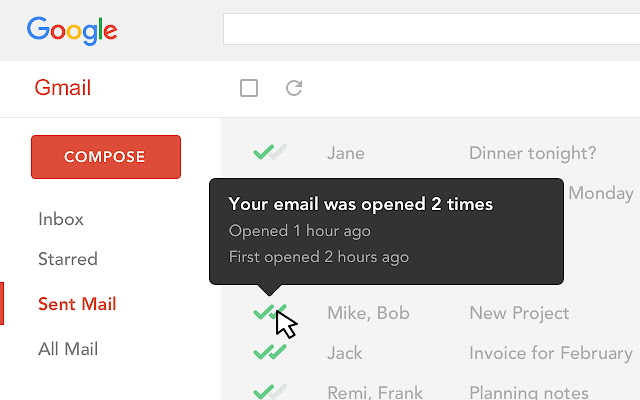
It boasts intuitive checkmarks (✓✓) added to email, for Gmail read receipts right in an inbox.

How to use the mail tracker app:
✓ means that an email has been sent, but not opened.
✓✓ mean that an email has been opened.

The vendor also states it is the only email open tracking in the Chrome Web Store to trace emails for free forever.

EMAIL TRACKING FOR READ RECEIPTS
- See which emails have been read
- Stop asking if colleagues read sent emails
- Access its dashboard and filter emails that have been ‘read’ or ‘not read’

MAILTRACK FREE
- Free and unlimited email tracker for Gmail
- Mailtrack Campaign: Send Google email marketing emails up to 200 contacts at once
- Includes "Sent with Mailtrack" signature

MAILTRACK PRO
- Extra information on email opens: how long ago and how many times
- No Mailtrack signature
- Real-time Gmail read receipts (desktop pop-up or by email)
- Daily email tracking reports
- Reminders
- Last read: know if a recipient is engaged with conversations
- Email & phone support
- Mailtrack Sales: Integrate it with Salesforce or the user's choice of CRM

Categories & Use Cases

Media

Know when your emails were opened, and how many times.

Track emails with Mailtrack

Pros

  • Email tracking
  • Bulk emails
  • Easy to use

Cons

  • Free trail does not have much of features.

Most Important Features

  • Live tracking

Return on Investment

  • Highlights good leads
  • Effective communication
  • Good response
  • Sales efficiency

A good alternative to Boomerang for Gmail.

Use Cases and Deployment Scope

Mailtrack is mainly just used by the Commercial Sales team at the moment. It is being trialed as an alternative to Boomerang.

Within Sales, it is very important to be able to keep track of who read emails vs who didn't in order to prioritise your day. By using Mailtrack, we are able to see if a particular email is "hot" or not for example, giving invaluable insight into the situation.

Pros

  • Summaries of all emails sent.
  • Snooze functions.
  • Hot topic (when read or forwarded many times).

Cons

  • Would like to be able to specify when the snooze should be activated until. Right now only 2 options. 24h or 48h.

Return on Investment

  • Increased my time spent on prospecting instead of useless follow-ups when an email has not been read.
  • Being able to determine if an email was received well e.g. Hot Topic, making the prospect even better.

Other Software Used

Looker, Pipedrive, Chargebee

Mailtrack: The best solution for communication tracking (especially Sales)

Pros

  • Mail tracking.
  • Immediate notification on communication.
  • Reminders if mails have been read or not.
  • Notifies if email is from an old conversation.

Cons

  • None.

Return on Investment

  • Efficiency in operations increased.
  • Effective communication.
  • Highlights dead leads.

Usability

Other Software Used

Zoom

Mailtrack review

Pros

  • Easy to use
  • Fair price
  • Beginner friendly
  • Immediate feedback knowing if the email was delivered.

Cons

  • Some of the settings can be confusing at first.
  • Some alerts are on by default and can be annoying at times.
  • Good to know if the email was deleted.
  • It would be great to know how much time recipients spent on each email.

Return on Investment

  • 20% increase in mail responses.
  • More success with follow-ups,
  • Less time spent worrying if I should follow up.

Alternatives Considered

Mailchimp

Usability