Filter Ratings and Reviews
Filter 140 vetted Yesware reviews and ratings
Reviews (1-25 of 51)
Companies can't remove reviews or game the system. Here's why.
February 19, 2020
Yesware is being used across the whole organization. It has been a very useful tool mainly to ensure our customers received our communications and it has proven to be a fantastic follow-up tool as well.
- Email open tracking.
- Templates are great.
- The overall user interface is not the most intuitive visually.
We used Yesware to manage outreach campaigns, sync emails to Salesforce, and to track when prospects opened our emails. This solved the problem of structuring and streamlining our outreach. It can be hard to keep up with outreach in a consistent fashion, but Yesware's campaigns made it extremely easy to conduct this. Also, it takes the manual work out of crafting emails which is a massive time saver.
- Email tracking.
- Campaign management.
- Make the campaign builder more user-friendly.
- Improve LinkedIn sync.
Yesware is being used by our company to better craft emails and gets better analytics on who is opening those emails. This software is being used by our entire sales organization, both our outbound and inbound sales teams use it to better understand their prospects and schedule them out to deliver at a strategic time.
- Yesware makes it really easy to understand if a prospect is responsive or ignoring you.
- Yesware is a very simple interface and user-friendly.
- Yesware allows you to write emails to prospects and effectively schedule them out.
- Yesware does lag when trying to schedule emails.
- If you forward your emails to colleagues it counts them as people opening it.
- Yesware templates when saving them don't always save on the first attempt.
November 09, 2019
We currently use Yesware for tracking all emails sent from the company. Our sales organization uses the ability to generate campaigns to try to reach new customers. Primary functionalities we use most include campaigns, tracking, open rates, templates, and tracking data for our teams.
- Mass emailing
- Salesforce integration
- Templates
- Data tracking
- Sharing templates
- Performance metrics
- Open and click rates
- Campaigns could sync better with CRM
October 24, 2019
Yesware is currently being used to track the sales teams' emails to both potential and existing partners. Our sales team will use Yesware to send follow up emails to leads they've recently spoken to. Our team then gets notified when an email is opened allowing them to gauge when to call back.
- Immediate notifications.
- Allows you to track when an attachment was opened.
- Allows you to create templates.
- Attaching files to Yesware has to be done one at a time. Very time-consuming.
- The notification for when a person opens an email isn't always accurate.
- The templates are very janky and take time to format.
March 31, 2020

Yesware was one of several email tracking tools we tried at my last job, and it worked extremely well to enable our sales team to communicate with prospects in a timely and professional manner. It allowed us to reach out to prospects when their attention was grabbed by our emails and made a cold call somewhat warmer.
- Email Tracking Notifications
- Create and Consolidate Templates
- Providing Email Analytics
- When you forward an email to a coworker, it marks it as if a client opened the email (skews data)
- CRM Integration
- Limited Fonts
January 22, 2020

It is extensively used by our sales department. Yesware can easily be integrated with Outlook and Salesforce. You can create templates and also it offers some pre-made templates for sending emails. Users can easily track all the emails that are sent to company workers and customers. Users can also easily identify whether their emails are being opened or not. The sales team is working smoothly with this tool.
- Email tracking
- Reporting
- Sometimes shows a false ‘message has been read by the receiver‘ because they use a firewall.
- Should be able to use it seamlessly on mobile phone.
Yesware was used to share marketing-approved templates with the sales and accounts team and then track the performance of those emails. This included templates that were persona-specific or would help promote things like conferences or new collateral. Yesware was integrated with our Salesforce instance and was mostly used by our business development reps who are tasked with prospecting efforts.
- Sharing templates was relatively easy with the platform.
- Controlling mass email sends - it is an easy setting to toggle on and off so that people can or cannot send emails to a mass distribution list.
- Sharing templates with specific groups - this is something Yesware did well where you could designate specific folders for templates which made it easy for the team to find the most relevant templates.
- Salesforce integration - this left a lot to be desired and reporting between the two was pretty non-existent.
- Reporting - This is a massive issue because the reporting was not only difficult, but a lot of data was lacking in terms of being actionable.
- Limited functionality for cadence creation. It was more used for templates, which made it hard for the team to use to maintain engagement.
January 07, 2020

Yesware is primarily used by the sales/business development team. Yesware allows our team to track the effectiveness of our personalized emails and maximize our efficiency when doing email blast campaigns.
- Email tracking - Excellent accuracy when providing location/time opened.
- Mail merge - Easily send hundreds of target email campaigns and track opens + link activity.
- Limited font styles in mail merge campaigns.
- Unable to track if the email was opened by a firewall (some emails pop automatically so it is hard to gauge if emails popped within a few moments of sending are actually by the user).
Both our marketing and admissions department use the software! We use the program to see what emails perform the best, both on an individual and on a team level. Knowing when someone opens or clicks an email is great information when finding out habits about our parents and prospective families!
- Email Tracking!
- Easy for a simple and clean mail merge
- Template Features
- Lack of customization
- Sometimes my syncing updates have gone a little wonky.
- When syncing with my personal Gmail it can have issues.
October 25, 2019

It's a sales tool used for sending templates & reminders. Great for following up with prospects & creating reminders when you have a large pipeline.
- Reminders.
- Templates.
- Keeping track of emails sent.
- Not as robust as its competitors.
- The sequencing can be challenging and rigid.
- Does not integrate with Gmail as smooth as it should.
We use Yesware across our sales division to automate prospecting efforts. Yesware allows the team to add prospects into a sequenced campaign directly from SFDC. This alleviates the need for manual one-off emails and frees up time to research new target accounts. Additionally, Yesware provides tracking on outgoing emails, as well as attachments.
- Drip campaigns.
- Email/attachment tracking.
- None that I can think of!
We utilize Yesware in all company-wide emails. Whether it be mass email merges or campaigns for Prospects or more personalized single use emails. It is used by our Sales department, Billing department, Marketing department and Account Management department as well as by our Executive and C-Level team. Yesware enables us to not only utilize the stats from Merges but also simply be aware of whether or not our emails have been opened and the links within them clicked on a single use scale as well.
- Tracking open rates, link click rates, and reply rates. This allows us to compare different templates in order to see which allows for the most interactions and meetings set directly from email engagement.
- Seeing exactly when someone opens an email and whether it is in their normal location. Also if they are opening on a mobile device versus a computer to be able to organize the set up of the email in a more beneficial way.
- Being able to save Templates for Mail Merges to avoid the duplication of effort that other mass email systems utilize.
- Currently, if you send a personal email to more than one recipient it will only tell you that "someone" opened the email, it would be nice to know which of the 4 people it was CC'd to actually opened it.
- With the last update from Google/Gmail, it made it so that Yesware reporting was a bit off. If the sender opened an email they would get the notification that "someone" opened it, despite the fact that is supposed to only be for recipients.
- Despite being a Team Leader or Manager, there does not seem to be a way to track the stats of the others on your team, which makes reporting a very difficult and time-consuming task. If this is possible it is not user-friendly in that it is not easily accessible.
To my understanding, Yesware is being used across the entire organization. Yesware alerts me know when a potential client has opened my email. This allows me to track which email templates are seeing a high success rate, and also it can trigger me to potentially reach back out to that client.
- Yesware does a good job on keeping analytics of the emails. Information that can be very useful for sales.
- A very timely alert of when emails are being opened.
- It does a great job organize email templates and making them very easily accessible.
- Yesware informs me when I open my own prior emails, which can useless and misleading
We use Yesware as a tracking software to gauge interest from sales prospects throughout the sales organization.
- Templates: Monitors the best performing templates.
- Tracking: Monitors emails that are opened and how often this occurs.
- Links: Monitors whether users have clicked on links and attachments within the email.
- Send Later: It would be helpful if there was a folder outside of drafts where emails could be stored.
August 26, 2019

Our teams used Yesware to enable them to run scaled email campaigns to promote events, reach out to prospects, and ensure that we could manage these things at scale at a very cost effective rate. Yesware was easy to use and served its purpose but there are areas where it can improve. The free version does help quite a bit.
- Email campaigns. I found YesWare very easy to run targeted email programs with good tracking mechanisms in place, even for the free version.
- Templates. This is very helpful for junior SDRs or AEs to be able to leverage what others have used and not recreate the wheel every time.
- Simplify building campaigns. The templates are great and it inspires collaboration across the internal teams. That said, there is always room for improvement on targeting audiences and maximizing the tool.
- Campaigns will erase if not saved ASAP. Had this happen numerous times and there was not an autosave and if you hit the wrong button the entire campaign would disappear.
June 04, 2019

Yesware is used across our sales team for prospecting and tracking email communications. It's particularly helpful in logging emails to the appropriate lead and contact records in Salesforce, and managing templates that are re-used in daily outreach. It's a simple plug-in that can easily be added to your instance of Gmail.
- Easy to set up and navigate.
- Helpful for tracking email opens and engagement with content.
- Ability to see the geo and device-type that the recipient is using.
- Sometimes the formatting can be frustrating.
- If your Salesforce data includes duplicate contacts it can be difficult to make sure communication is logged on the correct record.
November 21, 2018
Yesware is being used as a tool to automate the prospecting process across our sales organization. From SDRs to AEs, we are using it to prospect and generate meeting, while also being used to nurture prospects that are not yet ready to make a purchase with us. It addresses the automation of prospecting, so reps/SDRs can focus more on targeted lead-gen that is not as time consuming. Overall, its an effective and efficient tool that is easy to use and helps automate a lot of the mundane, repetitive work that successful sales professionals have to do!
- Ability to upload an entire excel sheet/CSV of contacts. Huge for avoiding to have to upload individuals manually.
- The multi-touch function, where you can send a prospect multiple emails, automatically, throughout the course of weeks/months and keep them engaged. Super helpful.
- The scheduling functionality. Some people check email first thing in the morning and are extremely busy during the day. The ability to schedule an email to go out at, for example, 7AM - is extremely effective and gives you a chance to make a touchpoint at a time when you otherwise wouldn't have been able to.
- I used to think that a LinkedIn Sales Navigator integration would be ideal, and then they rolled it out!
- One thing would be to find a way to auto-populate my signature line into the merge as opposed to copy/pasting it every time (but not the end of the world).
November 13, 2018
Works great for sending multiple email campaigns and having insights on email activity including analytics on downloaded resources. Also helps track the effectiveness of emails being sent with real-time stats. The ability to copy campaigns to test subject lines is effortless. Quick Chrome plug-in allowed our entire team on-boarded in minutes and support was very responsive.
- Dashboards with open, clicks, downloads, and replies help teams track the effectiveness
- Real-time alerts increase contact rates and lets reps know when to reach out.
- Adding custom fields and mapping to a CSV file allowed for a more personal touch in mass communication
- Not being able to change subject lines for email campaigns per recipient impacted open rates
July 18, 2018
Yesware is used by our sales team to track emails, log emails back to SFDC, create templates and to build out cadences and follow up accordingly using their Touchpoints feature. I no longer have to worry about my emails not being logged as Yesware takes care of this for me. Their Touchpoints feature is what is the most valuable for me. We have campaigns built out based on if the contact is inbound or outbound, persona and other details about the account. These campaigns have templates specific to the campaign which makes it significantly easier for me to send more follow up emails. Also, the Touchpoints feature makes it so I don't have to leave Gmail to figure out who to email next which is a huge time saver.
- Creating campaigns and templates with analytics to show which templates/cadences are the most effective. This has helped us improve our messaging and even better understand which types of companies/contacts we should spend our time with.
- I have used other similar technologies and always run into some sort of problems with my emails being logged into SFDC. This isn't something I have run into with Yesware.
- Sometimes the formatting, when you write a template, doesn't show up the same once you plug it into an email and it can be frustrating to mess around so that the email looks presentable.
- I wish there was an easy way to sort through your email tracking so that you can sort by emails that were opened up the most. This would make it even easier to prioritize where you send your next email.
November 09, 2018
We used Yesware at wOw Prezi to automate some of our communications while avoiding to end in the recipient's "Updates" folder. We also used Yesware to automate most of our Outbound efforts.
- Drip email campaigns.
- SalesForce integration.
- Automatic data manipulation.
- Managing cadences can be cumbersome.
- The UI's logic (or intuitiveness) could use some help too.
Our sales team uses Yesware to track email opens and sends. It is a great tool to track your emails for follow-ups and outbound sales prospecting.
- Email Tracking
- Email Opens
- Reporting
- Better teams functionality
- Better Reporting
- Clean up notifications
May 25, 2018
My company uses Yesware for mass mail merges, email tracking, templates and email efficiency. We also have been grandfathered into the click to call option that syncs with Salesforce to make calling seamless. We use this in certain regions like the US, UK, and Japan. Overall the tool solves the problem of efficiency and strategic targeting of prospects.
- Mass Mail Merge - you are able to send scheduled emails to 200 contacts at once, with templates that you saved previously.
- Click to call - calling functionality that we can just click the number and it connects to the sales reps cell phone which then logs automatically to Salesforce and you can type notes while on the call which also gets saved into the database.
- Templates - quickly save and organize emails for later use
- Tracking - being able to see the time, location, and action of your prospects makes outreach much more targeted
- Templates - more ways to add pictures and videos and not have an error
- I would also increase the limit of 200 people on the mail merge
- Touchpoints which is a more sophisticated Mail Merge feature is NOT simple to use and the UEX needs to be dramatically increased
- Tracking when you cc someone is not accurate. The tool can only track effectively when you send the email to one person only.
We use Yesware for our sales team as well as for our appointment setters.
It helps us do email blasts, see when people open our emails as well as manage email responses & appointments.
- Alert you when an email has been opened by the recipient
- Allows you to include available calendar appointment times into your email correspondance
- Trackability
- Ease of creating campaigns (series of emails pre-planned for delivery over a period of time)
- Allow my appointment setters to use available calendar appointment slots for their sales partner
I use Yesware on a daily basis as a prospecting tool. It identifies to me who is reading my emails. This is important information for me to know.
- It's great at identifying who reads my emails.
- It has a good integration with Salesforce that allows me to track my activity history within the lead/contact in Salesforce.
- It's easy to use.
- The support is predominantly online only. I had an issue that required technical support and I had to push hard to set up a call. They wanted me to initially troubleshoot and I would have preferred to speak to a person.
- That's really it; I love Yesware and would highly recommend it.
Yesware Scorecard Summary
What is Yesware?
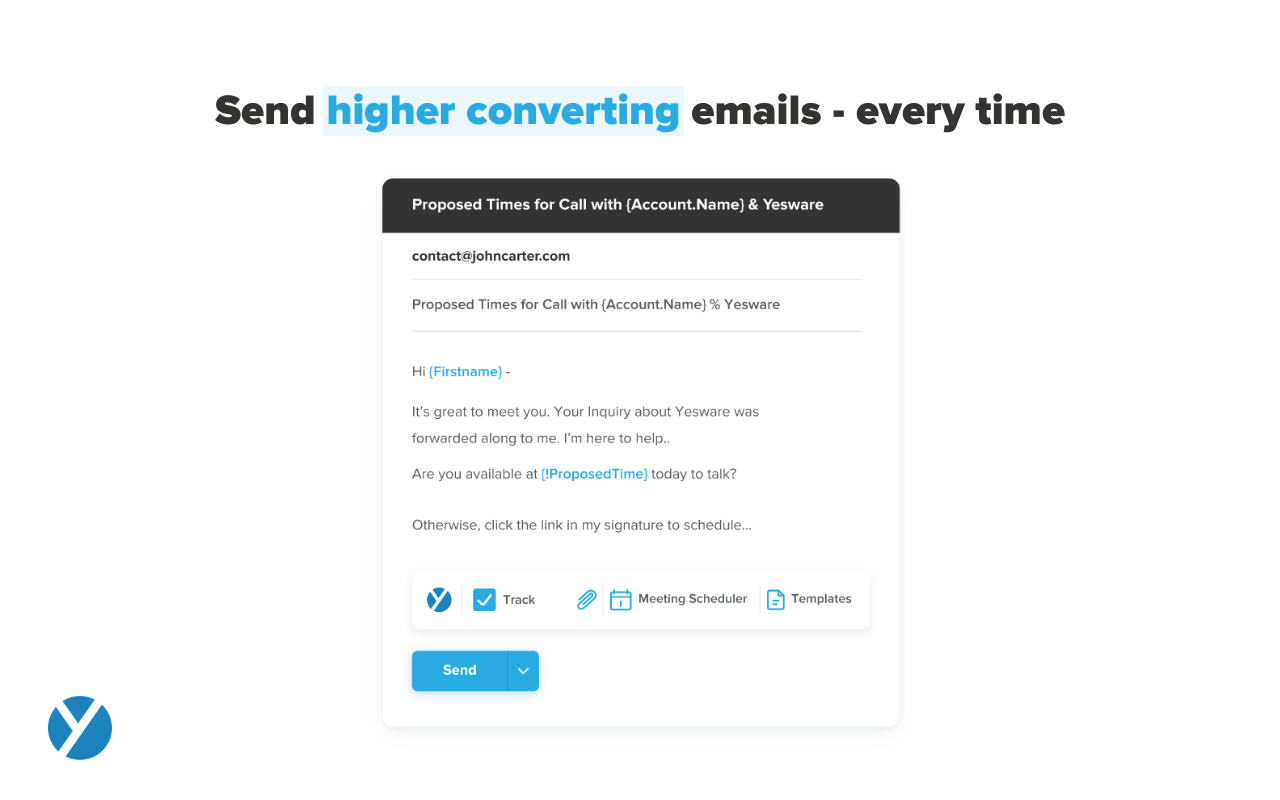
Yesware is a service for salespeople that helps them close deals faster. This solution includes an email service that tracks email, template responses and syncs to CRM solutions.
Yesware Integrations
Yesware Competitors
Yesware Pricing
Starting Price: $10
- Has featureFree Trial Available?Yes
- Does not have featureFree or Freemium Version Available?No
- Has featurePremium Consulting/Integration Services Available?Yes
- Entry-level set up fee?No
| Edition | Pricing Details | Terms |
|---|---|---|
| Pro | $19 | per month |
| Premium | $45 | per month |
| Enterprise | $85 | per month |
Yesware Technical Details
| Deployment Types: | SaaS |
|---|---|
| Operating Systems: | Unspecified |
| Mobile Application: | Apple iOS |