
TrustRadius: an HG Insights company

OrbitNote

Score7.6 out of 10

11 Reviews and Ratings

What is OrbitNote?

OrbitNote is a dynamic PDF editor for working with documents. Users can modify, annotate, and convert files while creating an accessible and collaborative workspace for all.

Media

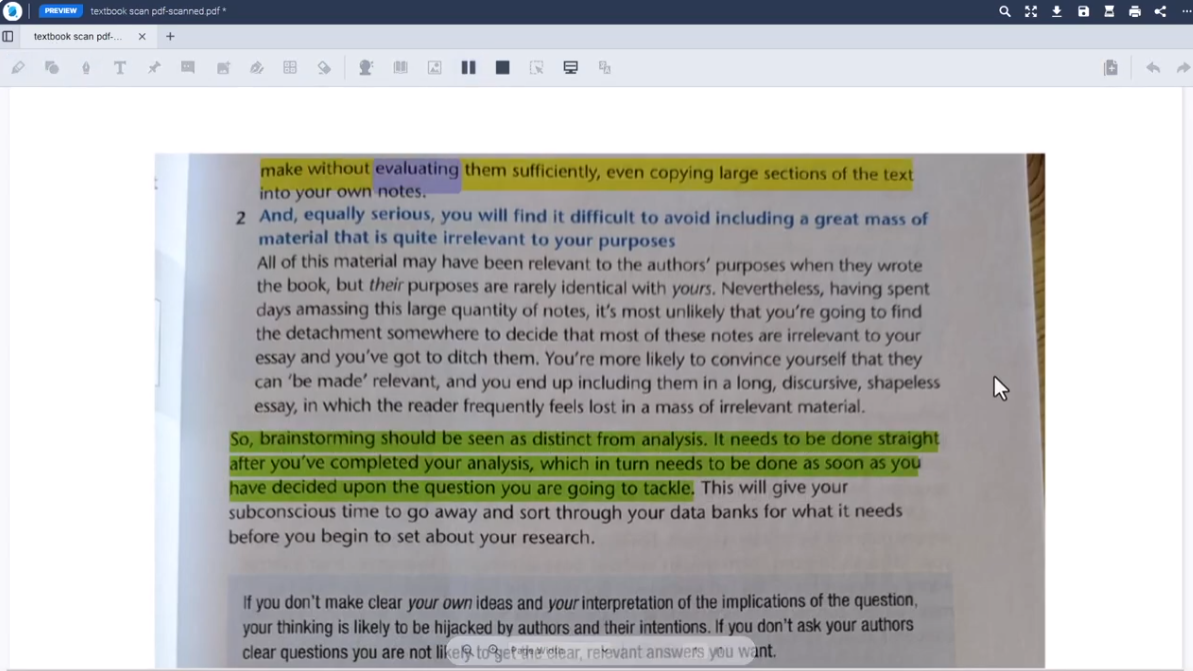
Screenshot of Annotations
Screenshot of Dashboard
Screenshot of Dictionaries
Screenshot of PDF Editor
Screenshot of Freehand Drawing
Screenshot of Highlights
Screenshot of OCR Scanning
Screenshot of Scan Text
Screenshot of Shapes Drawing
Screenshot of Text-to-speech

1 / 10

Screenshot of Annotations

Top Performing Features

  • Edit Text and Images

    Users can edit and manipulate text and images within the PDF document.

    Category average: 6.9

  • Text Recognition (OCR)

    Supports Optical Character Recognition to convert scanned documents or images into editable text.

    Category average: 7.6

  • Undo and Redo Actions

    Provides the ability to undo or redo previous actions to correct mistakes or backtrack changes made to the PDF document.

    Category average: 9.3

Areas for Improvement

  • Add Annotations

    Enables users to insert comments, highlights, shapes, and other annotations to provide feedback or mark up the document.

    Category average: 9.1

OrbitNote

Use Cases and Deployment Scope

It is used with students to make traditional classroom paper assignments accessible to a variety of learners' needs. We are using the free version as a UDL tool in the district and the paid version with specific special education students.

Pros

  • OCR scanning.
  • Text to speech.
  • Annotation on worksheets.
  • Integration with Google classroom.

Cons

  • Would like it to have a specific iPad app.
  • Circle- shape tool difficult to use.

Return on Investment

  • It has made it possible for teachers to provide accessible materials to students with just a few clicks.

Alternatives Considered

Kami and Claro