Overview
ProductRatingMost Used ByProduct SummaryStarting Price
Accelo
Score 3.1 out of 10
Small Businesses (1-50 employees)
Accelo provides cloud-based Professional Services Automation (PSA) software designed to unify and streamline client, project, resource, and financial management for service-based businesses. By centralizing operations into a single, intuitive platform, Accelo eliminates the need for fragmented tools, delivering a comprehensive solution that improves efficiency, transparency, and collaboration across teams. Serving industries such as consulting, engineering, architecture, IT…N/A
QuickBooks Time
Score 8.7 out of 10
N/A
QuickBooks Time (formerly TSheets) is a cloud-based time tracking and scheduling app that allows employees to clock in and out from the job site with the devices they’ve already got in their pockets. The vendor aims to help companies replace paper timesheets with accurate, electronic time data as well as make payroll and invoicing faster and less costly. QuickBooks Time also accurately tracks time and GPS points (even without cell or internet service) then automatically syncs when back…
$0
1 user, unlimited projects
Traqq
Score 9.1 out of 10
Small Businesses (1-50 employees)
Traqq leads the shift to ethical time tracking through non-invasive analytics. No screenshots. No screen recording. No micromanagement. Our lightweight desktop app respects privacy while delivering rich insights into team performance and productivity. You get intelligent analysis that tracks app usage, work patterns, and idle time - all while keeping your data secure. Traqq combines AI-powered time tracking with smart activity monitoring. The 2025 AI analytics upgrade brings…
$0
(for up to 3 users)
Pricing
AcceloQuickBooks TimeTraqq
Editions & Modules
No answers on this topic
Free
$0
1 user, unlimited projects
Premium
$8
per user/month + $20 base fee/month (paid annually)
Elite
$10
per user/month + $40 base fee/month (paid annually)
Premium Starter
$0
(up to 3 users)
Premium Teams
$7
per month per user
Enterprise
Custom Plan
Offerings
Pricing Offerings
AcceloQuickBooks TimeTraqq
Free Trial
NoYesYes
Free/Freemium Version
NoYesYes
Premium Consulting/Integration Services
YesNoYes
Entry-level Setup FeeOptionalNo setup feeNo setup fee
Additional DetailsDiscounts available for quarterly (10%) and annual (14%) pricing.
More Pricing Information
Community Pulse
AcceloQuickBooks TimeTraqq
Considered Multiple Products
Accelo

No answer on this topic

QuickBooks Time
Chose QuickBooks Time
TSheets offered the better value, user experience, and a QuickBooks interface.
Traqq

No answer on this topic

Best Alternatives
AcceloQuickBooks TimeTraqq
Small Businesses
Teamwork.com
Teamwork.com
Score 8.5 out of 10
Traqq
Traqq
Score 9.1 out of 10
Dayforce Powerpay
Dayforce Powerpay
Score 9.3 out of 10
Medium-sized Companies
Teamwork.com
Teamwork.com
Score 8.5 out of 10
TimeClock Plus
TimeClock Plus
Score 9.5 out of 10
TimeClock Plus
TimeClock Plus
Score 9.5 out of 10
Enterprises
Planview AdaptiveWork
Score 8.2 out of 10
Zoho People
Zoho People
Score 8.9 out of 10
Zoho People
Zoho People
Score 8.9 out of 10
All AlternativesView all alternativesView all alternativesView all alternatives
User Ratings
AcceloQuickBooks TimeTraqq
Likelihood to Recommend
8.0
(8 ratings)
8.5
(195 ratings)
9.4
(27 ratings)
Likelihood to Renew
9.0
(1 ratings)
10.0
(3 ratings)
-
(0 ratings)
Usability
7.0
(1 ratings)
9.5
(6 ratings)
-
(0 ratings)
Performance
10.0
(1 ratings)
-
(0 ratings)
-
(0 ratings)
Support Rating
8.2
(3 ratings)
2.1
(31 ratings)
-
(0 ratings)
Implementation Rating
-
(0 ratings)
6.0
(1 ratings)
-
(0 ratings)
User Testimonials
AcceloQuickBooks TimeTraqq
Likelihood to Recommend
Accelo
Accelo is a system that can do it all. It's extremely sophisticated. Depending on the sophistication of your organization, or specifically the abilities of the people you put in charge of the implementation, it can almost be too sophisticated. It all just depends on your situation. The more you use it, the more data you give it, the more you'll be able to see and do. It's incredibly powerful. But it's definitely not a tool that would be appropriate for smaller boutique type organizations that have only basic needs.
Read full review
Intuit
It would be very useful for certain remote jobs that require a high level of presence, as in the case of web development, or remote maintenance sessions, so that when reviewing the work data it is possible to ensure that there will be no failures. By being able to include files in the management, from the equipment tab, it is possible to fully control the hours in which each change in these files were made.
Read full review
Traqq
Traqq is a great system when you are in the field of education. In my experience, it has saved me countless hours of figuring out how to remember the timezone my employees and students are located in. I used to use a written spreadsheet of each employee's timezone and one of those random timezone calculators. Being able to modify Traqq based on my employees' timezone, my timezone, and our company's timezone (the technical "working hours") has been a game-changer.
Read full review
Pros
Accelo
  • Timing Client Work: You are able to better manage your time on your clients.
  • Housing Client Info in one Area: You can view all you need for any given client in one area.
Read full review
Intuit
  • Support (their help desk team is incredibly helpful and always quick to respond).
  • Ease of access and use (the app is user-friendly an intuitive, and the desktop version is equally as approachable).
  • Manager functionality (it's useful to be able to clock employees in and out at multiple events on the same day by sorting them into different groups by manager/event).
Read full review
Traqq
  • Gave me a detailed report of my daily activities, even hours of productivity.
  • My clients were not left behind every step of the way in my project. They had access to my activities and knew the periods I was inactive and even the apps I visited (although they blurred the screen, my clients were aware along the line, I visited a couple of applications) I loved that Traqq is conscious of its user's privacy. This is something you don't see in all Tracking apps.
  • Helps me track my hours effectively. This way, I had no issues on paydays because I was receiving the exact money for the exact time I worked. This is the big deal for me because no one like to work really hard and be underpaid, and neither does anyone want to overpay a lazy freelancer. I really love this about Traqq.
Read full review
Cons
Accelo
  • Accelo is excellent on the adaptation to its deep functionalities.
  • Managing multiple project is very challenging.
  • Not easy to collect multiple reports across platforms.
Read full review
Intuit
  • The desktop version of the TSheets schedule does not have a search feature. This makes it challenging to find things you are looking for without extra work
  • The app can be a bit buggy. Though it is a great app, there are many reasons that the app will stop syncing and can cause problems with staff scheduling
Read full review
Traqq
  • Lack of a clear option for dark mode, which would be useful to reduce eye strain as the app is predominantly white.
  • No options to increase or decrease the level of detail in reports, which would be nice to change depending on what kind of report is being sent.
  • Whilst the timeline is clear, it would be nice if it was a bit bigger, and perhaps if it highlighted key parts of the day.
Read full review
Likelihood to Renew
Accelo
Looking forward to seeing more refinement of features provided and upcoming features promised :)
Read full review
Intuit
TSheets tech support people, like Shawn Sommer, from Tsheets. She has been instrumental, after terminating the person in charge of TSheets I was left with a learning curve too high to climb but after 10 mins of her instructions I was able to make payroll in no time. She cleared all errors that nobody had fixed before.
TSheets is not a vendor for me, TSheets is my partner in business. Thank you TSheets.
Read full review
Traqq
No answers on this topic
Usability
Accelo
No answers on this topic
Intuit
Our employees find TSheets easy to use and spend minimal time at reporting hours using it. As an administrator and user of the TSheets "data and information" I am extremely positive on the functionality and reporting that it has provided me. From its ease of set-up to training to reporting, TSheets has made us so much more efficient from an administration standpoint
Read full review
Traqq
No answers on this topic
Support Rating
Accelo
From the beginning the Accelo team has been very invested in ensuring our success and overall happiness with the platform. The initial implementation specialists and trainers did a fairly good job of learning our company and needs, and tried to tailor the trainings accordingly. However, once we made the formal switch to the platform, meaning we no longer were using our legacy systems, we found that we had a lot of questions....and a lot of ideas and recommendations. The support team is extremely responsive and seemingly happy to receive our continual feedback. And if we encounter an issue that seems to be a system issue, they work diligently to fix it (we've actually had an engineer join a call with us to learn of the issue - and subsequently fix it)
Read full review
Intuit
I have never failed to have an issue resolved within minutes of contacting Support. Jen D recently assisted my with an export issue and I was back on track in less the 10 minutes. She was knowledgable and thought about the current and future contexts of the issue and assured there would be no recurrence next payroll.
Read full review
Traqq
No answers on this topic
Implementation Rating
Accelo
No answers on this topic
Intuit
I wasn't originally helping with the implementation so not sure.
Read full review
Traqq
No answers on this topic
Alternatives Considered
Accelo
Accelo doesn't really exceed any competitors in any one area of their product, but in 2015 when we made the move this was the best option that included all the tools we wanted. However, user adoption was low in some areas due to the UI, so we scaled back Accelo and added other tools.
Read full review
Intuit
Besides Intuit Payroll (Sage), the only program I've used is WorkBrain through Menards, and it's more as a scheduling guideline for management, employees don't use it to punch in or out or record hours. However, WorkBrain does show scheduling and it matches with a punch clock to record those hours. Every other place I've used has used either punch clocks or handwritten time cards. I think the TSheets is modern, user-friendly, convenient, accessible, and cost-effective for the owners. It also streamlines payroll for the Accountant instead of manually entering all hours for multiple employees by hand into a software program like Sage.
Read full review
Traqq
So I have used Jibble and Time Doctor for time tracking, but none of these would reflect the reasons for low/high performance of the employees as Jibble is just a time clock, and the Time Doctor won't yet make reports and send them to superiors right away. Traqq solves it. Honestly, I have never come across any software competing with functionalities like Traqq yet.
Read full review
Return on Investment
Accelo
  • It substantially reduced the number of systems we use to run our business.
  • It reduced the need to train our staff on a variety of platforms.
  • It gave us the ability to have a client-facing portal that directly integrates with our backend systems.
Read full review
Intuit
  • As a Microsoft Access software development shop, Help4Access could have built ourselves a time tracking system, but why reinvent the wheel?
  • tSheets got us out of spreadsheets and into the cloud in days not months.
  • The ROI the first year is over $5,000.
Read full review
Traqq
  • I've been able to get things done faster with Traqq. One of my clients made a comment a while back(I asked for her permission before posting this). She said, "I loved how I don't get to pay freelancers for doing nothing, now I pay employees according to the quality of work I receive". We both laughed about it though, but I believe that's a positive impact on her.
  • I've been able to write more, knowing that my clients can see my major moves. My main aim is to impress my employers to get good feedback in return and Traqq helps me greatly in that area.
Read full review
ScreenShots

Accelo Screenshots

Screenshot of the PSA / Platform - a client profileScreenshot of the included CRM functionality, used to communicate, track and engage with leads and clientsScreenshot of the Sales interface, providing lead management functionalityScreenshot of quote creation, where users can compose, modify and send professional work proposalsScreenshot of projects, the interface to plan, manage and collaborate on client deliverablesScreenshot of ticket generation, where users can submit, monitor and complete ad-hoc work requests

QuickBooks Time Screenshots

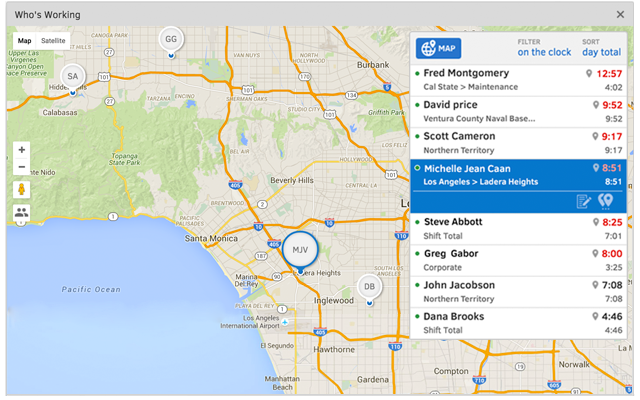
Screenshot of TSheets is the only time tracking app embedded inside QuickBooks. You can easily review and approve employee time cards to run payroll, do job costing, or create invoices--without ever leaving QuickBooks!Screenshot of With accurate employee hours from TSheets at your fingertips, you're always ready to run payroll--without the tedious manual entry!Screenshot of TSheets is more than just a time tracker. It keeps a timestamp for each clock in/out, job code change & GPS location. See who’s on the clock, where, and their assigned schedule—in real-time.Screenshot of Creating a schedule with Excel is costing you more than you think. TSheets employee scheduling software makes it faster & easier than ever to build & share schedules with employees, assign jobs & shifts, & keep your workforce in sync.Screenshot of Track time using devices your employees already use; any computer, mobile phone or landline, iPhone or Android app, smartphone browser, text message or Twitter.Screenshot of Really friendly free, unlimited support by phone, chat, or email. We guarantee you'll be impressed.

Traqq Screenshots

Screenshot of the Dashboard, showing a general summary of individuals and teams within a workforce. In the Dashboard, the viewer can see how many hours a workforce, an individual or team has put in and their average activity level across the board.Screenshot of the top apps and websites for a team, displayed in a pie chart.Screenshot of the timelines page, which gives an overview of activity levels for teams and individuals. Traqq sorts activity levels into green, yellow and red zones from most active to least active based on mouse and keyboard activity.Screenshot of timelines, a visualization that gives a comprehensive view of the top apps and websites visited.Screenshot of where to see who showed up to work, how many hours they put in, and when they clocked in/clocked out over a time period of choice.Screenshot of reports offering comprehensive summaries of performance, activity levels, payment (how much an employee has earned), time spent idle, among others. All of these reports can be exported as excel or pdf files.