TrustRadius: an HG Insights company

Action1 vs. Google Endpoint Management vs. LogMeIn Rescue

Save this comparison

Save this comparison

Add Product

Recommended Comparisons

    Overview
    ProductRatingMost Used ByProduct SummaryStarting Price

    Action1

    Score9.4 out of 10
    N/AAction1 is an autonomous endpoint management platform that is cloud-native, scalable, and configurable in 5 minutes. It is free for the first 200 endpoints, with no functional limits. By pioneering autonomous OS and third-party patching - AEM’s foundational use case - through peer-to-peer patch distribution and real-time vulnerability assessment without needing a VPN, it eliminates costly, time-consuming routine labor, preempts ransomware and security risks, and protects the digital…N/A

    Google Endpoint Management

    Score10 out of 10
    N/AGoogle Endpoint Management is a UEM / MDM solution that controls access to company Google Workspaces, and provides security functionality for Android and iOS mobile devices, as well as Windows and macOS accessing resources or tools remotely. Features include screen or device lock, remote data wipe, limiting access based on device type or user, remote user logout, and centralized management of devices through a Google Workspace admin console. There is no cost for Google Endpoint…

    $6

    per month

    LogMeIn Rescue

    Score8.2 out of 10
    N/ALogMeIn Rescue is an enterprise remote support solution that provides IT helpdesks and customer support organizations with the ability to remotely access, diagnose, and resolve issues across endpoint devices. The platform includes in-session diagnostic tools, security controls, and workflow configuration features. The solution is utilized by IT help desks, global enterprises, Business Process Outsourcers (BPOs), and Managed Service Providers (MSPs). It is designed to support…

    $149

    per month

    Pricing
    Action1Google Endpoint ManagementLogMeIn Rescue
    Editions & Modules
    No answers on this topic
    Google Workspace - Business Starter
    $6
    Per User / Per Month
    Google Workspace - Business Standard
    $12
    Per User / Per Month
    Google Workspace - Business Plus
    $18
    Per User / Per Month
    Remote Device Support
    $149
    per month per seat
    Rescue Enterprise
    Contact Sales
    Offerings
    Pricing Offerings
    Action1Google Endpoint ManagementLogMeIn Rescue
    Free Trial
    NoYesYes
    Free/Freemium Version
    YesNoNo
    Premium Consulting/Integration Services
    NoNoNo
    Entry-level Setup FeeOptionalNo setup feeNo setup fee
    Additional Details——Contact sales for Enterprise pricing. A discount is available for annual billing.
    More Pricing Information
    Community Pulse
    Action1Google Endpoint ManagementLogMeIn Rescue
    Considered Multiple Products
    Action1
    No answer on this topic
    Google
    No answer on this topic
    GoTo formerly LogMeIn
    No answer on this topic
    Key User Insights
    Would buy again
    100%
    Would buy again
    20 Answers
    No answers on this topic
    91%
    Would buy again
    150 Answers
    Delivers good value for the price
    100%
    Delivers good value for the price
    19 Answers
    No answers on this topic
    95%
    Delivers good value for the price
    124 Answers
    Happy with the feature set
    100%
    Happy with the feature set
    20 Answers
    No answers on this topic
    96%
    Happy with the feature set
    158 Answers
    Lived up to sales and marketing promises
    100%
    Lived up to sales and marketing promises
    19 Answers
    No answers on this topic
    97%
    Lived up to sales and marketing promises
    95 Answers
    Implementation went as expected
    100%
    Implementation went as expected
    20 Answers
    No answers on this topic
    97%
    Implementation went as expected
    110 Answers
    Features
    Action1Google Endpoint ManagementLogMeIn Rescue
    Security
    Comparison of Security features of Action1 and Google Endpoint Management and LogMeIn Rescue
    Feature
    Action1
    -
    Ratings
    Google Endpoint Management
    -
    Ratings
    LogMeIn Rescue
    8.6
    10 Ratings
    0% above category average
    Role-based user permissions00 Ratings00 Ratings8.610 Ratings
    Remote Administration
    Comparison of Remote Administration features of Action1 and Google Endpoint Management and LogMeIn Rescue
    Feature
    Action1
    -
    Ratings
    Google Endpoint Management
    -
    Ratings
    LogMeIn Rescue
    8.4
    214 Ratings
    1% above category average
    File transfer00 Ratings00 Ratings8.6193 Ratings
    Instant message00 Ratings00 Ratings8.0132 Ratings
    Access to sleeping/powered-off computers00 Ratings00 Ratings9.365 Ratings
    Session record00 Ratings00 Ratings8.6149 Ratings
    Annotations00 Ratings00 Ratings8.669 Ratings
    Platform & Infrastructure
    Comparison of Platform & Infrastructure features of Action1 and Google Endpoint Management and LogMeIn Rescue
    Feature
    Action1
    -
    Ratings
    Google Endpoint Management
    -
    Ratings
    LogMeIn Rescue
    8.5
    6 Ratings
    5% above category average
    Third-party software integrations00 Ratings00 Ratings8.56 Ratings
    Remote Access
    Comparison of Remote Access features of Action1 and Google Endpoint Management and LogMeIn Rescue
    Feature
    Action1
    -
    Ratings
    Google Endpoint Management
    -
    Ratings
    LogMeIn Rescue
    8.3
    12 Ratings
    2% above category average
    Attended device access00 Ratings00 Ratings8.612 Ratings
    Unattended device access00 Ratings00 Ratings7.76 Ratings
    Mobile device access00 Ratings00 Ratings8.14 Ratings
    Virtual device access00 Ratings00 Ratings8.64 Ratings
    Multiple-display support00 Ratings00 Ratings8.59 Ratings
    Multiple concurrent sessions00 Ratings00 Ratings8.18 Ratings
    Best Alternatives
    Action1Google Endpoint ManagementLogMeIn Rescue
    Small Businesses
    Avast CloudCare
    Score10 out of 10
    Avast CloudCare
    Score10 out of 10
    TeamViewer
    Score8.6 out of 10
    Medium-sized Companies
    LogMeIn Resolve
    Score9.1 out of 10
    Action1
    Score9.4 out of 10
    BeyondTrust Remote Support
    Score8.6 out of 10
    Enterprises
    ManageEngine Endpoint Central
    Score9 out of 10
    ManageEngine Endpoint Central
    Score9 out of 10
    TeamViewer
    Score8.6 out of 10
    All AlternativesView all alternativesView all alternativesView all alternatives
    User Ratings
    Action1Google Endpoint ManagementLogMeIn Rescue
    Likelihood to Recommend
    9.7
    (20 ratings)
    10.0
    (1 ratings)
    7.9
    (234 ratings)
    Likelihood to Renew
    9.4
    (2 ratings)
    -
    (0 ratings)
    5.9
    (23 ratings)
    Usability
    9.5
    (13 ratings)
    -
    (0 ratings)
    8.3
    (87 ratings)
    Availability
    -
    (0 ratings)
    -
    (0 ratings)
    9.1
    (1 ratings)
    Performance
    -
    (0 ratings)
    -
    (0 ratings)
    9.1
    (1 ratings)
    Support Rating
    5.0
    (1 ratings)
    -
    (0 ratings)
    9.1
    (39 ratings)
    Implementation Rating
    10.0
    (1 ratings)
    -
    (0 ratings)
    9.0
    (3 ratings)
    Configurability
    -
    (0 ratings)
    -
    (0 ratings)
    8.2
    (1 ratings)
    Product Scalability
    -
    (0 ratings)
    -
    (0 ratings)
    9.1
    (1 ratings)
    User Testimonials
    Action1Google Endpoint ManagementLogMeIn Rescue
    Likelihood to Recommend
    Action1
    If your organization is like mine (nonprofit and tight budget) this product is for you. The first 200 endpoints are free and being we are a small organization, this product is perfect for us. I was able to use Action1 to upgrade all my endpoints from Windows 10 to 11 pretty much effortlessly. If you are not a nonprofit and have more endpoints over 200, this is still a great product to use as I don't find it very expensive to incorporate into your infrastructure.
    Incentivized
    Read full review
    Google
    Google Endpoint securely manages data, more so the sensitive one, by developing passwords that are strong and complex. Further, Google Endpoint remotely updates or installs software and other details. For purposes of synchronization, Google Endpoint is adequately available and helpful. Lastly, has a utility management scope, and the deployment process is simplistic.
    Incentivized
    Read full review
    GoTo formerly LogMeIn
    This remote support tool is essential for the IT environment and is a must-have compared to other applications. From my point of view, it's well suited: it's easy to use, access, and transfer data, and it reduces time and workload. Occasionally, it is unstable and freezes due to network issues, and session quality can be affected. Overall Works best for IT organizations.
    Incentivized
    Read full review
    Pros
    Action1
    • Easy remote access to devices. That simple. We have some very unskilled users in the field where asking them to access their PC via conventional remote tools like TeamViewer, Anydesk, etc. was always a pain. Now, all they have to do is ensure their PC is online, and we can connect to them.
    • Remote software deploy. Before Action1, we did have some GPOs and scripts, but again - being able to deploy to PCs outside of our office/LAN, is just beautiful. On top of the standard repository, being able to create new packages is very useful for our scenario.
    • Inventory Reporting. Recently we had to identify PCs running old versions of Windows. Can't highlight enough how easy it is.
    Incentivized
    Read full review
    Google
    • Google Endpoint has a network support system that is wireless.
    • Further, there is remote installation or update from Google Endpoint.
    • Lastly, Google Endpoint manages data without compromise or setbacks.
    Incentivized
    Read full review
    GoTo formerly LogMeIn
    • To be able to connect through email or through the website.
    • To be able to remotely control our client's computers.
    • To be able to see what is on our clients' screens after a remote session has been established.
    • To be able to chat with our clients through both the web and the desktop app versions in case we get disconnected.
    Incentivized
    Read full review
    Cons
    Action1
    • Remote Access could use added functionality
    • The deployment screens for update deferrals can be hard to understand at first and easy to skip since it carries some default info when you create a new automation rather than a more conspicuous prompt to update.
    Incentivized
    Read full review
    Google
    • Google Endpoint lacks proper online templates, for training.
    • Google Endpoint is not a flexible or configurable application unless the developer does.
    • Google Endpoint consumes some system space, making the device load much.
    Incentivized
    Read full review
    GoTo formerly LogMeIn
    • By default it would be good to have clipboard sync enabled - disabled instead. So difficult when copying from my computer doesn’t work because of an agent sharing the connection and it will not let us copy information into the client’s computer.
    • Copying into excel is difficult. It will deselect things that you have highlighted when copying.
    • Would be nice to make the hierarchy easier when sharing files between clients and us.
    • Logging into certain environments can be challenging and require customers to be fairly techy to be able to understand how to get logged into client’s computers.
    • Sometimes login is pretty unstable on certain internet connections even though they are fine when they use team viewer with their IT.
    Incentivized
    Read full review
    Likelihood to Renew
    Action1
    Price, functionality, and continuous improvement of the product.
    Incentivized
    Read full review
    Google
    No answers on this topic
    GoTo formerly LogMeIn
    Since we have not had anything other than a couple minor hiccups with LogMeIn Rescue and due to the overwhelming success we have had in implementing as well as utilizing LogMeIn Rescue, I cannot see any reason why would consider looking elsewhere. Overall, we have been highly satisfied with LogMeIn Rescue and have no intentions of making a switch.
    Incentivized
    Read full review
    Usability
    Action1
    Action1 has taken many of the tasks that are time consuming and made them simple automated tasks that can be run on a schedule. I can schedule tasks to run off-hours and know that they will be done and I no longer have worry about it. As someone who does IT support for a living, it just makes my job so much simpler with less stress.
    Read full review
    Google
    No answers on this topic
    GoTo formerly LogMeIn
    LogMeIn allows end users the ability to get help when they are needing it and scheduling it at a time that is optimal pretty much world wide with good connectivity. This can be accomplished when they are a cafeteria if they do not have a suitable internet connection affording them good support.
    Incentivized
    Read full review
    Reliability and Availability
    Action1
    No answers on this topic
    Google
    No answers on this topic
    GoTo formerly LogMeIn
    Log me in has never failed me
    Incentivized
    Read full review
    Performance
    Action1
    No answers on this topic
    Google
    No answers on this topic
    GoTo formerly LogMeIn
    no complaints
    Incentivized
    Read full review
    Support Rating
    Action1
    I never contacted support services
    Incentivized
    Read full review
    Google
    No answers on this topic
    GoTo formerly LogMeIn
    We have never had to access support because the software has always worked as expected. It is great to have a software vendor from whom we know we will have no issue with glitches or incompatibility. We do know, however, that if we did have an issue, we would have our issue resolved quickly.
    Incentivized
    Read full review
    Implementation Rating
    Action1
    very easy to start using it.
    Incentivized
    Read full review
    Google
    No answers on this topic
    GoTo formerly LogMeIn
    Make sure you have your LogMeIn Rescue account sign-in details handy when installing on multiple support systems.
    Incentivized
    Read full review
    Alternatives Considered
    Action1
    After looking at different solutions, Action1 [Cloud Remote Monitoring and Management Solution] was the perfect fit for us that delivered all of the features we wanted without being as costly as some of the others alternatives we've looked at. There was no minimum endpoint count and they even offer up to 50 endpoints for free, which is really great for a small organization like us to help us lower our starting costs and still allows us to grow at our pace without having to commit to a defined amount of endpoints to start.
    Read full review
    Google
    Google Endpoint has a remote control, which simplifies tasks, and it's not a must for a person to install the software on the required device. Also, Google Endpoint has a free version, and the monthly subscription amount is small. The training and installation process are all fair, effective, and effortless
    Incentivized
    Read full review
    GoTo formerly LogMeIn
    Teams is less secure and poses a higher risk of exposing tech Support and clients to additional sharing of info, i.e., face and personal email addresses; however, Teams is used when the client has a firewall that prevents rescue and no IT support nearby to bypass or enter the firewall password.
    Incentivized
    Read full review
    Scalability
    Action1
    No answers on this topic
    Google
    No answers on this topic
    GoTo formerly LogMeIn
    it's perfect
    Incentivized
    Read full review
    Return on Investment
    Action1
    • Saved hours per week on patching and able to ensure a 100% patching success rate.
    • Able to create custom alerting on potential problems as well as able to create some automation to automatically address problems.
    • Improved support to our remote locations and users.
    • Custom deployments allow us to have a mechanism to deploy custom applications we build as well as other third party applications we need to distribute.
    Incentivized
    Read full review
    Google
    • Data safety is one of the perfect returns from Google Endpoint.
    • Inventory management ensures proper use of the company's resources.
    • Automatic installations and updates saves on time and expenses.
    Incentivized
    Read full review
    GoTo formerly LogMeIn
    • For businesses with small to midsize IT staff, the ability to remotely control devices that are not on-site and occasionally out of state is extremely cost-effective.
    • The speedy response time of LogMeIn Rescue has been very helpful in resolving issues for IT staff.
    • The administrative process has been made more efficient by the ability to remotely log into servers.
    Incentivized
    Read full review
    ScreenShots

    Action1 Screenshots

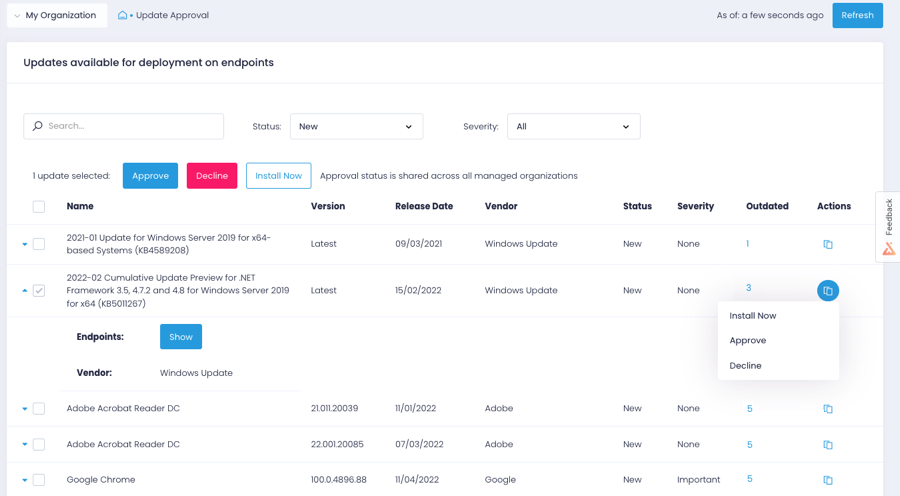
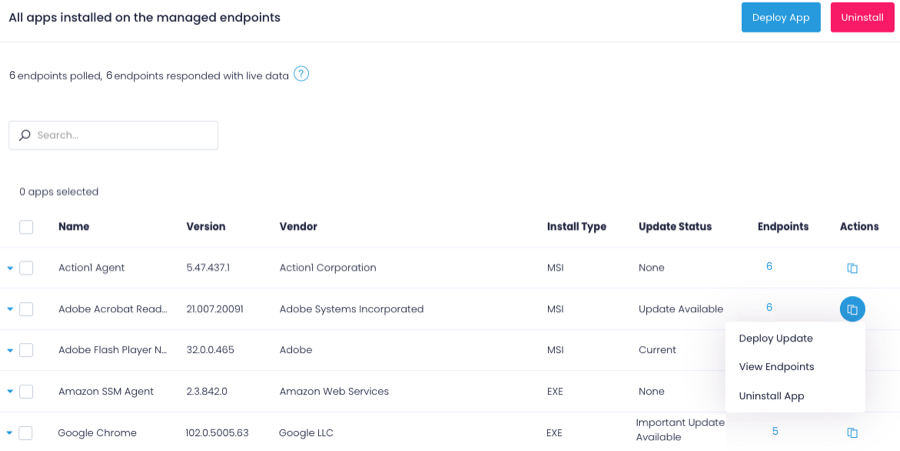
    Screenshot of the Action1 dashboardScreenshot of Action1 patch managementScreenshot of Action1 software deploymentScreenshot of Action1 endpoint managementScreenshot of an Action1 vulnerabilities viewScreenshot of Action1 vulnerabilities remediation

    LogMeIn Rescue Screenshots

    Screenshot of Technician Group Configuration - Where users can create technician groups and subgroups with granular agent permissionsScreenshot of The console where repetitive tasks automated by running pre written scripts in the background, without disturbing end usersScreenshot of A smartphone camera being used to troubleshoot offline computers and hardwareScreenshot of Remote control of Macs, PCs and Linux/AndroidScreenshot of Reboot sessions and automationScreenshot of The central dashboard where common mobile device issues on iPhone and Android can be identified and addressed without the need to navigate the end user's device.