Adobe Learning Manager is a Learning Management System developed by Adobe Inc. that offers personalized learning at scale to employees, partners and customers alike. Compliant with GDPR guidelines, SOC2 TYPE 2 and FedRAMP Certifications, Adobe Learning Manager integrates with Adobe Experience Manager Sites, Adobe Commerce, Marketo Engage with out-of-the-box components and any other application through Open APIs, offering hybrid learning programs and detailed analytics.…
N/A
PeopleFluent
Score7.9 out of 10
Enterprise companies (1,001+ employees)
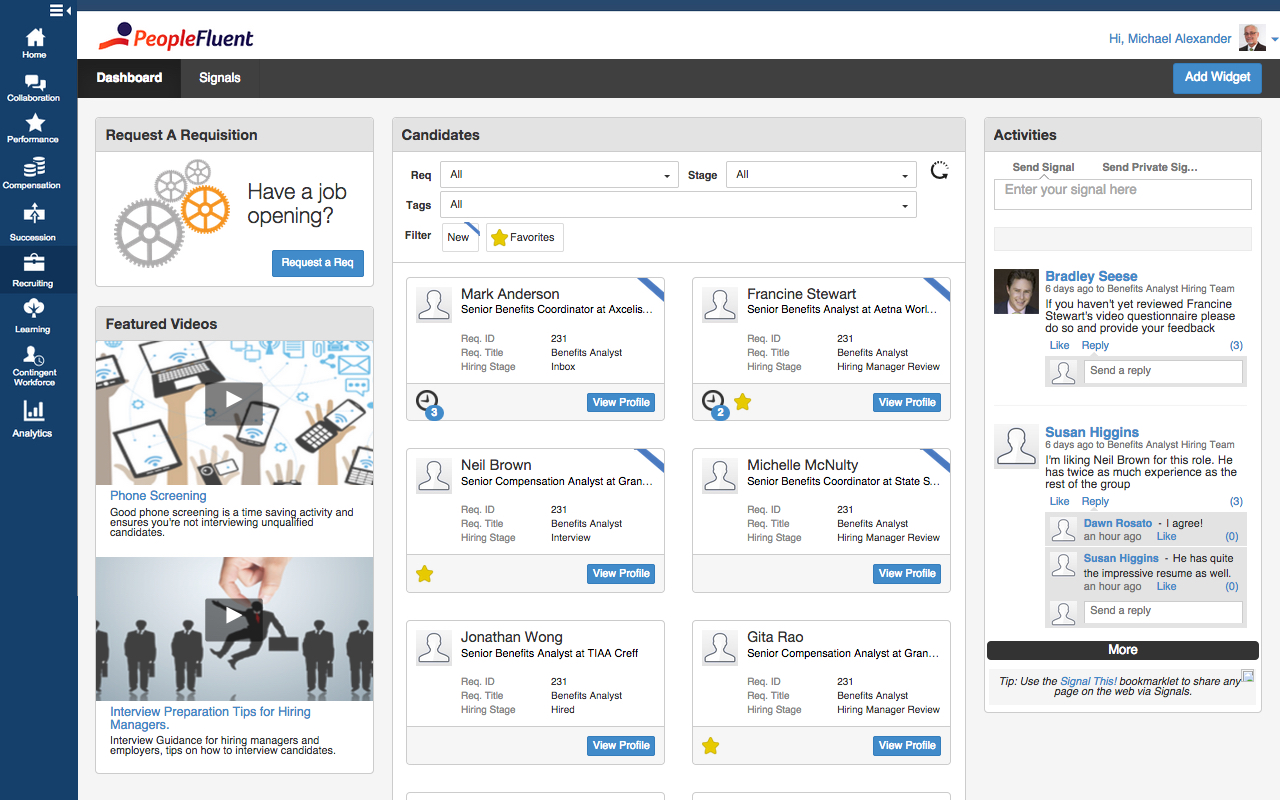
PeopleFluent includes modules for recruiting, performance management, compensation, learning, succession, and vendor management, as well as workforce planning and diversity. These modules can be purchased separately or bundled, and integrate with other HR systems.
It's good if you have a good use case for that feed. I do know that you have to incorporate it in a process in isolation. It's not you don't realize the full value, so you have to incorporate it into an overall improvement process. I would say the pro cases are marketing optimization with respect to campaigns. And I would say that the areas it's not well suited is in distilling attribution. So if you were to take all of the improvements that it suggested, the numbers exceed revenue, which isn't real, but that's a hard problem to solve. Nobody's really solved that problem well. So distilling the attribution piece would be good. And it is well suited for marketing campaigns in the ideation phase of so
A de minimis incentive was given to thank the reviewer for their time. The incentive was not used to bias or drive a particular response, nor was the incentive contingent on a positive endorsement. More Info
PeopleFluent has eliminated the use of paper reviews. It is also eliminated the use of scanning, emailing or interoffice mail. It is a great tool for communication and I highly recommend it. However, in some ways, the product can be improved. Some processes are tied to each other and could function in tandem. For example, while completing the self-review, the employee has to capture multi-raters. If self-review is submitted without listing multi-rater names then multi-rater review has to be captured separately on paper. In my opinion, these two processes can be different. Multi-raters should be added/removed/modified after submitting self-review.
A de minimis incentive was given to thank the reviewer for their time. The incentive was not used to bias or drive a particular response, nor was the incentive contingent on a positive endorsement. More Info
Rich and engaging learning experiences that capture employees' attention.
Is multi-device capable so our teams can take classes where it's most convenient for them during the day, especially if they don't have an assigned static workstation?
Allows us to personalize compliance training based on where our employees are at in the organizational chart, competencies, and requirements.
A de minimis incentive was given to thank the reviewer for their time. The incentive was not used to bias or drive a particular response, nor was the incentive contingent on a positive endorsement. More Info
It was very easy to go through resumes, choose the people you wanted to interview and set up the interviews.
It is great at keeping track of people that have come through hiring process in the past so you do not waste time on those that have already been declined or are sent in by multiple vendors.
The handling of time sheets and expense reports is very easy to manage.
A de minimis incentive was given to thank the reviewer for their time. The incentive was not used to bias or drive a particular response, nor was the incentive contingent on a positive endorsement. More Info
The interface is a little confusing. I'm not sure if it's something that can be fixed in implementations, or if it's inherent to PeopleFluent, but there are almost too many tabs asking for too much information. A lot of it can be repetitive as well.
Changing your password/resetting your password seems to be nightmarish. It requires an organization ID as well as security questions, and forces you to reset your password far too often. I really dislike that feature.
Honestly, PeopleFluent itself looks pretty outdated. I feel as though the entire application really needs a facelift to be more current.
A de minimis incentive was given to thank the reviewer for their time. The incentive was not used to bias or drive a particular response, nor was the incentive contingent on a positive endorsement. More Info
Currently, our company uses this program and another competitor for our learning management software. We like the adaptability of this program and appreciate the customer service that Adobe provides, however the other program is starting to turn out to be a better value for our company as they improve their compatibility.
A de minimis incentive was given to thank the reviewer for their time. The incentive was not used to bias or drive a particular response, nor was the incentive contingent on a positive endorsement. TR verified that a representative sample of customers was invited. More Info
PeopleFluent continues to develop an already high quality product and works to continually improve the user experience. The different modules integrate well, and the administrative functions are easy to understand and perform resulting in less time spent with KTLO functions. They provide world class customer service and work hard to keep you engaged as a customer.
In general, the user experience in Adobe Learning Manager is very satisfactory. The layout of the interface, the structure and the order of the available functionalities make it very intuitive and usable. The adaptation to mobile devices is very convenient since most of the participants connect through these electronic devices.
A de minimis incentive was given to thank the reviewer for their time. The incentive was not used to bias or drive a particular response, nor was the incentive contingent on a positive endorsement. More Info
PeopleFluent seems to have all the functionality one would need, but it can be a bit overwhelming. Depending on the client implementation, it can be downright confusing and not intuitive. My 6 rating comes from the fact that it seems like the system can be configured to actually be confusing and not make sense. I think a VMS should be set up not to allow a customer to configure it in such a way as to not really work, or to allow users to circumvent steps. I also really don't like the "organization key" that needs to be entered every time you log in. Why is a login and password good enough for 99% of the systems out there, but PeopleFluent requires an extra field?
A de minimis incentive was given to thank the reviewer for their time. The incentive was not used to bias or drive a particular response, nor was the incentive contingent on a positive endorsement. More Info
On a few occasions, I've logged in to issue a test to a staff member and my course would just spin. I've had to reschedule several test attempts due to this. In my opinion, the issue was not resolved by Adobe
A de minimis incentive was given to thank the reviewer for their time. The incentive was not used to bias or drive a particular response, nor was the incentive contingent on a positive endorsement. More Info
The performance of Adobe Captivate Prime is also extremely good. The user interface is fast and easy to load. The complexity is not nearly as bad as some of the other programs on the market. Speed was not impacted.
A de minimis incentive was given to thank the reviewer for their time. The incentive was not used to bias or drive a particular response, nor was the incentive contingent on a positive endorsement. TR verified that a representative sample of customers was invited. More Info
I think they have a competent, friendly and "resolving" team. I have only ever been met with a willingness to assist any and every query I have come across. Roy who is one of the technical people is amazing, and so is my Customer Success Manager, Hema! I do not know what I would do without them.
A de minimis incentive was given to thank the reviewer for their time. The incentive was not used to bias or drive a particular response, nor was the incentive contingent on a positive endorsement. More Info
I would rate this ATS system a 9 as there's some room for improvement as mentioned prior. I really love the design and its functionality buttons and the way I can integrate it with other systems. I would really love to see a more detailed reporting metrics long with super candidate filters when searching profiles.
A de minimis incentive was given to thank the reviewer for their time. The incentive was not used to bias or drive a particular response, nor was the incentive contingent on a positive endorsement. More Info
A de minimis incentive was given to thank the reviewer for their time. The incentive was not used to bias or drive a particular response, nor was the incentive contingent on a positive endorsement. More Info
Trial period was great, and It let me plenty of time to try the different feature of the platform. However, when we decided to move forward, the ADOBE team was slow and not reactive at all. Actually after 2 years, I am still waiting for answers which is quite unacceptable.
A de minimis incentive was given to thank the reviewer for their time. The incentive was not used to bias or drive a particular response, nor was the incentive contingent on a positive endorsement. More Info
360 keeps up the Adobe learning manager. It even outclasses it in certain parts, but with a huge stalwart tech giant like Adobe, it is hard to keep up. Many of the features are present, but there's always that final touch missing. And it is always trying to play catchup.
A de minimis incentive was given to thank the reviewer for their time. The incentive was not used to bias or drive a particular response, nor was the incentive contingent on a positive endorsement. More Info
Its great, its very versatile and stacks up very well against the competition. In terms of usability and ease of use, anyone can quickly learn how to use PeopleFluent. Again, the faults against the system would be when a client who is running the tool customizes it to their liking. Not to mention it's a very popular tool that i have had the pleasure of working in twice now with two different organizations.
A de minimis incentive was given to thank the reviewer for their time. The incentive was not used to bias or drive a particular response, nor was the incentive contingent on a positive endorsement. More Info
The product's overall scalability and flexibility is extremely good. I wish that the other products our company uses were this flexible! The product is easy to deploy across multiple departments and teams as needed.
A de minimis incentive was given to thank the reviewer for their time. The incentive was not used to bias or drive a particular response, nor was the incentive contingent on a positive endorsement. TR verified that a representative sample of customers was invited. More Info
A de minimis incentive was given to thank the reviewer for their time. The incentive was not used to bias or drive a particular response, nor was the incentive contingent on a positive endorsement. More Info
I do believe that goal setting and the workflow of following up, going through the process yearly is as good as you make it. If you set good goals, or help your team make good goals then the experience can go well. Otherwise it's just another thing that an employee is doing to make their manager happy.
I am not sure the cost of the product, but if it is really expensive I am not sure that we are getting fully what we should be for what the product offers. Make sure you are using what is offered.
A de minimis incentive was given to thank the reviewer for their time. The incentive was not used to bias or drive a particular response, nor was the incentive contingent on a positive endorsement. More Info