Adobe Workfront, acquired by Adobe in late 2020, is a web-based project-management tool. It is designed for both IT and marketing teams, but can be implemented for any kind of project. Workfront offers all the features standard to project management platforms, as well as resource allocation, automation, and agile workflow.
N/A
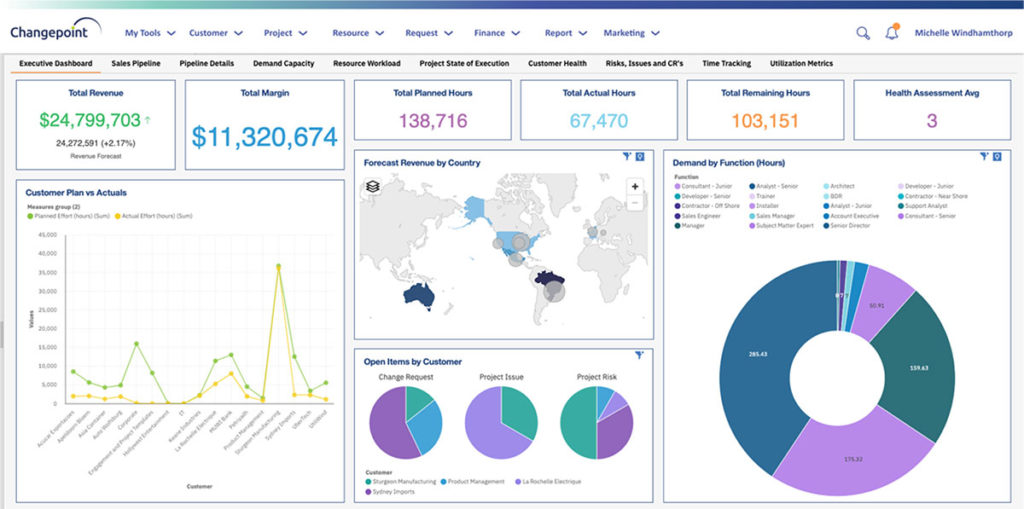
Planview ChangePoint
Score 7.0 out of 10
N/A
Planview Changepoint is a platform that marries professional services automation (PSA), project portfolio management (PPM) and business analytics to provide managers broad operational visibility and control over their strategic business portfolios.
Having requests for immediate work being routed directly to the team members who perform the function. Proofreading needs to happen fast and turnaround quickly while retaining visibility everywhere. Through reporting and statuses, we can show progress at every stage. A large campaign organization means multiple requests and documents going between departments. By using requests alongside related rejects, we have everything in one place.
Changepoint is basic and would, therefore, work for businesses with uncomplicated requests, pretty straightforward workflows and willingness to work with an unsightly solution. It is basic, from the UI to the search option and the way the information is captured, which can be frustrating and counter-intuitive at times. It is relatively robust (i.e. I have been using it for almost 2 years and have not seen it crash once) but it does log me out when the system has been inactive for about 30 minutes - and I am only notified about being logged out upon clicking the Submit button, meaning many a line of text have been typed more than once!
Changepoint has significant reporting capabilities, though of course, the data that comes out is only as good as the data that goes in. I enjoy being able to use the standard reports to understand exactly how much a project has cost us and to compare it to how much we are charging. This allows us to more accurately set our prices. Though we have not used the report designer capability, I understand that custom reports can be designed with relative ease.
Changepoint has a versioning capability for changes made to user profiles in the system manager, which I find particularly helpful. As a non-power user, it is valuable to be able to see what changes I have made to various profiles so that I can troubleshoot a problem down the line.
Changepoint has significant functionality well beyond the features that we are currently using, and for this reason, I think it is affordable and a good deal. Particularly if your organization is interested in dedicating the time and resources into using all of the features around project planning, resource allocation, etc., the price is well worth the value.
We use Changepoint to manage the IS organization. I would like to see more advancement in order to do benefits management.
I would like to see a capability where a project manager can build a very detailed work breakdown structure, but only require project resources to charge time and provide a task status at a higher level.
Workfront is sometimes a bit clunky to use, but overall it works well for our teams when it comes to project management and collaboration across multiple, involved teams. It also has flexibility that allows us to adapt it to diverse use cases, some of which aren't necessarily always the first things that one would think of using workfront for.
Sometimes the decision to renew boils down to an old adage "if it isn't broken don't fix it". Previous to moving to Changepoint, it was obvious that we needed a better project management tool. Projects we completed on time but the time zone difference between the teams and several iterations of back and forth caused a number of communication issues with projects. The difference is night and day.
Workfront is overly complex, but it is functional as a tool to keep track of projects. It is a shame that sometimes it takes a lot of clicks to find anything. Workfront is slowly modernizing its interface but at the same time, hides certain information away thus making the experience feels worse.
I have found that Adobe Workfront is a reliable resource, because in the post 6 years of using it, rarely has it been unavailable to our team. I think I could count on one hand the number of times the site has been down over my time using it with my team.
I think overall, Adobe Workfront performs well. There have been some times when it doesn't load or run as quickly as our team would like. This is frustrating when it is such a crucial tool that our team utilizes on a daily basis. It can show our workflow when it lags.
I know that this particular company has it's own Adobe Workfront employee that builds out things they need from the software, and meets with them regularly to troubleshoot. I'm not part of this process, but it's refreshing to see Adobe provide this level of customer service to people, and they're expedient.
The training is very easy to use and you can simply choose the topics included in the course(s) that are most important to your training needs. After each training course, you are tested on what you have learned. If you need a refresher course, they provide Course Catalogs as well as instructor-led courses & workshops.
Most people learn as you go, a lot of this stuff requires trial and error throughout so my suggestion is to provide as much information in the upfront and keep it as simple as possible. You can add other tools and features as you go but everyone should have the basics down so no bad habits can start to develop. Be persistent with everyone, and don't be afraid to correct and talk through steps again so everyone is on the same page
Adobe Workfront blows the other systems out of the water. It just delivers more - out of the gate, and at every quarterly update. Innovation is top of mind, and meeting customers' needs is key. We have been extremely satisfied with Workfront and look forward to all the new features on the horizon, especially AI.
Planview Changepoint helps us to understand our key customers enabling us to capitalize on every financial opportunity and helps us to forecast demand against the capacities required for new opportunities, and also it automates and monitors contractual terms and conditions. It gives us visibility into our employees' skills and helps to optimize resource allocation.
As I stated earlier, I didn't have to pay for Workfront myself- I'm a user under a large organization. I know it's not cheap to implement, I don't know how the price scales for a small-business, but I do like the product enough that I'm going to look into it in the future for my own company.
Our organization has thousands of users that use Workfront and it seems to hold up very well. I have not encountered any issues using it and I think it makes it very easy for multiple people to be involved in a project and keep things organized and clear for everyone involved.
Resource Management - Year over year, we were able to validate time and money saved by the implementation of Workfront by more than 2%, saving in non-working dollars and 9% savings in working media dollars.
Organization Restructuring and Automation- We also restructured our teams and implemented automation based on our analysis of how and what we spend our time on and the ROI for our respective business units.
Employee efficiency has decreased significantly within our Project MAnagement team. The main causes are lack of logical steps/not user-friendly and the slowness of the entire program.
Changepoint PSA has greatly improved being able to track budgets for all projects. Before this software, budgets were done manually by hand and cross-referenced with Accounting. Now, we can pull a report out of the system, as long as all parties entered their time and data correctly.