Overview
ProductRatingMost Used ByProduct SummaryStarting Price
Amazon CloudWatch
Score 7.7 out of 10
N/A
Amazon CloudWatch is a native AWS monitoring tool for AWS programs. It provides data collection and resource monitoring capabilities.
$0
per canary run
Datadog
Score 8.7 out of 10
N/A
Datadog is a monitoring service for IT, Dev and Ops teams who write and run applications at scale, and want to turn the massive amounts of data produced by their apps, tools and services into actionable insight.
$1.27
per month (billed annually) per host
Pricing
Amazon CloudWatchDatadog
Editions & Modules
Canaries
$0.0012
per canary run
Logs - Analyze (Logs Insights queries)
$0.005
per GB of data scanned
Over 1,000,000 Metrics
$0.02
per month
Contributor Insights - Matched Log Events
$0.02
per month per one million log events that match the rule
Logs - Store (Archival)
$0.03
per GB
Next 750,000 Metrics
$0.05
per month
Next 240,000 Metrics
$0.10
per month
Alarm - Standard Resolution (60 Sec)
$0.10
per month per alarm metric
First 10,000 Metrics
$0.30
per month
Alarm - High Resolution (10 Sec)
$0.30
per month per alarm metric
Alarm - Composite
$0.50
per month per alarm
Logs - Collect (Data Ingestion)
$0.50
per GB
Contributor Insights
$0.50
per month per rule
Events - Custom
$1.00
per million events
Events - Cross-account
$1.00
per million events
CloudWatch RUM
$1
per 100k events
Dashboard
$3.00
per month per dashboard
CloudWatch Evidently - Events
$5
per 1 million events
CloudWatch Evidently - Analysis Units
$7.50
per 1 million analysis units
Log Management
$1.27
per month (billed annually) per host
Infrastructure
$15.00
per month (billed annually) per host
Standard
$18
per month per host
Enterprise
$27
per month per host
DevSecOps Pro
$27
per month per host
APM
$31.00
per month (billed annually) per host
DevSecOps Enterprise
$41
per month per host
Offerings
Pricing Offerings
Amazon CloudWatchDatadog
Free Trial
YesYes
Free/Freemium Version
YesYes
Premium Consulting/Integration Services
NoNo
Entry-level Setup FeeNo setup feeOptional
Additional DetailsWith Amazon CloudWatch, there is no up-front commitment or minimum fee; you simply pay for what you use. You will be charged at the end of the month for your usage.Discount available for annual pricing. Multi-Year/Volume discounts available (500+ hosts/mo).
More Pricing Information
Community Pulse
Amazon CloudWatchDatadog
Considered Both Products
Amazon CloudWatch
Chose Amazon CloudWatch
We use Cloudwatch for simpler monitoring, but these metrics and logs often feed into bigger ecosystems across our organization. The metrics and logs in Cloudwatch allow our developers quick and easy access to the data they need whilst easily integrating the same data into more …
Chose Amazon CloudWatch
If you use AWS, then just use CloudWatch, as it's tightly integrated.
Chose Amazon CloudWatch
Grafana is definitely a lot better and flexible in comparison with Amazon CloudWatch for visualisation, as it offers much more options and is versatile. VictoriaMetrics and Prometheus are time-series databases which can do almost everything cloudwatch can do in a better and …
Chose Amazon CloudWatch
In comparison to its competitors, Amazon CloudWatch is efficient, reliable, and has a fast response time, and it maximizes an application's life while also providing the best load balance and storage. The services that Amazon CloudWatch provides are far better and cheaper for …
Chose Amazon CloudWatch
We have also tested with SolarWinds NPM, and Zoho Monitors. They seemed to work fine and setup was not as involved as Amazon services, JSON, etc. However, the issue of upgrades made the other solutions incur more downtime overall for maintenance and software upgrades via the …
Chose Amazon CloudWatch
I think there is no alternative of [Amazon] CloudWatch service. However it provides lot of glue points which you can use to show different metrics, trigger events and update your dashboards.
Chose Amazon CloudWatch
I believe that CloudWatch is a better solution to use with AWS services and resources in terms of cost and ease of integration with AWS infrastructure services. But keep in mind that Elasticsearch is better at aggregating application-level metrics.
We chose CloudWatch because of …
Chose Amazon CloudWatch
You can create very easily particular alarms.
Chose Amazon CloudWatch
We found that CloudWatch is the best solution to use with AWS services in terms of cost and ease of integration with AWS infrastructure services. While Elasticsearch is better at aggregating application-level metrics, CloudWatch wins out in its capabilities to tightly integrate …
Chose Amazon CloudWatch
CloudWatch is the minimum viable product that is used as your baseline. Once you graduate beyond the basic needs, there is a wide range of tools from other AWS partners that go well above and beyond. However the cost of those tools is typically considerably more.
Chose Amazon CloudWatch
We thought about using Logstash for capturing our data. But we encountered several configuration issues, so as I mentioned before, if you're using AWS, the best way to do this is using the service they offer, as you don't encounter configuration problems. This is why I consider …
Chose Amazon CloudWatch
CloudWatch's native integration with other AWS tools such as AWS and Lambda make it a better fit and simpler to set up than most of the competitors.
Chose Amazon CloudWatch
I think Amazon has put more efforts to develop AWS CloudWatch features to monitor each kind of AWS service you can use instead of Dynatrace One Agent that just can monitor some variables of Computing services and FaaS, unless Dynatrace One Agent integration with AWS CloudWatch …
Chose Amazon CloudWatch
Nagios is nice, but not as coupled with AWS cloud as CloudWatch. You might even think of cases you would use them both.
Chose Amazon CloudWatch
AWS is still a more mature product overall and offers more features compared to other cloud platforms like Google.
Chose Amazon CloudWatch
Out of the box monitoring which compliments workloads implemented from infrastructure as code so we have standardized metrics across all our monitoring for our AWS workloads. Also incredibly easy to implement via the console which can be done in minutes oppose to hours of …
Chose Amazon CloudWatch
We choose Amazon CloudWatch because, first, we use AWS and we need a monitoring tool. That is why we considered CloudWatch as soon as we started deploying AWS services to our company. Second, CloudWatch is a great, handy tool to monitor our services. Its strength is obvious …
Chose Amazon CloudWatch
Currently, we only tried and used Cloud Watch, but for AWS it is perfect. Since this is an Amazon product monitoring Amazon services, integration is great. If we decide in the future to move away from AWS, we would reconsider changing alarm monitoring. AWS can be costly …
Chose Amazon CloudWatch
Amazon CloudWatch is fully integrated into your existing AWS account, and provides easy hooks into several different services to make a cohesive infrastructure. Unfortunately, using other services will not allow you to get into the weeds to do everything Amazon CloudWatch can …
Chose Amazon CloudWatch
It's cheap and we use other AVS services. And for us, it is better to use AWS services for faster and easier adjustment.
Chose Amazon CloudWatch
CloudWatch is incredibly cheap compared to new relic and much more intuitive and easy to use than Nagios. It requires no setup, expertise, or otherwise extensive knowledge to use.
Chose Amazon CloudWatch
We used to use Miscosoft Azure, however when we came across Amazon CloudWatch, and all the features it can provide, it seemd no brainer to switch. We transitioned from Azure to CloudWatch within 2 years of using Azure, And may not go back. Hopefully Amazon will keep adding more …
Chose Amazon CloudWatch
Amazon CloudWatch is great in terms of the CloudWatch Logs feature, it integrates easily with other AWS services (CloudFormation, S3, Lambda, etc.) and is reasonably low cost, so it was a no-brainer for that area. For alerting, CloudWatch didn't offer much in the way of …
Chose Amazon CloudWatch
I feel that CloudWatch will always remain the backbone of log analytics, events, and alarms. However, we can use other products in conjunction with it for better log analytics and monitoring. In my organization, we also ingest logs from CloudWatch to Splunk and ELK. This way we …
Datadog
Chose Datadog
Its the Enterprise level decision, definitely usability and features perspective Datadog is much more advanced.
Chose Datadog
Datadog is significantly more user-friendly than CloudWatch.In terms of capabilities, they're similar.
I would not call either of the best-in-class for any single feature, but Datadog feels more polished and ready to use overall.Multi-cloud monitoring is a clear differentiator …
Chose Datadog
Datadog dashboard is very intuitive and offer seamless integration into multi-cloud platform compared to its competitor.
Chose Datadog
I use Datadog because it concentrates all these features into a single tool, facilitating the learning curve that my platform and development engineering team needs in order to be able to set up the monitors/alerts/SLIs/SLOs as well as to diagnose a production issue. Its easier …
Chose Datadog
Datadog seems to be the most feature-rich of all the alternatives we've considered, however due to problems outlined earlier, some of the others have benefits. OpenTel can give us a way to make our platforms compatible with a variety of vendors, and can be done without …
Chose Datadog
Datadog is a more complex but complete solution than any of the other Log Aggregation, monitoring, or general observabilty tools that we have trialed. I found it easier to setup following useful and up-to-date documentation provided directly by Datadog instead of scattered …
Chose Datadog
Kibana
Datadog
… because within our usecase we have all the events in kibana but sampled traces in Datadog … but if we had all the traces it would have been much more useful
Chose Datadog
I think Datadog and sentry serve different needs. I like sentry to keep track of errors on our systems. And then I'll jump into Datadog to investigate those issues.
Chose Datadog
We have utilized a SIEM in the past, but it was a very manual process to set it up. Content packs make it very easy to set up and get alerting instantly. Datadog takes out a lot of headaches for our security team, since they no longer have to create custom alerts for every …
Chose Datadog
First think first - it's easy to use, and very easy to implement in any infrastructure. It provides a custom dashboard and monitors. I’ve used or evaluated Grafana, Prometheus, Amazon CloudWatch, and Dynatrace, and each tool has strong capabilities. Prometheus + Grafana provide …
Chose Datadog
Wavefront seems to be better at observability and allows more custom query language.
Chose Datadog
All other tools dont have all the features which Datadog provides.
Easy to use from UI where other may have complicated UI or no UI at all to create monitors. Consider like AWS grafana, we have limitation to create monitors from UI. There is no recurring downtime for monitors. …
Chose Datadog
UI of the Datadog is easy to understand and integration steps are easy to understand. It also provides the troubleshooting steps which are easy to understand. Supports multi cloud integrations which is very important for all the customers to know about the cloud service's …
Chose Datadog
we primarily use Kubernetes, and Prometheus is great for collecting time series metrics, especially in Kubernetes. and Grafana is used for dashboards. As these are open source, we host them and manage them internally. We choose Datadog because of its logs, traces, and …
Chose Datadog
I selected Datadog because of its features and the wide range of integration support. As I already told it supports more that 600+ integrations which helps and organization to keep everything in a single place and also its AI feature which is reducing the time for root cause …
Chose Datadog
1. Grafana is good, but a lot of integration is required for it to work. .that not the case of Datadog
2. Faster to set up Datadog instead of Grafana
3. Alerting in Datadog feels much easier thanin Grafana.
Chose Datadog
Datadog is best for cloud-native and fast-setup. It is more mature for infrastructure and real-time observability. The UI is more user-friendly and provides wide coverage of app insights.
Chose Datadog
I have tried and used a number of other tools similar to Datadog such as New Relic, Splunk, Prometheus, AWS cloudwatch and Dynatrace. New Relic and Splunk provide excellent monitoring and analytics, but Datadog’s consolidated dashboards and ease of setup combined with a wealth …
Chose Datadog
Our logs are very important, and Datadog manages them exceptionally well. We frequently use Datadog services for our investigations. Use case: Monitor your apps, infrastructure, APIs, and user experience.
Chose Datadog
ease of use and implementation, other than new relic (which I think is terrible in every possible way), the other two support opentelemetry better, have more manageable costs and comparable basic services, but they do not have the breadt of services dd does.
Chose Datadog
We moved to Datadog from Microsoft's Application Insights. Application Insights did a fine job in allowing us to view our application data, but it lacked the holistic view of all our infrastructure and other platforms that could not use Application Insights. Being able to …
Chose Datadog
In terms of usability, I’ve found Datadog significantly more approachable and powerful compared to Elasticsearch, especially for day-to-day operational monitoring. Datadog offers a much more cohesive, user-friendly interface out of the box, with built-in support for metrics, …
Best Alternatives
Amazon CloudWatchDatadog
Small Businesses

No answers on this topic

Amazon CloudWatch
Amazon CloudWatch
Score 7.7 out of 10
Medium-sized Companies
ManageEngine Site24x7
Score 10.0 out of 10
ManageEngine Site24x7
Score 10.0 out of 10
Enterprises
ManageEngine Site24x7
Score 10.0 out of 10
ManageEngine Site24x7
Score 10.0 out of 10
All AlternativesView all alternativesView all alternatives
User Ratings
Amazon CloudWatchDatadog
Likelihood to Recommend
7.7
(0 ratings)
8.9
(0 ratings)
Likelihood to Renew
-
(0 ratings)
1.0
(0 ratings)
Usability
7.0
(0 ratings)
8.7
(0 ratings)
Support Rating
8.4
(0 ratings)
5.0
(0 ratings)
Implementation Rating
-
(0 ratings)
1.0
(0 ratings)
User Testimonials
Amazon CloudWatchDatadog
Likelihood to Recommend
If you use any AWS services, CloudWatch is the natural choice to monitor & troubleshoot your workload. Thankfully, for most AWS services, CloudWatch is either built-in or very easy to set up. However, being proficient in browsing & tracking the log events would take some training & practice. Having some experienced people on the team would help immensely, especially in spreading the skill to the rest of the team.
Read full review
Datadog works really well with complex microservices architecture like any E-commerce platform which will be having multiple services but they all are interdependent to others so in this scenario Datadog will be best to monitor these as it will show the transactions also between those microservices. If you are using multiple services in your architecture whether it will be cloud services or on prem services Datadog will be the best choice to monitor all those service with in Datadog so that you can see everything in a single place. But if you are having small architecture and few services in that then in that scenario you can use Datadog but it will be little costly as compared to other but obviously the features are very well.
Read full review
Pros
  • It provides lot many out of the box dashboard to observe the health and usage of your cloud deployments. Few examples are CPU usage, Disk read/write, Network in/out etc.
  • It is possible to stream CloudWatch log data to Amazon Elasticsearch to process them almost real time.
  • If you have setup your code pipeline and wants to see the status, CloudWatch really helps. It can trigger lambda function when certain cloudWatch event happens and lambda can store the data to S3 or Athena which Quicksight can represent.
Read full review
  • Create Dashboards as per application, environments, and Custom metrics in one panel.
  • Log aggregation, one-stop Application monitoring tools for the whole infrastructure.
  • Playbooks, SLA definition, success and error quotas, request visualizations.
  • DB monitoring, Serverless stack monitoring.
  • Alerting of Production incidents so we can quickly resolve the issues on time.
Read full review
Cons
  • Memory metrics on EC2 are not available on CloudWatch. Depending on workloads if we need visibility on memory metrics we use Solarwinds Orion with the agent installed. For scalable workloads, this involves customization of images being used.
  • Visualization out of the box. But this can easily be addressed with other solutions such as Grafana.
  • By design, this is only used for AWS workloads so depending on your environment cannot be used as an all in one solution for your monitoring.
Read full review
  • Alert windows cause lag in notifications (e.g. if the alert window is X errors in 1 hour, we won't get alerted until the end of the 1 hour range)
  • I would appreciate more supportive examples for how to filter and view metrics in the explorer
  • I would like a more clear interface for metrics that are missing in a time frame, rather than only showing tags/etc. for metrics that were collected within the currently viewed time frame
Read full review
Likelihood to Renew
No answers on this topic
Definitely will not revisit after our issues and, in my opinion, poor support.
Read full review
Usability
Although the tool itself is easy to integrate and is readily available for use, it has its limitations. The key limitations of cloudwatch are with respect to cost incurred on log retention and log querying. While for key use cases this is sufficient, for more advanced use cases, Amazon CloudWatch doesn't work out. Also, obviously it is tightly coupled with AWS, which makes you look away if you need a single tool for all monitoring
Read full review
There is some room for improvement, but the Datadog team sends out updates frequently, and the UI is user-friendly for engineers, with no significant loading issues or region-specific problems. That was one of the key reasons we preferred Datadog; our company has employees worldwide, and it wasn't difficult to transition to the tool.
Read full review
Support Rating
Support is effective, and we were able to get any problems that we couldn't get solved through community discussion forums solved for us by the AWS support team. For example, we were assisted in one instance where we were not sure about the best metrics to use in order to optimize an auto-scaling group on EC2. The support team was able to look at our metrics and give a useful recommendation on which metrics to use.
Read full review
The support team usually gets it right. We did have a rather complicate issue setting up monitoring on a domain controller. However, they are usually responsive and helpful over chat. The downside would be I don’t think they have any phone support. If that is important to you this might not be a good fit.
Read full review
Implementation Rating
No answers on this topic
Documentation was difficult to work through, rollout was catastrophic (completely outage)
Read full review
Alternatives Considered
We use Cloudwatch for simpler monitoring, but these metrics and logs often feed into bigger ecosystems across our organization. The metrics and logs in Cloudwatch allow our developers quick and easy access to the data they need whilst easily integrating the same data into more prominent platforms for wider analysis, including Service desk support, SecOps, and ITOps monitoring within the organization.
Read full review
Datadog is a more complex but complete solution than any of the other Log Aggregation, monitoring, or general observabilty tools that we have trialed. I found it easier to setup following useful and up-to-date documentation provided directly by Datadog instead of scattered around many blogs or articles. I would love to have my own Grafana + Prometheus expert to setup all the peices we need but you're paying for expertise there instead of an experience with Datadog.
Read full review
Return on Investment
  • Positive for alarms and alert notifications once configured/customized.
  • Has upfront learning curve, and cost can increase as does the alarm activity and monitoring details you may require.
  • Cost-effective for any size organization keeping with AWS and utilizing its native tools is a savings in long-term ROI.
Read full review
  • Saved us (time & money) from developing our own monitoring utilities that would pale in comparison
  • Alerts allow us to remedy issues before our customers even know about them
  • Tracking resource usage over time allows us to better plan for future needs, before it becomes a pain-point.
Read full review
ScreenShots

Amazon CloudWatch Screenshots

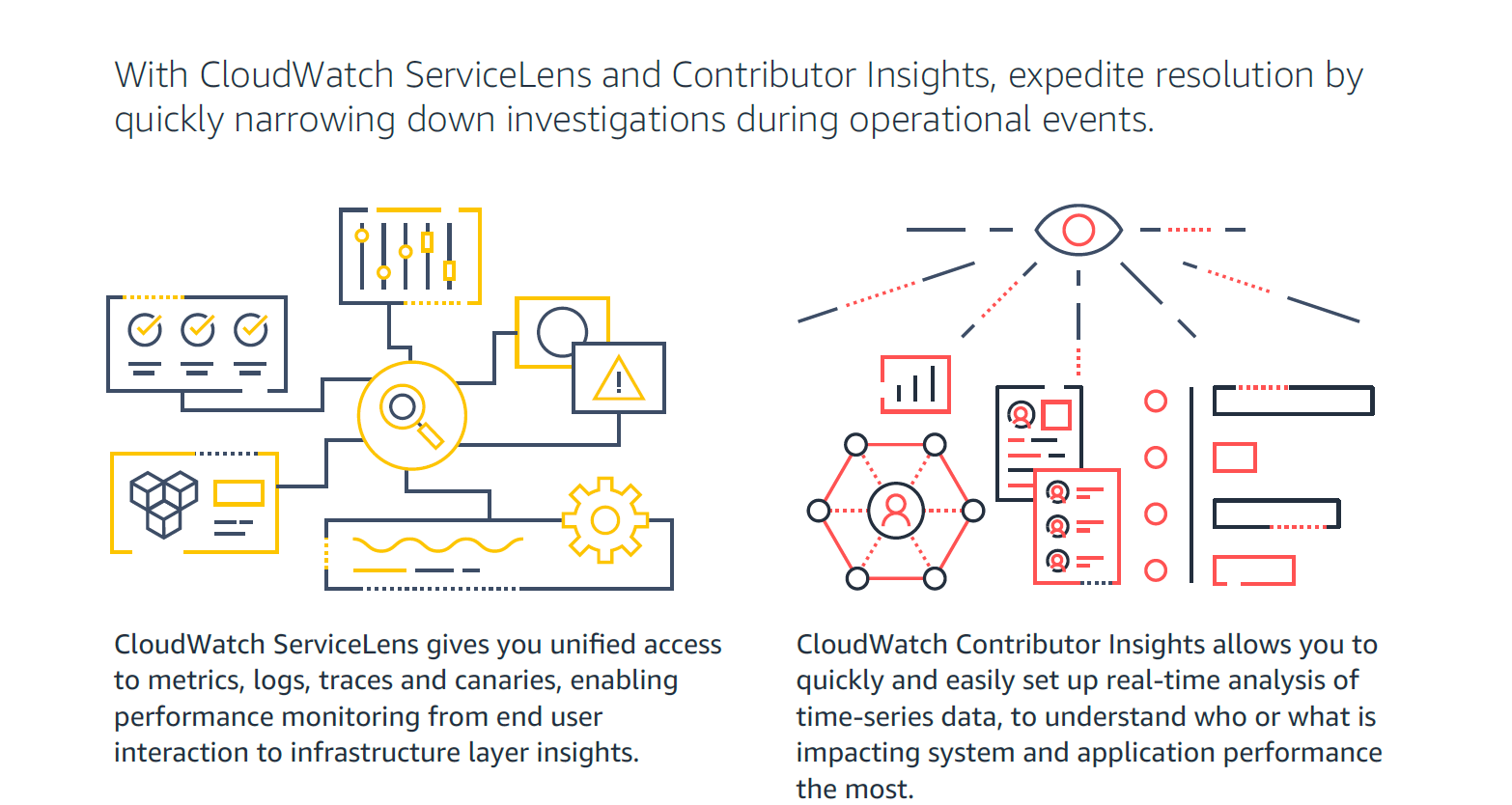
Screenshot of How Amazon CloudWatch works - high-level overviewScreenshot of CloudWatch Application MonitoringScreenshot of CloudWatch ServiceLens and Contributor Insights - expedite resolution timeScreenshot of Improve Observability with Amazon CloudWatchScreenshot of Visual overview of Amazon CloudWatch

Datadog Screenshots

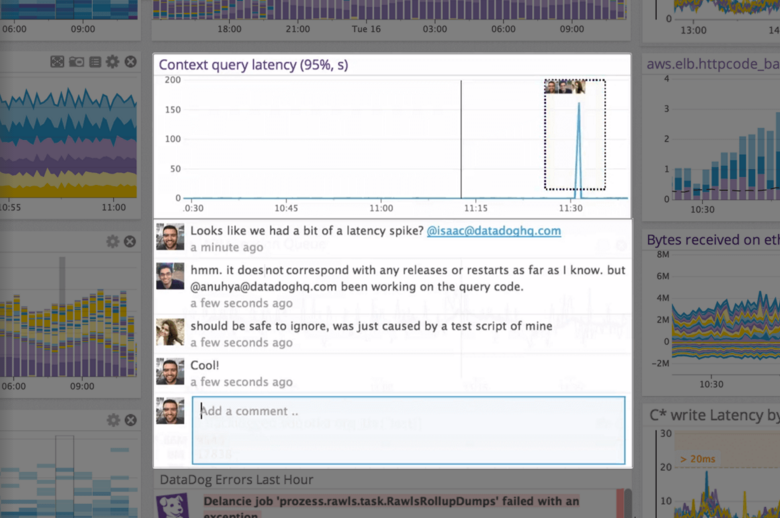
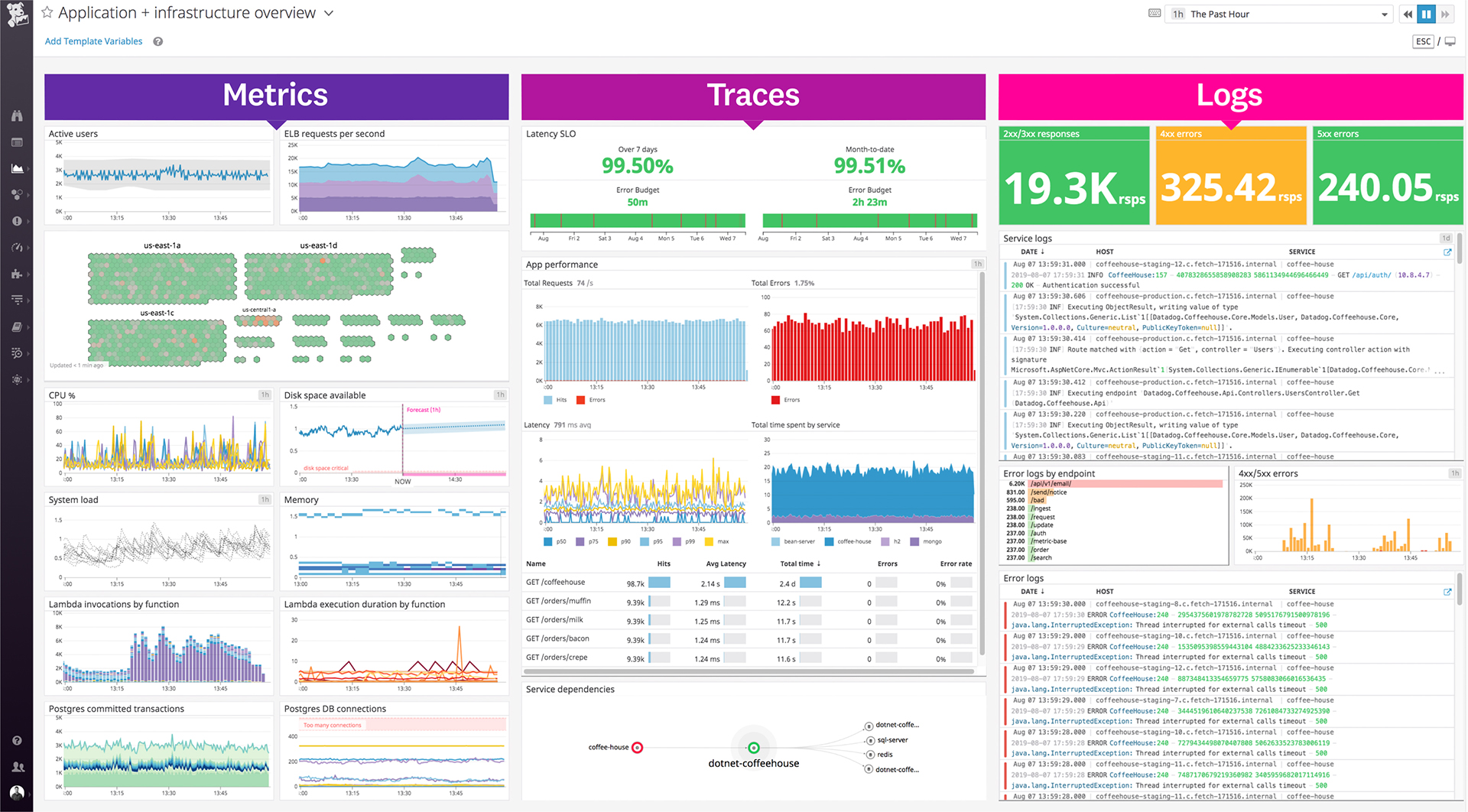
Screenshot of the out-of-the-box and customizable monitoring dashboards.Screenshot of Datadog's collaboration features, where users can discuss issues in-context with production data, annotate changes and notify their teams, see who responded to that alert before, and discover what was done to fix it.Screenshot of where Datadog unifies traces, metrics, and logs—the three pillars of observability.Screenshot of some of Datadog's 400+ built-in integrations.Screenshot of Datadog's Service Map, which decomposes an application into all its component services and draws the observed dependencies between these services in real timeScreenshot of centralized log data, pulled from any source.