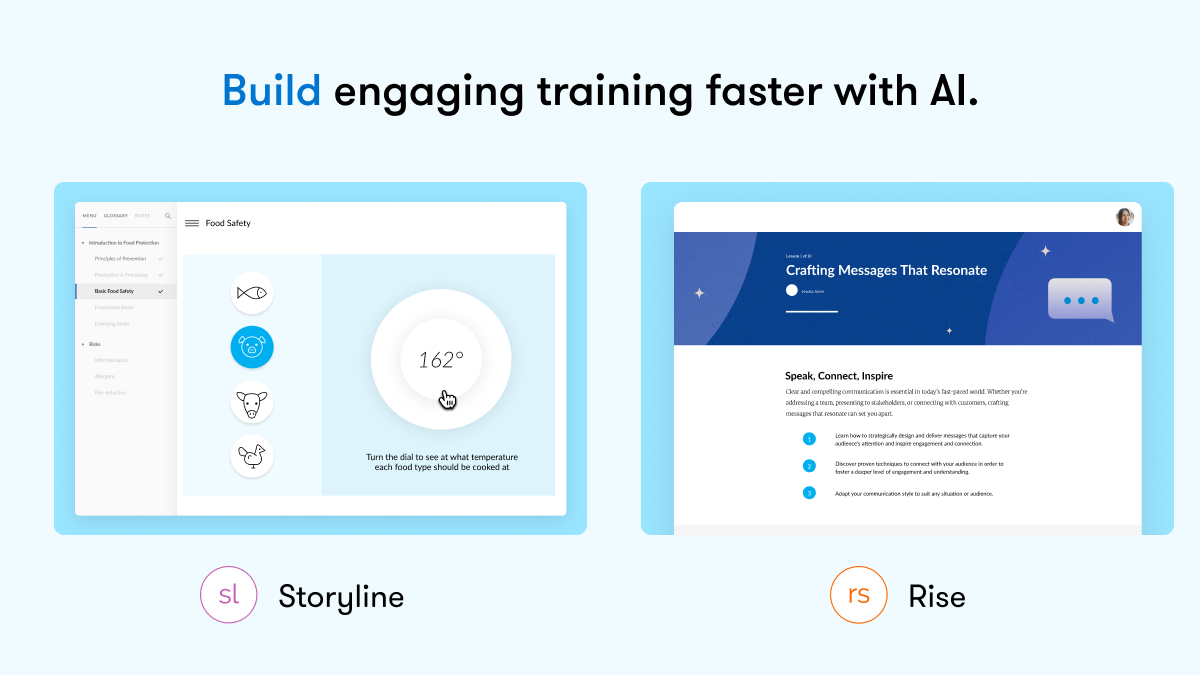
Articulate 360 is an e-learning platform for creating workplace training. Users can build engaging courses with AI-enhanced authoring, simplify collaboration, and quickly share content. A subscription includes robust onboarding resources and access to a community of 1.5M pros.
$1,449
per year per user
Studio 360 (discontinued)
Score6 out of 10
N/A
Studio 360 for PowerPoint, or formerly Articulate Studio, was a PowerPoint plugin used to develop elearning course content. It has been discontinued and is no longer receiving support.
N/A
Pricing
Articulate 360
Studio 360 (discontinued)
Editions & Modules
Articulate 360 AI - Personal Plan
$1,449
per year
Articulate 360 AI - Teams Plan
$1,749
per year
Frontline
Starting at $500
No answers on this topic
Offerings
Pricing Offerings
Articulate 360
Studio 360 (discontinued)
Free Trial
Yes
No
Free/Freemium Version
No
No
Premium Consulting/Integration Services
No
No
Entry-level Setup Fee
Optional
No setup fee
Additional Details
If you’re new to Articulate 360, you can try it out free of charge. After the trial period is over, you can subscribe to one of the following packages:
Articulate 360 AI
Teams plan: $1,749 per user per year
Rise: Build beautiful training that automatically adapts to every screen
Storyline: Create deeply custom, interactive courses
AI generation: Guide AI to draft complete courses and other formats from source material
Collaboration: Get stakeholder input, share for review, and finalize faster
Integrations: Stay in your flow of work with connections to Google Drive, OneDrive, Claude, ChatGPT, and more
Flexible distribution: Share trackable links, export to your LMS, use our native LMS—Reach—or download in more formats
AI tutor: Give learners personalized, in-context guidance and coaching
Analytics: Track engagement and completion, with insights to improve effectiveness
Advanced workflows available with credits (purchased separately)
Personal plan: $1,449 per user per year
Rise: Build beautiful training that automatically adapts to every screen
Storyline: Create deeply custom, interactive courses
AI generation: Guide AI to draft complete courses and other formats from source material
Review: Get stakeholder input, share for review, and finalize faster
Integrations: Stay in your flow of work with connections to Google Drive, OneDrive, Claude, ChatGPT, and more
Flexible distribution: Share trackable links, export to your LMS, use our native LMS—Reach—or download in more formats
AI tutor: Give learners personalized, in-context guidance and coaching
Analytics: Track engagement and completion, with insights to improve effectiveness
Advanced workflows available with credits (purchased separately)
Frontline: Starting at $500
Complete training kits: Turn source content into a connected set of training assets, with the right mix of formats chosen for what you're trying to teach
Formats that fit the job: Create training decks, guides, scenarios, interactive videos, and quick references, each built for a different training need
Quick updates and editing: Use AI to quickly update a whole kit, individual format, or specific sections
Insights and analytics: Gather data from surveys, track engagement and completion, and see what questions your team has to improve effectiveness
Easy distribution: Share trackable links anywhere your team already works: Slack, Microsoft Teams, email, or text
Integrations: Stay in your flow of work with connections to Google Drive, OneDrive, Claude, ChatGPT, and more
AI avatars: Create presenter-led videos, no filming required
Multi-format translation: Translate each output into 80+ languages in a click
AI tutor: Give learners personalized, in-context guidance and coaching
Learning Management System Analyst -- CornerstoneOnDemand in Human Resources at H&E Equipment Services, Inc. (Machinery, 1001-5000 employees)
Chose Articulate 360
It's about 6 one way half a dozen the other. Articulate provides a robust amount of tools and different suits we have taken advantage of. Members of the team also had spent the majority of the time in this suite and we rebuilt old content using Articulate so it became our main …
A de minimis incentive was given to thank the reviewer for their time. The incentive was not used to bias or drive a particular response, nor was the incentive contingent on a positive endorsement. More Info
Corporate Training Manager at Ohio Support Services (Facilities Services, 201-500 employees)
Chose Articulate 360
With the older version of Captivate, do not like the learning curve. Articulate 360 eliminates that obstacle. I love Storyline and Storyline 2. I used Articulate Studio for several years, and it is very good for someone that knows PowerPoint, or wants to convert PowerPoint …
A de minimis incentive was given to thank the reviewer for their time. The incentive was not used to bias or drive a particular response, nor was the incentive contingent on a positive endorsement. More Info
Creative Director at Artisan E-Learning (E-Learning, 1-10 employees)
Chose Articulate 360
Articulate 360 takes a slightly different approach to multi-device support compared to other authoring tools. Instead of true responsive design, which requires at least twice as much time to develop, it strikes a balance with the addition of the responsive player. Although …
A de minimis incentive was given to thank the reviewer for their time. The incentive was not used to bias or drive a particular response, nor was the incentive contingent on a positive endorsement. More Info
Online Learning and Performance Advisor at SERIOUS LEARNING. (E-Learning, 1-10 employees)
Chose Articulate 360
Articulate Storyline on its own merit already was a great contender with the rest of the tools on the market, now in this 'bundle of joy' you have all the tools you need to develop amazing elearning content. No need for anything else!
A de minimis incentive was given to thank the reviewer for their time. The incentive was not used to bias or drive a particular response, nor was the incentive contingent on a positive endorsement. More Info
Instructional Designer for E-Learning in Professional Services at Jackie Van Nice (E-Learning, 1-10 employees)
Chose Articulate 360
Articulate 360 is a suite of apps - including a 360 version of Storyline - so it's kind of an all-inclusive set of development tools; whereas the non-360 version of Storyline is Storyline alone.
A de minimis incentive was given to thank the reviewer for their time. The incentive was not used to bias or drive a particular response, nor was the incentive contingent on a positive endorsement. More Info
Director, Technology and Learning Development in Human Resources at Joelearning.com (Education Management, 1-10 employees)
Chose Articulate 360
No comparison - Captivate is clunky, difficult to master, action script-heavy and lacking in the dynamics and organic UI that Storyline (now Articulate 360) is known for.
A de minimis incentive was given to thank the reviewer for their time. The incentive was not used to bias or drive a particular response, nor was the incentive contingent on a positive endorsement. More Info
A de minimis incentive was given to thank the reviewer for their time. The incentive was not used to bias or drive a particular response, nor was the incentive contingent on a positive endorsement. More Info
Verified User
Chose Studio 360 (discontinued)
I have used Captivate, Articulate Studio, Storyline 1 and StoryLine2 and participated in the beta tests for Articulate 360. Studio is the simplest of the items. I like any of the Articulate products more than Captivate. It has a steep learning curve and I don't think course …
A de minimis incentive was given to thank the reviewer for their time. The incentive was not used to bias or drive a particular response, nor was the incentive contingent on a positive endorsement. More Info
It is pretty well suited for information sharing. Where it lacks is training that requires discussions or a lot of complex thinking or decision-making. For content like that, we will usually host live sessions so we can facilitate discussions and actually hear from the learners on how they are using the material that they may have learned in a Rise course
A de minimis incentive was given to thank the reviewer for their time. The incentive was not used to bias or drive a particular response, nor was the incentive contingent on a positive endorsement. More Info
Articulate Studio is constantly surprising in terms of what it can do. It is like a "Swiss Army Knife" of functionality. I've used it to build portfolios, whole interactive websites, authoring videos and I often discover novel ways to make it useful on a pretty regular basis. What would be a situation where you would not want to use Articulate Studio? Well, even though you can use it to author video and to publish websites, it's not a replacement for a video editing package or a web platform like WordPress, but there are times when it will do certain things in an astoundingly simple way superior to other tools.
A de minimis incentive was given to thank the reviewer for their time. The incentive was not used to bias or drive a particular response, nor was the incentive contingent on a positive endorsement. More Info
They made it very easy to understand how to add new content to the courses, including images, videos or audio, of course, you are still able to do text-based content as well.
Creating quizzes has never been easier. The ability to add controls to each question and what actions each answer creates, whether an additional question or passing to the next section. Customizing these actions are very easy to learn and add to your course.
Being able to use your own scoring mechanism is awesome! I like SCORM but there are many options to use including a custom one of your own. This ability allows you to pass your students over to a proprietary system that enrolls them in the next course, or use the built-in utilities to provide the next course or quiz, the choice is yours!
A de minimis incentive was given to thank the reviewer for their time. The incentive was not used to bias or drive a particular response, nor was the incentive contingent on a positive endorsement. More Info
The audio editor is awful. Sometimes when you cut a section, it actually takes a different section that you selected. Especially when in zoom mode. You have to then undo the action, and re-do. Also, scrubbing through the audio is difficult. If you're exporting audio, it can glitch during the process. I avoid using the audio editor whenever I can.
After all these years, it's still a buggy program. You can be doing your recordings, and a sudden message appears saying that something went wrong and needs to close. I've done re-installs, contacted support, and I constantly clear the temp folder. Still happens. Also, it's a good idea to export your audio, and there have been times the program freezes up on me, and the audio file (in the .ppta file) gets corrupted and all audio is permanently lost.
The program can get slow when publishing, previewing or opening the audio editor.
The included Engage program is pretty good, but it needs more customization options. And I think they can add more modules that provide a little more engagement.
A de minimis incentive was given to thank the reviewer for their time. The incentive was not used to bias or drive a particular response, nor was the incentive contingent on a positive endorsement. More Info
This has been a huge time saver with all the new features. It has become a trusted platform for ease of use and reliability. Cost per license continues to stay at a good point for renewal. Using it to think outside of our current needs and innovate in a timely manner.
A de minimis incentive was given to thank the reviewer for their time. The incentive was not used to bias or drive a particular response, nor was the incentive contingent on a positive endorsement. TR verified that a representative sample of customers was invited. More Info
A de minimis incentive was given to thank the reviewer for their time. The incentive was not used to bias or drive a particular response, nor was the incentive contingent on a positive endorsement. More Info
I love the tool and while I do use others, this is my go to for Rise and Storyline. While Rise is very easy to use, Storyline is a learned platform. I do not have anyone on my team, yet, and will need to catch new ID up to speed which is why I rated 9
A de minimis incentive was given to thank the reviewer for their time. The incentive was not used to bias or drive a particular response, nor was the incentive contingent on a positive endorsement. TR verified that a representative sample of customers was invited. More Info
This is very useable software even for novice eLearning authoring users. People with some PowerPoint experience should be fine with this software and even Excel!
A de minimis incentive was given to thank the reviewer for their time. The incentive was not used to bias or drive a particular response, nor was the incentive contingent on a positive endorsement. More Info
A de minimis incentive was given to thank the reviewer for their time. The incentive was not used to bias or drive a particular response, nor was the incentive contingent on a positive endorsement. More Info
A de minimis incentive was given to thank the reviewer for their time. The incentive was not used to bias or drive a particular response, nor was the incentive contingent on a positive endorsement. TR verified that a representative sample of customers was invited. More Info
I rate the overall support for Articulate 360 with a 9. On the one hand because of the smooth and accurate support from Articulate's support team (usually within 24 hours) and on the other because of the commitment / use of a community (e-learning Heroes) where I have all kinds of insights from other helpful users.
I've never really had any major issues with the product (Other than the registration loop error)and my ten out of ten rating is based on the assistance I got when we initially set up the extension in Power Point. I found the support folks to be professional, helpful and friendly
A de minimis incentive was given to thank the reviewer for their time. The incentive was not used to bias or drive a particular response, nor was the incentive contingent on a positive endorsement. More Info
A de minimis incentive was given to thank the reviewer for their time. The incentive was not used to bias or drive a particular response, nor was the incentive contingent on a positive endorsement. TR verified that a representative sample of customers was invited. More Info
The online training options given by the online tutorials, forums, and "E-Learning Heroes" community are simply awesome. Examples galore, easy to understand descriptions including step-by-step guides, images, occasionally videos, and the "Articulate Insiders" sub-community give you more materials to learn about Storyline than you are likely to be able to read.
Outside of having to dedicate a powerful enough PC for the installation and having to update Flash in our browsers there really isn't much pain involved in using Articulate. For the most part this is an easy to implement and roll-out product. The installation occurs quickly and smoothly with no additional steps needed.
Articulate 360 is the industry leader for e-learning authoring. While we use the Adobe Creative Suite for artistic support, we find that when it comes to authoring tools, Articulate products are superior in both design and accessibility. Articulate 360 has strong support behind it and has deep educational resources for new and intermediate users.
A de minimis incentive was given to thank the reviewer for their time. The incentive was not used to bias or drive a particular response, nor was the incentive contingent on a positive endorsement. More Info
Articulate Studio is very much a leader in the e-learning space. It stacks up well against other tools designed to quickly and easily build and update CBTs by managers and super-users versus needing to invest time and effort in dedicated e-learning developers. Process improvement initiatives and cross-functional departments are empowered to develop their trainings themselves and identify areas for future development.
A de minimis incentive was given to thank the reviewer for their time. The incentive was not used to bias or drive a particular response, nor was the incentive contingent on a positive endorsement. More Info
The immersive 360 image activities allowed us to train our field engineers on dangerous topics and environments like electrical safety and on-site safety without even putting a hard hat on.
The new AI outline features have decreased our time-to-product by at least 30%
The use of a single suite of tools, (along with the creative cloud) led to decreased annual costs over alternative piecemeal solutions.
A de minimis incentive was given to thank the reviewer for their time. The incentive was not used to bias or drive a particular response, nor was the incentive contingent on a positive endorsement. More Info
I only see positive impact since it is a very easy to use tool for rapid learning. The only point is to know what is possible to develop using this tool to avoid any kind of frustration afterwards.
Another positive impact is that we don't need a diversified development team. There is no need of technical professionals, and a creative instructional designer is enough to develop effective learning content using Studio.
The third positive impact is that Studio makes possible to realize short-term projects, mainly when there's already a PowerPoint presentation.
A de minimis incentive was given to thank the reviewer for their time. The incentive was not used to bias or drive a particular response, nor was the incentive contingent on a positive endorsement. More Info