Bitwarden vs. Dashlane Password Manager vs. Keeper

Overview
ProductRatingMost Used ByProduct SummaryStarting Price
Bitwarden
Score 9.3 out of 10
N/A
Bitwarden headquartered in Santa Barbara offers open source password management solutions for individuals, teams, and business organizations.
$4
per month (billed annually) per user
Dashlane Password Manager
Score 9.1 out of 10
N/A
Dashlane is a credential manager that secures every credential, every user, and every employee device to proactively protect against breaches. Brands worldwide can use Dashlane to stay ahead of evolving threats.
$8
per month (billed annually) per seat
Keeper
Score 8.3 out of 10
N/A
Keeper's password security and management platform boasts millions of people and thousands of businesses as users, who manage, secure and enforce strong passwords across all employee logins, applications and sites. Employees can access Keeper natively on all mobile operating systems, desktops and browsers. Keeper enables businesses to auto-generate high-strength passwords, protect sensitive files in an encrypted digital vault, securely share records with teams and integrate with SSO, LDAP and…
$2
per month per user
Pricing
BitwardenDashlane Password ManagerKeeper
Editions & Modules
Teams
$4
per month (billed annually) per user
Enterprise
$6
per month (billed annually) per user
Business
$8
per month (billed annually) per seat
Omnix™
Contact Sales
per year for organizations of 100+
Keeper Business Starter
$2.00
per month per user
Keeper Enterprise
Contact Keeper for pricing
Offerings
Pricing Offerings
BitwardenDashlane Password ManagerKeeper
Free Trial
YesYesYes
Free/Freemium Version
YesYesNo
Premium Consulting/Integration Services
NoNoNo
Entry-level Setup FeeNo setup feeNo setup feeNo setup fee
Additional Details
More Pricing Information
Community Pulse
BitwardenDashlane Password ManagerKeeper
Considered Multiple Products
Bitwarden
Chose Bitwarden
Bitwarden hasn't been hacked and is easy to implement. None of the others can say the same in both aspects.
Chose Bitwarden
LastPass had a huge security breach which led us to switch to Bitwarden.
Chose Bitwarden
Other solutions felt more clunky or were significantly higher priced. Bitwarden seems to straddle the consumer/prosumer/SMB fence more than adequately by designing their user experience to feel welcoming but also trustworthy and reliable. The other tools seem to assume that …
Dashlane Password Manager
Chose Dashlane Password Manager
By far, Dashlane offers better security protocols and has a better interface that combines ease of use with security. We found the price and security to be the deciding factors in our choice to explore Dashlane beyond the trial usage. My CEO speaks highly of your product and …
Chose Dashlane Password Manager
Easier to manage
Chose Dashlane Password Manager
More user friendly, easier setup and use of 2FA, exporting passwords easy as well.
Chose Dashlane Password Manager
Dashlane was a stronger product than Passportal, and it had the sharing capabilities that Passportal didn't. LastPass is better software, in my opinion, and I use it for my personal password storage. I like that Lastpass organizes logins based on the type of website (ex. …
Chose Dashlane Password Manager
Preferred Dashlane Password Manager due to health monitoring, encryption and dark web monitoring
Chose Dashlane Password Manager
Better useability, ability to share notes and codes, easy to toggle between organisation and personal logins, ability to share to other users and revoke that access as needed, able to get updates on password health and how many passwords other people are storing, user friendly …
Chose Dashlane Password Manager
It has been quite some time since we selected Dashlane, but it was a combination of features and price - it offered the greatest value with user sharing and cross-platform capabilities.
Chose Dashlane Password Manager
It's been a long time, so I don't remember. Secure safe seemed to focus a bit more on storing documents... Dashlane Password Manager is much more powerful as to securely collaborating credentials.
Chose Dashlane Password Manager
NordPass Business, 1Password and Bitwarden
Chose Dashlane Password Manager
Dashlane supports full business-/enterprise-level credential management: Admin dashboards, group/team management, policy enforcement, SSO/identity-provider integration, etc. Dashlane offers features such as dark-web monitoring, secure digital wallet, built-in VPN (in some …
Chose Dashlane Password Manager
LastPass for Business and Microsoft Excel
Chose Dashlane Password Manager
Our IT person said it was the best for our size of business and security needs.
Chose Dashlane Password Manager
More advanced and user friendly on multiple platforms
Chose Dashlane Password Manager
Excel isn't really a password manager, so there's no comparison.
Chose Dashlane Password Manager
The usability for Dashlane was better than the other options we tested before making our decision. Specifically, Dashlane makes sharing passwords and updating shared passwords very simple.
Chose Dashlane Password Manager
I didn't compare to other password managers.
Chose Dashlane Password Manager
As previously mentioned, NetworkChuck on YouTube played a big part in my final decision. The security concerns of what I used at previous employers (LastPass) left a really bad taste in my mouth.
Chose Dashlane Password Manager
we evaluated lastpass and keeper. we liked the pricing and ease of use with Dashlane.
Chose Dashlane Password Manager
I use Proton Pass in my personal life as part of the Proton suite of products, and it's a fantastic, lightweight, and robust service. I personally prefer supporting a solid, privacy, freedom focused company with my personal money, but as far as comparing goes, I'd say Dashlane …
Chose Dashlane Password Manager
I don't Aura listed here, but I think Dashlane Password Manager's UI and UX is better and security is top notch.
Chose Dashlane Password Manager
Dashlane was the most complete product. We have moved to Keeper, though, for client management; we wish Dashlane had similar functionality.
Chose Dashlane Password Manager
I chose Dashlane Password Manager over Lastpass due to cost and their prior history of data breaches. I felt more comfortable with Dashlane Password Manager hoping I wouldn't have to deal with downtime or stolen credentials. Dashlane Password Manager to me felt more compact and …
Chose Dashlane Password Manager
We can get a discount on Dashlane Password Manager through TechSoup, so cost was the deciding factor, as all other elements were about equal for us in our evaluation.
Keeper
Chose Keeper
From a password manager, they are all similar in terms of organisation and credential management but what Keeper has above these organisations is the MSP/Admin console.

Chose Keeper
I do not recall the other products I tested. I believe Keeper provided a free trial that allowed me to verify that it met my needs before I was required to purchase. I also found their support team to be responsive when I experienced some problems. The cliche, "If it ain't …
Chose Keeper
I do not have any direct experience with LastPass, but I did assess them before deciding on Keeper. I believe the reason I went with Keeper over LastPass at the time was Keeper's enterprise solution was a lot more solid and featured SSO which I do not believe was offered by …
Chose Keeper
Usability, file organization, attachments, and other information that can be included.
Chose Keeper
I tried different Android services for password managing but all of them have many different features that are not useful and just distract you - Keeper is simple and easy to use with only needed features included.
Chose Keeper
I have used the Apple cloud, but if you forget your password into that, once again, you’re at the mercy of calling customer service. With Keeper, you can use the thumbprint option to log on, and there’s any of your needed passwords. It’s fast and simple, and you don’t have to …
Chose Keeper
My husband recommended Keeper to me about 3 years ago when I complained about never being able to remember my passwords. I have never used any other product. Why would I? I found the best vault, so there's no need to change! As they say, "if it ain't broke, don't fix it!"
Chose Keeper
I read a lot of reviews before buying Keeper even though it has an annual renewal. When it came down to it, it beat the rest, although when I bought it did not have document and photo storage. After enquiring at the help desk I was told it was in the pipeline and in the next …
Chose Keeper
I am a true believer in the Keeper app and know, with confidence, that if you use it and take advantage of all its functions you'll find it to be a tool that helps you live life easier every day.
Chose Keeper
Keeper fit with my usage. I felt Keeper was more in tune with my daily activities. In my opinion, it was easier to use and access. Dash did offer other options but those were not important to me at all. From the beginning, Keeper has always been a great partner in the way I use …
Best Alternatives
BitwardenDashlane Password ManagerKeeper
Small Businesses
RoboForm
RoboForm
Score 8.4 out of 10
RoboForm
RoboForm
Score 8.4 out of 10
Bitwarden
Bitwarden
Score 9.3 out of 10
Medium-sized Companies
1Password
1Password
Score 9.3 out of 10
1Password
1Password
Score 9.3 out of 10
Bitwarden
Bitwarden
Score 9.3 out of 10
Enterprises
KeePass
KeePass
Score 8.9 out of 10
KeePass
KeePass
Score 8.9 out of 10
Delinea Secret Server
Score 7.8 out of 10
All AlternativesView all alternativesView all alternativesView all alternatives
User Ratings
BitwardenDashlane Password ManagerKeeper
Likelihood to Recommend
9.7
(0 ratings)
9.0
(0 ratings)
10.0
(0 ratings)
Likelihood to Renew
-
(0 ratings)
9.2
(0 ratings)
-
(0 ratings)
Usability
9.5
(0 ratings)
8.8
(0 ratings)
9.0
(0 ratings)
Support Rating
-
(0 ratings)
5.9
(0 ratings)
10.0
(0 ratings)
User Testimonials
BitwardenDashlane Password ManagerKeeper
Likelihood to Recommend
Bitwarden supports various forms of two-factor authentication, including time-based one-time passwords (TOTP), Duo, YubiKey, and other hardware-based tokens. This integration enhances the security of the Bitwarden account and allows to store and manage their 2FA credentials for other applications within Bitwarden itself.
Read full review
Dashlane Password Manager works really well for situations where we need to share access to client portals or government filing sites, since multiple people can log in without ever seeing the actual password and we can cut off access right away when it’s no longer needed. It is also great for onboarding and offboarding since new hires or interns can get the logins they need quickly and we don’t have to pass around spreadsheets. Another strong use case is meeting compliance expectations because it shows clients we are serious about security and password hygiene. Where it’s less useful is in environments that already use single sign-on since that already centralizes access and makes Dashlane Password Manager feel redundant. It can also be a little frustrating if you rely heavily on mobile since the autofill doesn’t always work smoothly across different apps.
Read full review
I can only think of scenarios where Keeper is well-suited, in my experience. I work in small business (i.e., sole proprietor, 1 employee) environments and Keeper is well-suited to my needs. I imagine it would also be well-suited to multi-user environments, but would require a great deal more management and organization in such environments.
Read full review
Pros
  • Bitwarden secures company passwords within the organization vault.
  • Bitwarden makes entering credentials to different websites a breeze.
  • Bitwarden allows us to shares passwords securely within our organization.
Read full review
  • Ensuring secure & unique passwords created for each account.
  • Allowing the company to see a "security score" of how secure the team's password management is.
  • Sharing passwords securely between employees.
  • A "vault" for storing other secure information (notes, credit cards, etc.)
  • Free Hotspot Shield VPN included in our tier of accounts.
Read full review
  • Easy to use - you can easily access it anywhere and anytime you want (it has mobile apps, web and desktop versions)
  • High level of security - 2-step authentication with your phone number
  • Simple to save and get passwords and login information. Keeper fills it in for you. It may create complex passwords for you
  • Syncs across all devices
Read full review
Cons
  • Sometimes it will not fill in my password and I have to do it manually.
  • It does not work as well at filling in passwords on the mobile app.
Read full review
  • Initial setup was a little difficult.
  • User SSO invite and sign on would not work at first but this seems to have been improved/fixed.
  • The extension on websites doesn't work sometimes and will need to be refreshed if you open a new tab but have already logged in before.
Read full review
  • I find that Keeper could use some work with their desktop interface, a sleeker and friendlier user interface would definitely benefit them.
  • Keeper doesn’t have a Security Dashboard, which makes it more complicated to evaluate the strengths and weaknesses of your passwords.
  • The automatic web form filling is somewhat limited at the time, but im sure they will improve it soon.
Read full review
Likelihood to Renew
No answers on this topic
It has served us very well until now and at the pricepoint it doesn't make us second guess our current relationship.
Read full review
No answers on this topic
Usability
Bitwarden is easy to use and has a very straightforward simple interface. Having coverage across multiple platforms is the key to its value to me. Additionally, Bitwarden is consistently rated by third party (PC Magazine, Wired, Tom's Guide, etc.) as one of the best password managers available.
Read full review
Dashlane Password Manager is great for the price. Some feature sets of competitors are lacking, but I'm happy with what we get for the spend. We are a small enough company that I can walk people through the steps, and it isn't something that comes up enough to complain about. Password generation, storage and use are all great.
Read full review
It's just easy to use, plain and simple. It has the complexity and user-interface that gives you confidence in its build but the ease-of-use that keep things from getting too complicated. A huge plus when you have to onboard new members of the team or summer interns when you need them to step in and make orders on your behalf.
Read full review
Support Rating
No answers on this topic
We've had no issues with Dashlane. I can't speak to their customer service because I have not personally needed to contact them. I guess that speaks about their product if we've not had any issues to reach out about. Great for supporting data/information on multiple platforms that are shared among team members.
Read full review
Because it is so good. It always works, has not crashed even in 3 years; I have a lot of data in it (never any problems).
Read full review
Alternatives Considered
Bitwarden hasn't been hacked and is easy to implement. None of the others can say the same in both aspects.
Read full review
Dashlane was a stronger product than Passportal, and it had the sharing capabilities that Passportal didn't. LastPass is better software, in my opinion, and I use it for my personal password storage. I like that Lastpass organizes logins based on the type of website (ex. shopping, banking, etc. ), and it also has an authentication app, so it has you verify logins from your phone for an extra layer of security, which Dashlane does not
Read full review
From a password manager, they are all similar in terms of organisation and credential management but what Keeper has above these organisations is the MSP/Admin console.
Its intuitive, great to setup and the reporting functionality is second to none compared to the other reviewed tenants.
Read full review
Return on Investment
  • Saves me time by storing all of my login information. I'm no longer digging through my notes app or having to reset passwords that I've forgotten.
  • Stores vendor names, addresses, and W-9's. I don't have to text or email vendor's asking for this info every time I work with them.
  • Protects my data by identifying weak or unused passwords. Bitwarden helped me identify multiple weak and reused passwords and I quickly updated them using their built-in password generator.
Read full review
  • Our cybersecurity posture has drastically been improved since the adoption of Dashlane. Cybersecurity insurance looks very favorably on those that utilize password managers
  • Hundreds of hours of IT Admin time has been saved by not needing to reset passwords nearly as much at the user level.
  • User productivity is substantially improved when time is spent working and not resetting passwords over and over.
Read full review
  • The spreadsheets and printed papers being passed around the office with passwords on them have gone! This is a huge security hole plugged.
  • Users actively use the software which says something - it is easy to use and intuitive. When software is not intuitive, it tends to not get used.
  • It gives IT control over who does what with passwords, and while difficult to quantify it is certainly a dramatically positive impact on the organization.
Read full review
ScreenShots

Bitwarden Screenshots

Screenshot of the Bitwarden Vault, where users can generate, autofill, and share unlimited credentials and other sensitive data from any browser, mobile device, or desktop application.Screenshot of the Bitwarden browser extension that protects passwords and digital secrets in a vault, auto-fills them, and generates new passwords that are fully encrypted end-to-end (even the Bitwarden team can’t access them).Screenshot of Bitwarden's password generator, used to generate strong and unique passwords, including usernames. It also integrates with email alias services for additional security. Using the strong generator tool keeps personal info like anniversaries and pet names out of your passwords, out of the dark web, and out of hackers’ hands.Screenshot of Bitwarden Send, a feature that lets users quickly share encrypted files and text with another individual via a private link. It can also be used to automatically share vault items using collections in a Bitwarden organization.Screenshot of Bitwarden's sync feature, that syncs passwords and other sensitive data (like identities, addresses, and credit cards) across devices, including mobile devices.Screenshot of where Bitwarden can auto-fill login information into websites. Autofill can be used across browsers, mobile apps (Android and iOS), and other places using associated URIs.

Dashlane Password Manager Screenshots
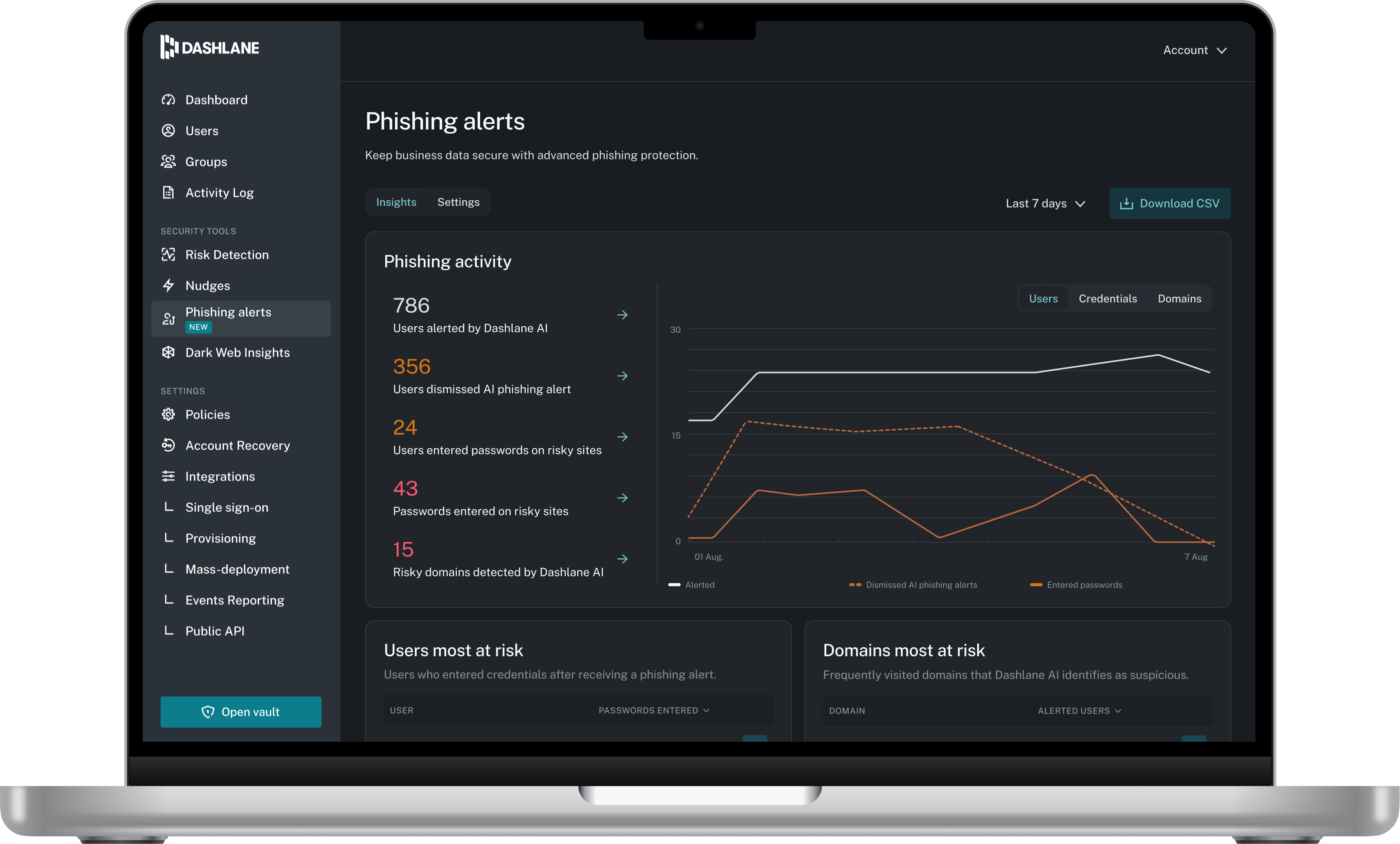
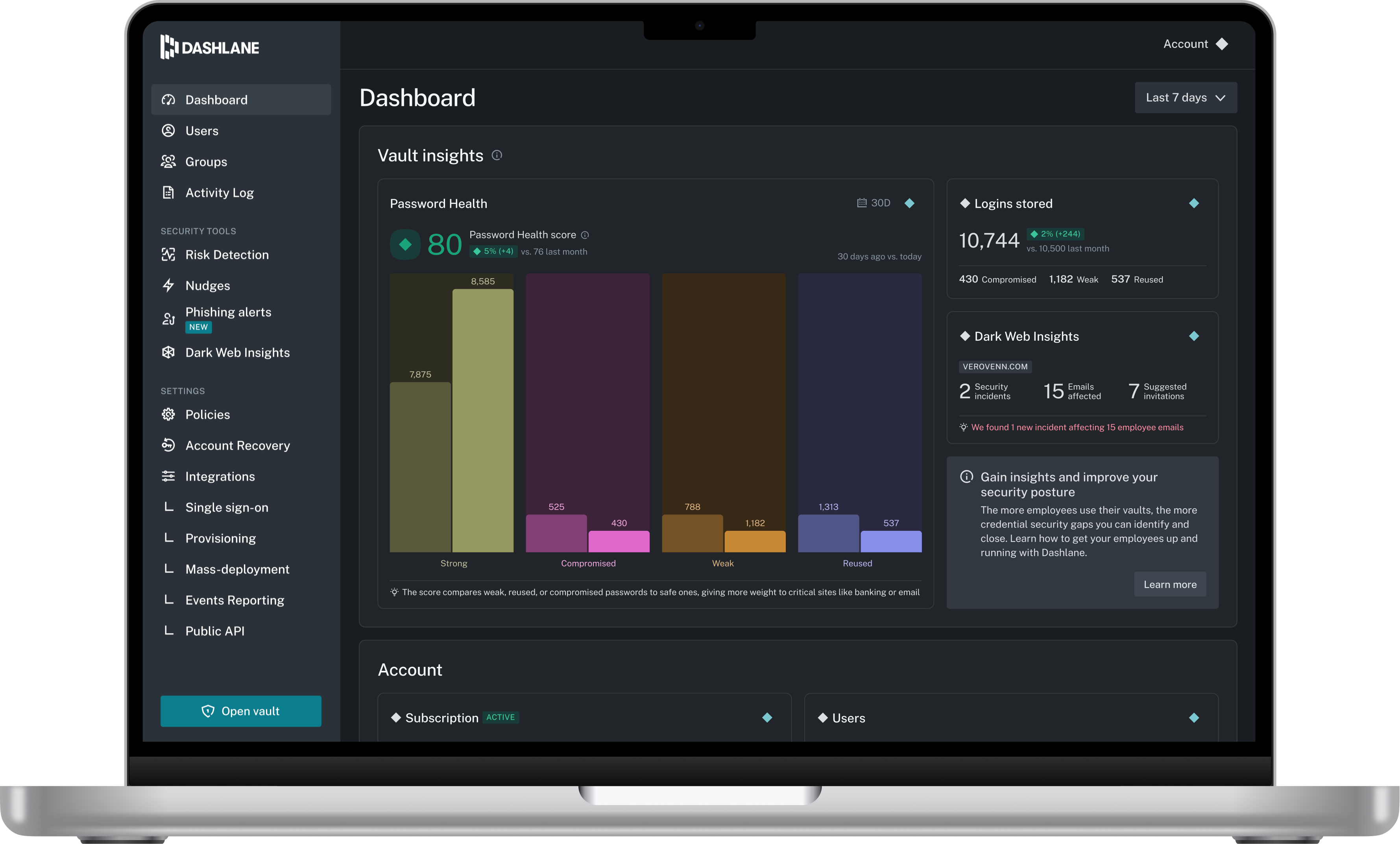
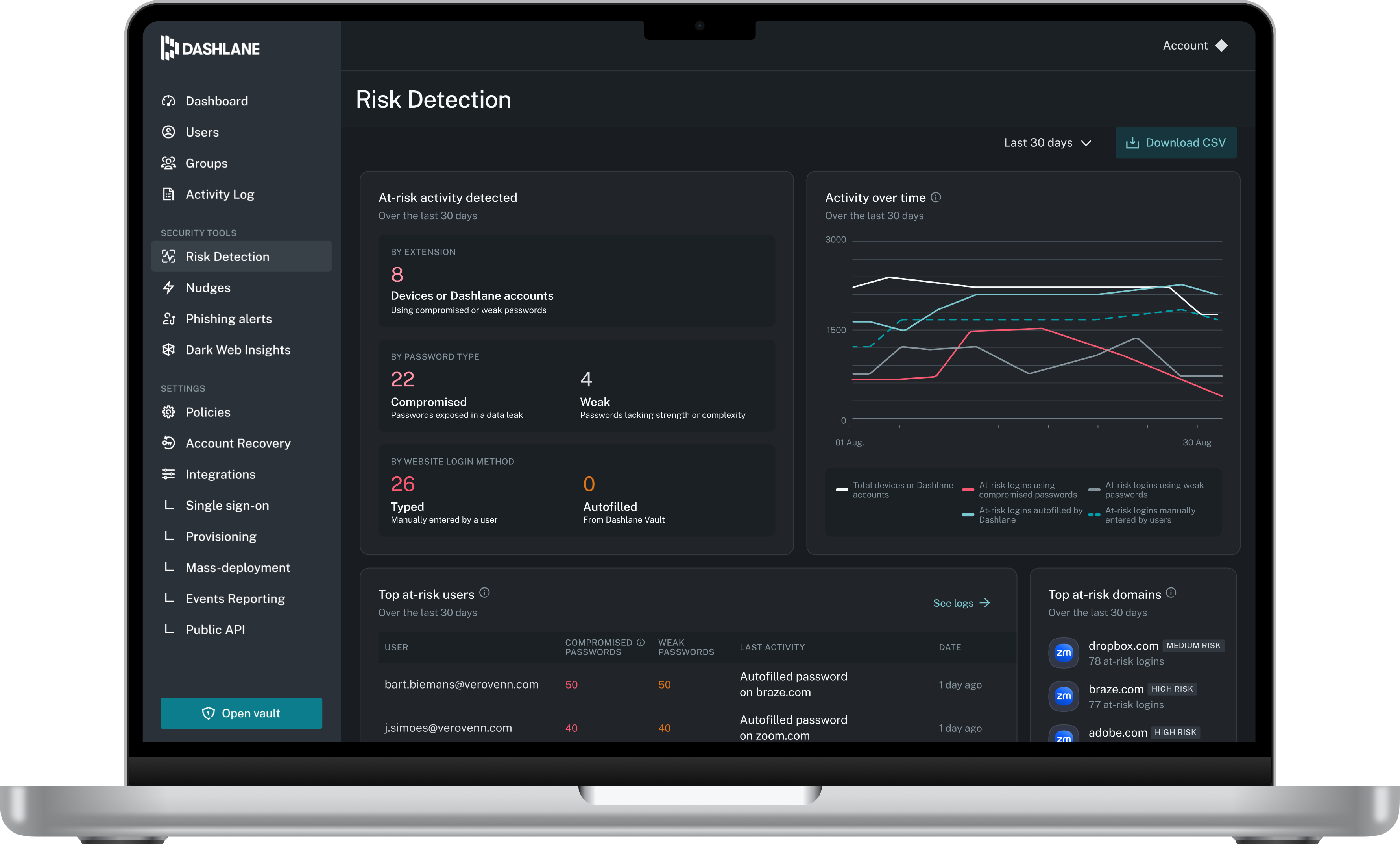
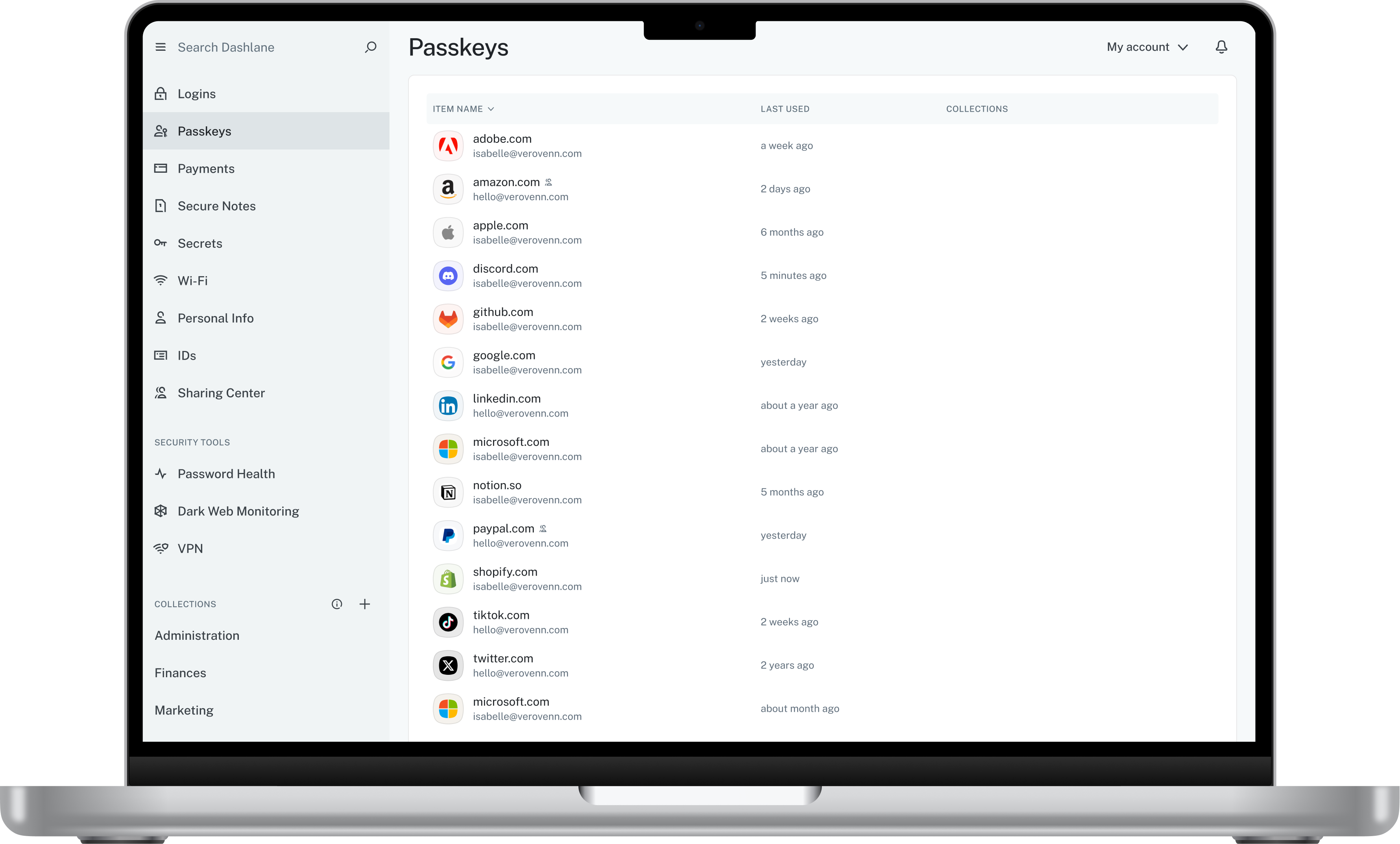
Screenshot of Admin DashboardScreenshot of Credential Risk DetectionScreenshot of AI Phishing AlertScreenshot of Vault

Keeper Screenshots

Screenshot of Autofill Passwords in Websites & AppsScreenshot of Business & Enterprise ProtectionScreenshot of Dark Web Monitoring & AlertsScreenshot of Enhanced Two-Factor AuthenticationScreenshot of Increase Organization with SubfoldersScreenshot of Secure File & Password Sharing