BQE CORE vs. InEight

Overview
ProductRatingMost Used ByProduct SummaryStarting Price
BQE CORE
Score 8.8 out of 10
Small Businesses (1-50 employees)
BQE CORE is a business management solution built specifically for professional service firms. BQE CORE is a combination of a billing assistant, project management, and accounting solution. CORE is designed to do the hard work of delivering actionable insights directly to the user's dashboards or inbox. BQE CORE replaces the products Engineeroffice, Archioffice, and BillQuick; the functionality of these applications is now found in BQE CORE.N/A
InEight
Score 8.2 out of 10
N/A
InEight's modular project controls software connects complex project data to improve visibility and delivery in capital construction.N/A
Pricing
BQE COREInEight
Editions & Modules
No answers on this topic
Offerings
Pricing Offerings
BQE COREInEight
Free Trial
YesNo
Free/Freemium Version
NoNo
Premium Consulting/Integration Services
NoNo
Entry-level Setup FeeNo setup feeNo setup fee
Additional DetailsInEight offers a modular, integrated project controls platform. Because the InEight platform covers the entire construction lifecycle, customers purchase the software based on their specific needs – purchasing stand-alone products, a bundle of products, or the entire platform. As a result, the pricing will vary depending on the specific product, number of users and length of contract. Once InEight has identified the highest impact areas, they offer potential customers a custom proposal. The options they consider include: Per user pricing: typically annual subscriptions. Revenue-based: using a percentage of the customer’s revenue. Project-based: software use dedicated to a specific project or program of work.
More Pricing Information
Community Pulse
BQE COREInEight
Considered Both Products
BQE CORE
Chose BQE CORE
Toms Planner gant charts are very easy to navigate and edit.
Chose BQE CORE
I previously used Gusto for both benefits / employee details and also time tracking. It was really nice to have everything in one place, and Gusto felt very simple. However, it did not have as many broken down categories for time allotment. Harvest felt similar to Gusto, and it …
Chose BQE CORE
It helps and have a great impact on It employees like me to track and submit my timesheet to my managers and higher officials and make a note that I have spend my working house valuable and resourceful and the managers can take a look at what have I done in my working hours
Chose BQE CORE
our team uses both the platforms and does not tie very well. bamboo does have a more pleasant to the eye interface comparatively. it is also a bit easier to navigate and not have to click too many times to reach any particular information on bamboo. BQE CORE does do visuals of …
Chose BQE CORE
BQE CORE combined numerous products for us. It allows everything to be in one place which cuts down on the back and forth, as well as user error.
Chose BQE CORE
It was an admin desiring to switch. However CORE is easy to manage and calculate timesheet automatic with timer future. In addition I believe the admin stag like the billing aimless function and multiple additional future that monograph does not have. Without mentioning that …
Chose BQE CORE
BQE has more visual tools for determining billable hours and for tracking hours against a project. BQE has a better system for involving employee and simpler methods of tracking expenses.
Chose BQE CORE
Monograph did not allow exporting/importing of data nor did they offer integration with Quickbooks Desktop
Chose BQE CORE
Again, since I'm only an employee, I had no part in choosing BQE for my organization. But it is the best timesheet tracking system that I've used, and I've used 3 other ones in the past. BQE is the simplest to use, yet equally as powerful as the others. When editing my …
Chose BQE CORE
It’s the best program I have used to date! It was selected for me through my company.
Chose BQE CORE
They aren't used for the same thing so not able to compare.
Chose BQE CORE
Not used any other software than accounting. This is much easier for my staff to use because it's not a straight up accounting software.
Chose BQE CORE
I didn't take part in selecting BQE CORE; however, our CEO chose it because of its ability to help with invoicing and incorporating other software into the program such as Gantt charts. I like BQE CORE better than BillQuick because it is more user friendly and also displays the …
Chose BQE CORE
BQE CORE has a much more streamlined process for entering expense entries than Concur. You are able to select which project you would like to charge to and where expense entries are sent for approval, whether that be your manager or the project manager. BQE CORE also is very …
Chose BQE CORE
I have only really used this product.
Chose BQE CORE
BQE CORE is much more in-depth at time tracking than Harvest. Harvest is easier to use out of the gate but BQE CORE is worth the learning curve. I haven't had a chance to use BQE CORE on a mobile device so I can't speak to how it stacks up there against Harvest.
Chose BQE CORE
I don't recall the previous program we used as this was years ago, but we had to put in time manually each week and this was very time consuming. BQE CORE keeps your projects in the timesheet from week to week to you don't have to reinput the project number.
InEight
Chose InEight
I've used SAP for more than 10 years before my current job in this company. The best thing in SAP, is exactly what I have commented before, it's a single one tool, that does all what InEight do.
Here at CCC, we have COINS for cost management, and I don't know exactly if InEight …
Chose InEight
InEight seems to be an improvement on SAP BPC, though I haven't used SAP BPC for invoice processing, But in terms of planning, forecasting, budgeting and variance analysis. InEight has an edge because it is mor user friendly and the data you get is more streamlined and fit for …
Chose InEight
Ineight is almost similar to unifier in the sense that we get automatic updates on documents, Ineight also make it easier to sort out previous revisions of documents which makes it very necessary in the case that we are looking for a past version and not necessarily the latest …
Chose InEight
InEight has been the first product that I have used and I wouldn't change it. Coming up from a hand to staff it has made my job easier to perform. Easier to keep track of quantities, hours, production being made throughout the project and makes it easier to access work plans …
Chose InEight
InEight provides the tools that my business needs and its programs are geared troward the industry.
Chose InEight
InEight Estimate integrated with SAP much easier and the overall GUI was much nicer. easy decision
Chose InEight
The two items that set InEight apart was the estimating module with the ability to track cost to the exact estimate line item and the ability to export manhours to payroll. The other software's were either lacking or deficient in these items.
Chose InEight
Both Sage Estimating and InEight programs have their unique capabilities. Sage Estimating is much more configured for use in detailed construction, the majority of which are for non-nuclear projects. InEight has so many more capabilities, especially in creating our own …
Chose InEight
We've evaluated the project controls functions, but they aren't as functional as InEight Estimate
Chose InEight
InEight is perfect for our work in Heavy Civil construction. Some of the other products are designed for different workflows and industries. We chose InEight specifically because it was related to the construction industry. Procore is incredibly comprehensive, and we just don't …
Chose InEight
We looked at HCSS and Bid 2 Win but chose Ineight due to the fact that it seemed more user friendly, plus I had used it at a former company when it was available from the Grantlun Corporation and was very familiar with it in its ease of use and reliability.
Chose InEight
No others were evaluated at this time
Chose InEight
heavy bid is okay for bid item work and has a few things in the quote folder screen that are nice and user friendly but the ability to tag is not as useful.
Chose InEight
InEight is more robust than the other services I have used. I think it does a better job of rolling up a massive amount of individual user data into one complete project progress report. I like that most of our clients also use it, which makes collaboration easier. I think it …
Chose InEight
InEight exceeded our expectations from [the] capability to cost. This product selection was a no-brainer for our department.
Chose InEight
InEight is cheaper than both. It is more functional than Aconex, but not iTWO. InEight's GUI needs the most work to improve.
Chose InEight
Ecosys is used for project management reporting while InEight is used for document management.
Chose InEight
I would prefer Aconex but the cost is too high. The overall layout and feel of Aconex are modern compared to InEight.
Chose InEight
  1. Allows you to save all file types to a document, easily identify which formats you do and don’t have and manage which formats you issue.
  2. Great bulk functionality. Manage multiple projects and large volume of documentation easily with less staff.
Chose InEight
I have used Aconnex and have found InEight to be more flexible and works in partnership with us to provide the best solution.
Chose InEight
As an issuing tool, InEight's TeamBinder is on par with Aconex. Solidworks EPDM creation of review workflows and revision numbering is better placed with handling multiple versions of the same document with the ability to revert to older versions if required. InEight's support …
Features
BQE COREInEight
Project Management
Comparison of Project Management features of Product A and Product B
BQE CORE
8.1
Ratings
5% above category average
InEight
-
Ratings
Task Management9.40 Ratings00 Ratings
Resource Management9.00 Ratings00 Ratings
Gantt Charts9.20 Ratings00 Ratings
Scheduling9.00 Ratings00 Ratings
Workflow Automation8.10 Ratings00 Ratings
Team Collaboration6.90 Ratings00 Ratings
Support for Agile Methodology7.40 Ratings00 Ratings
Support for Waterfall Methodology4.60 Ratings00 Ratings
Document Management8.70 Ratings00 Ratings
Email integration6.30 Ratings00 Ratings
Mobile Access7.80 Ratings00 Ratings
Timesheet Tracking9.70 Ratings00 Ratings
Change request and Case Management8.40 Ratings00 Ratings
Budget and Expense Management9.10 Ratings00 Ratings
Professional Services Automation
Comparison of Professional Services Automation features of Product A and Product B
BQE CORE
8.6
Ratings
11% above category average
InEight
-
Ratings
Quotes/estimates8.40 Ratings00 Ratings
Invoicing8.90 Ratings00 Ratings
Project & financial reporting9.00 Ratings00 Ratings
Integration with accounting software8.30 Ratings00 Ratings
Reporting & Analytics
Comparison of Reporting & Analytics features of Product A and Product B
BQE CORE
-
Ratings
InEight
7.1
Ratings
9% below category average
Dashboards00 Ratings7.10 Ratings
Standard reports00 Ratings7.00 Ratings
Custom reports00 Ratings6.80 Ratings
Data exportability00 Ratings7.60 Ratings
Construction Project & Field Management
Comparison of Construction Project & Field Management features of Product A and Product B
BQE CORE
-
Ratings
InEight
6.8
Ratings
9% below category average
Plan distribution & viewing00 Ratings6.20 Ratings
Plan markups & sharing00 Ratings7.20 Ratings
Issue tracking & punchlists00 Ratings7.50 Ratings
Photo documentation00 Ratings6.90 Ratings
Jobsite reports00 Ratings7.00 Ratings
Document sharing00 Ratings6.10 Ratings
RFI tools00 Ratings6.70 Ratings
Collaboration & approvals00 Ratings7.20 Ratings
As-built drawings00 Ratings6.90 Ratings
Mobile app00 Ratings7.30 Ratings
Submittal design and management00 Ratings6.50 Ratings
Checklists00 Ratings6.40 Ratings
Meeting Minutes00 Ratings6.80 Ratings
Specifications00 Ratings6.10 Ratings
Change orders00 Ratings6.50 Ratings
Estimating
Comparison of Estimating features of Product A and Product B
BQE CORE
-
Ratings
InEight
6.8
Ratings
11% below category average
Takeoff tools00 Ratings6.20 Ratings
Job costing00 Ratings7.00 Ratings
Cost databases00 Ratings6.60 Ratings
Cost calculator00 Ratings6.80 Ratings
Bid creation00 Ratings7.40 Ratings
Best Alternatives
BQE COREInEight
Small Businesses
Stackby
Stackby
Score 8.9 out of 10
FollowUp CRM
FollowUp CRM
Score 1.5 out of 10
Medium-sized Companies
InEight
InEight
Score 8.2 out of 10
Revit
Revit
Score 9.0 out of 10
Enterprises
InEight
InEight
Score 8.2 out of 10
Revit
Revit
Score 9.0 out of 10
All AlternativesView all alternativesView all alternatives
User Ratings
BQE COREInEight
Likelihood to Recommend
9.3
(0 ratings)
9.6
(0 ratings)
Likelihood to Renew
7.0
(0 ratings)
9.1
(0 ratings)
Usability
9.5
(0 ratings)
8.2
(0 ratings)
Availability
8.2
(0 ratings)
-
(0 ratings)
Performance
7.3
(0 ratings)
-
(0 ratings)
Support Rating
7.4
(0 ratings)
6.6
(0 ratings)
Online Training
6.4
(0 ratings)
-
(0 ratings)
Implementation Rating
2.3
(0 ratings)
9.1
(0 ratings)
Ease of integration
4.5
(0 ratings)
8.0
(0 ratings)
Product Scalability
8.2
(0 ratings)
6.9
(0 ratings)
Vendor post-sale
8.2
(0 ratings)
-
(0 ratings)
Vendor pre-sale
8.2
(0 ratings)
-
(0 ratings)
User Testimonials
BQE COREInEight
Likelihood to Recommend
I would recommend this for our industry: architecture, engineering, or construction. I would recommend this for any larger firm with many employees or high number of projects. I would particularly recommend this for a company with projects that have budget constraints and where time tracking and expense tracking is very important. I would not recommend this complicated software for a small firm with a small amount of income or number of projects.
Read full review
Compared to other Estimating software I have used, InEight has superior capabilities and features. The ability to use a line item or an assembly to create an estimate is an outstanding feature of the program. The ability to create crew rates and use them in the estimate is a handy feature, especially when estimating construction projects.
Read full review
Pros
  • Invoice Collections within Billing is a great tool because of the ability to take notes and track contact.
  • Invoices are professional looking and easy for our clients to understand the overall progress within each phase of their project.
  • Dashboards are the best tool EVER!
  • The Contact List feature within Clients setup is the perfect way to track multiple project managers within a large company that also has multiple contracts with us.
Read full review
  • Tracking labor and equipment hours to specific estimated scope line items
  • Creating detailed work breakdown structures within Estimate and using that same structure to apply cost to during the job
  • Creating custom data blocks in control to track progress and create forecasts
Read full review
Cons
  • Customizable Reporting
  • Linking Project to Payment all together
  • Assigning contacts to particular roles - such as Invoicing, Contracts, etc.
  • Accounting Functionality - they are basically a project management accounting software, so in my opinion, they could learn some things from other accounting software such as QuickBooks etc.
Read full review
  • We do not use the search engine since it was last modified. It is no longer user friendly.
  • We used to like the way we could change the position of line items. The function has been changed to where it is not user friendly anymore.
  • The "Save" and "Delete" options are right next to each other. I have been after Ineight to change these for a long time but they have not.
Read full review
Likelihood to Renew
We have been using Core for a few years now, and honestly started to look at other software systems to see what was out there. What we chose was a nightmare for migration so we never left Core. Now we have added invoicing and payments from Core instead of double entry with QBO. Still only a few cycles in but looks like it will be up to speed soon and working smoothly.
Read full review
Some features with InEight's TeamBinder are worthy of single use, however the review feature and subsequent revision and version numbering could be improved. We will be aiming to roll out the package to encompass our internal documentation in the near future and will be in a better position to judge the usability after that point in time.
Read full review
Usability
The foundation is awesome, like I have said before, however the house being built on it, the educational resources being provided to us (more of sales pitches that don't work), and flexible workflow opportunities, is making us look elsewhere for how much we will be spending on per user. It's crazy to think how flexible they are not when it comes to user settings. Lack of integration with other sources is awful.
Read full review
InEight usability is quite good for viewing the stages of review of those documents. under whose authority, the review process is in. The areas where it is less appropriate is in customizing your viewer for easy filtering. it is also good for viewing documents without the need to download the document to your device.
Read full review
Reliability and Availability
I can only remember a couple of times in 4 years that Core has been unavailable.
Read full review
No answers on this topic
Performance
This is one area that does need some improvement. It can be slow at time, so we had our IT look at it from our side and we had no issues, so it has to be some slowness on their side.
Read full review
No answers on this topic
Support Rating
As a new employee and CORE user, I talk to support on a weekly basis. I have never had to wait for more than 3 min to get connect with a support rep, and all my questions have been answered. The support representatives are polite and eager to help no matter how simple your question is.
Read full review
Every time I have contacted support, they have gotten back to [me] quickly and with a few solutions. I like that they seem to be US-based, so there is no language barrier when I try to communicate my problem. For the few times, they did not have a solution ready, they told me they would respond later after further research, and they actually followed up! Better than most support I have used in the past with other software.
Read full review
Online Training
Make sure you have someone training you that fits your style of learning.
Read full review
No answers on this topic
Implementation Rating
wont let me skip
Read full review
Since the original inception, I have been required to overhaul the system so that it is more user friendly and combines both aspects of our business, documentation and drawings. Being able to control revision and version numbering has been a key struggle that only staff training has been able to mark this as complete.
Read full review
Alternatives Considered
Deltek Vision is far more advanced, more encompassing and offers more flexibility with what you want to do. However, it's also quite difficult to use, whereas BQE CORE is intuitive and user friendly. The trade off is worth it in some arenas but overall it's not suited for a larger fast paced company. Great for smaller companies.
Read full review
I've used SAP for more than 10 years before my current job in this company. The best thing in SAP, is exactly what I have commented before, it's a single one tool, that does all what InEight do. Here at CCC, we have COINS for cost management, and I don't know exactly if InEight would be able to do whatever that COINS does, but what I'm trying to say is that, for systems, as much less external communication, better. InEight is covering a great portion on planning, we will see schedule and estimate, it will definitely improve, so, waiting on that to see.
Read full review
Scalability
This software works on a small and large scale.
Read full review
InEight is a good system that has scaled nicely as the company has grown. the tools are still readily available and applicable for our larger scope of work. It has kept up with the growth of the company very nicely
Read full review
Return on Investment
  • Quick setup of new tasks under a parent project, with immediate hourly billing to it.
  • Monitoring of details of non-chargeable efforts in appropriate detail
  • Validation of hourly cost, billing cost, benefit cost, profitability by person and role
  • Company tracking of write-off's included in corporate and project reporting, no data is "lost"
  • Can track excessive work time as +PTO in lieu of pay for use as future vacation
Read full review
  • We have gone from an $6.5M per year company to over $10M per year since integrating InEight in 2018
  • Job costing has really helped us to understand where the money is going and how to manage it better.
  • Being able to compare different estimates has sped up the estimation process and allowed us to be more competitive.
Read full review
ScreenShots

BQE CORE Screenshots

Screenshot of Core powered by BQE SoftwareScreenshot of BQE CORE Project Dashboard ViewScreenshot of BQE CORE 360* Firm Performance ViewScreenshot of BQE CORE Reporting & AnalyticsScreenshot of BQE CORE Project Time EntryScreenshot of BQE CORE Project Expense Tracking

InEight Screenshots

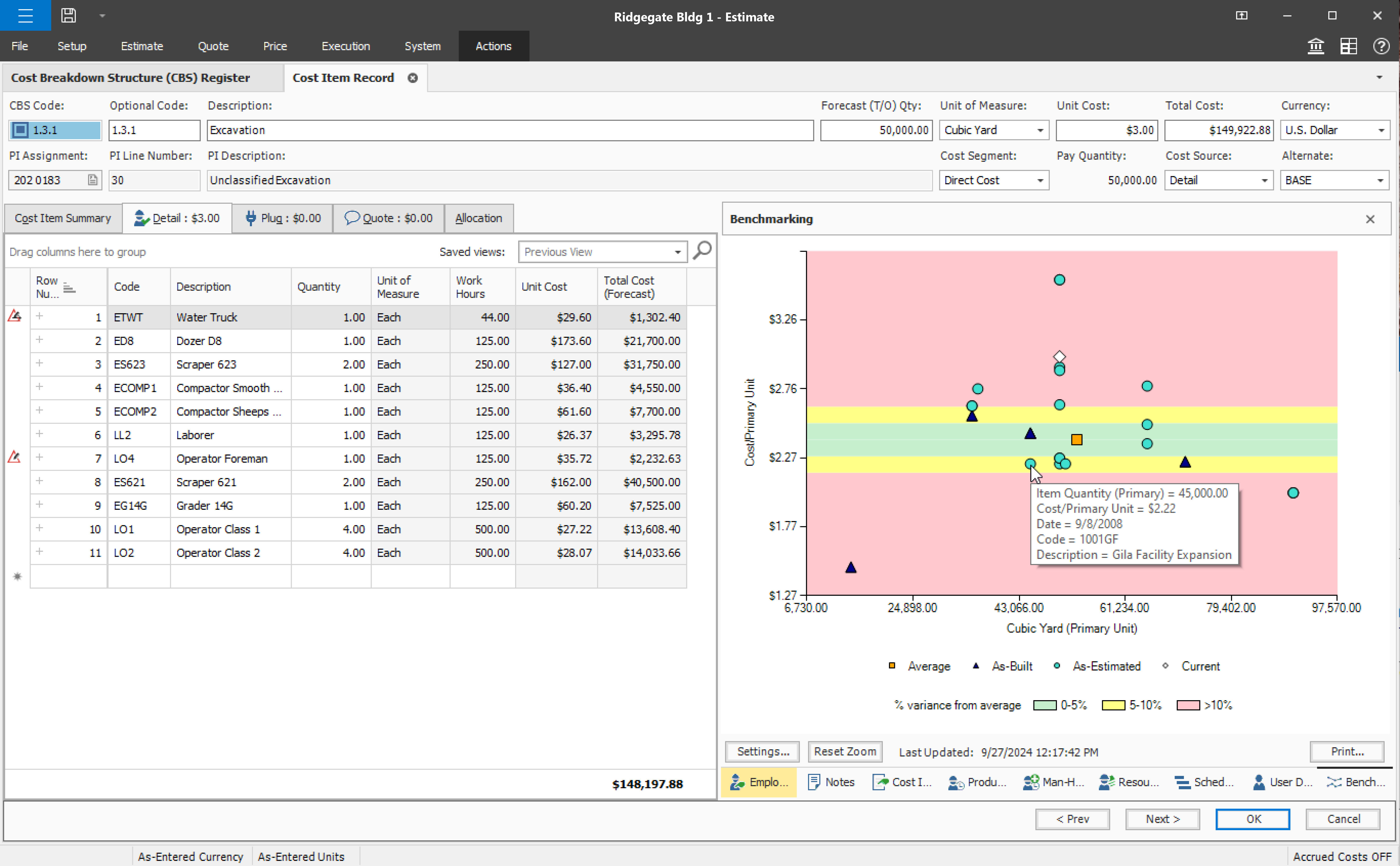
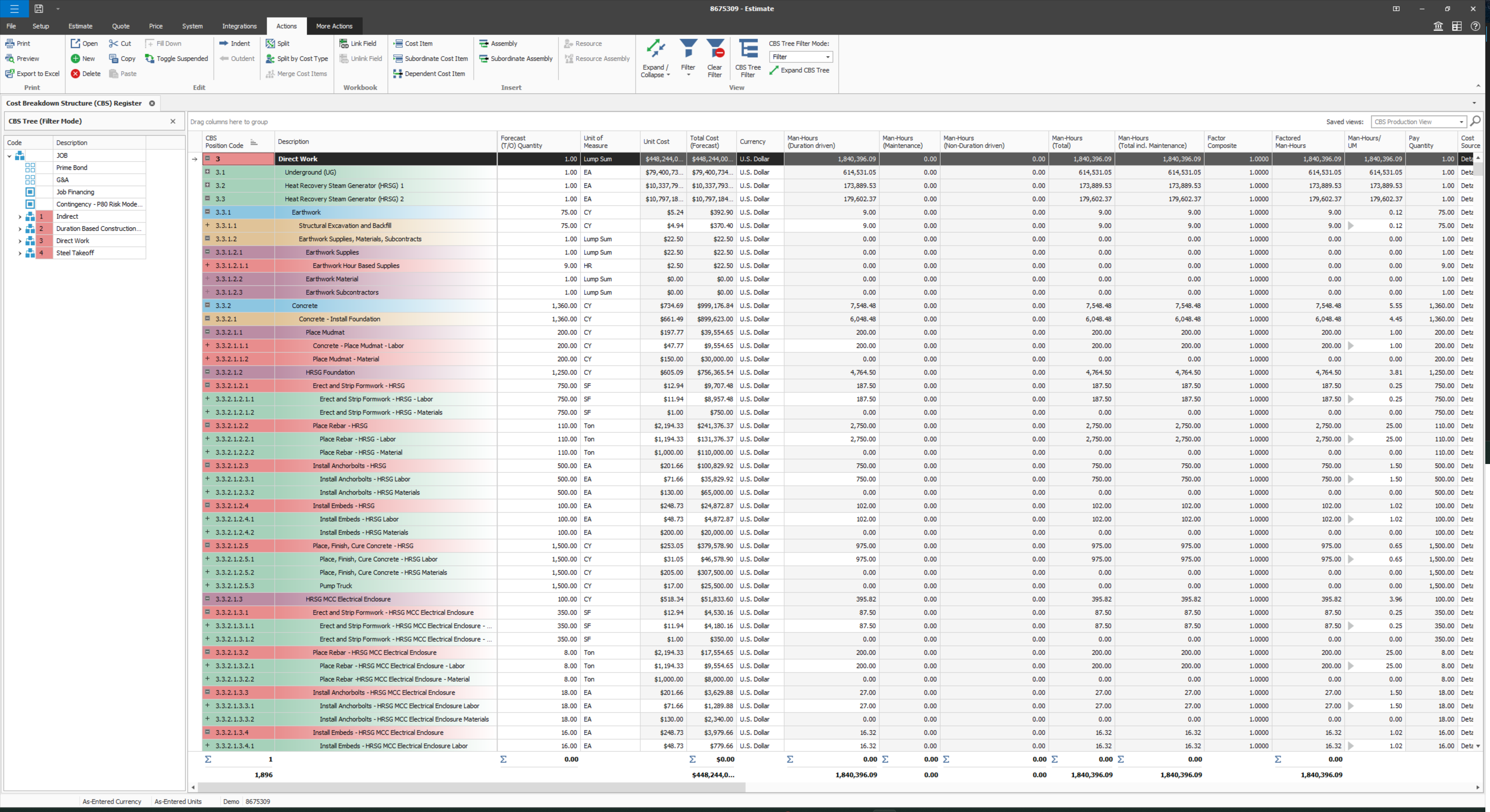
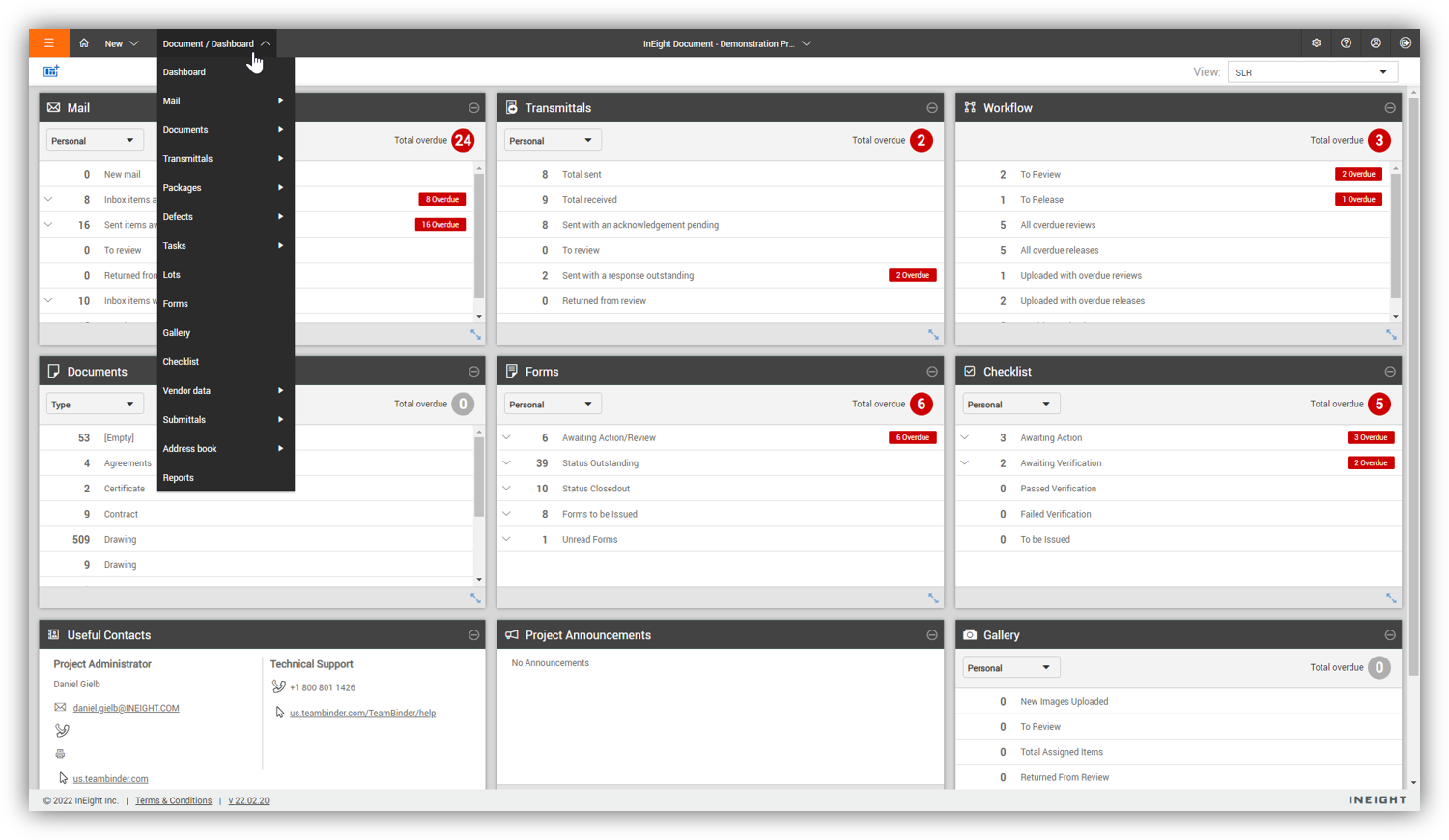
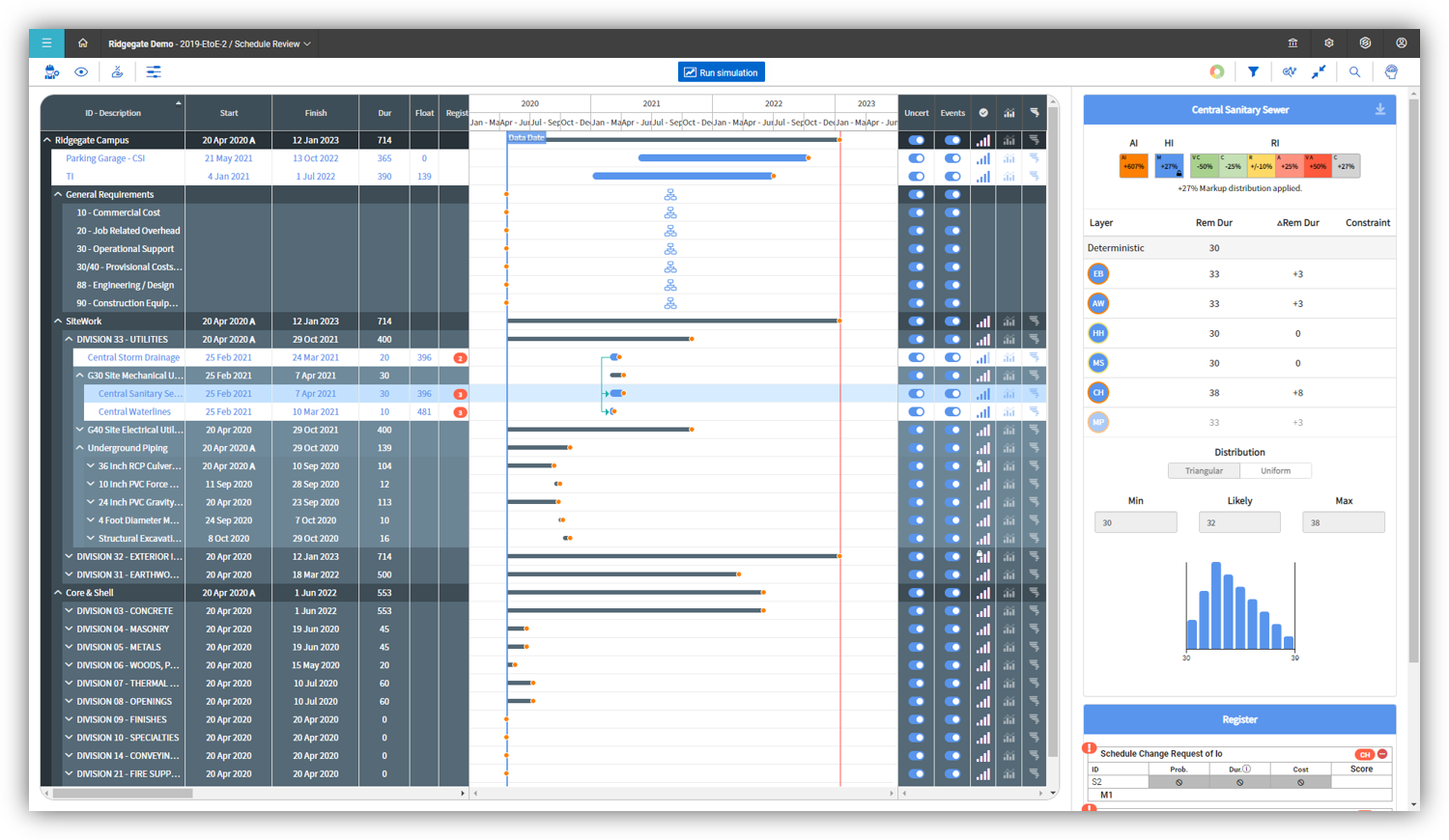
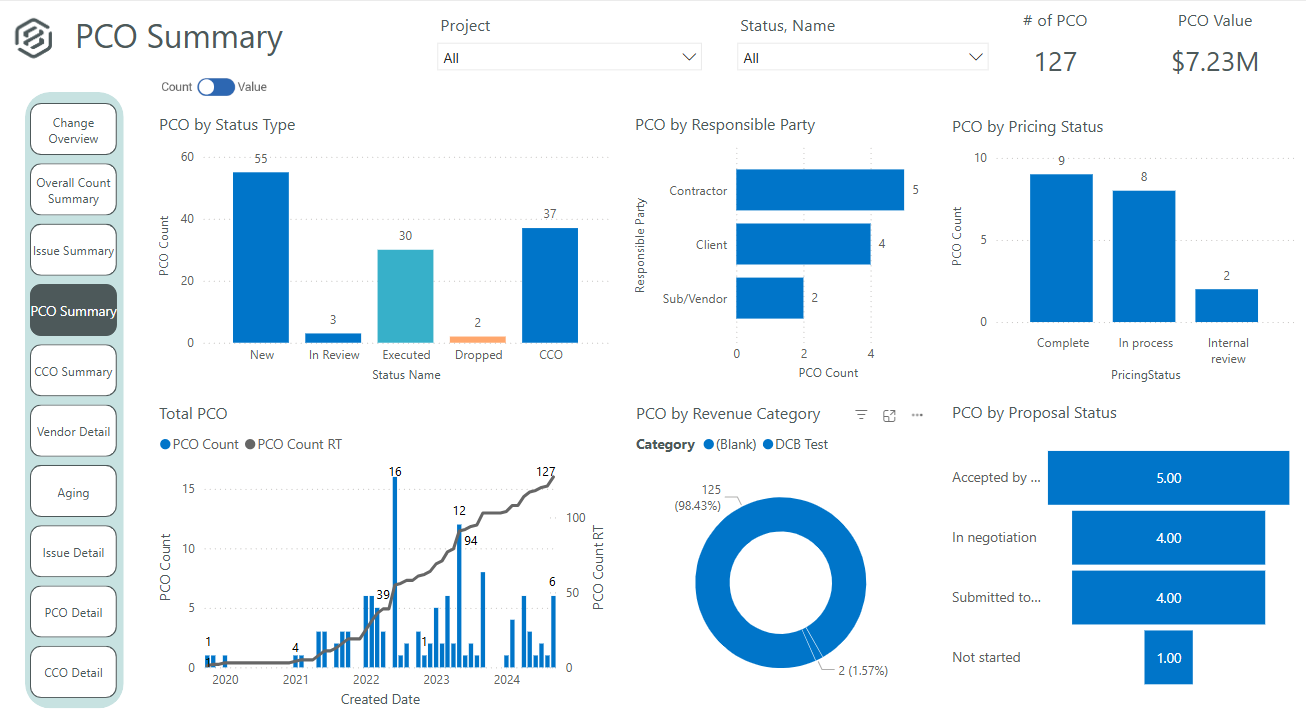
Screenshot of InEight Estimate’s Benchmarking feature, which allows users to compare high, low, and average costs, as well as productivity rates from past projects, to visually assess whether current estimates fall within a realistic range. With historical performance data at their fingertips, estimators can bid more strategically and deliver more reliable, data-driven estimates.Screenshot of InEight Estimate’s CBS Register, which provides a user-specific view of an estimate, allowing users to create unlimited WBS structures and custom rollups. With parametric cost item assemblies, estimators can generate more accurate, reliable, and data-driven estimates.Screenshot of InEight Document’s Dashboard, that delivers a centralized, visual view of project information across all modules. Interactive dashboard tiles make it easy to track document activity and maintain visibility into project performance.Screenshot of InEight Document’s Gallery, which offers a comprehensive visual library of all project-related files—including drawings, photos, and documents—so teams can quickly access and manage the content they need from one intuitive location.Screenshot of InEight Schedule’s Risk Management feature, which enables project teams to evaluate schedules through a risk-adjusted lens. By visualizing scenarios with varying confidence levels, teams can anticipate potential impacts and plan with greater certainty.Screenshot of InEight Change’s PCO Summary dashboard that delivers a visual summary of all potential change orders. This helps project teams evaluate impacts, track approvals, and manage changes proactively for better cost and scope control.