BQE CORE is a business management solution built specifically for professional service firms. BQE CORE is a combination of a billing assistant, project management, and accounting solution. CORE is designed to do the hard work of delivering actionable insights directly to the user's dashboards or inbox. BQE CORE replaces the products Engineeroffice, Archioffice, and BillQuick; the functionality of these applications is now found in BQE CORE.
N/A
Nuclino
Score 7.1 out of 10
N/A
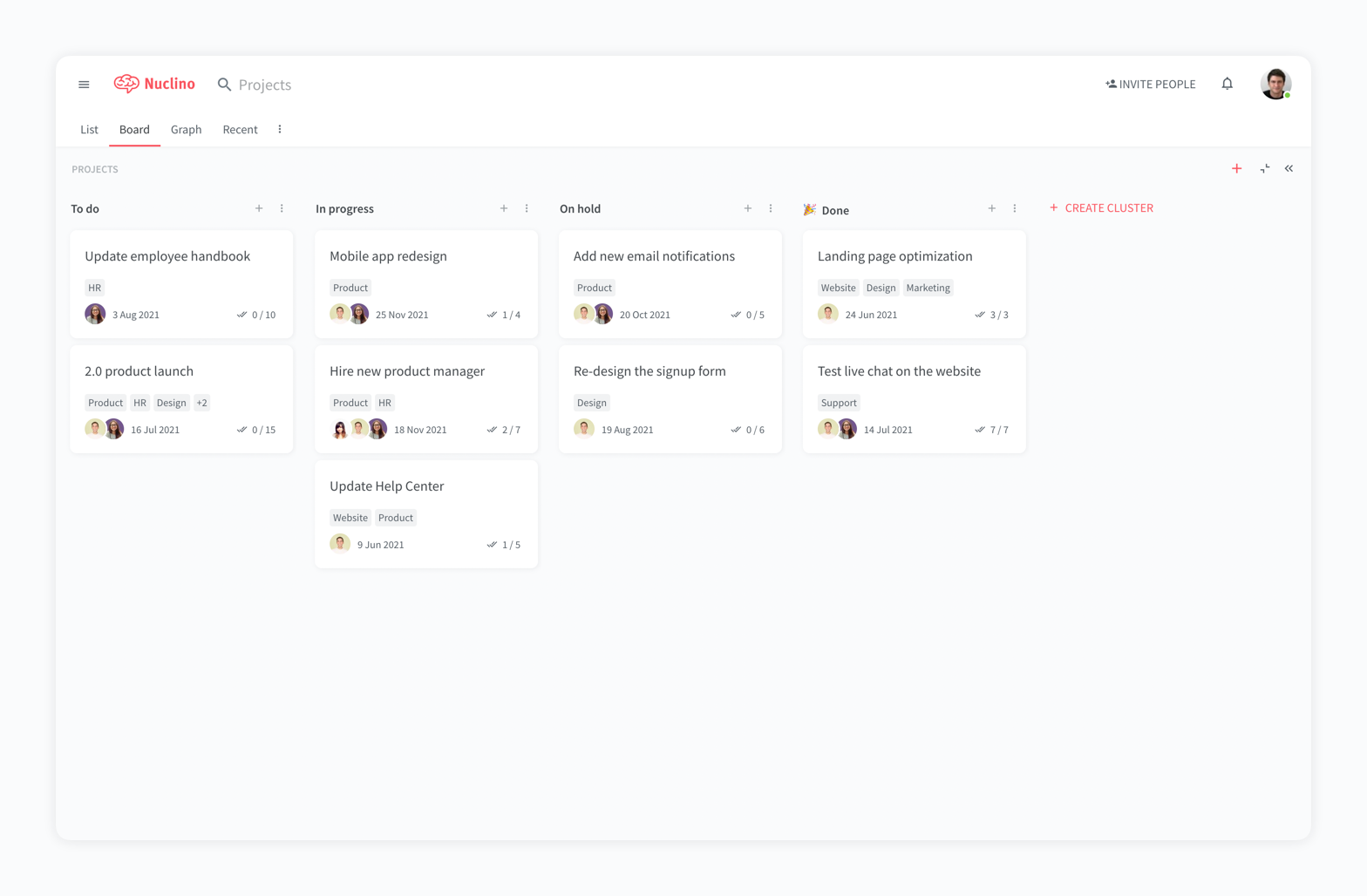
Nuclino is a unified workspace where teams can organize knowledge, manage projects, and share ideas. Progress can be tracked in a Kanban board, work structured in a hierarchical list, or data organized in a visual graph — Nuclino adapts to a team's workflow. Presented as simple and lightweight by design, Nuclino focuses on the essentials, doing away with clunky menus and rarely-used settings, to minimize the learning curve for new users. Teams from across the globe can use Nuclino…
$0
Slite
Score 6.4 out of 10
N/A
Slite is a knowledge base designed to provide teams with needed answers even without searching. From onboarding guides to all hands notes, Slite keeps all types of company information centralised.
$10
per month per member
Pricing
BQE CORE
Nuclino
Slite
Editions & Modules
No answers on this topic
Free
$0
per month per user
Starter
$8
per month per user
Business
$12
per month per user
Standard
$10
per month per member
Premium
$15
per month per member
Enterprise
Contact Sales
Offerings
Pricing Offerings
BQE CORE
Nuclino
Slite
Free Trial
Yes
Yes
Yes
Free/Freemium Version
No
Yes
No
Premium Consulting/Integration Services
Yes
No
No
Entry-level Setup Fee
No setup fee
No setup fee
No setup fee
Additional Details
—
Nuclino offers a free plan for up to 50 items and 2GB total storage. Commercial plans support unlimited items, advanced features, and 10GB storage per user. 25% discount for annual pricing.
Discount available for annual pricing.
More Pricing Information
Community Pulse
BQE CORE
Nuclino
Slite
Features
BQE CORE
Nuclino
Slite
Project Management
Comparison of Project Management features of Product A and Product B
BQE CORE
8.0
74 Ratings
3% above category average
Nuclino
8.3
13 Ratings
6% above category average
Slite
-
Ratings
Task Management
9.256 Ratings
7.49 Ratings
00 Ratings
Resource Management
8.955 Ratings
00 Ratings
00 Ratings
Gantt Charts
9.128 Ratings
8.01 Ratings
00 Ratings
Scheduling
8.936 Ratings
9.01 Ratings
00 Ratings
Workflow Automation
7.939 Ratings
10.01 Ratings
00 Ratings
Team Collaboration
6.646 Ratings
00 Ratings
00 Ratings
Support for Agile Methodology
7.521 Ratings
00 Ratings
00 Ratings
Support for Waterfall Methodology
4.818 Ratings
00 Ratings
00 Ratings
Document Management
8.639 Ratings
00 Ratings
00 Ratings
Email integration
6.233 Ratings
00 Ratings
00 Ratings
Mobile Access
7.745 Ratings
8.010 Ratings
00 Ratings
Timesheet Tracking
9.674 Ratings
00 Ratings
00 Ratings
Change request and Case Management
8.232 Ratings
00 Ratings
00 Ratings
Budget and Expense Management
8.858 Ratings
00 Ratings
00 Ratings
Search
00 Ratings
8.012 Ratings
00 Ratings
Visual planning tools
00 Ratings
7.411 Ratings
00 Ratings
Professional Services Automation
Comparison of Professional Services Automation features of Product A and Product B
BQE CORE
8.5
56 Ratings
9% above category average
Nuclino
-
Ratings
Slite
-
Ratings
Quotes/estimates
8.229 Ratings
00 Ratings
00 Ratings
Invoicing
8.849 Ratings
00 Ratings
00 Ratings
Project & financial reporting
8.854 Ratings
00 Ratings
00 Ratings
Integration with accounting software
8.235 Ratings
00 Ratings
00 Ratings
Communication
Comparison of Communication features of Product A and Product B
BQE CORE
-
Ratings
Nuclino
8.3
12 Ratings
4% above category average
Slite
-
Ratings
Chat
00 Ratings
8.01 Ratings
00 Ratings
Notifications
00 Ratings
7.49 Ratings
00 Ratings
Discussions
00 Ratings
7.98 Ratings
00 Ratings
Surveys
00 Ratings
9.01 Ratings
00 Ratings
Internal knowledgebase
00 Ratings
8.512 Ratings
00 Ratings
Integrates with GoToMeeting
00 Ratings
9.01 Ratings
00 Ratings
Integrates with Gmail and Google Hangouts
00 Ratings
9.01 Ratings
00 Ratings
Integrates with Outlook
00 Ratings
8.01 Ratings
00 Ratings
File Sharing & Management
Comparison of File Sharing & Management features of Product A and Product B
I would recommend this for our industry: architecture, engineering, or construction. I would recommend this for any larger firm with many employees or high number of projects. I would particularly recommend this for a company with projects that have budget constraints and where time tracking and expense tracking is very important. I would not recommend this complicated software for a small firm with a small amount of income or number of projects.
For game design - Perfect for personal notes, recipes, snippets - Perfect for storing some organized data (for example, links to resources) - Perfect for a content playground powered by AI - Very good for diagrams - Very good. Don't know any bad examples. Tool really great. Rich functionality. Especially love different views (table, graph).
It is well suited for entire companies to use not just small teams because you can create so many workspaces and folders which allow better organization for a centralized space. For example, if you want to create for one team a folder thats a Social Media Marketing Hub you can have that with supportive resources, documents, meet the team section, and so much more. You can have another folder for other teams like HR and HR Resources where everyone has visibility into the documents and anything added under that section. It's super helpful.
Invoice Collections within Billing is a great tool because of the ability to take notes and track contact.
Invoices are professional looking and easy for our clients to understand the overall progress within each phase of their project.
Dashboards are the best tool EVER!
The Contact List feature within Clients setup is the perfect way to track multiple project managers within a large company that also has multiple contracts with us.
The system is extremely fast. The application loads and displays data in milliseconds. This makes the system easy to work with.
It's also easy to edit documentation and information, as information can be editing directly without the use of an "edit" button.
Pricing: Loading speed, ease of use and quick editing are its main advantage that makes it stand out from competitors. Having said that, the pricing is very good as well.
Assigning contacts to particular roles - such as Invoicing, Contracts, etc.
Accounting Functionality - they are basically a project management accounting software, so in my opinion, they could learn some things from other accounting software such as QuickBooks etc.
I don't love that it doesn't integrate easily with the other tools we use, at least it doesn't as far as I know.
Since there is not an Excel sort of capability there is no way it could ever replace Google, so it is sometimes easier to just use Word docs instead of Slite since everything is in one place.
I think if Slite extended their product line up, it would be more attractive to use exclusively, instead of just using it for documentation.
We have been using Core for a few years now, and honestly started to look at other software systems to see what was out there. What we chose was a nightmare for migration so we never left Core. Now we have added invoicing and payments from Core instead of double entry with QBO. Still only a few cycles in but looks like it will be up to speed soon and working smoothly.
The foundation is awesome, like I have said before, however the house being built on it, the educational resources being provided to us (more of sales pitches that don't work), and flexible workflow opportunities, is making us look elsewhere for how much we will be spending on per user. It's crazy to think how flexible they are not when it comes to user settings. Lack of integration with other sources is awful.
It has a very clean UI for me, the multiple views are so so useful, we can collaborate freely, and fast. This app helped us to grow because now we are giving our time more on generating ideas and of course getting more projects and clients giving real ROI instead of focusing on organizing files. But just like all apps out there, it has some room for improvement
Very clean interface however editing can be a challenge which is a big part of using it so I can't give a 10 until the editing and customization for editing is improved. I love how minimal the look and feel is though and how easy it is to organize different pages and folders.
This is one area that does need some improvement. It can be slow at time, so we had our IT look at it from our side and we had no issues, so it has to be some slowness on their side.
As a new employee and CORE user, I talk to support on a weekly basis. I have never had to wait for more than 3 min to get connect with a support rep, and all my questions have been answered. The support representatives are polite and eager to help no matter how simple your question is.
My team has an individual dedicated to content management and Nuclino is one of her job descriptions. It's nice knowing she is able to handle any issues that arise before we even realize they exist. We haven't had any technical issues since implementation so that's been a very pleasant experience.
Deltek Vision is far more advanced, more encompassing and offers more flexibility with what you want to do. However, it's also quite difficult to use, whereas BQE CORE is intuitive and user friendly. The trade off is worth it in some arenas but overall it's not suited for a larger fast paced company. Great for smaller companies.
Nuclino is the clear winner when it comes to ease of use for both the administrator and user. Less setup time and less "training" time. The streamlined interface is quick and intuitive to learn and is not cluttered as compared to Confluence. Every tool you need to use to create a page or administer the workspace is available immediately on screen or by right-clicking. In contrast, Confluence buries many tools in administrative interfaces and only allows use of some features once you make several clicks to include a "macro" or "plug-in". We use both tools and I get complaints constantly from my team about how complicated Confluence can get just to author a quick page.
[In my opinion,] Slite is cheaper but less mature and feature full. Notion is a much more mature solution, so I'd recommend it for teams who want to be at the front and don't care about cost.