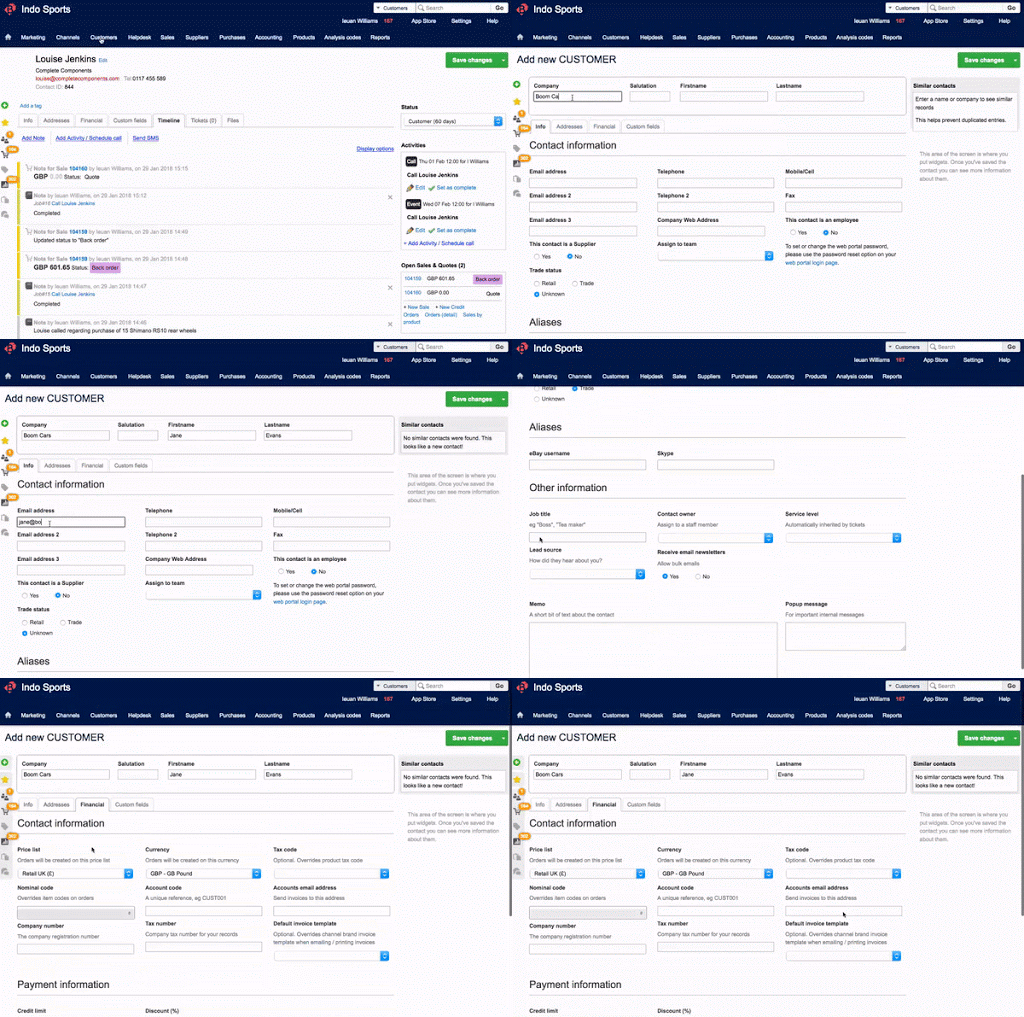
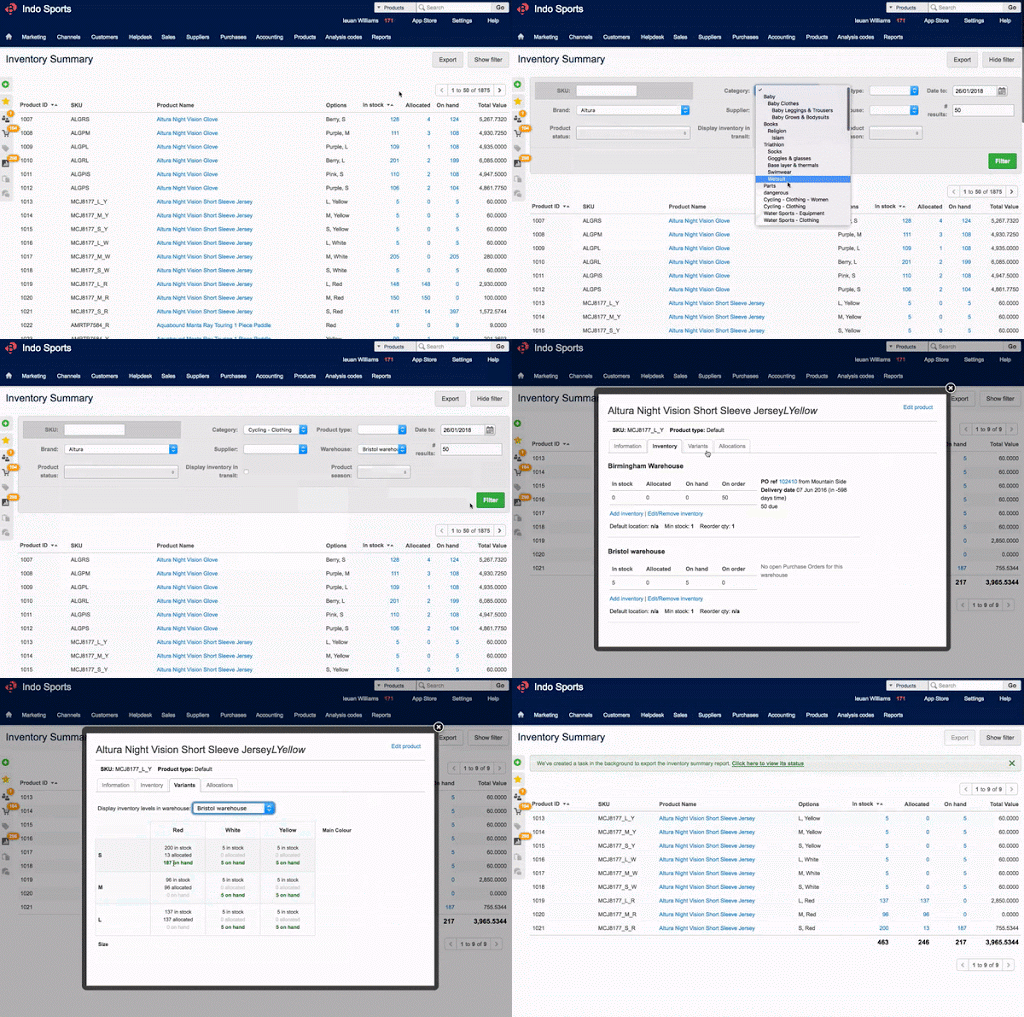
Brightpearl’s retail operations platform is designed to handle peak trading, integrates with the full retail tech ecosystem, and is omni-channel native. Additionally, the vendor says their solution is the system of record for key trading data, provides real-time trading insights and is automated so users can stay in control and manage by exception. According to the vendor key differentiators include: Software and Service. Service is an integral part of Brightpearl's offer. The…
N/A
Sage 50
Score7.7 out of 10
Small Businesses (1-50 employees)
Sage 50cloud Accounting (formerly Sage 50 Accounting) is accounting software designed for small businesses. Sage 50cloud Accounting (formerly Sage 50, and formerly Peachtree) lets businesses invoice customers, pay bills, manage inventory, control costs, and pay employees. The solution includes high-level dashboards and in-depth reports.
$61.92
per month per user
Pricing
Brightpearl
Sage 50
Editions & Modules
No answers on this topic
Sage 50 Pro Accounting
$61.92
per month
Sage 50 Premium Accounting
$103.92
per month per user
Sage 50 Quantum Accounting 3 User
$177.17
per month per user
Offerings
Pricing Offerings
Brightpearl
Sage 50
Free Trial
No
Yes
Free/Freemium Version
No
No
Premium Consulting/Integration Services
Yes
Yes
Entry-level Setup Fee
Required
No setup fee
Additional Details
Brightpearl is for merchants trading $1M or above, or those that expect to be in the next 12 months. Pricing is designed to suit the needs of fast-growth and larger merchants.
Annual billing plans also available for all products.
Chief Executive - UK & Europe in Sales at Southpaw UK (Business Supplies and Equipment, 1-10 employees)
Chose Brightpearl
Brightpearl was the only online package that integrated with its different functions well and that had the core requirements of SKU management, CRM, order processing and accounting all on an easy to understand clear format.
A de minimis incentive was given to thank the reviewer for their time. The incentive was not used to bias or drive a particular response, nor was the incentive contingent on a positive endorsement. TR verified that a representative sample of customers was invited. More Info
Verified User
Chose Brightpearl
Brightpearl is streets ahead in almost every way. It felt at least three times faster, kept all relevant information at our fingertips instead of hiding some of it away in different modules, and had much more user-friendly reporting. Reporting in Sage was so difficult in …
A de minimis incentive was given to thank the reviewer for their time. The incentive was not used to bias or drive a particular response, nor was the incentive contingent on a positive endorsement. TR verified that a representative sample of customers was invited. More Info
Managing Director at MonkeyPuzzle Computers (Information Technology and Services, 1-10 employees)
Chose Brightpearl
Brightpearl is streets ahead of the usual suspects. It is clean and lean compared to Sage and much easier to use than QuickBooks. The regular updating and added functionality is great and improves on an already great product.
A de minimis incentive was given to thank the reviewer for their time. The incentive was not used to bias or drive a particular response, nor was the incentive contingent on a positive endorsement. TR verified that a representative sample of customers was invited. More Info
Brightpearl is very well suited for small-medium companies that are growing quickly and need a way to improve their operational systems and functionality to handle increasing volume of orders. Particularly if you use multiple SKUs, sales channels, and/or warehouses, the features offered by Brightpearl are excellently well suited to handle these types of needs. I don't believe Brightpearl would be very applicable for very small companies with a small number of SKUs, as many of the features offered would be unnecessary and underutilized.
A de minimis incentive was given to thank the reviewer for their time. The incentive was not used to bias or drive a particular response, nor was the incentive contingent on a positive endorsement. TR verified that a representative sample of customers was invited. More Info
Sage 50 Accounts is well-suited for small to medium-sized enterprises, where there is a moderate number of expenses and invoices that need processing, typically by a company with a smaller finance team. Sage 50 is probably less suitable for a large organisation that needs to handle a higher volume of transactions and manage significant stock levels.
A de minimis incentive was given to thank the reviewer for their time. The incentive was not used to bias or drive a particular response, nor was the incentive contingent on a positive endorsement. More Info
Brightpearl tracks order changes and communications very well. It documents all activity in a feed that anyone can see, including status changes, notes made, emails sent, etc.
Brightpearl makes it incredibly easy to find orders fitting certain criteria through the use of statuses that you can customize. For example, as a multichannel seller, we can easily create statuses for each channel that we sell from, where our orders will (oftentimes automatically) land in. We also deal often with things like back ordered items; we can also create statuses for certain brands, so that when we expect a shipment in from that company, our back order specialist can easily sort through her orders that are waiting on that shipment.
Brightpearl makes it easy to take orders over the phone. Everything I need is right there on one screen; not often do I find myself needing to deviate to other tabs. The steps I take (from "new order" to finish) are straightforward and understandable, and go in steps that make sense.
A de minimis incentive was given to thank the reviewer for their time. The incentive was not used to bias or drive a particular response, nor was the incentive contingent on a positive endorsement. TR verified that a representative sample of customers was invited. More Info
We can build "templates" for recurrent charges/invoices. This saves some time and also ensures that we always use the right accounting rubric.
A lot of additional information can be filled out such as client information (name, address, ...) which makes the software a little more complete.
If you don't need an updated version every year (my case) then the software is not too expensive. The pro version that I'm using was just a little over $300.
I really like the banking statement consolidation which allows you to ensure you got the right information registered.
A de minimis incentive was given to thank the reviewer for their time. The incentive was not used to bias or drive a particular response, nor was the incentive contingent on a positive endorsement. More Info
Supports only a small number of marketplaces and in a limited way only. When I signed up with Brightpearl they claimed that you could list directly onto eBay from within Brightpearl but this turned out to be untrue as Brightpearl did not support eBay postage policies (eBay's semi literate way of saying shipping tables).
Not only can you not list directly onto eBay, you cannot list directly from within Brightpearl to any marketplaces whatsoever. With other software you can list directly to all the marketplaces they integrate with.
Brightpearl is abysmal at VAT. Brightpearl calculates VAT on Channel Islands and Canary Islands orders even though there is no Vat in either of them. So when you pay HMRC you will be paying them a bit extra unless you check all your orders which makes the software somewhat redundant.
When I signed up they advertised Brightpearl as the software to automate your online selling. But it didn't really do that. A couple of years later at considerable extra cost they released an add-on app called Brightpearl Automation that does seem to deliver on automation. However other software offers that at no extra cost.
Brightpearl claims that it integrates with Amazon, but this is only partially true as they have completely ignored the new marketplaces that Amazon have opened. If you list on those marketplaces you have to input the orders manually and Brightpearl will not update the stock, putting you at risk of negative feedback. Other software integrates fully with all Amazon marketplaces.
Now that I am leaving it was suggested that I might benefit from read-only access so that we could easily double check things like warranty claims. They offered me a year's read-only access for £10,080 which is more than double my yearly contract for full use of the software. Now, if that isn't taking the mickey, I don't know what is!!!
Sage 50 could use some improvement in the Invoicing Module to allow for more flexibility in the design of the Invoice fields. The report customization tools could use some upgrading for easier use.
Fixed assets management module needs to be included with unlimited number of fixed assets.
Brightpearl has proved to work out for our company and we have no need or intention to let it go. Rather we intend to build on what we've accomplished and it will no doubt help us scale our business and meet our ambitions.
A de minimis incentive was given to thank the reviewer for their time. The incentive was not used to bias or drive a particular response, nor was the incentive contingent on a positive endorsement. TR verified that a representative sample of customers was invited. More Info
I use this rating simply because I have a thriving Sage 50 consulting practice and will continue to keep my expertise in the product. I have consulted on both Sage 50 and QuickBooks for over 25 years so I have to maintain expertise in the solution as well as accounting and verticals.
A de minimis incentive was given to thank the reviewer for their time. The incentive was not used to bias or drive a particular response, nor was the incentive contingent on a positive endorsement. More Info
Brightpearl can be a little confusing to begin with, there are a lot of options to look through and working out the intricacies takes some time depending on what you would like to be able to do on it and what your account is set up to do. It is however very thorough and once you can work your way around it most of the functions are fairly simple to use and very detailed.
A de minimis incentive was given to thank the reviewer for their time. The incentive was not used to bias or drive a particular response, nor was the incentive contingent on a positive endorsement. TR verified that a representative sample of customers was invited. More Info
I think Sage 50 is a trusted product and is reliable from a product delivery and support perspective. They have deep domain expertise in the non-profit space and should be a consideration for new non-profit startups or existing non-profits looking to migrate from other platforms. Overall, I believe that Sage 50 does many things well with few limitations.
A de minimis incentive was given to thank the reviewer for their time. The incentive was not used to bias or drive a particular response, nor was the incentive contingent on a positive endorsement. More Info
Brightpearl is always easily accessibly anywhere that you can find an internet source. I have checked our stock levels when we have been off site at Ham Rally's at home and on my way home or to work if needs be. That is probably one of the best features of this system.
A de minimis incentive was given to thank the reviewer for their time. The incentive was not used to bias or drive a particular response, nor was the incentive contingent on a positive endorsement. TR verified that a representative sample of customers was invited. More Info
Brightpearl performs very well and integrates very well with our Metapak packing and despatch system. IT also intergrates very well with Amazon and we have used Ebay although there have been complications with Ebay and stock levels. We use Ebay mostly for second hand items of which we only have one so have skipped using Brighpearl for these products.
A de minimis incentive was given to thank the reviewer for their time. The incentive was not used to bias or drive a particular response, nor was the incentive contingent on a positive endorsement. TR verified that a representative sample of customers was invited. More Info
Brightpearl was ALWAYS great at responding to us. Their customer service was quick and responsive. Unfortunately, the responses were often that "engineers were working on it" but nothing seemed to ever come of that. I realize that Brightpearl is a large company that a lot of businesses rely on. But when you can't hit "enter" when trying to search in the front-end POS, that type of behavior should be changed very quickly and it never was. Admittedly, small things, but those annoyances tend to ultimately affect the overall experience.
A de minimis incentive was given to thank the reviewer for their time. The incentive was not used to bias or drive a particular response, nor was the incentive contingent on a positive endorsement. TR verified that a representative sample of customers was invited. More Info
They were very knowledgeable of the product, understood my timeline was limited for a software issue and allowed me to get back to my day to day work. The dial into your computer is great so you can monitor what they are doing and learn some tricks yourself
A de minimis incentive was given to thank the reviewer for their time. The incentive was not used to bias or drive a particular response, nor was the incentive contingent on a positive endorsement. TR verified that a representative sample of customers was invited. More Info
The online training was very helpful in the areas we were shown and was implemented very well via a Skype call and an presentation done via the internet. However it was not thorough enough for all of our needs in certain areas. More training in person on site would have been very helpful.
A de minimis incentive was given to thank the reviewer for their time. The incentive was not used to bias or drive a particular response, nor was the incentive contingent on a positive endorsement. TR verified that a representative sample of customers was invited. More Info
Implementation was generally perfect, but if you are coming across from Sage I personally would recommend doing this as baby steps. We tried to import our entire Sage history in one batch and that was a bad idea hence the 9/10. That was mainly our fault and nothing on Brightpearl.
A de minimis incentive was given to thank the reviewer for their time. The incentive was not used to bias or drive a particular response, nor was the incentive contingent on a positive endorsement. TR verified that a representative sample of customers was invited. More Info
We implemented Sage 50 Premium Accounting in house, not using any third party or professional service. It was a relatively trouble free process, but can be tricky. Just read all instructions carefully, especially if you need to load the program on a network with more than one user
A de minimis incentive was given to thank the reviewer for their time. The incentive was not used to bias or drive a particular response, nor was the incentive contingent on a positive endorsement. More Info
Initially we went with Brightpearl because it was an all in one solution. Salesforce CRM capabilities right out of the box far surpass Brightpearl's, but there's no inventory or accounting system pre-built in. We are currently moving away from Brightpearl for both CRM and accounting functions however.
A de minimis incentive was given to thank the reviewer for their time. The incentive was not used to bias or drive a particular response, nor was the incentive contingent on a positive endorsement. TR verified that a representative sample of customers was invited. More Info
As we did the conversion almost 10 years ago it is hard to answer this question. At the time it was the ease of being able to produce both cash and accrual financial statements and reporting that led us to pick Sage
A de minimis incentive was given to thank the reviewer for their time. The incentive was not used to bias or drive a particular response, nor was the incentive contingent on a positive endorsement. More Info
Brightpearl's ability to increase or expand its capacity and retain its performance levels to accommodate growth were acceptable but not fantastic. The program was constantly making changes which can be useful, but was also confusing & hard to keep up with since we were never updated that changes were about to be made or had been made.
A de minimis incentive was given to thank the reviewer for their time. The incentive was not used to bias or drive a particular response, nor was the incentive contingent on a positive endorsement. TR verified that a representative sample of customers was invited. More Info
I define scalable from two perspectives; 1) the scalability to handle more bookkeepers/accountants using the product, and 2) the scalability to handle increasing customer/vendor/employee and transactional data. Sage 50 does a good job on both fronts. From the single users operating a micro-business accounting for customer invoices and bill payments only, to the multi-staff, multi-location, multi-departmental complex transactional operation. Although Sage 50 is quite expensive for that smallest user, it is quite inexpensive for the larger business entity. So, for the new enterprise expecting rapid growth, Sage 50 is the application of choice.
A de minimis incentive was given to thank the reviewer for their time. The incentive was not used to bias or drive a particular response, nor was the incentive contingent on a positive endorsement. TR verified that a representative sample of customers was invited. More Info
Sage definitely needs to do a better job with customer service. I have had to use them only a handful of times and it was not a great experience but not the worse I've seen. They didn't make us a priority and I felt that they didn't have a sense of urgency. They did address my lack of satisfaction and I can see that they are at least aware of the issues and they are trying to correct them.
Sage is exactly what we need in my current organization and I wouldn't change it for another system. I have used quite a few in my lifetime and I would say that it fits our needs.