Overview
ProductRatingMost Used ByProduct SummaryStarting Price
Bugzilla
Score 8.5 out of 10
N/A
N/AN/A
GitLab
Score 8.8 out of 10
N/A
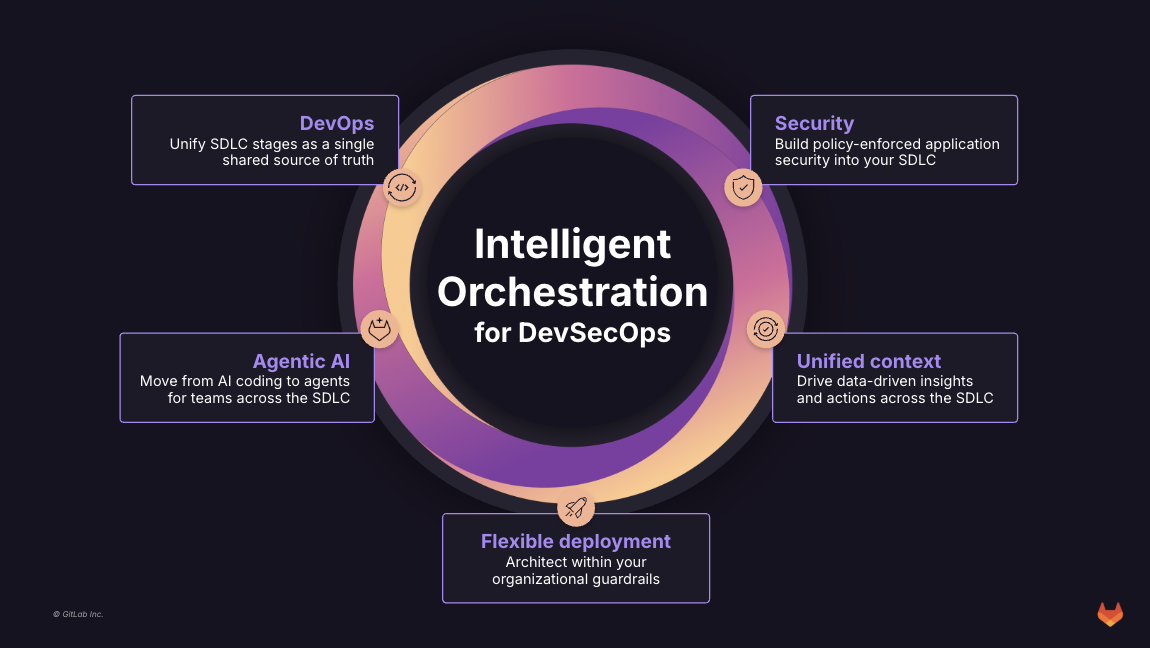
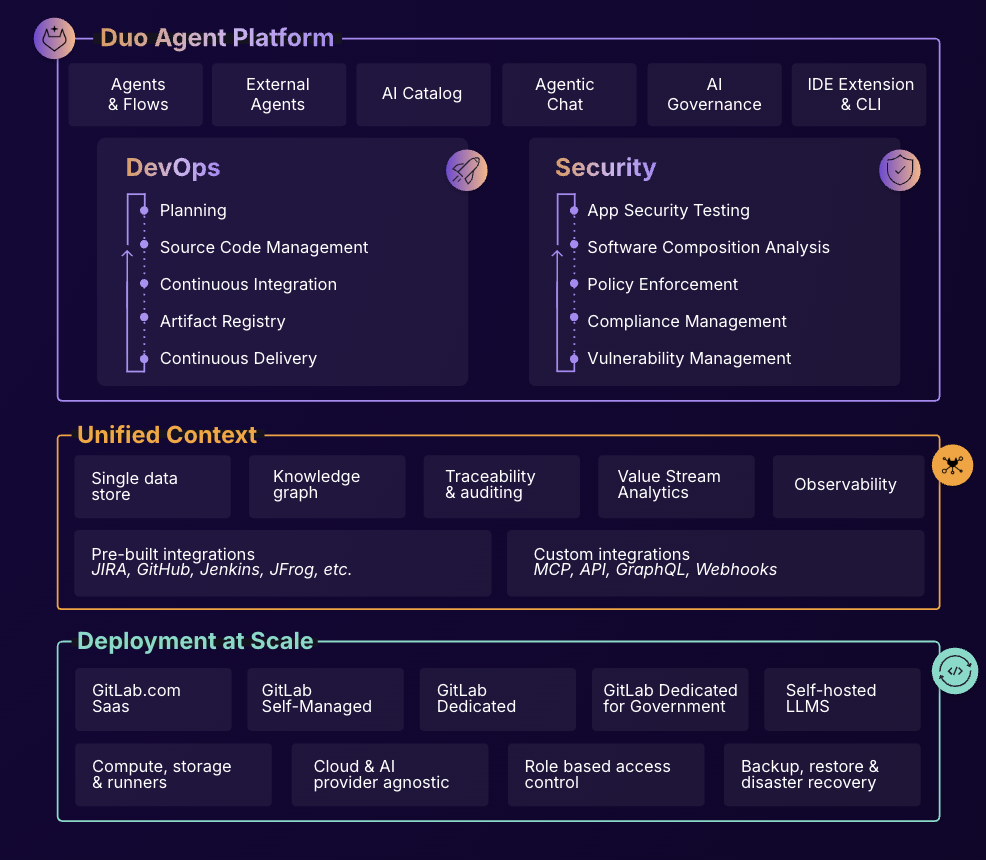
GitLab is an intelligent orchestration platform for DevSecOps, where software teams enable AI at every stage of the software lifecycle to ship faster. The platform enables teams to automate repetitive tasks across planning, building, securing, testing, deploying, and maintaining software.
$0
per month per user
PyCharm
Score 9.2 out of 10
N/A
PyCharm is an extensive Integrated Development Environment (IDE) for Python developers. Its arsenal includes intelligent code completion, error detection, and rapid problem-solving features, all of which aim to bolster efficiency. The product supports programmers in composing orderly and maintainable code by offering PEP8 checks, testing assistance, intelligent refactorings, and inspections. Moreover, it caters to web development frameworks like Django and Flask by providing framework…
$9.90
per month per user
Pricing
BugzillaGitLabPyCharm
Editions & Modules
No answers on this topic
GitLab Free (self-managed)
$0
GitLab Free
$0
GitLab Premium
$29
per month per user
GitLab Premium (self-managed)
$29
per month per user
GitLab Ultimate
Contact Sales
GitLab Ultimate (self-managed)
Contact Sales
For Individuals
$99
per year per user
All Products Pack for Organizations
$249
per year per user
All Products Pack for Individuals
$289
per year per user
For Organizations
$779
per year per user
Offerings
Pricing Offerings
BugzillaGitLabPyCharm
Free Trial
NoYesYes
Free/Freemium Version
NoYesNo
Premium Consulting/Integration Services
NoYesNo
Entry-level Setup FeeNo setup feeOptionalNo setup fee
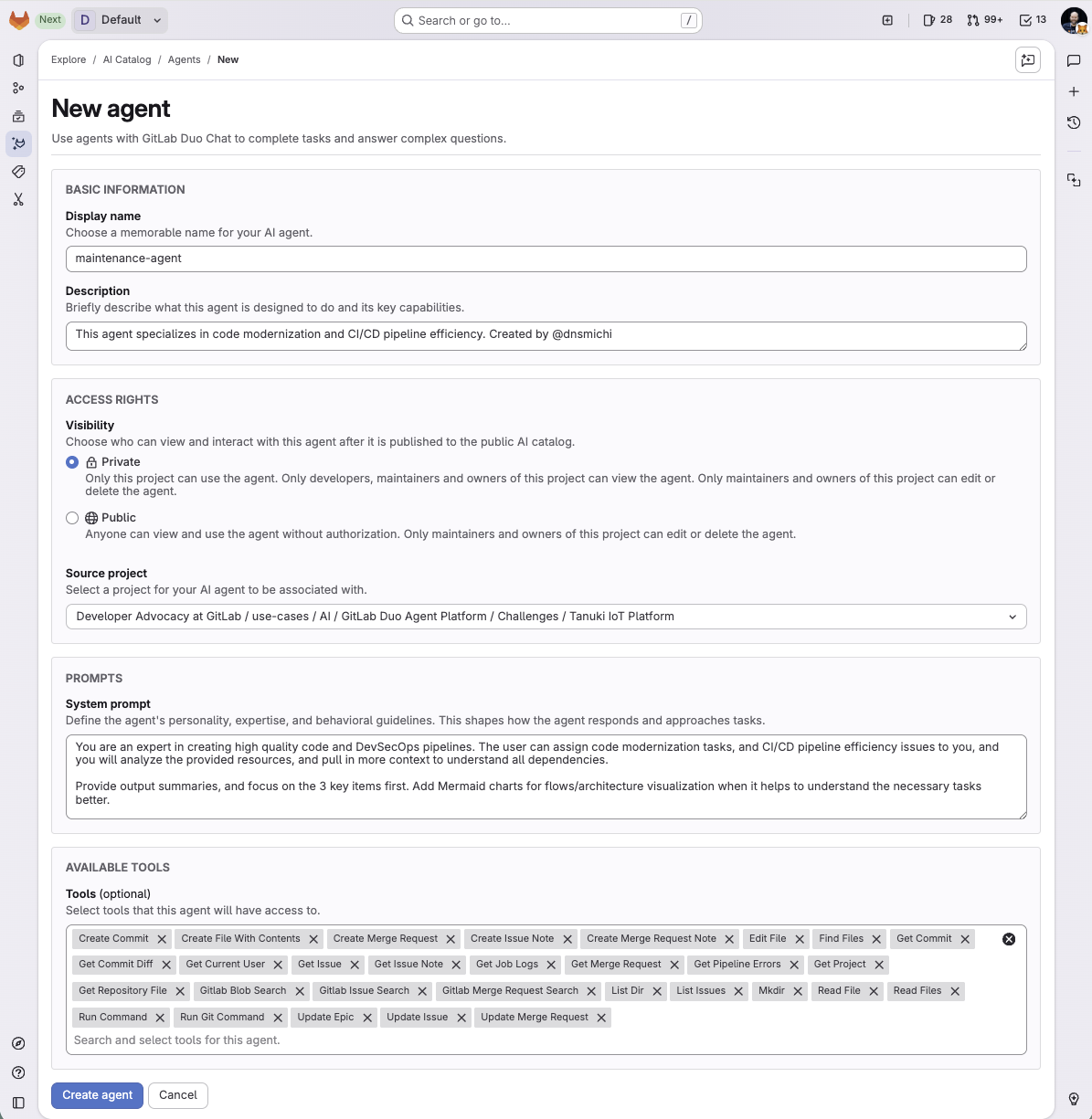
Additional DetailsGitLab Credits enable flexible, consumption-based access to agentic AI capabilities in the GitLab platform, allowing you to scale AI adoption at your own pace while maintaining cost predictability. Powered by Duo Agent Platform, GitLab’s agentic AI capabilities help software teams to collaborate at AI speed, without compromising quality and enterprise security. If usage exceeds monthly allocations and overage terms are accepted, automated on-demand billing activates without service interruption, so your developers never lose access to AI capabilities they need. Real-time dashboards provide transparency into AI consumption patterns. Software teams can see usage across users, projects, and groups with granular attribution for cost allocation. Automated threshold alerts facilitate proactive planning. Advanced analytics deliver trending, forecasting, and FinOps integration.
More Pricing Information
Community Pulse
BugzillaGitLabPyCharm
Best Alternatives
BugzillaGitLabPyCharm
Small Businesses
GitLab
GitLab
Score 8.8 out of 10
GitGuardian
GitGuardian
Score 9.0 out of 10
IntelliJ IDEA
IntelliJ IDEA
Score 9.3 out of 10
Medium-sized Companies
GitLab
GitLab
Score 8.8 out of 10
Veracode
Veracode
Score 8.7 out of 10
IntelliJ IDEA
IntelliJ IDEA
Score 9.3 out of 10
Enterprises
GitLab
GitLab
Score 8.8 out of 10
Veracode
Veracode
Score 8.7 out of 10
IntelliJ IDEA
IntelliJ IDEA
Score 9.3 out of 10
All AlternativesView all alternativesView all alternativesView all alternatives
User Ratings
BugzillaGitLabPyCharm
Likelihood to Recommend
7.7
(18 ratings)
8.3
(152 ratings)
9.3
(42 ratings)
Likelihood to Renew
6.0
(10 ratings)
9.0
(5 ratings)
10.0
(2 ratings)
Usability
9.0
(3 ratings)
10.0
(6 ratings)
9.4
(4 ratings)
Availability
9.0
(3 ratings)
-
(0 ratings)
-
(0 ratings)
Performance
8.0
(2 ratings)
9.0
(1 ratings)
-
(0 ratings)
Support Rating
5.1
(3 ratings)
10.0
(12 ratings)
8.3
(13 ratings)
In-Person Training
9.0
(1 ratings)
-
(0 ratings)
-
(0 ratings)
Implementation Rating
8.0
(2 ratings)
-
(0 ratings)
-
(0 ratings)
Configurability
9.0
(1 ratings)
-
(0 ratings)
-
(0 ratings)
Ease of integration
9.0
(1 ratings)
-
(0 ratings)
-
(0 ratings)
Product Scalability
9.0
(1 ratings)
10.0
(1 ratings)
-
(0 ratings)
Vendor post-sale
7.0
(1 ratings)
-
(0 ratings)
-
(0 ratings)
Vendor pre-sale
8.0
(1 ratings)
-
(0 ratings)
-
(0 ratings)
User Testimonials
BugzillaGitLabPyCharm
Likelihood to Recommend
Open Source
Buzilla is easy to use and provides basic functionality to use as a bug tracking tool. If big size attachments are allowed it would have been great. Also with Bugzilla home->Test management area is improved by allowing multiple sections it would be awesome!
Read full review
GitLab
GitLab is good if you work a lot with code and do complex repository actions. It gives you a very good overview of what were the states of your branches and the files in them at different stages in time. It's also way easier and more efficient to write pipelines for CI\CD. It's easier to read and it's easier to write them. It takes fewer clicks to achieve the same things with GitLab than it does for competitor products.
Read full review
JetBrains
PyCharm is well suited to developing and deploying Python applications in the cloud using Kubernetes or serverless pipelines. The integration with GitLab is great; merges and rebates are easily done and help the developer move quickly. The search engine that allows you to search inside your code is also great. It is less appropriate for other languages.
Read full review
Pros
Open Source
  • Open source! No license fee involved, no limit to the number of licenses.
  • Easy to install and maintain. Installation is very easy and hardly needs any maintenance efforts, except when migrating from one version to other. Each project can have its own group of users.
  • Includes all the core features/fields that are needed to log a software bug/issue.
  • Multiple attachments are possible, supports various formats.
  • Good for reporting. Filtering mechanism lets you query bugs by various parameters.
Read full review
GitLab
  • GitLab excels in managing code versions, allowing easy tracking of changes, branch management, and merging contributions.
  • It helps maintain code stability and reliability, saving time and effort in the development or research workflow.
  • Powerful code review features, enabling collaboration and feedback among team members.
  • Robust project management features, including issue tracking, kanban boards, and milestones.
Read full review
JetBrains
  • Git integration is really essential as it allows anyone to visually see the local and remote changes, compare revisions without the need for complex commands.
  • Complex debugging tools are basked into the IDE. Controls like break on exception are sometimes very helpful to identify errors quickly.
  • Multiple runtimes - Python, Flask, Django, Docker are native the to IDE. This makes development and debugging and even more seamless.
  • Integrates with Jupyter and Markdown files as well. Side by side rendering and editing makes it simple to develop such files.
Read full review
Cons
Open Source
  • Cloud Based. I'd like to see bugzilla be cloud based. The company I currently work with made a final decision to change db's for this specific reason. Due to the frequency of travel in this company, they need access to bugzilla from differing national / international locations.
  • Larger File Attachments. I believe the limit of a bugzilla content upload is 4 megabytes. For many of our video'd issues, this file size is simply impractical without the additional effort exertion on video compressor applications.
Read full review
GitLab
  • CI variables management is sometimes hard to use, for example, with File type variables. The scope of each variable is also hard to guess.
  • Access Token: there are too many types (Personal, Project, global..), and it is hard to identify the scope and where it comes from once created.
  • Runners: auto-scaled runners are for the moment hard to put in place, and monitoring is not easy.
Read full review
JetBrains
  • The biggest complaint I have about PyCharm is that it can use a lot of RAM which slows down the computer / IDE. I use the paid version, and have otherwise found nothing to complain about the interface, utility, and capabilities.
Read full review
Likelihood to Renew
Open Source
For future projects I will look at something that is hosted in the cloud that I don't have to manage. I would also like something that has a more modern feel to allow my customers to use it as well as my employees.
Read full review
GitLab
I really feel the platform has matured quite faster than others, and it is always at the top of its game compared to the different vendors like GitHub, Azure pipelines, CircleCI, Travis, Jenkins. Since it provides, agents, CI/CD, repository hosting, Secrets management, user management, and Single Sign on; among other features
Read full review
JetBrains
It's perfect for our needs, cuts development time, is really helpful for newbies to understand projects structure
Read full review
Usability
Open Source
This is a pretty straightforward system. You put in the bug details, a ticket is created, the team is notified. The user interface reflects this very simple and straightforward flow. It's certainly much easier than trying to track bugs with using Excel and email.
Read full review
GitLab
I find it easy to use, I haven't had to do the integration work, so that's why it is a 9/10, cause I can't speak to how easy that part was or the initial set up, but day to day use is great!
Read full review
JetBrains
It's pretty easy to use, but if it's your first time using it, you need time to adapt. Nevertheless, it has a lot of options, and everything is pretty easy to find. The console has a lot of advantages and lets you accelerate your development from the first day.
Read full review
Reliability and Availability
Open Source
I used it.
Read full review
GitLab
I've never had experienced outages from GItlab itself, but regarding the code I have deployed to Gitlab, the history helps a lot to trace the cause of the issue or performing a rollback to go back to a working version
Read full review
JetBrains
No answers on this topic
Performance
Open Source
I like this rating.
Read full review
GitLab
GItlab reponsiveness is amazing, has never left me IDLE. I've never had issues even with complex projects. I have not experienced any issues when integrating it with agents for example or SSO
Read full review
JetBrains
No answers on this topic
Support Rating
Open Source
Since it is open source, it doesn't have customer service. However, the amount of information on forums is vast. If you can wade through it, you'll get what you need
Read full review
GitLab
At this point, I do not have much experience with Gitlab support as I have never had to engage them. They have documentation that is helpful, not quite as extensive as other documentation, but helpful nonetheless. They also seem to be relatively responsive on social media platforms (twitter) and really thrived when GitHub was acquired by Microsoft
Read full review
JetBrains
I rate 10/10 because I have never needed a direct customer support from the JetBrains so far. Whenever and for whatever kind of problems I came across, I have been able to resolve it within the internet community, simply by Googling because turns out most of the time, it was me who lacked the proper information to use the IDE or simply make the proper configuration. I have never came across a bug in PyCharm either so it deserves 10/10 for overall support
Read full review
In-Person Training
Open Source
I know it.
Read full review
GitLab
No answers on this topic
JetBrains
No answers on this topic
Implementation Rating
Open Source
Implementation was pretty simple. Particularly because the product cannot be customized so there is not much to do apart from getting it up and running.
Read full review
GitLab
No answers on this topic
JetBrains
No answers on this topic
Alternatives Considered
Open Source
We migrated away from the whole suite of Rational tools because of their massive complexity around administration and inflexibility regarding workflows. In addition, the suite was insanely expensive, and users hated the usability of the tools. We evaluated, and liked JIRA, but because the organization was looking for cost savings, we ended up going with Bugzilla and it's FOSS model so as to avoid ongoing costs.
Read full review
GitLab
Gitlab seems more cutting-edge than GitHub; however, its AI tools are not yet as mature as those of CoPilot. It feels like the next-generation product, so as we selected a tool for our startup, we decided to invest in the disruptor in the space. While there are fewer out-of-the-box templates for Gitlab, we have never discovered a lack of feature parity.
Read full review
JetBrains
When it comes to development and debugging PyCharm is better than Spyder as it provides good debugging support and top-quality code completion suggestions. Compared to Jupiter notebook it's easy to install required packages in PyCharm, also PyChram is a good option when we want to write production-grade code because it provides required suggestions.
Read full review
Scalability
Open Source
I used it
Read full review
GitLab
I think is very well designed, and like any VCS it works as intended
Read full review
JetBrains
No answers on this topic
Return on Investment
Open Source
  • It has made the SDLC process more efficient. Bugs were logged and tracked in emails or in Excel sheets leading to slow communication and at time version issues with multiple files. Being an online tool, Bugzilla solved those issues, improved communication, instant status updates and improved efficiency.
  • We have used Bugzilla with a lot of federal goverment agencies (DHS, CMS, SAMHSA, CDC, HHS etc). Project Directors adn Principle Investigators were at times given access to Bugzilla which provided a snapshot of open vs closed issues.
  • Some groups would resist using Bugzilla with the email reminders being the main reason. Turning off or reminding them of features where we can 'control' email notification helped a lot.
Read full review
GitLab
  • GitLab cut down our spent on container, package and infrastructure registry
  • Best thing is we can now have everything in single platform which cost effective too
  • Quality of support is really good and they do have emergency support team as well which is great
Read full review
JetBrains
  • PyCharm has a very positive ROI for our BU. It has increased developer productivity exponentially.
  • Software quality has significantly improved. We are able to refactor/test/debug the code quicker/faster/better.
  • Our business unit is able to deliver faster. Customers are happier than ever.
Read full review
ScreenShots

GitLab Screenshots

Screenshot of What is Intelligent Orchestration for DevSecOps?Screenshot of an overview of GitLab Duo Agent PlatformScreenshot of a new agent creation screen