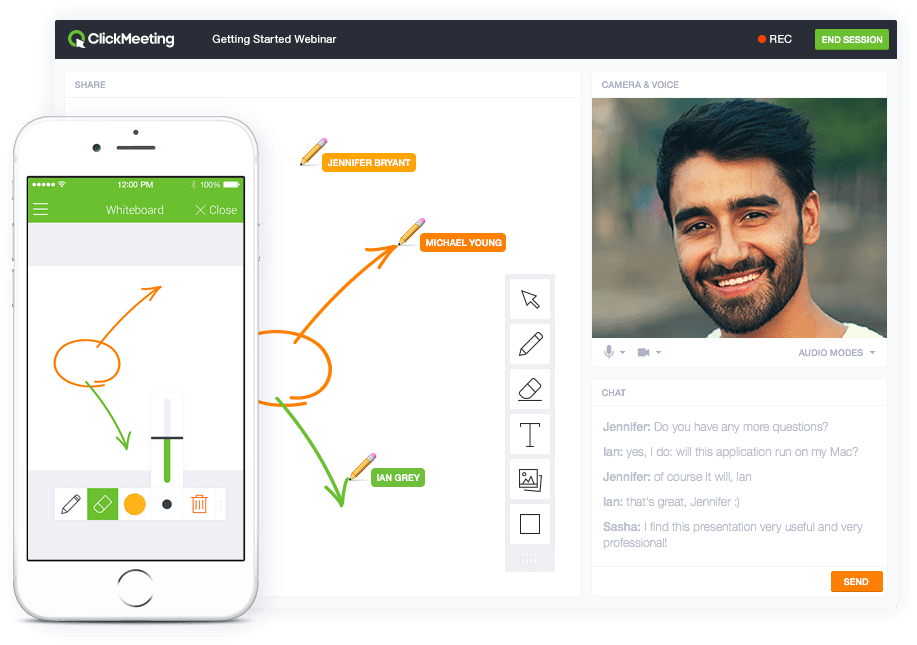
ClickMeeting is a webinar solution formerly owned by GetResponse, an email marketing software company. ClickMeeting's online meeting and collaboration tools are designed to support the sales, marketing, e-learning, and training needs of business of all sizes.
$25
per month
Dropbox
Score8.4 out of 10
N/A
Dropbox is a cloud storage solution, equipped with features that help users to save time, improve productivity, and collaborate with others. Users can edit PDFs, share videos, sign documents, and collaborate with stakeholders without leaving Dropbox.
$9.99
per month
Quip
Score8.4 out of 10
N/A
Quip is a collaboration tool, from Salesforce, that helps sales teams accelerate business in real-time with embedded documents, live Salesforce data, and other built-in collaboration features.
$120
per year per user
Pricing
ClickMeeting
Dropbox
Quip
Editions & Modules
Live 25
$25
up to 25 attendees
Live 50
$35
up to 50 attendees
Automated 25
$40
up to 25 attendees
Automated 50
$45
up to 50 attendees
Live 100
$60
up to 100 attendees
Automated 100
$75
up to 100 attendees
Live 200
$119
up to 200 attendees
Live 500
$139
up to 500 attendees
Automated 200
$145
up to 200 attendees
Enterprise
$165
500 - 5000
Automated 500
$179
up to 500 attendees
Live 1000
$239
up to 1000 attendees
Automated 1000
$279
up to 1000 attendees
Plus
$9.99
per month
Essentials
$18
per month
Business
$20
per month per user
Business Plus
$26
per month per user
Basic
Free
Enterprise
$25
per user per month
Starter
$120
per year per user
Plus
$300
per year per user
Advanced
$1,200
per year per user
Offerings
Pricing Offerings
ClickMeeting
Dropbox
Quip
Free Trial
Yes
No
No
Free/Freemium Version
No
No
No
Premium Consulting/Integration Services
Yes
No
No
Entry-level Setup Fee
No setup fee
No setup fee
No setup fee
Additional Details
Detailed enterprise pricing on demand.
—
All editions include unlimited personal documents and folders and a custom subdomain. Paid versions include unlimited document revision history, message archive and group sharing.
Dropbox is somehow easier to use, it is lighter and faster. Also the UX is more understandable and clear to me. I used Google Drive because it was a standard with one of my clients... But I really didn't like it. I truly hope, I will not be forced to use it again.
A de minimis incentive was given to thank the reviewer for their time. The incentive was not used to bias or drive a particular response, nor was the incentive contingent on a positive endorsement. More Info
Salesforce
Verified User
Chose Quip
We no longer use Teamwork but when we did, we tried to house documents but we'd always forget where they were. They weren't easy to access. Dropbox we still use sometimes, but if all our clients used quip, we would no longer need to use Dropbox except for audio and video files …
A de minimis incentive was given to thank the reviewer for their time. The incentive was not used to bias or drive a particular response, nor was the incentive contingent on a positive endorsement. More Info
Verified User
Chose Quip
While Quip is a fine tool, I personally would recommend an organization leverage Google Work Suite for Docs, Slides, and Sheets over Quip. I found Quip's feature set to be limited in relation to Google, all things considered. However, Quip can be valuable if your company has …
A de minimis incentive was given to thank the reviewer for their time. The incentive was not used to bias or drive a particular response, nor was the incentive contingent on a positive endorsement. More Info
Verified User
Chose Quip
Functionality of Quip exceeds Evernote across most criteria I can think of.
Downside is lower level of adoption of Quip, which makes sharing hard at times.
Also, the high penetration of Evernote vs. Quip can make some users resistant to switch tools (high cost) or at times change …
A de minimis incentive was given to thank the reviewer for their time. The incentive was not used to bias or drive a particular response, nor was the incentive contingent on a positive endorsement. More Info
ClickMeeting serves a dual purpose within our organization. Firstly, it acts as a reliable platform for hosting staff meetings, enabling effective communication and collaboration among team members. Whether it's for updates, discussions, or brainstorming sessions, ClickMeeting provides the necessary tools for seamless engagement.Secondly, ClickMeeting is instrumental in delivering online courses to our students. It empowers us to create interactive learning experiences regardless of geographical constraints. We can easily share course materials, conduct live or pre-recorded lectures, and facilitate interactive discussions and Q&A sessions. ClickMeeting ensures our students have access to high-quality education and a supportive learning environment.In summary, ClickMeeting is an invaluable tool for both internal staff communications and student-centered online courses. It fosters collaboration, engagement, and knowledge sharing in a flexible and accessible manner, enhancing our overall productivity and educational offerings.
Dropbox is well suited for sending File Requests to clients to upload documents, and for me to send File Transfers to clients with documents for them to download. I can create separate files for each client, and also create files within files, which is very convenient and useful for my business purposes. In Dropbox I can also see all of the File Requests that I have sent and it shows me how many times they've accessed it and how many files they uploaded. I can also see all of the File Transfers that I have made and whether how many times the client has accessed it and how many documents were downloaded. It also sends me notifications if the clients haven't downloaded their files yet so I can remind them. Dropbox Sign has been very easy to use, and I have already stated what could be changed with it
A de minimis incentive was given to thank the reviewer for their time. The incentive was not used to bias or drive a particular response, nor was the incentive contingent on a positive endorsement. More Info
I think collaboration is probably the best use case for it allows really good drafts of documents. I think it's really good use case if you want to go track edits to documents as well. It's probably not really good for versioning control, but it's definitely, it's very, very lightweight and so you can use it on a mobile device, you can use it in any web browser. So it's very easy to use, very easily accessible. I probably wouldn't use it from a spreadsheet perspective. Well I think some of the primary functions of data sheets are there. It doesn't have some of the more complex formulas that you would typically get from Excel or something like that
A de minimis incentive was given to thank the reviewer for their time. The incentive was not used to bias or drive a particular response, nor was the incentive contingent on a positive endorsement. More Info
ClickMeeting is user-friendly, the admin and user panel is simple, intuitive!
When conducting training, you can use default settings such as edu mode and it saves time, I don't have to worry if I'm sure I've muted everyone and if I'm the only one visible.
ClickMeeting is also integrated with the Moodle e-learning platform, so it's a great support in organizing blended-learning processes.
I can make projects available to editors so that they can do their work.
Dropbox is a place where I can store files that I can access from anywhere, even if I don't have my laptop with me at the time.
I have an old friend who is an acting professor in Tokyo. He loves the dialogue that I write in my novels. He converts chapters into scenework for his acting students. They get very excited when there's new material!
A de minimis incentive was given to thank the reviewer for their time. The incentive was not used to bias or drive a particular response, nor was the incentive contingent on a positive endorsement. More Info
Individual Audio Controls. I'd love to be able to adjust the audio for each of the presenters within the platform, as the host. Not all presenters are tech savvy and sometimes don't know how to adjust this themselves.
Additional Saved Color Schemes. I'd love to be able to create/save multiple custom color schemes that I can use for various events instead of a single one.
A de minimis incentive was given to thank the reviewer for their time. The incentive was not used to bias or drive a particular response, nor was the incentive contingent on a positive endorsement. More Info
A de minimis incentive was given to thank the reviewer for their time. The incentive was not used to bias or drive a particular response, nor was the incentive contingent on a positive endorsement. More Info
When using Quip Desktop, it can be slow to update with content from other users
I think it would be cool to have a PDF proofing system integrated into Quip. Once copy has gone to design, we are basically done using Quip - I'd like to bring that all together within Quip
Multi -select and group export of documents would be helpful
A de minimis incentive was given to thank the reviewer for their time. The incentive was not used to bias or drive a particular response, nor was the incentive contingent on a positive endorsement. More Info
Dropbox is a user-friendly, easy tool which requires little to no skill and they offer a free version with a good amount of storage available. There are other file sharing tools available however at a cost. Dropbox free version I have used for years and it serves every purpose I need.
ClickMeeting's overall usability is commendably excellent. Its intuitive, user-friendly interface makes it remarkably easy for users of all skill levels to navigate. The platform delivers a seamless, streamlined experience from setting up meetings to engaging with participants. Despite some advanced features having a slight learning curve, the platform remains user-friendly, efficient, and reliable.
A de minimis incentive was given to thank the reviewer for their time. The incentive was not used to bias or drive a particular response, nor was the incentive contingent on a positive endorsement. More Info
It works extremely well, and we have never had any issues with connecting or sharing files. It's very easy to use, and any team member can share, add, and delete files to a virtual drive. This is extremely helpful, and it's an amazing tool to use, ensuring everyone can connect and work together effectively.
It is the best collaboration tool in my company. Through it, the organization has achieved better connectivity and efficiency in its communication. Primarily, the docs feature of this software is the most utilized in the company. Slowly, dash-boarding and project management features have also been utilized. Generally, it is the best tool, very easy and fairly streamlined
A de minimis incentive was given to thank the reviewer for their time. The incentive was not used to bias or drive a particular response, nor was the incentive contingent on a positive endorsement. More Info
I really recommend the product for the Dropbox availability is a great having very very less downtimes, they errors are less I have been faced yet, due to connectivity sometimes we are getting errors. Only sometimes the limitations of some features show some errors.
A de minimis incentive was given to thank the reviewer for their time. The incentive was not used to bias or drive a particular response, nor was the incentive contingent on a positive endorsement. More Info
Dropbox is really useful, you can access any file from anywhere and you can upload and even edit files online, but, sometimes it can be slow. Downloading, uploading, and syncing is a bit slow, it can take several minutes. Furthermore, the search engine for large amounts of data can be slow too and it is not powerful.
It takes a bit of time to get to grips with the platform at first, but it's short and there is an online help chat available. People on the chat are very helpful and available for a long time - also on weekends, which greatly improves work. Really very good support.
They immediately responded like in an example that I gave where one of our staff members accidentally deleted the whole Special Hope Network Dropbox, we immediately contacted Dropbox they walked us through the steps of how to retrieve the information and luckily enough we were able to retrieve the entire Dropbox and we have had back and forth with Dropbox on what to do when an employee leaves how to remove them how to add another employee.
I have never used Quip's support. To be fair, we hired someone who used to work for Quip before working at our company, and he implemented it and pushed it with the team. He was very biased toward the product, and yes it was better than Google Drive, but by how much?
A de minimis incentive was given to thank the reviewer for their time. The incentive was not used to bias or drive a particular response, nor was the incentive contingent on a positive endorsement. More Info
The person for corporate product dealing and knowledge of the product explore and better and secure use are properly handover to us. Also provide full software and tool training from the basic to the pro level with each and every possible explanation. Provide many sessions regarding every doubt. Also Guide better suitable options for our business to migrate and integrate for the expansion in all places employee smoothly.
A de minimis incentive was given to thank the reviewer for their time. The incentive was not used to bias or drive a particular response, nor was the incentive contingent on a positive endorsement. More Info
I did not personally take any training for Dropbox so I am self taught but I know when our Vice President selected Dropbox, he personally did do some training modules on it and I'm assuming it was very easy and simple to understand since he now acts like he is a pro at it!
I needed to stay current in improving my daily operations. Dropbox was suggested to me by a former colleague two-years ago and I've been using it just fine ever since.
- does not require installation - clear interface - fast chat technical support - available in Polish language - provides a stable connection - it allows us to share presentations - we can also record the meeting - the process of creating the meeting is quick and easy also for beginners
I prefer the layout and visual aspect of Dropbox as it mirrors my files on my computer. I feel that I am more organized, and it's easier to find my files in Dropbox than it was with Google Drive.
Google Drive is an obvious choice for a collaboration suite, but it still has this old-fashioned Windows 95 feel to it, with the standard file system hierarchy and spread-sheet like lists of files. Quip has a fresh take on the user interface, and the comments and discussion on a given file or line within a file seems more integrated and seamless, rather than a bunch of boxes out in the margin away from where you're actually reading and working. Having everything just to the left of a list or paragraph makes it easier to focus and maintain context while you're working or discussing a certain point.
A de minimis incentive was given to thank the reviewer for their time. The incentive was not used to bias or drive a particular response, nor was the incentive contingent on a positive endorsement. More Info
I would recommend to this product directly to the sales team of Dropbox for the best deal provide to my referred person and provide the best service to them.
A de minimis incentive was given to thank the reviewer for their time. The incentive was not used to bias or drive a particular response, nor was the incentive contingent on a positive endorsement. More Info
It's easy to integrate with the systems of Windows and Linux, easy to have web versions accessible, which provide the web login credentials. Also, it can be installed for individuals for the best autosync features.
A de minimis incentive was given to thank the reviewer for their time. The incentive was not used to bias or drive a particular response, nor was the incentive contingent on a positive endorsement. More Info
A de minimis incentive was given to thank the reviewer for their time. The incentive was not used to bias or drive a particular response, nor was the incentive contingent on a positive endorsement. More Info
ClickMeeting has had a very positive impact on our organization’s objectives. It allows us to run open training sessions and webinars for participants from multiple organizations, reaching more people without the need for travel or large venues. The platform’s reliability and ease of use help us deliver high-quality training efficiently.
When it works (usually if a client already has Dropbox, so they don't get the solicitation to sign up), it works flawlessly.
I've had multiple clients not see the "continue with download only" at the bottom and email me to resend the media another way because they don't have a Dropbox account.
It is a tool that allows work teams to move forward in a centralized way and meet their objectives as efficiently as possible; this has allowed us to meet our customers and brought more work to the organization, therefore more revenue; I would say that the ROI was fast enough, as expected.