Chose Time Doctor
Time Doctor is easier to use with a bit more flexibility on reporting, plus it has an interface for the client to view the details.

| Product | Rating | Most Used By | Product Summary | Starting Price |
|---|---|---|---|---|
 Clockify | Small Businesses (1-50 employees) | Clockify, from COING in Palo Alto, is a time tracker and employee timesheet software for teams of all sizes. Clockify lets users track how much time is spent working on tasks, as well as keep track of employee timesheets and billable hours, project completion, reports, and schedules. | $0 forever, unlimited everything | |
 Time Doctor | N/A | Time Doctor offers in-depth productivity analytics, giving business owners insight on how to improve performance and scale. Going beyond tracking and monitoring, Time Doctor’s suite of tools put data-driven improvement front and center, helping to ensure that teams of all sizes are actively working on the right things while also offering actionable insights to maximize performance and efficiency. Time Doctor tracks the collective hours a team puts in. But it also provides a… | $7 per month per user | |
 TMetric | Small Businesses (1-50 employees) | TMetric is an online time tracker designed for freelancers and teams of any size. With TMetric users can: set budgets for their projects; set rates on any task, client, project or team member; create tags and set them to any task; see their workday on a timeline; get detailed time and money reports. TMetric integrations include Asana, Basecamp, Bitbucket, GitHub, GitLab, Jira, Pivotal Tracker, Redmine, Trello, Visual Studio Online, Wrike, and YouTrack. | $5 per month per seat |
| Clockify | Time Doctor | TMetric | ||||||||||||||||||||||
|---|---|---|---|---|---|---|---|---|---|---|---|---|---|---|---|---|---|---|---|---|---|---|---|---|
| Editions & Modules |
|
|
| |||||||||||||||||||||
| Offerings |
| |||||||||||||||||||||||
| Entry-level Setup Fee | Optional | $9.99 per user | No setup fee | |||||||||||||||||||||
| Additional Details | Unlimited usage and number of users for free. Paid plans are solely for access to additional features. Self-hosting software on own servers available. | — | Discount of up to 20% for annual billing. | |||||||||||||||||||||
| More Pricing Information | ||||||||||||||||||||||||
| Clockify | Time Doctor | TMetric | |
|---|---|---|---|
| Considered Multiple Products | Clockify No answer on this topic | Time Doctor | TMetric No answer on this topic |
| Clockify | Time Doctor | TMetric | |
|---|---|---|---|
| Small Businesses |  Traqq Score 9.1 out of 10 | Traqq Score 9.1 out of 10 | Traqq Score 9.1 out of 10 |
| Medium-sized Companies |  TimeClock Plus Score 9.5 out of 10 | TimeClock Plus Score 9.5 out of 10 | TimeClock Plus Score 9.5 out of 10 |
| Enterprises |  Zoho People Score 8.9 out of 10 | Zoho People Score 8.9 out of 10 | Zoho People Score 8.9 out of 10 |
| All Alternatives | View all alternatives | View all alternatives | View all alternatives |
| Clockify | Time Doctor | TMetric | |
|---|---|---|---|
| Likelihood to Recommend | 7.0 (12 ratings) | 8.0 (54 ratings) | 9.9 (4 ratings) |
| Likelihood to Renew | 10.0 (1 ratings) | 10.0 (1 ratings) | - (0 ratings) |
| Usability | 7.0 (2 ratings) | 10.0 (3 ratings) | 10.0 (1 ratings) |
| Availability | 10.0 (1 ratings) | - (0 ratings) | - (0 ratings) |
| Performance | 9.0 (1 ratings) | - (0 ratings) | - (0 ratings) |
| Support Rating | 8.2 (4 ratings) | 5.0 (5 ratings) | 8.3 (2 ratings) |
| Implementation Rating | - (0 ratings) | 10.0 (1 ratings) | - (0 ratings) |
| Product Scalability | 10.0 (1 ratings) | - (0 ratings) | - (0 ratings) |
| Clockify | Time Doctor | TMetric | |
|---|---|---|---|
| Likelihood to Recommend | CAKE.com, Inc
 Keith James Veloso Virtual Assistant | Time Doctor
| Devart
 Dr. Tom G. Beaufort Wilson CTO (Chief Technical Officer) |
| Pros | CAKE.com, Inc
 Quentin Goin Integration Engineer | Time Doctor
 Marc Harty CEO | Devart
|
| Cons | CAKE.com, Inc
Keith James Veloso Virtual Assistant | Time Doctor
 Ruby Javaid Chief Designer | Devart
 Josh Rubino Project Manager |
| Likelihood to Renew | CAKE.com, Inc
Quentin Goin Integration Engineer | Time Doctor
| Devart No answers on this topic |
| Usability | CAKE.com, Inc
Keith James Veloso Virtual Assistant | Time Doctor
| Devart
Josh Rubino Project Manager |
| Reliability and Availability | CAKE.com, Inc
Quentin Goin Integration Engineer | Time Doctor No answers on this topic | Devart No answers on this topic |
| Performance | CAKE.com, Inc
Quentin Goin Integration Engineer | Time Doctor No answers on this topic | Devart No answers on this topic |
| Support Rating | CAKE.com, Inc
| Time Doctor
 Mark Rueckert Sales Director | Devart
Dr. Tom G. Beaufort Wilson CTO (Chief Technical Officer) |
| Implementation Rating | CAKE.com, Inc No answers on this topic | Time Doctor
| Devart No answers on this topic |
| Alternatives Considered | CAKE.com, Inc
 McKay Salisbury Owner | Time Doctor
 Takara Sights Chief Editor and Project Manager | Devart
|
| Scalability | CAKE.com, Inc
Quentin Goin Integration Engineer | Time Doctor No answers on this topic | Devart No answers on this topic |
| Return on Investment | CAKE.com, Inc
McKay Salisbury Owner | Time Doctor
 Chris Basson eLearning and Development Specialist | Devart
|
| ScreenShots | Clockify Screenshots     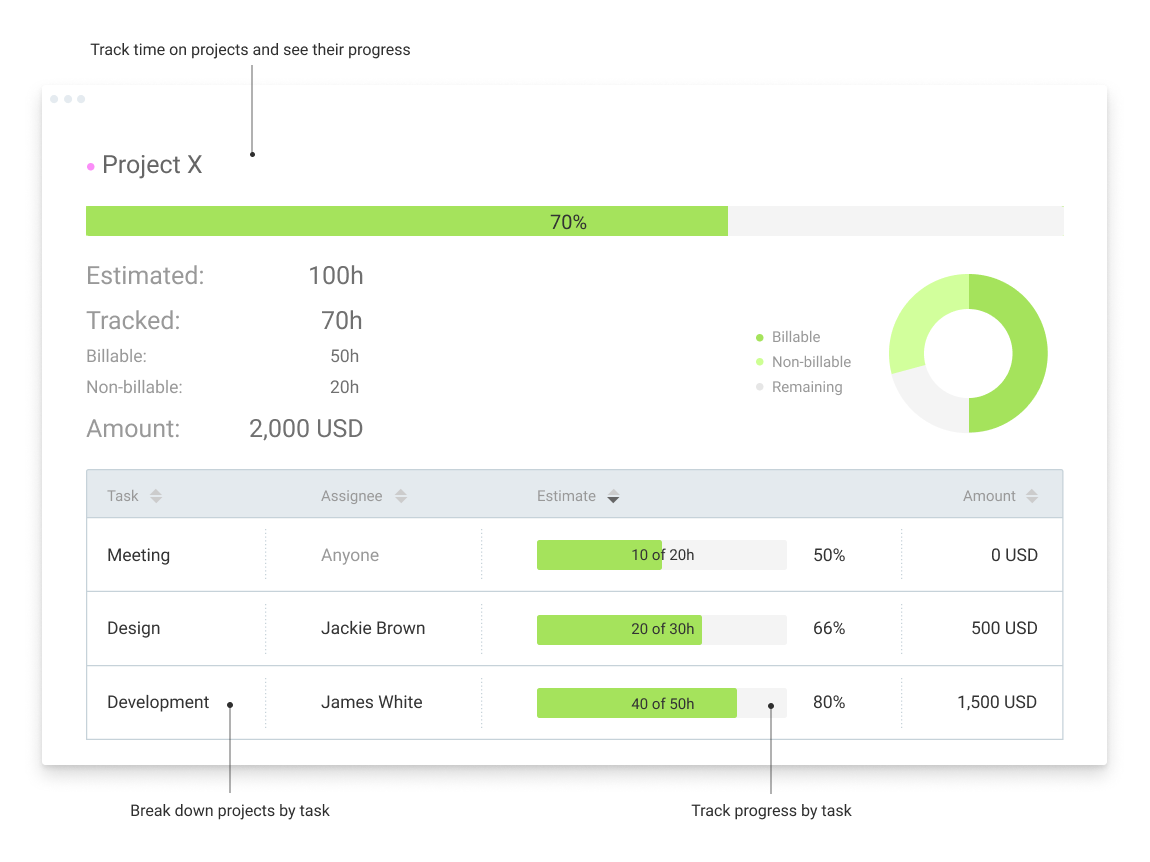 | Time Doctor Screenshots     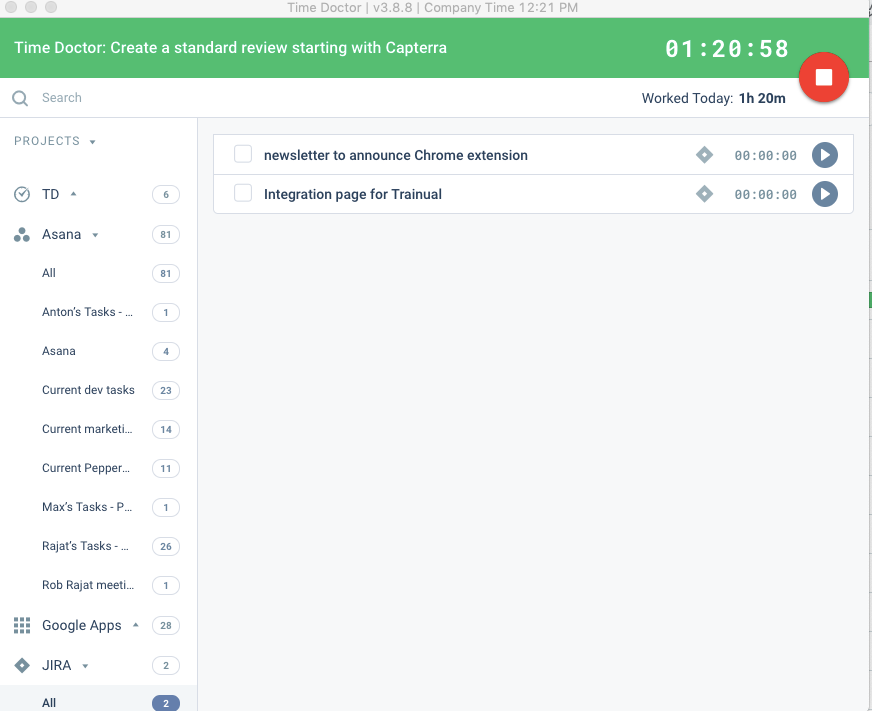 | TMetric Screenshots     |