TrustRadius: an HG Insights company

Save this comparison

Save this comparison

Add Product

Recommended Comparisons

    Overview
    ProductRatingMost Used ByProduct SummaryStarting Price

    DocuSign CLM

    Score8.2 out of 10
    N/ADocuSign CLM, formerly SpringCM, is a cloud-based platform that can be used to manage documents, contracts and related collateral. The solution includes workflows that can be tailored to an organization's business processes. It is also designed to accelerate team collaboration. SpringCM was acquired by DocuSign in the summer of 2018.

    $15

    per month

    OneSpan Sign

    Score9.6 out of 10
    Enterprise companies (1,001+ employees)
    OneSpan Sign (formerly eSignLive) is an e-signature solution for secure document signing processes that enables organizations to digitize business processes and eliminate costly paper and inconvenient “wet” signatures.

    $240

    per year per user

    Pricing
    DocuSign CLMOneSpan Sign
    Editions & Modules
    Personal
    $15
    per month
    Real Estate Starter
    $15
    per month
    DocuSign for Realtors
    $35
    per user/per month
    Standard
    $40
    per user/per month
    Business Pro
    $60
    per user/per month
    Starter
    $75
    per month
    Intermediate
    $450
    per month
    Advanced Solutions
    Contact sales team
    Real Estate Plus, Broker Edition
    Contact sales team
    Sandbox Account
    Free
    Enterprise Offerings
    Contact sales team
    Free Trial
    $0
    Free for 30 Days
    Professionnal
    $20
    Per User per Month
    Enterprise
    Call for Pricing
    Enterprise
    Call for pricing
    Contract
    Offerings
    Pricing Offerings
    DocuSign CLMOneSpan Sign
    Free Trial
    NoYes
    Free/Freemium Version
    NoNo
    Premium Consulting/Integration Services
    NoYes
    Entry-level Setup FeeNo setup feeNo setup fee
    Additional Details——
    More Pricing Information
    Community Pulse
    DocuSign CLMOneSpan Sign
    Considered Both Products
    DocuSign
    No answer on this topic
    OneSpan
    No answer on this topic
    Key User Insights
    Would buy again
    92%
    Would buy again
    33 Answers
    100%
    Would buy again
    7 Answers
    Delivers good value for the price
    100%
    Delivers good value for the price
    28 Answers
    100%
    Delivers good value for the price
    7 Answers
    Happy with the feature set
    92%
    Happy with the feature set
    33 Answers
    100%
    Happy with the feature set
    7 Answers
    Lived up to sales and marketing promises
    94%
    Lived up to sales and marketing promises
    17 Answers
    100%
    Lived up to sales and marketing promises
    6 Answers
    Implementation went as expected
    96%
    Implementation went as expected
    24 Answers
    100%
    Implementation went as expected
    5 Answers
    Features
    DocuSign CLMOneSpan Sign
    Contract Authoring
    Comparison of Contract Authoring features of DocuSign CLM and OneSpan Sign
    Feature
    DocuSign CLM
    6.9
    3 Ratings
    17% below category average
    OneSpan Sign
    -
    Ratings
    Contract creation6.03 Ratings00 Ratings
    Contract templates5.63 Ratings00 Ratings
    Clause library/saved fields9.12 Ratings00 Ratings
    Guided logic6.83 Ratings00 Ratings
    Contract Collaboration
    Comparison of Contract Collaboration features of DocuSign CLM and OneSpan Sign
    Feature
    DocuSign CLM
    7.5
    3 Ratings
    9% below category average
    OneSpan Sign
    -
    Ratings
    Contract sharing8.22 Ratings00 Ratings
    Contract editing5.63 Ratings00 Ratings
    Collaborating on contracts8.12 Ratings00 Ratings
    MS Word plug-in7.31 Ratings00 Ratings
    Approval process8.53 Ratings00 Ratings
    Interdepartmental workflows7.43 Ratings00 Ratings
    Contract Monitoring
    Comparison of Contract Monitoring features of DocuSign CLM and OneSpan Sign
    Feature
    DocuSign CLM
    6.2
    3 Ratings
    28% below category average
    OneSpan Sign
    -
    Ratings
    Contract database6.03 Ratings00 Ratings
    Contract search6.03 Ratings00 Ratings
    Contract milestone reminders & alerts6.83 Ratings00 Ratings
    Custom contract reports5.63 Ratings00 Ratings
    Tracking contract status6.13 Ratings00 Ratings
    Compliance check6.52 Ratings00 Ratings
    Contract Management
    Comparison of Contract Management features of DocuSign CLM and OneSpan Sign
    Feature
    DocuSign CLM
    7.6
    4 Ratings
    8% below category average
    OneSpan Sign
    -
    Ratings
    Contract Storage7.13 Ratings00 Ratings
    Advanced Search and Filtering6.43 Ratings00 Ratings
    Customizable Contract Templates5.63 Ratings00 Ratings
    Workflow Acceleration8.22 Ratings00 Ratings
    E-Signatures9.64 Ratings00 Ratings
    Reminders and Alerts9.63 Ratings00 Ratings
    Analytics and Reporting6.42 Ratings00 Ratings
    Integration with other Systems7.43 Ratings00 Ratings
    Best Alternatives
    DocuSign CLMOneSpan Sign
    Small Businesses
    No answers on this topic
    BoldSign, by Syncfusion
    Score10 out of 10
    Medium-sized Companies
    Conga CLM
    Score8.8 out of 10
    MSB Docs
    Score9.4 out of 10
    Enterprises
    Conga CLM
    Score8.8 out of 10
    DocuSign
    Score8.7 out of 10
    All AlternativesView all alternativesView all alternatives
    User Ratings
    DocuSign CLMOneSpan Sign
    Likelihood to Recommend
    8.0
    (39 ratings)
    10.0
    (38 ratings)
    Likelihood to Renew
    10.0
    (2 ratings)
    8.0
    (8 ratings)
    Usability
    8.1
    (2 ratings)
    10.0
    (2 ratings)
    Availability
    8.0
    (1 ratings)
    -
    (0 ratings)
    Performance
    8.0
    (1 ratings)
    -
    (0 ratings)
    Support Rating
    5.0
    (2 ratings)
    7.9
    (3 ratings)
    Online Training
    -
    (0 ratings)
    9.1
    (1 ratings)
    Product Scalability
    7.0
    (1 ratings)
    -
    (0 ratings)
    Professional Services
    10.0
    (1 ratings)
    -
    (0 ratings)
    User Testimonials
    DocuSign CLMOneSpan Sign
    Likelihood to Recommend
    DocuSign
    DocuSign is useful for collecting electronic signatures on isolated documents and packets that are administered separately or integrated into another system. DocuSign is integrated into our onboarding system, Paylocity, which is where the employee completes all onboarding tasks required for employment. Integrating DocuSign with Paylocity allows us to send documents that require more than one signature along with other onboarding tasks, which makes for a less confusing onboarding experience for the worker. DocuSign also allows us to automatically run E-Verify from the integrated Form I-9 Document, which saves us lots of time onboarding each employee.
    Incentivized
    Read full review
    OneSpan
    OneSpan Sign is suited to many professional business situations. It is well used by the legal, security and compliance teams as well as many people within the financial functions. A lot of businesses have become very agile, and require a paperless environment to working. There are some companies and businesses who would prefer paper documents to be signed, which would not work as well as the paperless versions. I would use it in many different scenarios where I would prefer to have a paperless transaction
    Incentivized
    Read full review
    Pros
    DocuSign
    • Alerts when documents are signed
    • Notifications if customers don't complete any or all of their required tasks
    • Showing clients exactly where to sign
    • Making signing easy and fast
    Incentivized
    Read full review
    OneSpan
    • One can set up a workflow in which one can specify the order in which signatures have to be done.
    • Customer service is great and always ready to go the extra mile.
    • Pricing is very transparent, and there are no hidden charges.
    Read full review
    Cons
    DocuSign
    • Increase sending limit for initial plans
    • Faster return for client service requests
    • When correcting a document, no new email is sent for notification of an update. The clients have to go back to the old document, and it feels uncomfortable for them.
    Incentivized
    Read full review
    OneSpan
    • Search capabilities can be improved by a great extent. We still can't search documents by name of the signatory
    • Pricing seems a bit high when compared with other players in the market
    • Data importing and exporting capabilities can be improved drastically
    Read full review
    Likelihood to Renew
    DocuSign
    Before we started using DocuSign, getting contracts actually signed by new clients was one more barrier to new business and to begin work. Once we started using DocuSign, it eliminated that barrier and has become a much less cumbersome process for us and our clients
    Incentivized
    Read full review
    OneSpan
    I don't see any reasons to change as their solution covers all my need for now. I could make even more integrations but that might be something that I will do down the road. I'm used to working with the interface and my data is all there as well.
    Read full review
    Usability
    DocuSign
    It is easy to use, however sometimes editing is not always the easiest, depending on, which can cause a redo or resend
    Incentivized
    Read full review
    OneSpan
    Easy to use design and tool
    Incentivized
    Read full review
    Reliability and Availability
    DocuSign
    Its a rare occurrence that this even happens
    Incentivized
    Read full review
    OneSpan
    No answers on this topic
    Performance
    DocuSign
    Easy to use for various documents. Easy for clients as well
    Incentivized
    Read full review
    OneSpan
    No answers on this topic
    Support Rating
    DocuSign
    Honestly, personally, I have only had one issue and it had nothing to do with the product but with the login
    Incentivized
    Read full review
    OneSpan
    The product is so well designed and built that we rarely need to reach out to customer service. But we have reached out to them in case of downtime, and we have always gotten a satisfactory response. We never had to follow up, as customer service executives were very responsible.
    Read full review
    Alternatives Considered
    DocuSign
    DocuSign CLM has a much improved user experience compared to similar products we have used. The streamlining of templates and traceability through the signing process are huge benefits, and better than competitors. The ability to set up designated templates for different use-case scenarios, and roll out efficient documents for signing, is invaluable, as well as other functions like Bulk Send and PowerForms.
    Incentivized
    Read full review
    OneSpan
    My experience with OneSpan in the customer service has been very positive. However, since my experience with OneSpan is much more recent, most of my technical experience with OneSpan includes technical areas that were not available in other products at the time I was working with other products.
    Incentivized
    Read full review
    Scalability
    DocuSign
    Reliable for the most part, there are issues here and there but minor
    Incentivized
    Read full review
    OneSpan
    No answers on this topic
    Professional Services
    DocuSign
    Service is easy and professional
    Incentivized
    Read full review
    OneSpan
    No answers on this topic
    Return on Investment
    DocuSign
    • Positive - has helped us track renewals which allows us to get out of "bad" contracts or renew "good" ones.
    • Negative - we had hoped for it to help us determine which terms and conditions we have agreed to in other contracts. This has made contract review remain a lengthy process.
    • Positive - We are now able to find all of our contracts which has helped us get out of unnecessary contracts (which positively impacts finances).
    Incentivized
    Read full review
    OneSpan
    • It has done what we got it for. It has made it much easier for our advisers to do business with clients in remote areas.
    • It has significantly reduced the time that it used to take to open a new account.
    Incentivized
    Read full review
    ScreenShots

    OneSpan Sign Screenshots

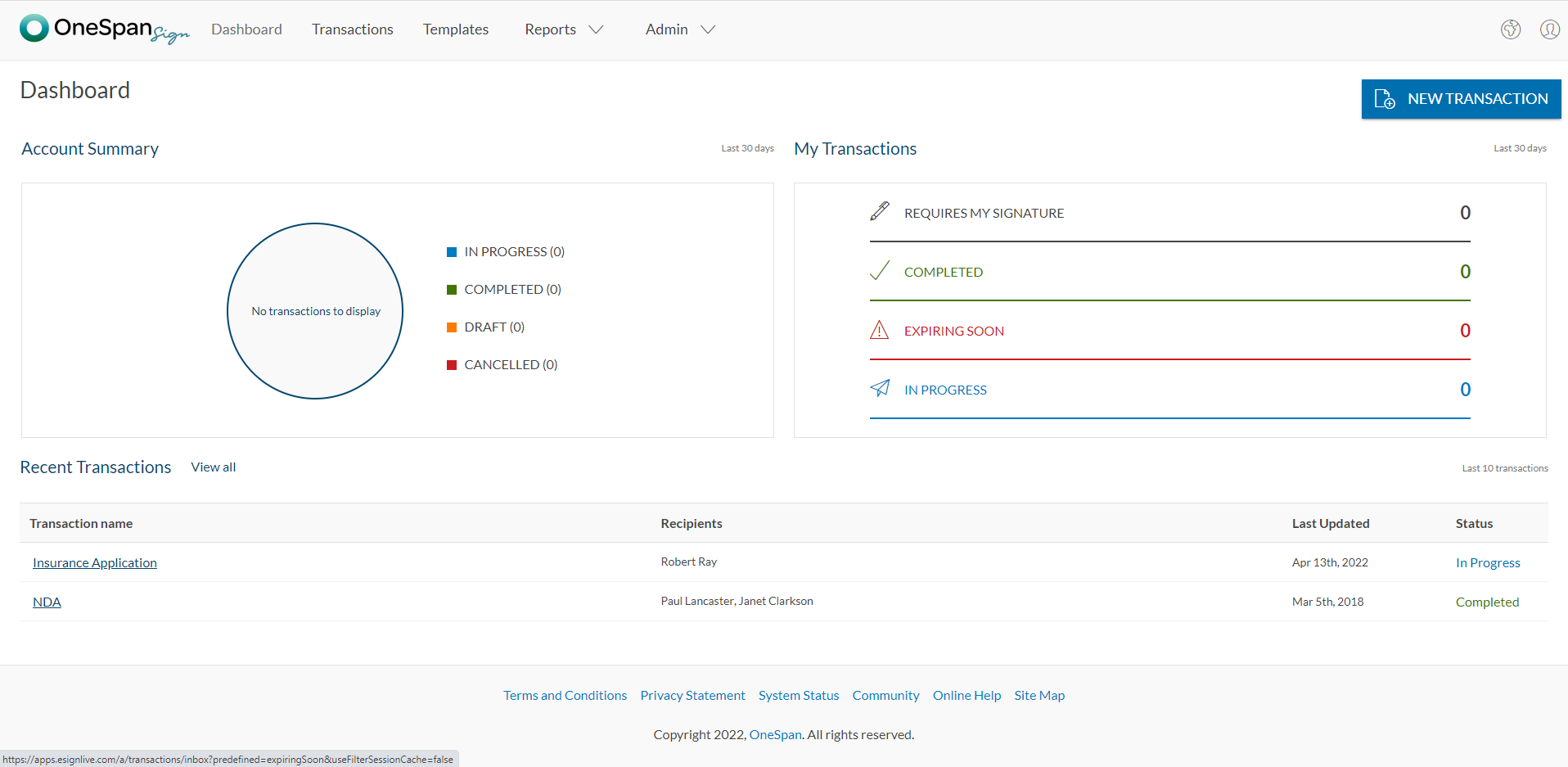
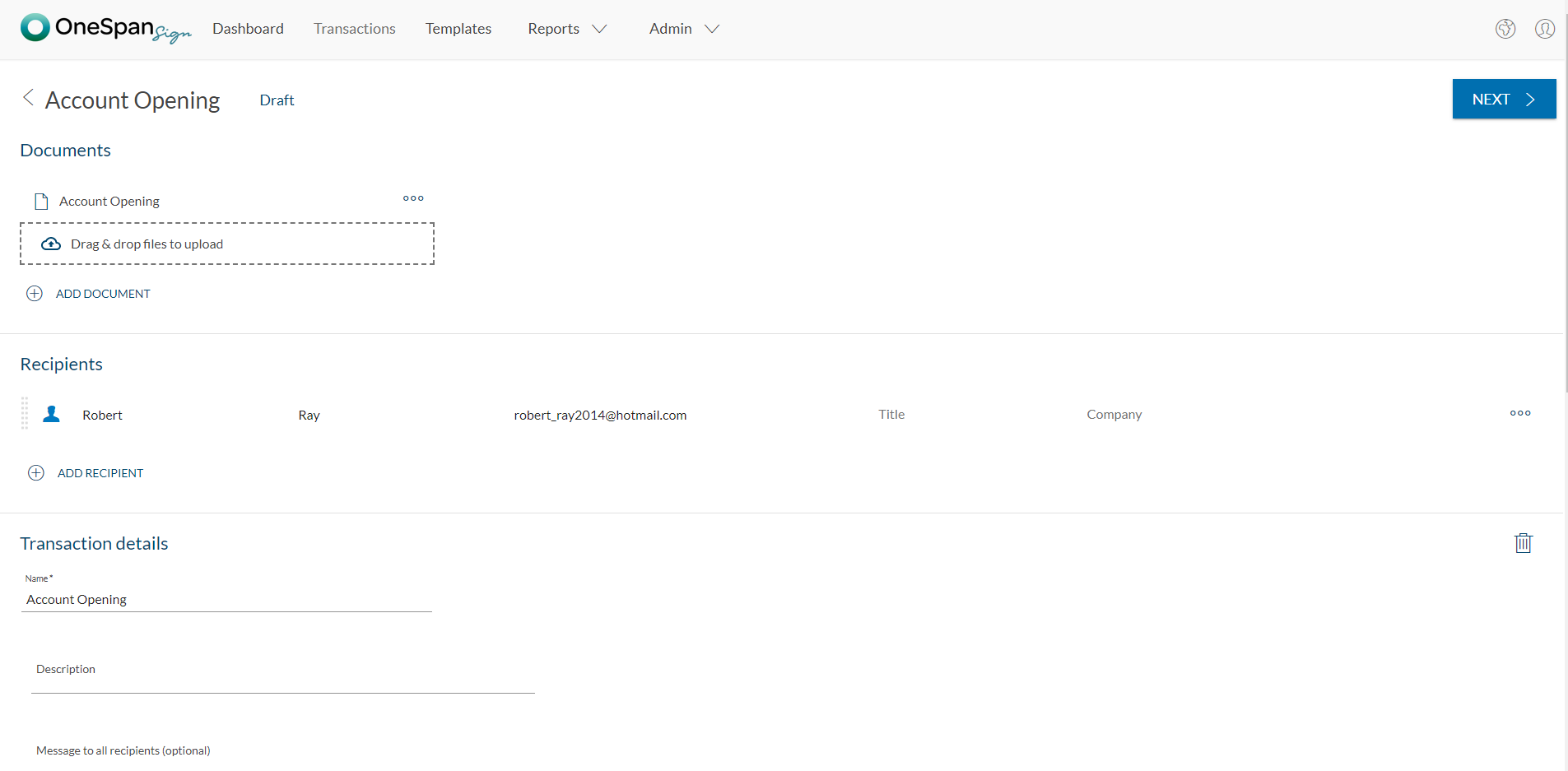
    Screenshot of User initiates the e-signature process by clicking 'New Transaction'.Screenshot of The user adds the necessary documents and signers to the transaction. Additional options like signer authentication & identification, in-person signing, reminders & notifications, and more are available in OneSpan Sign.Screenshot of Add signature blocks to desired locations on your document for your recipients to sign. Simply drag-and-drop the signature blocks into the document. Click the ‘Send to Sign’ button to route your document for signing.Screenshot of The signer can click-to-sign to complete the signing of the account opening application.Screenshot of The signing process is intuitive and easy for your signers. OneSpan Sign offers an optimized signing experience so your signers can sign anywhere, anytime, and across multiple devices.