Dotcom-tools vs. LogicMonitor

Overview
ProductRatingMost Used ByProduct SummaryStarting Price
Dotcom-tools
Score 0.0 out of 10
Mid-Size Companies (51-1,000 employees)
Dotcom-Tools' solutions monitor the performance of web pages, web applications, APIs, and servers for availability, speed, and functionality from a network of global monitoring locations. Dotcom-Tools develops performance tools to help users, webmasters, and developers improve their sites and their user’s experience on the web. Dotcom-Tools can be used to keep tabs on both performance and uptime of websites and web applications, or to monitor performance and uptime from multiple…N/A
LogicMonitor
Score 9.1 out of 10
Mid-Size Companies (51-1,000 employees)
LogicMonitor’s SaaS-based platform, LM Envision, enables observability across on-prem and multi-cloud environments. It provides IT and business teams operational visibility and predictability across their technologies and applications.N/A
Pricing
Dotcom-toolsLogicMonitor
Editions & Modules
No answers on this topic
Enterprise
Contact sales team
Website Monitoring
Contact sales team
Offerings
Pricing Offerings
Dotcom-toolsLogicMonitor
Free Trial
YesYes
Free/Freemium Version
NoNo
Premium Consulting/Integration Services
NoNo
Entry-level Setup FeeOptionalNo setup fee
Additional DetailsOur platform is broken down into Pro and Enterprise Pricing. Pro includes monitoring for all of your cloud, hybrid, and on-premises infrastructure. Our Enterprise package includes all of this, plus our AIOps and Machine Learning functionality that provides dynamic thresholds, root cause analysis, anomaly detection and more! LogicMonitor only charges by the device. What is considered a device? A device is anything with an IP address that you want to monitor, including a physical device or a cloud resource. This means multiple data sources under the same IP address can be monitored for the same price. Unlike some monitoring platforms. we don’t charge per node, interface, or metric.
More Pricing Information
Community Pulse
Dotcom-toolsLogicMonitor
Considered Both Products
Dotcom-tools

No answer on this topic

LogicMonitor
Chose LogicMonitor
I was one of the members who were looking for a better application for our system security, and we tried Datadog and New Relic. Those software were very good for normal usage. New Relic was working fine until we started facing problems if any sudden system increase as it was …
Chose LogicMonitor
I did use Dynatrace for my freelance work, as I was doing some projects on weekends for some extra income. We used to protect all of the financial information. However, LogicMonitor is used by our organization. I must say I really like LogicMonitor, as it is the best solution …
Chose LogicMonitor
It was a fantastic product, but I used it in my previous company. After I changed jobs, I became familiar with LogicMonitor because my current employer was considering it. I must say I have not faced any issue within my career since the time I started using it, and we are happy …
Chose LogicMonitor
We did not use software like LogicMonitor for the same work before, but I must say that my experience with LogicMonitor has been outstanding so far. It helps me to be free of tension. I can now concentrate on the actual work I was hired to do for my company.
Chose LogicMonitor
Some teams in our company are also using New Relic, and they are pretty satisfied with it. However, I also used it for some time, and I did not find it as flexible as LogicMonitor for our needs. So, yes, I suggested that management remove New Relic, as we have a superior tool …
Chose LogicMonitor
Our business used the trial period they provided on one of our systems and conducted sessions with all of this software. Our team tested all of these software options before deciding on LogicMonitor, as our business is expanding daily and we needed a system that could …
Chose LogicMonitor
Basically, we did not have any idea about it and how to choose, but we asked one of our former bosses, as they were very experienced with it, so they helped us by clarifying a few things between New Relic and LogicMonitor, as they told us that if you are looking for an …
Chose LogicMonitor
We evaluated Datadog, but it was primarily focused on data-related issues. So we decided to use LogicMonitor because it is excellent and offers so many more things than just data protection. It also keeps our systems safe with an advanced alert system, which is more critical …
Chose LogicMonitor
SaaS monitoring makes so much sense. Why run your monitoring inside the same environment you're trying to monitor, and how do you monitor your on prem monitoring if there's an outage affecting your own infrastructure? Whilst LogicMonitor isn't a specific point solution so …
Chose LogicMonitor
SolarWinds Access Rights Manager (ARM), SolarWinds NetFlow Traffic Analyzer (NTA), SolarWinds Network Automation Manager (NAM) and Microsoft System Center Operations Manager (SCOM)
Chose LogicMonitor
When looking for a monitoring tool, LogicMonitor was similar or better than all of them. We moved away from SolarWinds because of its inability to monitor other network environments and lack of a collector or probe type device that could collect remote data. PRTG was very …
Chose LogicMonitor
Fabrico and Splunk Infrastructure Monitoring
Chose LogicMonitor
LogicMonitor was the most versatile and easy to deploy solution. The data from LogicMonitor could be integrated with our other platforms, so it became the source of truth.
Chose LogicMonitor
We replaced N-Central with LogicMonitor, and had an extended bakeoff with Datadog. There were many things we liked (and still like) about Datadog, but its deployment model and less agnostic focus were disqualifying for our specific use case.
Chose LogicMonitor
Our initial business requirements in 2016 were to monitor Vblock and FlexPod deployments. We had specific gaps with particular storage appliances the monitoring tool we used at that time could not monitor effectively. When evaluating the mentioned solutions, LogicMonitor was …
Chose LogicMonitor
After switching from Solarwinds to LogicMonitor we would never go back. The higher price for LogicMonitor is well worth all the areas that this platform excels when compared to Solarwinds. The support is great, they are available directly through the web portal in a chat and I …
Chose LogicMonitor
During the evaluation process we looked a number of other solutions, a detailed technically analysis was carried out to map functionlity, deployment and scalabilty across the solutions.

The primary areas that LogicMonitor succeeded are around the simplicity of deployment, …
Chose LogicMonitor
LogicMonitor is good when compared with SolarWinds. Great UI and is simple to use.
Chose LogicMonitor
Domotz didnt cover all devices, for example MacOS devices. Which we dont have a lot of but are still critical to monitor on our network. Solarwinds Network Device monitoring was free and great, however the display was a bit much. Also had a lot of stuff we didnt really need to …
Chose LogicMonitor
Auvik did not provide historical data and could not monitor as many device types as LM. We found the Auvik collector to be more "buggy" and have had less issues with LM. We do feel that Auvik had a better network topology map and would clearly show device relationship. That is …
Chose LogicMonitor
Logic Monitor is not a near to the Solarwinds,
Chose LogicMonitor
LogicMonitor has a ton more ways to customize and monitor specific processes or items that other products simply cannot do. We started monitoring applications and actually logging into them to verify everything from start to finish is fully monitored and is working properly. I …
Chose LogicMonitor
SolarWinds had the big breach just as we left it. We loved how powerful it was, and how customizable - however, it is an ON-Prem tool, and as a growing MSP, that dynamic didn't and couldn't scale. We then moved to Auvik, which had the cleanest GUI and some neat features. That …
Chose LogicMonitor
LogicMonitor is much easier to configure, deploy, and manage than Zabbix. Alert tuning and client configuration is clear and intuitive in LogicMonitor. Zabbix is agent based, very convoluted configuration, and is difficult to adjust tuning to minimize false positives and alert …
Best Alternatives
Dotcom-toolsLogicMonitor
Small Businesses
SolarWinds Pingdom
SolarWinds Pingdom
Score 8.3 out of 10
Amazon CloudWatch
Amazon CloudWatch
Score 7.7 out of 10
Medium-sized Companies
ManageEngine Site24x7
Score 10.0 out of 10
ManageEngine Site24x7
Score 10.0 out of 10
Enterprises
ManageEngine Site24x7
Score 10.0 out of 10
ManageEngine Site24x7
Score 10.0 out of 10
All AlternativesView all alternativesView all alternatives
User Ratings
Dotcom-toolsLogicMonitor
Likelihood to Recommend
-
(0 ratings)
9.3
(0 ratings)
Likelihood to Renew
-
(0 ratings)
8.0
(0 ratings)
Usability
-
(0 ratings)
7.3
(0 ratings)
Availability
-
(0 ratings)
9.1
(0 ratings)
Performance
-
(0 ratings)
9.1
(0 ratings)
Support Rating
-
(0 ratings)
6.0
(0 ratings)
In-Person Training
-
(0 ratings)
8.2
(0 ratings)
Online Training
-
(0 ratings)
7.3
(0 ratings)
Implementation Rating
-
(0 ratings)
9.5
(0 ratings)
Configurability
-
(0 ratings)
9.1
(0 ratings)
Ease of integration
-
(0 ratings)
7.3
(0 ratings)
Product Scalability
-
(0 ratings)
9.1
(0 ratings)
Vendor post-sale
-
(0 ratings)
9.1
(0 ratings)
Vendor pre-sale
-
(0 ratings)
9.1
(0 ratings)
User Testimonials
Dotcom-toolsLogicMonitor
Likelihood to Recommend
No answers on this topic
We have several government departments and universities as our clients, and we conduct online examinations for them. Therefore, our servers require additional security to prevent unauthorized access to our systems remotely without our permission. We were performing an examination for one of our clients when someone from outside attempted to access our systems by creating a backdoor to our servers. Our team was busy handling the examination process and ensuring its smoothness. However, thanks to LogicMonitor, we were alerted at the right time, and we were able to save our data and clients' information with its help.
Read full review
Pros
No answers on this topic
  • LogicMonitor is very customizable. We can build whatever modules we need, because it uses standard protocols like HTTPS, SNMP and WMI to gather data and metrics.
  • We like that LogicMonitor is an agentless solution for our use case. Not all customers will allow an agent-based approach to 3rd party tools.
  • LogicMonitor has thousands of out of the box modules, which work on their own and also act as good baselines for the ones that we will end up customizing more. We are rarely starting at zero when we decide to do something new with LogicMonitor.
  • LogicMonitor has great documentation, and support has been helpful in the instances where we've needed them.
Read full review
Cons
No answers on this topic
  • Because of the rapid change in technology, maintaining DataSources to the most current level can be time-consuming for staff.
  • The network discovery and mapping capabilities are not as robust when compared to other solutions
  • While it can back-up configuration files on devices, it does not have the ability to push or modify configuration files back to devices.
Read full review
Likelihood to Renew
No answers on this topic
This product has met virtually all of our needs. It was easy to implement and has been simple to support. Customization has been intuitive with many options available. They keep adding features and expanding available options. The future of LogicMonitor looks even better than it is today which is very promising. The management and support teams at LogicMonitor are always helpful
Read full review
Usability
No answers on this topic
Set up is super easy. Just stand up a small Linux or Windows server to act as a collector. There are no agents to install on monitored devices and all you need is SNMP or WMI access. When creating dashboards, all you have to do is find the widget on the device you want to show up and choose the menu option to add it.
Read full review
Support Rating
No answers on this topic
The sales team support we received was top notch. They worked hand in hand to make sure the product met all expectations. So far we have not really had to work with support that much; we have worked with setup team after purchase to deploy product fully. No issues so far and we are four weeks in.
Read full review
In-Person Training
No answers on this topic
Add good training
Read full review
Online Training
No answers on this topic
The training is good but room to improve
Read full review
Implementation Rating
No answers on this topic
I did not truly dedicate myself to implementing LogicMonitor. However, I overheard the IT team members explain that "LogicMonitor is perfect for us as it has made most of the work automated, and implementation and training sessions were perfect for us." Thus, I can state that everything went smoothly with our implementation.
Read full review
Alternatives Considered
No answers on this topic
We did not use software like LogicMonitor for the same work before, but I must say that my experience with LogicMonitor has been outstanding so far. It helps me to be free of tension. I can now concentrate on the actual work I was hired to do for my company.
Read full review
Return on Investment
No answers on this topic
  • We have been able to eliminate multiple tools through LogicMonitor's ability to use collectors to run scripts and collect any numerical data from any reachable endpoint along with the customization and widgets available for dashboards. This has allowed for reduced costs and consolidation to a single point of view.
  • The ability to grant our clients access to see their data in real time has improved both our client satisfaction surveys and attributed to a few point gain in our NPS score. The ease of getting to the data has also reduced the quoting time for our sales teams during renewals to quantify what a client is consuming.
  • The amount of data that LogicMonitor collects affords our technicians a wide area of review when trying to isolate an issue and find a root cause. With the standard out of box data that is collected we have often been able to set a new threshold on something not previously thought of to proactively alert us in the future after identifying those root causes. This has reduced our Major Issues from 3-5 per month to usually 1-2 or less per quarter.
Read full review
ScreenShots

LogicMonitor Screenshots

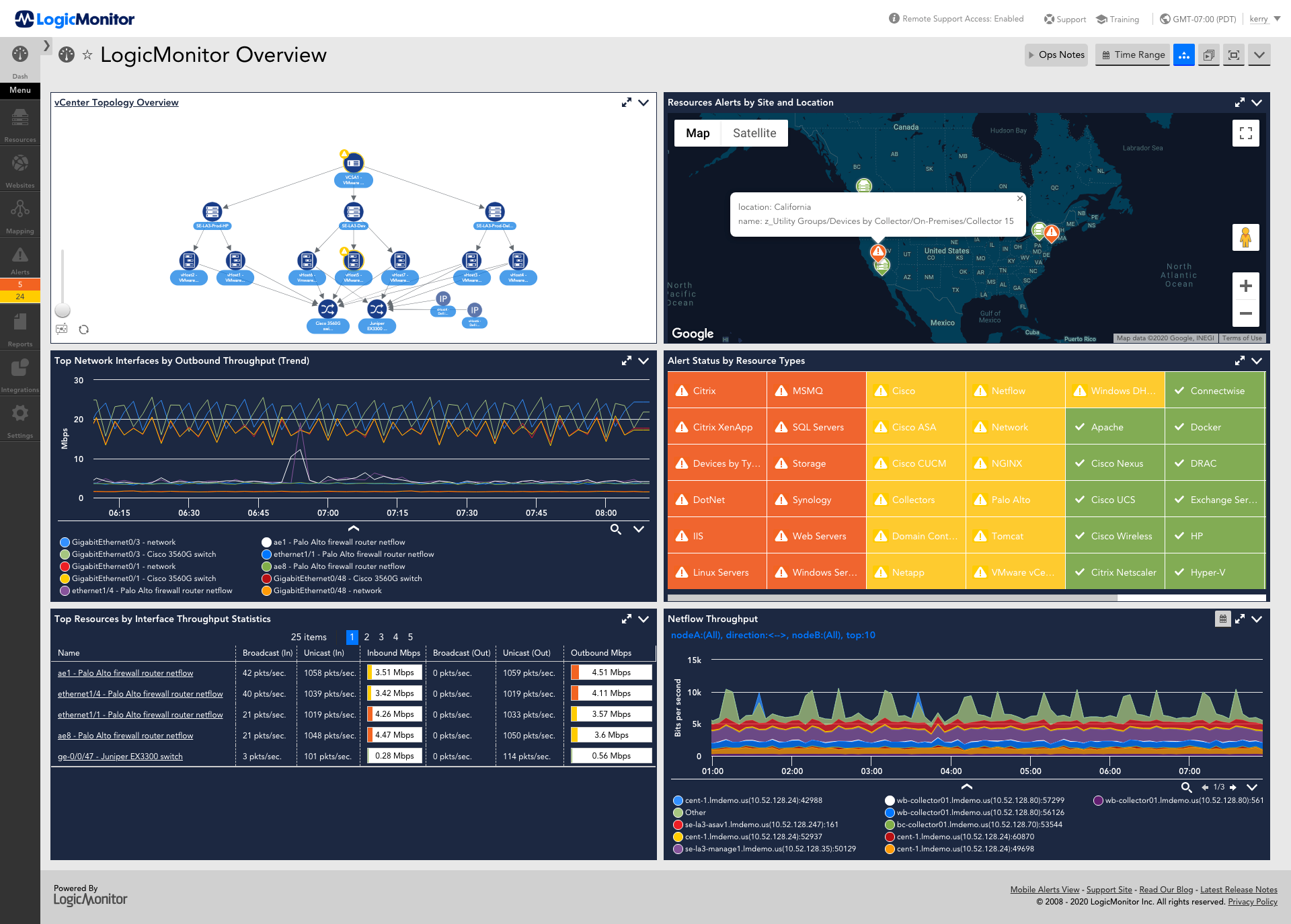
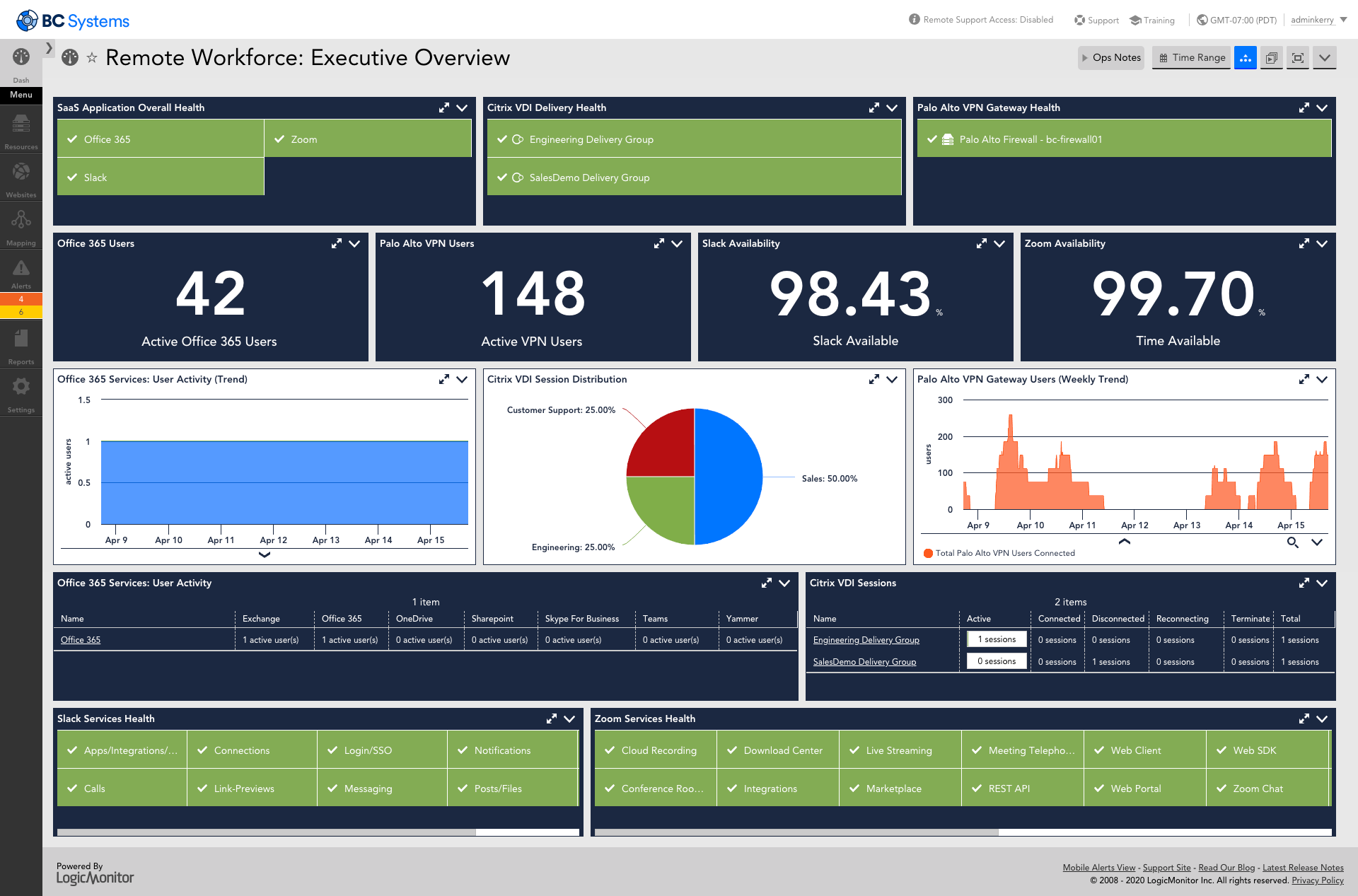
Screenshot of AIOps features for enterprises using technology or hybrid environments with cloud and container resources. LogicMonitor can be used to monitor and improve the performance of complex enterprise networks with dynamic thresholds, topology mapping, anomaly detection, and root cause analysis.Screenshot of LM Envision's comprehensive monitoring and observability capabilities across the IT infrastructure, that help to identify alerts for the most important systems while ensuring the user experience is uninterrupted across the globe.Screenshot of Monitoring that ensures servers and the applications running on top of them are highly available. Helps resolve issues and optimize resource consumption for the server infrastructure.Screenshot of LogicMonitor remote workforce monitoring, which ensures that employees are connected to the systems that keep them productive and provide proactive insight into dispersed systems and third-party outages.Screenshot of Unified cloud monitoring across a hybrid multi-cloud ecosystem.Screenshot of LM Logs delivering log analysis at enterprise scale.