Filter Ratings and Reviews
Filter 139 vetted LogicMonitor reviews and ratings
Reviews (1-25 of 94)
Companies can't remove reviews or game the system. Here's why.
January 21, 2021
LogicMonitor is used by a majority of our IT Support team as well as our software engineering teams. Each team has their own systems and modified data sources set to their standards and preferences. The Engineering teams use LogicMonitor for historical performance information and troubleshooting application issues. The IT Support team primarily leverages LogicMonitor as an alerting tool for critical events and secondarily as a performance/metrics tool to troubleshoot server/network issues. We monitor both our on-prem environments as well as Cloud all in one tool. Our management teams use LogicMonitor to determine uptime SLA as well as the health our all of our various software products and underlying critical infrastructure.
- LogicMonitor data sources allow you to monitor practically anything. If you can convert it to data, LogicMonitor can be modified to ingest and alert on it. There are a large number of out of the box data sources that cover pretty much everything standard you want to monitor, there is a large community of users who have also published their data sources and there is the flexibility to create your own. Data sources are limited only by your imagination.
- LogicMonitor offers the ability to monitor a broad range of devices and environments with great detail and precision. We struggled to find a software package that offered the ability to monitor both our Cloud and on-prem environments, with the detail we were looking for and at the price that we were offered. We have grown by acquisition so we are in all the Clouds as well as running a diverse set of hardware and software environments and LogicMonitor was out of the box ready to handle a vast majority of our environments.
- LogicMonitor customer support is very responsive and willing to work on any issues that we are experiencing. Their first level support handles most of our questions and is able to quickly escalate directly to the developers for any bugs that are discovered.
- When thinking about monitoring we have two major pieces. Performance metrics and logging. LogicMonitor covers the first very well but currently, it was not in the log monitoring sector. They are currently working on making up ground in that area but have a lot of work to do to get to the level of ELK or Splunk.
- Intelligent alerting is still a bit young. Knowing how devices are connected to what and alerting only on the device that's having issues is in its infancy. There are ways to configure this but it takes a lot of manual configuration to get it where you want it and needs to be maintained with any changes. We don't normally have a cascade of alerts due to devices failing but in certain environments, it has happened.
December 13, 2020
We use LogicMonitor solely within our IT department currently. However, we are exploring creating limited status dashboards for other departments to see the high-level status of our systems. We implemented LogicMonitor to gather more information regarding our servers and appliances with far less configuration compared to previous laborious and custom solutions.
- Auto discovery of Datasources and Datapoints for every added device
- Custom visual dashboards and many pre-configured rich dashboards
- Broad support and continual expansion of new devices and manufacturers
- After-hours alert management is lacking. 3rd party solutions are still recommended
- Updating DataSources can be time consuming if you need to edit the original DataSource.
December 11, 2020
We use LogicMonitor as our infrastructure monitoring platform across our 7 plants, 7 logistics facilities, 50 remote sites, and AWS/Azure hybrid cloud environments. LogicMonitor gives us a single pane of glass to view all of our infrastructures; from legacy hardware to bleeding-edge cloud resources. LogicMonitor also provides excellent default thresholds and alerting behavior, giving us huge gains in time for resolution compared to our previous toolset.
- Cloud native service monitoring: Easy to setup and just works. Any service, any public cloud.
- Legacy hardware monitoring: Just as good at monitoring that 25-year-old ERP HP-UX system as the latest cloud-native tool, all in one pane of glass.
- Redundant collectors out of the box allow us to perform maintenance and not lose monitoring insight.
- Support is outstanding. Just top notch.
- The UI is not always consistent, particularly the enforcement of the 'better' alerts pane.
- Spend even more time on your 'troubleshooter' data sources to identify monitoring collection issues; granted this has come a long way in the last year.
- SSO integration using AD groups is not easy, requires custom integration work.
December 11, 2020
LogicMonitor is used by our Client Services and Support department for our managed services programs. We use it for proactive monitoring of critical application platforms as well as internal networks. By providing managed services, we employ LogicMonitor to watch all of the critical processes, services, and functions of an application in a client's environment. LogicMonitor being cloud-based and full-featured is crucial to our program not only for monitoring the technical applications, but also for it's impressive alerting architecture with different types of communication alerts for our on-call engineers.
- Flexible so that you can easily define the service, application, process or any other critical function that is essential to successful operation. Works with so many different types of systems
- Robust alerting mechanism and easy configuration and setup. Allowing for phone, SMS, and email alerting.
- Has technology for watching almost any part of a technical environment. Great network hooks and tools, as well as configurable for most applications. Also, some really great new ways to monitor and deal with logs.
- Easy to use interface for configuration and ongoing use.
- Can always be more improvements in predictive monitoring and trending. Perhaps employing AI for some of the trending decision needs.
- Reconsidering pricing on the entry-level side so that smaller organizations can get into these sophisticated tools more easily.
- Possible pre-baked integrations with cloud platforms and services would be very nice.
December 11, 2020
It was deployed by the IT Infrastructure department and is now being expanded to application support teams and other specialized groups. We have deployed it extensively to monitor physical and virtual servers, critical workstations, production services, all network equipment, and some security appliances so far. We are now implementing it to monitor application servers and services, databases, and webservices for uptime and performance. I've also been able to leverage it to give me thorough visibility into my SDWAN performance.
- Alert rules
- Performance monitoring
- Escalation chains
- Netflow monitoring
- API integrations such as Meraki
- Network mapping
December 10, 2020
Infrastructure monitoring. We have it deployed for our IT manufacturing systems deployed at plants, cloud and datacenter locations, and networking teams to replace SCOM. We like LogicMonitor for agentless server monitoring, its SaaS based, thresholds and its ability to autodiscover. We find LM lacking severely in website, network, and cloud monitoring, as well as automation as they are no longer supporting their ansible modules. When we first started with them, they had a marketing slide about PowerBi, that my manager was keenly interested in. It turned out that was not an actual feature and have since removed the graphic.
- Server monitoring
- Baselining performance
- Simple alerting method
- Easy to use interface
- Forward thinking
- They need to support automation like ansible, puppet, chef.
- The collector agent is extremely insecure and they are making no effort to improve this design.
- They only support a few collector sizes that are unable to keep up with number of devices we have.
- They do not support load balancing collectors.
- They are terrible at notifying when datapoints are dropped or missing.
- They are not good at network equipment monitoring and aren't able to tell the difference between weighted BGP interfaces intelligently understanding traffic patterns.
- They're ML story is a lie, its all based on what they call dynamic thresholds that don't really work at scale and still require manually configuring the settings.
- They released LM Cloud but scoped its use case too narrow causing a really good feature to be blind to other possible uses of that feature.
- It is WAY too easy for datapoints team to be messed with and broken.
December 10, 2020
We use LogicMonitor for network and system monitoring. The information and data provided by the tool helps influence decisions across the company as well as with our customers. We do standard network and systems monitoring to address issues actively as well as proactively. LogicMonitor provides a platform to deal with customer infrastructure issues, as well as the ability to predict and notify of trends, so our other teams can proactively predict future issues and deal with them before they happen. The ability to customize reports and dashboards is key as an MSP, because we can present custom tailored dashboards to our customers on request.
- Present data in an easily digestible way.
- Open communication with account representative for things like bug reports and feature requests to further customize our experience.
- Platform Integration with ticketing systems is very good out of the box, with support for custom integrations.
- Anything that can be measured can be monitored in LogicMonitor.
- New features are often lackluster on first deployment, but usually are patched within an expected timeframe.
- Support tickets could be worked faster.
- Out of the box data sources are sometimes irrelevant and need to be customized.
We utilize LogicMonitor to provide us real-time monitoring and alerting of our public-facing production ERP system, FTP, and Network. We are able to monitor Azure Cloud Services, Netflow data from our NexGen Firewalls, Website uptime, SQL Services, and trends as well as a variety of other tools.
- Very easy GUI to understand and read.
- Lots of great ready to use dashboards.
- Easy integration with Azure.
- Lots of great out of the box services, the SQL tools in particular are outstanding.
- Enhancements to the product have been great while using it.
- Mobile App is essentially non-existent other than being in the app store.
- Possibly more templates that are very specific and then allow a picklist (easy checkboxes) of resources instead of typing in more resources or creating a new group.
December 10, 2020
We use LogicMonitor across the whole IT dept. This includes teams from network, voice, servers, firewalls and applications. We have dashboards for all of them to quickly monitor their systems. It enables everyone to look at their own equipment from high level or dig into the individual metrics. Having the collectors distributed across the country is very useful. Each one monitors devices close to it and provides rapid notification when something goes wrong.
- Distributed collectors
- Web based admin/dashboards
- Very diverse monitoring platforms
- Root Cause Analysis
- Auto Balanced Collector Group
- Better report generation
December 09, 2020
We use [LogicMonitor] for our OPs team to quickly determine an issue with our many customers. LogicMonitor has made resolution so much quicker with its Alerting, Dashboard and other tools to keep an eye on your environment. Out of Box monitoring for almost all devices is quite impressive. No software to install on Nodes, just using SNMP or WMI and you are set.
- RDP, SSH and HTTPs built in support helps when needing to gain access to a machine.
- Web functionality makes it easier to do your job from anywhere. Even your phone.
- Root Cause Analysis is a must have if you have many network devices that flap.
- More out of box monitoring for Juniper Devices
- Apache web 60 minute time outs
December 09, 2020
We are a Managed Services Provider, so LogicMonitor is being used across multiple customers to give us real-time monitoring and alerting proactively for all of our customers infrastructure and Cloud resources on a 24x7x365 basis.
- Has great and easy to use reporting and dashboards
- Already has direct connectivity to and monitors all our clients' current infrastructure
- Has API connectivity for more workflows, automations, etc. to many different popular systems (i.e. ITSM, knowledgebases, etc.)
- Easier to understand licensing
We required a product to help us monitor our customers Azure environment. The in built Azure reporting was not up to the full requirement of what we needed.
- The Dashboards are a very useful feature for wall boards in the office
- Email notifications to warn of targets being hit
- Large variety of alerting options
- Can seem very complex to begin with due to the amount of configuration options
We use [LogicMonitor] to monitor servers (real and virtual) and network devices etc. It makes it simple to have our eyes on everything at once.
- Tells us if a server is down.
- Tells us if a network device is down.
- Tells us if a CPU is near 100% utilization (or any level we define)
- Tells if disk space is running low.
- I haven't got any complaints, it's quite robust.
December 14, 2020
We use LogicMonitor to monitor client systems and send alerts for those system to our PSA for remediation as needed. We deploy it also to monitor downtime for sites and to let us know if a system is offline.
- System monitoring.
- Offline status alerts.
- Overall alerts to our PSA.
- Can be a bit hard to filter out noise.
December 14, 2020
We are a managed services IT staff and use LogicMonitor to support our clients and our own infrastructure. We sell monitoring as a service and Logic Monitor serves a critical role in that service. It helps us monitor everything from Network infrastructure to Windows/Linux Servers to Cloud Resources like AWS and Azure.
- Very powerful views for Ops teams that need to find root causes quickly.
- Customizable alerts thresholds and Escalation Chains that work well.
- Website Monitoring is very robust.
- Supports Modern Authentication options.
- Customizable Customer access for Managed Service Providers.
- Reporting is somewhat difficult to work with to get what you need.
- Most scripting options requires learning Groovy (might be a pro for some).
- Web UI can sometimes require refreshing for changes to show up which can be annoying.
December 14, 2020
LogicMonitor is being used by a department, to monitor and provide analysis to companies seeking remote support capabilities. It helps to view and create in-depth analysis of systems and issues arising that cannot be found from bare troubleshooting. Clients require monitoring support and LogicMonitor provides that edge to thoroughly check network, systems services and databases.
- In-depth database reporting on mount points, luns, etc.
- Networking reporting. Get alerts on network degrading.
- Server reporting on server health and status. Uptime.
- Website links reporting when it is down.
- Robust app not just for viewing alerts.
- Additional connectors to work with a wide range of software for automation.
- More user friendly reporting for end users to understand.
December 14, 2020
LogicMonitor is currently being used across our entire organization. Since we are an MSP this is a critical component to our business. Monitoring and alerting is difficult across any organization let alone multiple ones.
- Their supported device base is second to none, 9 times out of 10 you probe the device and it knows it.
- Remote access through the platform is a big one for us as it simplifies access to devices without having to log into VPNs or opening them up to the internet.
- API integration. This was imperative as we needed to be able to manage and track alerts through our paging and ticket system. Their integrations were easy to set up.
- I think they could continue to improve the API integration allowing us to attach alerts to a particular customer in our PSA.
December 10, 2020
LogicMonitor is being used in our datacenters to provide an in depth overview at a glance and also granular alerting to specific events within our environments.
- Great granularity.
- Robust monitoring for all types of devices.
- Easy to understand dashboards.
- On-boarding is cumbersome.
- Steep learning curve compared to other products.
- Ease of use is not even considered.
December 10, 2020
We are a MSP and we utilize the product to monitor and alert us for both our customers as well as our internal network devices and servers. The application is integrated with our ticketing system and allows us to quickly respond to alerts. It also allows for two way communication between our ticketing system and Logic Monitor.
- Monitors a wide variety of equipment.
- Integrates with multiple platforms.
- Allows you to monitor multiple devices in a single view to give you a better idea of overall application performance.
- Needs a better integration with Connectwise CMDB.
- Would love to see a focus on MSP centric applications such as IT Glue and BrightGauge.
- Pricing is a little hard to swallow.
December 10, 2020
LogicMonitor is being used across our IS department to monitor our infrastructure as well as our applications. It helps us address any issues that come up immediately and keeps our systems running as expected. It allows us to quickly see the health of our applications as well as our infrastructure at all times and helps us isolate issues when they do come up.
- It allow us to monitor our traffic across our MPLS and DIA links.
- It monitors our switch ports and alerts us to any issues with our uplinks as well as our access ports.
- It alerted us to expiring certificates on our network equipment which allowed us to avoid downtime.
- We are able to create custom monitoring to tailor the software to our particular needs.
- We had issues with netflow working properly with our Cisco Nexus gear.
- We have had issues with SNMPv3.
- The ability to easily browse thru resources is a little clunky.
December 09, 2020
Synoptek uses LogicMonitor to monitor our own and our customers infrastructure world wide. Aside from monitoring, we also use LogicMonitor as a key tool in our capacity planning and problem management processes.
- Alarm distribution - being able to route different alarms or alarm types to different teams allows for more distributed management of the infrastructure.
- Being flexible and allowing customers to write monitoring data sources that meet their own needs is extremely valuable.
- Extending that flexibility to hosting a community where Logic Monitor users can share their custom data sources is a huge time saver. you are never the first person to encounter a particular problem, so being able to leverage other users' output to solve a similar problem is great.
- Billing - My pet peeve is that LogicMonitor does not yet support a "utility model" for billing. this is an antiquated billing model and while it provides stability and certainty for LogicMonitor, I'm far more concerned about spending dollars on licenses that I may or may not get to use.
December 09, 2020
We use [LogicMontior] to monitor our large call center and network devices. We have several MPLS links, and LogicMonitor provides usage analysis so we can easily tell if there is a network problem.
- Monitor Cisco Call Manger
- Network Devices
- Firewall Monitoring
- You have to pay extra for the really cool functions but that is the case with every cloud solution.
November 07, 2020
We are an MSP with clients that are very diverse, ranging from defense contractors to unions to hospitals. LogicMonitor allows us to monitor all the servers very easily and create dashboards that add value to the customer. It has been a game changer for our monitoring needs.
- Automatic recognition of devices
- Allows custom datasources with our own scripts
- Easy to deploy collectors and get monitoring up and running in minutes
- Allow return of data to include strings, not just integers; this is a pain point
- Allow other types of scripts to run besides PS and groovy
- Better LM Cloud datapoints, not everything is included for Azure; I know this is limited to the APIs that Azure allows
We use LM for our customers. This gives them a unified view of what's going on.
- Dashboards.
- Alert Deliveries.
- Custom DataSources.
- Integration with AWS, Google Cloud.
- Mobile Application.
- Showing Absolute numbers in the dashboards/graph instead doing average/sum.
December 23, 2020
LogicMonitor is one of the well-organised tool in the market and very easy to adapt to any industry. It has everything that you need for your company. We have been looking for more than 2 years [for a] tool like LM. This is the latest cloud-based monitoring tool that can monitor the cloud apps.
- Easy to access.
- Cloud monitoring.
- Agent-less monitoring tool.
- You need to learn the Groovy script.
- WMI Troubleshooting.
- SN integration.
LogicMonitor Scorecard Summary
What is LogicMonitor?
LogicMonitor aims to expand what’s possible for businesses by advancing the technology behind them. LogicMonitor's cloud-based infrastructure monitoring and observability platform helps businesses turn on a complete view in minutes, turn the dial from optimization to innovation, and turn the corner from sight to vision. With automated deployment and configuration for over 2000 technologies, LogicMonitor provides a unified view of infrastructure performance and analytics to help teams rapidly optimize their tech stack.
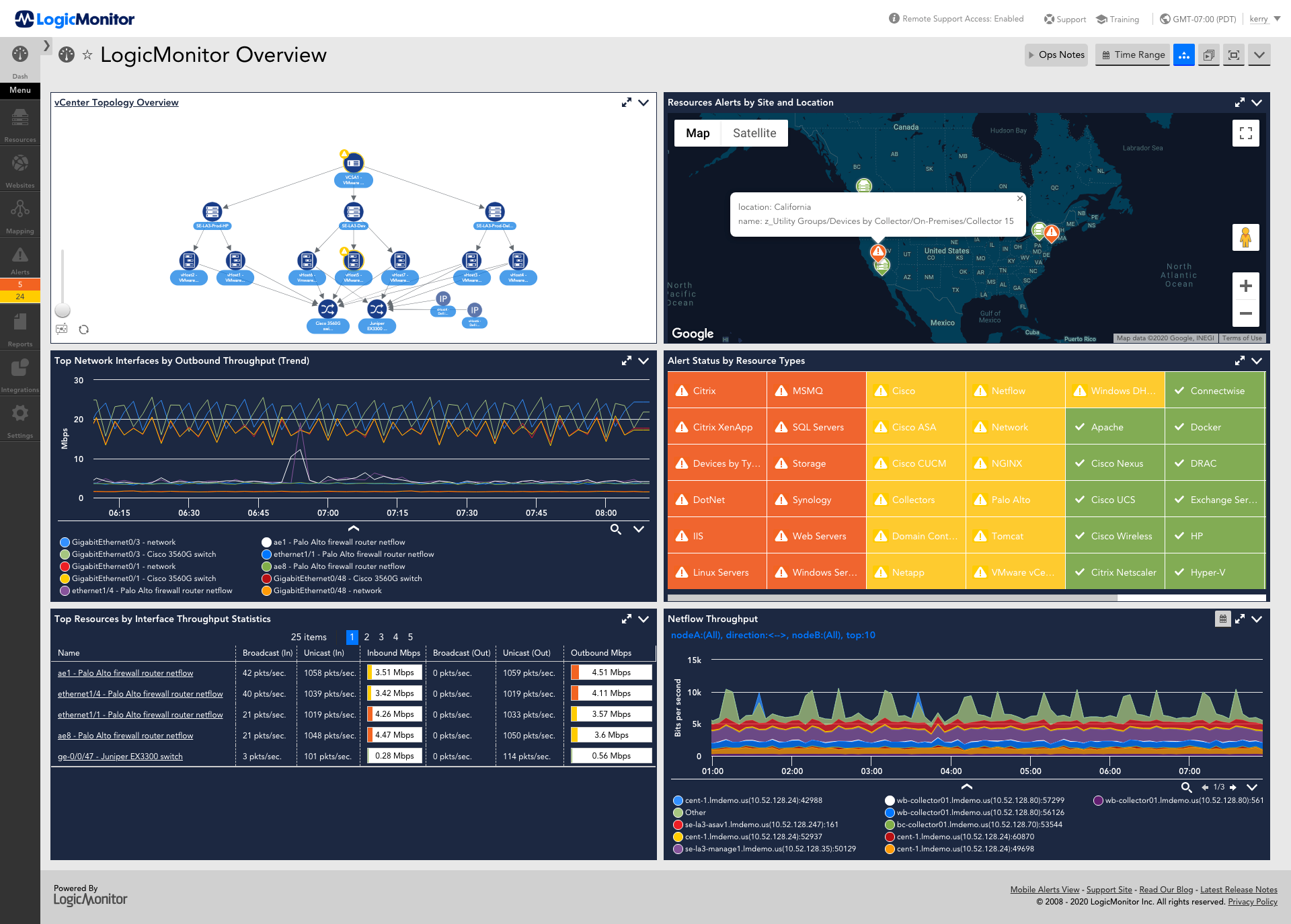
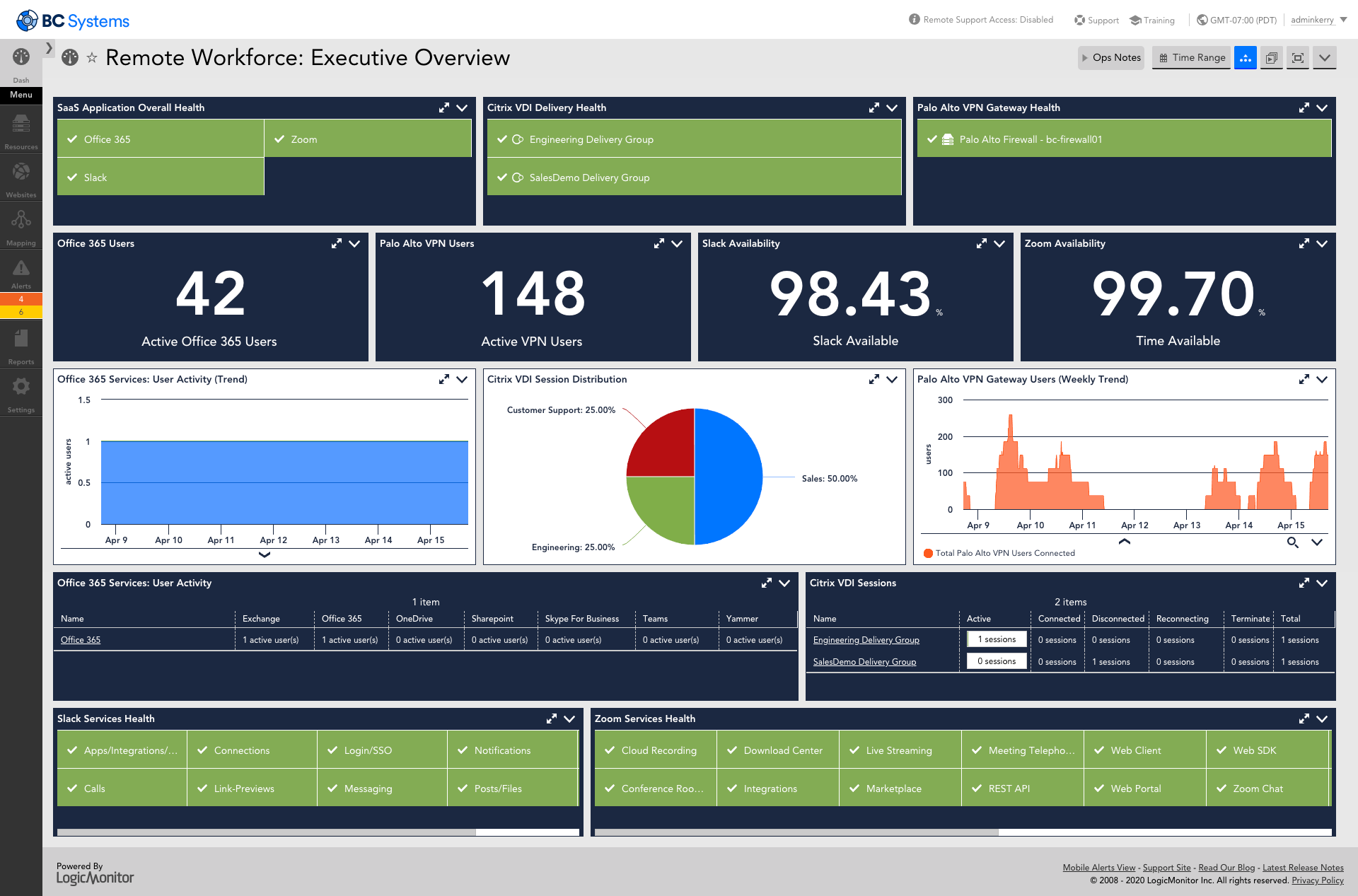
LogicMonitor provides users a single pane of glass to monitor and optimize the entire tech stack, including:
LogicMonitor comes with next-gen monitoring features, such as:
LogicMonitor provides users a single pane of glass to monitor and optimize the entire tech stack, including:
- Networks and physical networking gear
- On-premises and cloud-based servers
- Cloud and container resources (including Kubernetes)
- Websites and synthetic transactions
- Logs and log anomalies
- Virtualized environments
- Configuration and CMDB monitoring
- Applications, operating systems, storage, databases, and more!
LogicMonitor comes with next-gen monitoring features, such as:
- Automated deployment and configuration
- Dynamic topology mapping for networks, servers, containers, and more
- Alert escalation chains and dynamic thresholds for alerting
- Machine learning and AIOps that includes anomaly detection and root cause analysis
- Customizable dashboards and pre-built dashboard templates
- 24x7 live support with real technical engineers
LogicMonitor Screenshots
LogicMonitor Videos (5)
LogicMonitor Integrations
Terraform, by HashiCorp, Slack, ConnectWise Manage, Kubernetes, BigPanda, HipChat (discontinued), PagerDuty, ServiceNow IT Service Management, Stride, from Atlassian (discontinued), HashiCorp Vault, Puppet Enterprise (formerly Puppet Data Center Automation)
LogicMonitor Competitors
LogicMonitor Pricing
- Has featureFree Trial Available?Yes
- Does not have featureFree or Freemium Version Available?No
- Has featurePremium Consulting/Integration Services Available?Yes
- Entry-level set up fee?No
| Edition | Pricing Details | Terms |
|---|---|---|
| Pro (up to 199 devices) | Contact sales team | |
| Enterprise (200+ devices) | Contact sales team | |
| Website Monitoring | Contact sales team |
Our platform is broken down into Pro and Enterprise Pricing. Pro includes monitoring for all of your cloud, hybrid, and on-premises infrastructure. Our Enterprise package includes all of this, plus our AIOps and Machine Learning functionality that provides dynamic thresholds, root cause analysis, anomaly detection and more! LogicMonitor only charges by the device. What is considered a device? A device is anything with an IP address that you want to monitor, including a physical device or a cloud resource. This means multiple data sources under the same IP address can be monitored for the same price. Unlike some monitoring platforms. we don’t charge per node, interface, or metric.
LogicMonitor Customer Size Distribution
| Consumers | 0% | |
| Small Businesses (1-50 employees) | 29% | |
| Mid-Size Companies (51-500 employees) | 41% | |
| Enterprises (> 500 employees) | 30% |
LogicMonitor Support Options
| Free Version | |
|---|---|
| Phone | |
| Live Chat | |
| Forum/Community | |
| FAQ/Knowledgebase | |
| Social Media | |
| Video Tutorials / Webinar |
LogicMonitor Technical Details
| Deployment Types: | SaaS |
|---|---|
| Operating Systems: | Unspecified |
| Mobile Application: | Apple iOS, Android, Windows Phone, Mobile Web |



