eXo Platform is an open-source, social-collaboration software designed for enterprises. Some key features include: Enterprise Social Network, Enterprise Content Management and Social Collaboration.
$0
engaged user/month
Mikogo
Score1.2 out of 10
N/A
Mikogo is a free screen sharing solution with built-in VoIP for online meetings, web presentations, web conferencing and sales demos.
$156
Annually
Pricing
eXo Platform
Mikogo
Editions & Modules
Community
$0
engaged user/month
Social Intranet
$3
per month per user
Digital Workplace Cloud
$5
per month per user
Digital Workplace On-Premise
$5
per month per user
Enterprise Unlimited
9$
engaged user/month
Basic Annual
$156
Annually
Professional Annual
$228
Annually
Professional Lifetime
$456
Lifetime License per User
Team Annual
$468
Annually
Team Lifetime
$936
Lifetime License [Unlimited Users]
Offerings
Pricing Offerings
eXo Platform
Mikogo
Free Trial
Yes
Yes
Free/Freemium Version
Yes
Yes
Premium Consulting/Integration Services
Yes
No
Entry-level Setup Fee
No setup fee
No setup fee
Additional Details
—
Enterprise plans are also available for larger organizations, with a custom number of users, meeting participants, and channels. Master Administration and Web API integrations are also available. Contact Mikogo for further information.
More Pricing Information
Features
eXo Platform
Mikogo
Project Management
Comparison of Project Management features of eXo Platform and Mikogo
Feature
eXo Platform
9.2
5 Ratings
17% above category average
Mikogo
-
Ratings
Task Management
10.05 Ratings
00 Ratings
Gantt Charts
8.02 Ratings
00 Ratings
Scheduling
10.04 Ratings
00 Ratings
Workflow Automation
8.33 Ratings
00 Ratings
Mobile Access
10.05 Ratings
00 Ratings
Search
10.05 Ratings
00 Ratings
Visual planning tools
8.03 Ratings
00 Ratings
Communication
Comparison of Communication features of eXo Platform and Mikogo
Feature
eXo Platform
9.5
4 Ratings
17% above category average
Mikogo
-
Ratings
Chat
10.04 Ratings
00 Ratings
Notifications
10.04 Ratings
00 Ratings
Discussions
10.04 Ratings
00 Ratings
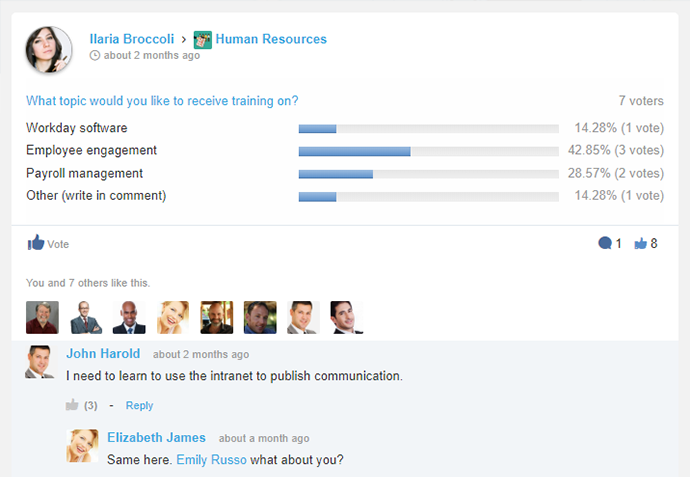
Surveys
7.13 Ratings
00 Ratings
Internal knowledgebase
10.04 Ratings
00 Ratings
Integrates with GoToMeeting
9.01 Ratings
00 Ratings
Integrates with Gmail and Google Hangouts
10.02 Ratings
00 Ratings
Integrates with Outlook
10.03 Ratings
00 Ratings
File Sharing & Management
Comparison of File Sharing & Management features of eXo Platform and Mikogo
Feature
eXo Platform
9.1
5 Ratings
12% above category average
Mikogo
-
Ratings
Versioning
8.64 Ratings
00 Ratings
Video files
9.03 Ratings
00 Ratings
Audio files
7.03 Ratings
00 Ratings
Document collaboration
10.05 Ratings
00 Ratings
Access control
10.05 Ratings
00 Ratings
Advanced security features
8.13 Ratings
00 Ratings
Integrates with Google Drive
10.04 Ratings
00 Ratings
Device sync
10.03 Ratings
00 Ratings
Performance & Compatibility of Online Events Software
Comparison of Performance & Compatibility of Online Events Software features of eXo Platform and Mikogo
Feature
eXo Platform
-
Ratings
Mikogo
3.1
4 Ratings
87% below category average
High quality audio
00 Ratings
4.14 Ratings
High quality video
00 Ratings
4.14 Ratings
Low bandwidth requirements
00 Ratings
1.14 Ratings
Mobile support
00 Ratings
3.22 Ratings
Screen Sharing
Comparison of Screen Sharing features of eXo Platform and Mikogo
Feature
eXo Platform
-
Ratings
Mikogo
6.0
4 Ratings
28% below category average
Desktop sharing
00 Ratings
2.24 Ratings
Whiteboards
00 Ratings
9.82 Ratings
Online Meetings / Events
Comparison of Online Meetings / Events features of eXo Platform and Mikogo
Feature
eXo Platform
-
Ratings
Mikogo
3.0
4 Ratings
93% below category average
Calendar integration
00 Ratings
1.12 Ratings
Meeting initiation
00 Ratings
1.24 Ratings
Record meetings / events
00 Ratings
2.14 Ratings
Slideshows
00 Ratings
7.63 Ratings
Online Events Collaboration
Comparison of Online Events Collaboration features of eXo Platform and Mikogo
Feature
eXo Platform
-
Ratings
Mikogo
2.1
4 Ratings
117% below category average
Live chat
00 Ratings
1.24 Ratings
Audience polling
00 Ratings
3.13 Ratings
Q&A
00 Ratings
2.13 Ratings
Online Events Security
Comparison of Online Events Security features of eXo Platform and Mikogo
It is especially suitable for working together remotely or from disconnected locations, allowing them to access collaborative work and tools to facilitate communication. Internal and cloud options also seem to offer a flexible adoption roadmap. It addresses the problems of efficient collaboration and effective communication between employees, particularly with regard to working and completing projects
A de minimis incentive was given to thank the reviewer for their time. The incentive was not used to bias or drive a particular response, nor was the incentive contingent on a positive endorsement. More Info
Pros Mikogo is well-suited and cost-effective for the small business Simple & well-designed; easy to figure out. Works best for one-on-one client support. Cons No live customer support Free version has limited features (e.g. no invite meeting allowed) Trial version only 14 days
A de minimis incentive was given to thank the reviewer for their time. The incentive was not used to bias or drive a particular response, nor was the incentive contingent on a positive endorsement. More Info
I personally love the user-friendly interface. Often you find software which is difficult to learn, and not utilized as often as it should be because of this. With eXo Platform, the interface is easy to understand, and is not particularly challenging to new users and non-tech savvy individuals.
It allows you to get work done, without feeling like using the platform is part of the actual work. It feels more like a natural system you would use in your leisure time to connect with friends and family, rather than a social intranet designed to facilitate employee communication and help you meet project deadlines.
The cloud platform allows users to easily share information and files, and collaborate on project work. Another benefit to this is it makes mobile collaboration possible.
A de minimis incentive was given to thank the reviewer for their time. The incentive was not used to bias or drive a particular response, nor was the incentive contingent on a positive endorsement. More Info
As the platform appears to be packed with features and functionality it may be a bit daunting at first to get used to it.
The initial adoption in a corporate setting would involve a number of questions, such as integration with other applications, data migration and security and the optimum adoption road map in order to maximise the benefit from the platform.
A de minimis incentive was given to thank the reviewer for their time. The incentive was not used to bias or drive a particular response, nor was the incentive contingent on a positive endorsement. More Info
This platform has a pleasant user interface, is very easy to use, and offers a lot of useful accessories and add-ons. At first it can be a little intimidating, but it doesn't take long to get used to it. It is considerably reliable and safe. Facilitates connection and collaboration with coworkers. It provides tools that allow you to capture, organize and act according to the internal knowledge of your team.
A de minimis incentive was given to thank the reviewer for their time. The incentive was not used to bias or drive a particular response, nor was the incentive contingent on a positive endorsement. More Info
The eXo platform offers a high quality support, which satisfies the requirements of our company, especially when the platform begins to be used, due to the amount of tools that can be overwhelming. Support responses are made in a short period of time.
A de minimis incentive was given to thank the reviewer for their time. The incentive was not used to bias or drive a particular response, nor was the incentive contingent on a positive endorsement. More Info
A de minimis incentive was given to thank the reviewer for their time. The incentive was not used to bias or drive a particular response, nor was the incentive contingent on a positive endorsement. More Info
We selected this product firstly because it's easy to use for end-users, even if it's not so simple to configure from an administrative point of view. Managing and tracking overall activities is quite easy and it's also possible to have an immediate vision of everything that is done on the platform. Users feel confident and are encouraged to share resources.
A de minimis incentive was given to thank the reviewer for their time. The incentive was not used to bias or drive a particular response, nor was the incentive contingent on a positive endorsement. More Info
Mikogo has simple features and is easy to use. If you don't need lots of bells and whistles and just want to screen share or video conference on a small scale Mikogo works best. Join.me & TeamViewer are a bit confusing for the novice small business person. My experience with LogMeIn has been that it's sluggish. GoToMeeting works great but is pricey for the small firm that mainly does one-to-one support/training. I couldn't get Zoom to work right.
A de minimis incentive was given to thank the reviewer for their time. The incentive was not used to bias or drive a particular response, nor was the incentive contingent on a positive endorsement. More Info
A de minimis incentive was given to thank the reviewer for their time. The incentive was not used to bias or drive a particular response, nor was the incentive contingent on a positive endorsement. More Info
A de minimis incentive was given to thank the reviewer for their time. The incentive was not used to bias or drive a particular response, nor was the incentive contingent on a positive endorsement. More Info