
Chose MoEngage
Figma vs. MoEngage vs. WebEngage
Figma vs. MoEngage vs. WebEngage
| Product | Rating | Most Used By | Product Summary | Starting Price |
|---|---|---|---|---|
 Figma | N/A | Figma, headquartered in San Francisco, offers their collaborative design and prototyping application to support digital product and UI development. | $15 per month per editor | |
 MoEngage | N/A | MoEngage is an insights-led customer engagement platform, that empowers marketers and product owners with AI-driven insights and the ability to instantly turn those insights into cross-channel experiences. | N/A | |
 WebEngage | N/A | WebEngage calls itself a multi-channel user engagement platform. It automates communication across a user's lifecycle and helps companies send messages via these channels: Web Messages In-app Messages Push Notifications Web Push Notification Email Marketing SMS Marketing Facebook Remarketing According to the vendor, cross-device tracking helps keep communication coherent and contextual, making the… | N/A |
| Figma | MoEngage | WebEngage | ||||||||||||||||||||||
|---|---|---|---|---|---|---|---|---|---|---|---|---|---|---|---|---|---|---|---|---|---|---|---|---|
| Editions & Modules |
| No answers on this topic | No answers on this topic | |||||||||||||||||||||
| Offerings |
| |||||||||||||||||||||||
| Entry-level Setup Fee | No setup fee | $1,000 | No setup fee | |||||||||||||||||||||
| Additional Details | — | — | Pricing is customised according to the customer usage and requirement. Contact support@webengage.com to know more about pricing plans. | |||||||||||||||||||||
| More Pricing Information | ||||||||||||||||||||||||
| Figma | MoEngage | WebEngage | |
|---|---|---|---|
| Considered Multiple Products |  Figma No answer on this topic | MoEngage | WebEngage |
| Figma | MoEngage | WebEngage | |||||||||||||||||||||||||||
|---|---|---|---|---|---|---|---|---|---|---|---|---|---|---|---|---|---|---|---|---|---|---|---|---|---|---|---|---|---|
| Email & Online Marketing |
| ||||||||||||||||||||||||||||
| Lead Management |
| ||||||||||||||||||||||||||||
| Campaign Management |
| ||||||||||||||||||||||||||||
| Reporting & Analytics |
| ||||||||||||||||||||||||||||
| Platform & Infrastructure |
|
| Figma | MoEngage | WebEngage | |
|---|---|---|---|
| Small Businesses |  OmniGraffle Score 9.7 out of 10 |  Mautic Score 9.0 out of 10 |  Vbout Score 9.9 out of 10 |
| Medium-sized Companies | OmniGraffle Score 9.7 out of 10 |  The Trade Desk Score 9.0 out of 10 |  PFL Direct Mail Platform Score 9.0 out of 10 |
| Enterprises | OmniGraffle Score 9.7 out of 10 |  Criteo Commerce Growth Score 8.0 out of 10 | PFL Direct Mail Platform Score 9.0 out of 10 |
| All Alternatives | View all alternatives | View all alternatives | View all alternatives |
| Figma | MoEngage | WebEngage | |
|---|---|---|---|
| Likelihood to Recommend | 8.9 (205 ratings) | 8.8 (2 ratings) | 7.3 (6 ratings) |
| Likelihood to Renew | 10.0 (7 ratings) | 2.0 (1 ratings) | - (0 ratings) |
| Usability | 8.1 (40 ratings) | - (0 ratings) | - (0 ratings) |
| Availability | 5.5 (1 ratings) | - (0 ratings) | - (0 ratings) |
| Performance | 8.2 (1 ratings) | - (0 ratings) | - (0 ratings) |
| Support Rating | 5.1 (17 ratings) | 8.0 (1 ratings) | - (0 ratings) |
| In-Person Training | 9.1 (1 ratings) | - (0 ratings) | - (0 ratings) |
| Online Training | 6.4 (1 ratings) | - (0 ratings) | - (0 ratings) |
| Configurability | 6.4 (1 ratings) | - (0 ratings) | - (0 ratings) |
| Contract Terms and Pricing Model | 7.3 (1 ratings) | - (0 ratings) | - (0 ratings) |
| Ease of integration | 6.4 (1 ratings) | - (0 ratings) | - (0 ratings) |
| Product Scalability | 7.3 (1 ratings) | - (0 ratings) | - (0 ratings) |
| Professional Services | 8.2 (1 ratings) | - (0 ratings) | - (0 ratings) |
| Vendor post-sale | 7.3 (1 ratings) | - (0 ratings) | - (0 ratings) |
| Vendor pre-sale | 7.3 (1 ratings) | - (0 ratings) | - (0 ratings) |
| Figma | MoEngage | WebEngage | |
|---|---|---|---|
| Likelihood to Recommend | Figma
| MoEngage
| WebEngage
 Atul Chaudhary Product Manager |
| Pros | Figma
| MoEngage
| WebEngage
 Rohit Asesh Deputy Manager - Digital Marketing |
| Cons | Figma
| MoEngage
| WebEngage
Rohit Asesh Deputy Manager - Digital Marketing |
| Likelihood to Renew | Figma
| MoEngage
| WebEngage No answers on this topic |
| Usability | Figma
| MoEngage No answers on this topic | WebEngage No answers on this topic |
| Reliability and Availability | Figma
 Abhimanyu Tiwari UX Research Lead | MoEngage No answers on this topic | WebEngage No answers on this topic |
| Performance | Figma
Abhimanyu Tiwari UX Research Lead | MoEngage No answers on this topic | WebEngage No answers on this topic |
| Support Rating | Figma
 Andrew Richardson UX Designer | MoEngage
| WebEngage No answers on this topic |
| In-Person Training | Figma
Abhimanyu Tiwari UX Research Lead | MoEngage No answers on this topic | WebEngage No answers on this topic |
| Online Training | Figma
Abhimanyu Tiwari UX Research Lead | MoEngage No answers on this topic | WebEngage No answers on this topic |
| Alternatives Considered | Figma | MoEngage
| WebEngage
Atul Chaudhary Product Manager |
| Scalability | Figma
Abhimanyu Tiwari UX Research Lead | MoEngage No answers on this topic | WebEngage No answers on this topic |
| Return on Investment | Figma
| MoEngage
| WebEngage
|
| ScreenShots | MoEngage Screenshots  | WebEngage Screenshots  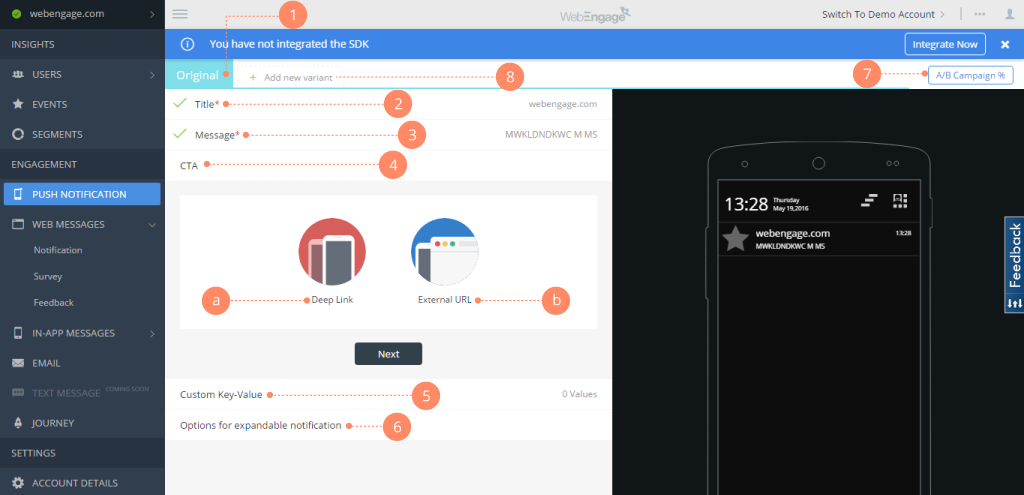    |