Foxit eSign vs. SignRequest, now part of Box

Overview
ProductRatingMost Used ByProduct SummaryStarting Price
Foxit eSign
Score 9.2 out of 10
N/A
eSign Genie in Cupertino offers their electronic signature application supporting digital document signing with reusable templates, contract drafting with esignature workflow, embedded online forms, and other features.
$120
per year per user
SignRequest, now part of Box
Score 9.7 out of 10
Small Businesses (1-50 employees)
SignRequest was an e-signature platform acquired by Box in 2021. The eSignature tool is the basis for Box Sign, a feature now included in Box's core offering.
$0
per user
Pricing
Foxit eSignSignRequest, now part of Box
Editions & Modules
eSign Essentials
$120
per year per user
eSign Business
$300
per year per user
Foxit eSign Enterprise
Contact Sales
Start
$0.00
per user
Professional
$8.00
per user
SME
minimal $16.00
$4.00 per user
Enterprise
Custom
per user
API
Custom
per installation
Offerings
Pricing Offerings
Foxit eSignSignRequest, now part of Box
Free Trial
YesYes
Free/Freemium Version
NoYes
Premium Consulting/Integration Services
NoNo
Entry-level Setup FeeNo setup feeNo setup fee
Additional DetailsFor text message verification and bank payment verification additional fees apply
More Pricing Information
Community Pulse
Foxit eSignSignRequest, now part of Box
Considered Both Products
Foxit eSign
Chose Foxit eSign
Foxit is a lot more user friendly and has more usability then Adobe.
Chose Foxit eSign
Better value and ease of use for HIPAA compliance.
Chose Foxit eSign
I looked at other options such as DocuSign and they're fairly expensive. The decision to go with eSign Genie had a lot to do with pricing. Once I selected them I was happy with the choice.
Chose Foxit eSign
eSign Genie has all of the features we needed when compared to other services but at a price point that better suited for our budget.
Chose Foxit eSign
[eSign Genie] is much easier to complete and modify forms and the customer support is great.
Chose Foxit eSign
In terms of value, eSign Genie beats DocuSign. The only advantage DocuSign has is that they are integrated with various applications and browsers.
Chose Foxit eSign
DocuSign didn't allow free-hand signatures when we were looking for a digital signature provider.
Chose Foxit eSign
Easier to use, easier for client's to use, and less expensive for my needs[.]
Chose Foxit eSign
Adobe Sign, despite coming from one of the best known brands in software, is the most frustrating and poorly-supported platform I've ever used.

HelloSign and Pandadoc are good platforms - although the cost a bit more than eSignGenie, they are ahead on some features (not all)... …
Chose Foxit eSign
Ease of use and affordability separate [eSign Genie] from its competitors[.]
Chose Foxit eSign
eSign Genie was super easy to use and much more economical. It competes well with Adobe and accomplishes the same thing at a fraction of the cost. It took minutes to get this going.
Chose Foxit eSign
I dumped DocuSign because I could not get any customer service from them. They seem to work via email and consistently replied to EVERY customer service request I had with "We were unable to reach you so we will be closing this issue." After the third time they did this (with …
Chose Foxit eSign
I only compared this to DocuSign and the price difference is vast. Our small business can't afford the cost of DocuSign.
Chose Foxit eSign
Neither DocuSign or Adobe (echosign) offered all the features I needed like condition fields. Plus, with [their] inability to offer any real quality customer support switching was the best thing for us. Also, since eSign Genie was 75% less expensive [it] was an easy decision …
Chose Foxit eSign
eSign Genie made contacting customer support way easier than any other platform! I was able to get my questions answered and negotiate a contract within hours instead of weeks.
Chose Foxit eSign
I liked the variety of options that Adobe had for creating fields, checkboxes and the fact that you didn't have to have a coding field. For example you could create a checkbox {{[]}} with this type of coding, where eSign Genie requires a whole line of coding to get a checkbox …
Chose Foxit eSign
eSign Genie stacks up with Adobe Sign. I find that the functionality of eSign Genie is easier to navigate and I think the option to include a personal note or instruction. I'm not able to do that with Adobe Sign. The pricing is so much more reasonable for eSign Genie and I see …
Chose Foxit eSign
I have not used any other products like this. But, I am happy with eSign Genie and have no plans to change software for the company.
Chose Foxit eSign
The price point is better than other products and allows all the same features. The learning curve is low and there’s multi functional across the organization.
Chose Foxit eSign
We have used other e-sign platforms, but we have found that eSign Genie, although not a huge company, has performed well and met our needs on every level. I especially like how there is no monthly subscription, and we can have access to all input field types without having to …
Chose Foxit eSign
Best thing is the customer support, super quick and friendly and the good correlation of price/product.
Chose Foxit eSign
Seem less professional and harder to use, slightly less easy to use than DocuSign. The price is much better though and I've found it does just as well. Not sure how it stacks up legally-wise to DocuSign?
Chose Foxit eSign
We selected based in security and price. The others has high implementation fees as well
SignRequest, now part of Box
Chose SignRequest, now part of Box
SignRequest is far and away more afforable than its competitors. Their support is also very responsive and willing to make improvements whereas its competitors seem to be a bit more unapproachable as far as their support goes. I have been able to resolve billing and reporting …
Chose SignRequest, now part of Box
Friendly interface, affordable costs, easy to understand and use, personalized language. You can manage users, templates and documents.
Chose SignRequest, now part of Box
I haven't used this in my role, but as a customer, I have used this program and it was nice. The pricing model, however, is far outside the reach for most small businesses. This is why I didn't consider Adobe Sign when trying to find a solution that meets our business needs.
Chose SignRequest, now part of Box
Less money and easier to set up than more well-branded e-signature platforms. Unlimited contracts on paid plans, which is a lot more than any other e-signature software I've used before. And under the free plan, you can get 15 contracts signed with limited features. For smaller …
Chose SignRequest, now part of Box
When I started this company in 2017, I looked for alternative solutions to getting e-signatures on business documents but never found anything that met our needs well until I encountered SignRequest. At this point we've been using it so long that I honestly can't remember the …
Chose SignRequest, now part of Box
We actually ended up switching to HelloSign after about three months. The main reason was the depth of the Salesforce integration that we needed to have. SignRequest is a really top-notch product for the market they play in. Small businesses especially will be able to use the …
Chose SignRequest, now part of Box
They have an unlimited free plan. In other words, you can sign as many documents as you want for free each month. The others (last I checked) limited your total number of signed docs on the freemium plan. That's certainly nice. SignRequest's upgrades come from more features …
Chose SignRequest, now part of Box
SignRequest is actually easier to use than SigningHub. It's much easier to just go to wherever you need a signature in the document and add the field. It's also got a cleaner interface, in my opinion, which makes it easier to figure out what's going on. I think that for someone …
Chose SignRequest, now part of Box
SignRequest is easier and quicker to use, integrates into Google services, and really is a smooth process overall. I found the other e-sign product I've used to be less user-friendly, and perhaps more dated in its design. With the other product I tried, there were several …
Chose SignRequest, now part of Box
I think SignRequest offers more and more powerful customization options thank competitors. I wasn't a fan of the user interface and usability when trying to customize documents on competitors' products, but SignRequest was easy. I also like SignRequest's template functionality …
Chose SignRequest, now part of Box
Unlike Adobe Acrobat DC, SignRequest is actually designed to request signatures and presents itself as such to my clients. DocuSign is not as user-friendly and approachable as SignRequest in my opinion. Even the free version of SignRequest offers more options and functionality …
Chose SignRequest, now part of Box
Adobe Acrobat left me frustrated and annoyed. I was wasting hours each week trying to upload contracts and agreements and customize them for each client. It never sent right and ended up being more frustrating for us and our clients in the end. So I tested some other tools …
Chose SignRequest, now part of Box
Adobe Sign (formerly EchoSign), DocuSign and Zoho Sign
Chose SignRequest, now part of Box
DocuSign is used in other areas of our business (client contracts, MSAs, SOWs, etc.) because it integrates with Salesforce and because we are a partner. We don't use DocuSign for HR purposes because DocuSign automatically creates a copy of the document in Salesforce, which …
Chose SignRequest, now part of Box
Unfortunately, I have no experience with alternatives. SignRequest seemed the most value for money at the time we made the decision to start e-signing.
Best Alternatives
Foxit eSignSignRequest, now part of Box
Small Businesses
OneSpan Sign
OneSpan Sign
Score 9.5 out of 10
Foxit eSign
Foxit eSign
Score 9.2 out of 10
Medium-sized Companies
MSB Docs
MSB Docs
Score 9.4 out of 10
MSB Docs
MSB Docs
Score 9.4 out of 10
Enterprises
DocuSign
DocuSign
Score 8.7 out of 10
DocuSign
DocuSign
Score 8.7 out of 10
All AlternativesView all alternativesView all alternatives
User Ratings
Foxit eSignSignRequest, now part of Box
Likelihood to Recommend
9.0
(0 ratings)
8.0
(0 ratings)
Likelihood to Renew
9.1
(0 ratings)
-
(0 ratings)
Usability
9.1
(0 ratings)
10.0
(0 ratings)
Support Rating
9.1
(0 ratings)
8.8
(0 ratings)
Implementation Rating
9.1
(0 ratings)
-
(0 ratings)
Vendor post-sale
8.2
(0 ratings)
-
(0 ratings)
Vendor pre-sale
7.3
(0 ratings)
-
(0 ratings)
User Testimonials
Foxit eSignSignRequest, now part of Box
Likelihood to Recommend
eSign Genie has completely streamlined our tedious document process and helps us to easily manage our documents from signature to delivery and even with ongoing storage. This enhancement saves us time, money, and headaches and has been a true lifesaver for our organization and for our customers. I highly recommend it!
Read full review
It's great for a law firm--especially ours which is paperless--and for any business that needs reviews and signatures constantly. I have recommended it to courts, my general contractor working on our house, and to other law firms that have a hard time getting us their clients' signatures. I think most businesses would benefit from SignRequest!
Read full review
Pros
  • The learning curve is faster compared to the last software we used.
  • It is easier to set up the templates and email messages so that the text boxes line up seamlessly.
  • It is quicker to send agreements and to follow up if they are not returned in the allotted timeframe.
  • Making changes to the documents is fast and easy.
Read full review
  • SignRequest is extremely user-friendly and its interface is smooth and straightforward. It takes the guesswork out of sending contracts and agreements online for review and signatures.
  • SignRequest is easy to set up and customize. I truly like how well its setup is structured. I've had zero issues uploading documents and customizing them.
  • SignRequest also allows you to save documents and use over and over. I really liked this feature as we send a lot of a similar contract out to our clients. We are able to change the amount and tweak the client information quickly and streamline the process.
  • SignRequest sends a final signed document after reach party signs it. I like adding this final PDF to our invoices when we send it out so our clients can keep a digital record of our agreements.
Read full review
Cons
  • User documentation could be better.
  • Requiring the field coding to be hidden makes it difficult to make adjustments.
  • I'd like to see where customers are in the signing process - whether they've opened and viewed documents.
  • If the document has been delegated, seeing a clear trail of the paperwork with email addresses including in the tracking.
Read full review
  • Clunky UI when filling in documents that require long-form responses. (Doesn't allow for entering of multiple lines at one time; lots of clicks required to complete a document with many fields)
  • In the free version, can only send one document at a time
Read full review
Likelihood to Renew
The tool is inexpensive and good value. We don't need a ton of eSign capabilities and this one provides what we need for a low cost given our low volume.
Read full review
No answers on this topic
Usability
Super simple - needs almost no instructions to setup and use
Read full review
I have found it easy to use and self-explanatory from day one. I love how clear and easy it is to use since I am not techy!
Read full review
Support Rating
eSign Genie has live chat support virtually twenty-four hours a day, seven days a week. They also have phone and email support as well. On the few occasions that I have had to contact support, they were very helpful, knowledgeable, and friendly. It's been a pleasure working with the folks at eSign Genie.
Read full review
Easy to understand supporting documents with a great search feature to easily find the information I need for legal purposes, API connections, how to connect Gmail or G Suite, along with the ability to send a message to them. They don't seem to have an online chat feature or a call option, but that's why it's so inexpensive. Since it's already easy to use, it takes less time to find out information.
Read full review
Implementation Rating
There is no implementation at all. You just sign up, upload your documents, set up the fields to complete, and you are done!
Read full review
No answers on this topic
Alternatives Considered
Adobe Sign, despite coming from one of the best known brands in software, is the most frustrating and poorly-supported platform I've ever used. HelloSign and PandaDoc are good platforms - although the cost a bit more than eSignGenie, they are ahead on some features (not all)... depending on your exact use case, I'd consider them. However, for my simple use case, eSigngenie is the clear winner!
Read full review
When I started this company in 2017, I looked for alternative solutions to getting e-signatures on business documents but never found anything that met our needs well until I encountered SignRequest. At this point we've been using it so long that I honestly can't remember the specific names of other products or vendors.
Read full review
Return on Investment
  • Creating a document that is easy for a client to understand and complete is a game changer. We are already experiencing a higher document completion rate than when we were with either DocuSign or Adobe (echosign)
  • With the number of completed documents on the rise with our company, having the incredible pricing structure that eSign Genie offers is a huge money saver for us
  • Not having to spend so much time with clients explaining how to complete the forms is saving us huge in customer support cost.
Read full review
  • We ended up switching vendors after about 3 months due to CRM integration with Salesforce not meeting our needs.
  • The cost was low enough where we did not feel it would be overly expensive with a growing sales team.
  • It allowed us to quickly get set up, and get e-signed contracts out to customers.
Read full review
ScreenShots

SignRequest, now part of Box Screenshots

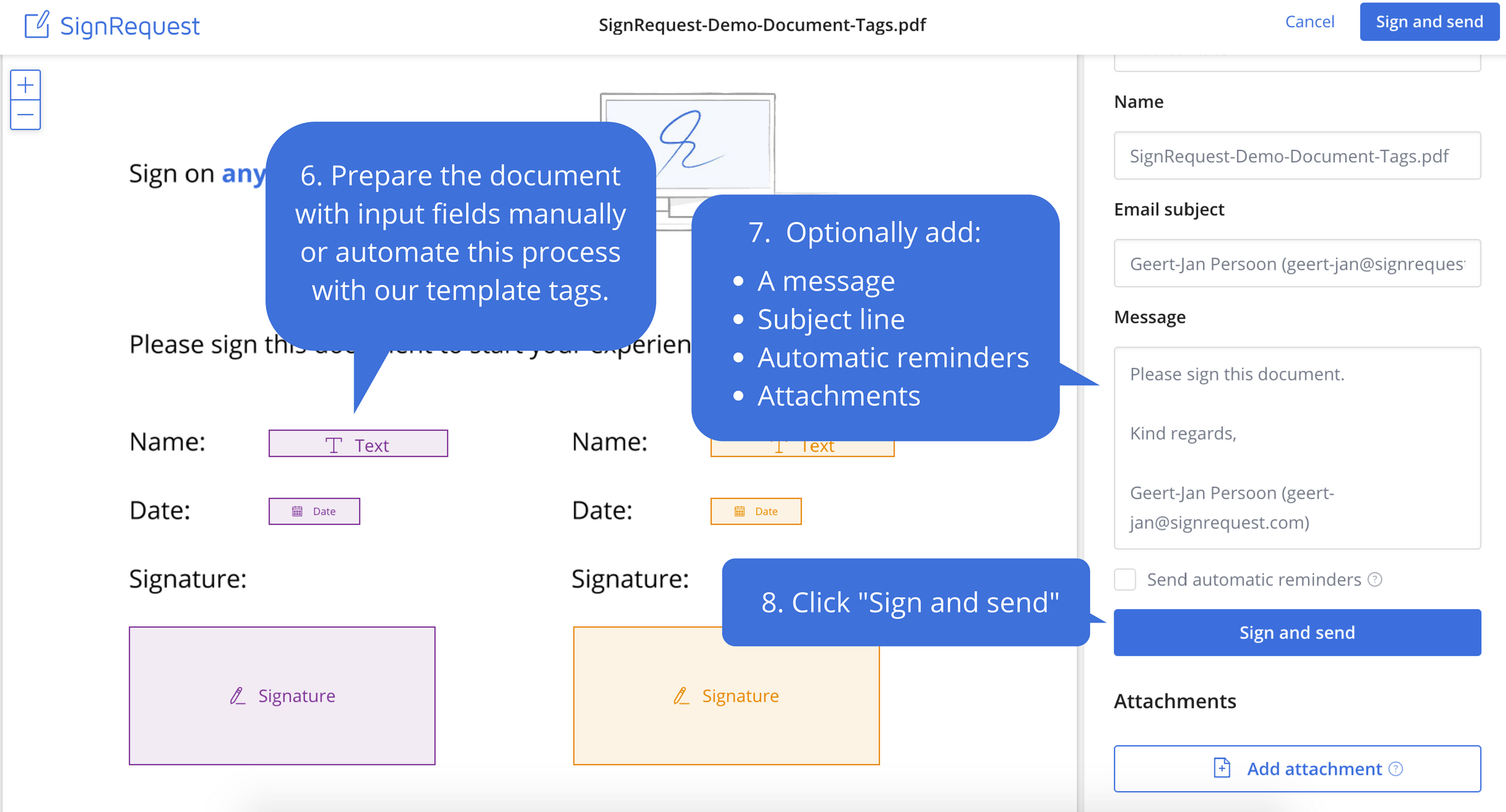
Screenshot of Step 1: Upload the document that needs to be signedScreenshot of Step 2: Prepare document before sendingScreenshot of Step 3: Your customers experience the ease of e-signingScreenshot of Step 4: Signed documents are stored and shared with your customerScreenshot of Step 5: Every alteration to a document is logged for legal purposes