Chose Google Sheets
It's easyest, fully online and fast to start. This is why I always use this tool to do something fast. Something that make it better than Excel as far as I know is the capability to connect to REST api and fetch data easily.

| Product | Rating | Most Used By | Product Summary | Starting Price |
|---|---|---|---|---|
 Google Sheets | N/A | Google Sheets is the spreadsheet app available on Google Workspace, or standalone, with a free plan for personal use and accessible via mobile apps for iOS and Android. | N/A | |
 MongoDB | N/A | MongoDB is an open source document-oriented database system. It is part of the NoSQL family of database systems. Instead of storing data in tables as is done in a "classical" relational database, MongoDB stores structured data as JSON-like documents with dynamic schemas (MongoDB calls the format BSON), making the integration of data in certain types of applications easier and faster. | $0 per month | |
 SQLite | N/A | SQLite is an in-process library that implements a self-contained, serverless, zero-configuration, transactional SQL database engine. The code for SQLite is in the public domain and is thus free for use for any purpose, commercial or private. SQLite is one of the most widely deployed databases in the world. | N/A |
| Google Sheets | MongoDB | SQLite | ||||||||||||||||||||||
|---|---|---|---|---|---|---|---|---|---|---|---|---|---|---|---|---|---|---|---|---|---|---|---|---|
| Editions & Modules | No answers on this topic |
| No answers on this topic | |||||||||||||||||||||
| Offerings |
| |||||||||||||||||||||||
| Entry-level Setup Fee | No setup fee | No setup fee | No setup fee | |||||||||||||||||||||
| Additional Details | — | Fully managed, global cloud database on AWS, Azure, and GCP | — | |||||||||||||||||||||
| More Pricing Information | ||||||||||||||||||||||||
| Google Sheets | MongoDB | SQLite | |
|---|---|---|---|
| Considered Multiple Products |  Google Sheets  Muhammad Rohan Director Chose Google Sheets It's online and easy to use. I know Excel is online too, but it comes with a package, whereas Google gave it for free. Even its free version is out of bounds and can do whatever there is. Great part about this is, it doesn't matter if the data is from XLXS or CSV if you don't …  Bridget Griggs, Ph. D. Talent Management Advocate Chose Google Sheets In some ways, SeaTable and AirTable provide a little more functionality beyond what Google Sheets provides. It is a little easier to set up different views of different types, not just table formats. They also make it easier to make groups and subgroups with the data set …  Marquis C. Brantley Regional Manager Chose Google Sheets Although I use Google Sheets more often than I use Microsoft Excel, I must admit that I frequently use them both. Google Sheets is my go to platform for a few reasons. I can easily use it offline when there's no connection. I don't have to have access to the Microsoft Suite in …  Allie Cobb Digital Director Chose Google Sheets Google Sheets is much better because it is already a part of our Google Workspace and we do not have to pay any extra for an extra server or software. We also use gmail for our internal communications and Google Slides for presentations, so it is easier for us to keep …  Nikki Goodson Technical Account Manager Chose Google Sheets Google Sheets is the best at version history and collaboration, leaving comments, writing formulas, and simple usability.  Jim Graham CEO Chose Google Sheets Easier to share amongst team members and better integration with Google Looker.  Josh Edney Executive Pastor Chose Google Sheets Apple Numbers doesn't have the collaboration tools like Google Sheets does. And if someone isn't working on a Mac, Number will have challenges. Google Sheets works across devices and operating systems.  Lucas Jambersi Marketing Manager Chose Google Sheets It is better than Excel when you need to work with many users at the same file at the same time. It is better than Excel when you need an web browser tool, since it is faster than the equivalent version of excel. |  MongoDB  Kendal Droddy Senior System Engineer Chose MongoDB The environment I work in is somewhat unique in that we use both MySQL and MongoDB. However, each is used for specific purposes that the other is not well suited for. MongoDB is not a relational database like MySQL, so it serves as the perfect place to dump key bits of data for …  Gaurav Pandey - PMP,ITIL,CSM SAP Application Manager Chose MongoDB We wanted to try something which is not a relation DB and has more of distributed architecture. MongoDB turned out to be a great choice.  Pablo Alejandro Laborde Coordinador Datacenter Backup&Storage Chose MongoDB None  Oleg Chumin Java Software Engineer Chose MongoDB We have [measured] the speed in reading/write operations in high load and finally select the winner = MongoDBWe have [not] too much data but in case there will be 10 [times] more we need Cassandra. Cassandra's storage engine provides constant-time writes no matter how big your …  Jose Manuel Ortega Software Engineer && Security researcher Chose MongoDB MongoDB is more of a general purpose nosql database, while elasticSearch is a search engine oriented nosql solution. Percona Server for MongoDB is a more suitable solution for the enterprise field.  Balázs Kiss Software Developer Chose MongoDB MongoDB is the most reliable and fastest for storing document-based data. It has a place among the most popular DB's these days.  Gregory Pecqueur Développeur Web Full Stack MEAN LAMP Chose MongoDB MySQL and PostgreSQL  Duncan Hernandez Product Owner, Business Intelligence Chose MongoDB Snowflake and Redshift are much more mature and have been around longer. MongoDB is definitely much less expensive and if you are in a startup, this is an almost for-sure option. Redshift can be slow and Mongo is much faster. However, losing the relational database aspect could …  Gene Baker Vice President, Chief Architect, Development Manager and Software Engineer Chose MongoDB I just felt MongoDB was easier to use and more cost-effective. Aggregation pipelines are great.  Thuvaragan Amarasingam Trainee software engineer Chose MongoDB It's very fast and easiest to use. Many companies are using this nowadays. It's helped to complete many software products very quickly so the year income has increased compared with last years. Many programmers are now leaning this tool as back end developers so that we changed …  Sagiv Frankel Senior Software Engineer Chose MongoDB Your default choice should not be MongoDB in my opinion. Most user-facing systems are relational by nature so a well known and reliable SQL database would be easier to maintain and simpler to develop long term. If you highly value speed of development go with firebase. If you …  Rounak Jangir Ab Initio Developer Chose MongoDB MongoDB and Cassandra are both database system from the NoSQL family. MongoDB can be used in lots of use cases while Cassandra has a specific usage. There are some features that MongoDB provides efficiently while Cassandra doesn't and vice-versa. Like, you can update the data … |  SQLite  Manidipa Kundu Data Analyst Chose SQLite Postgresql is more advanced features then sqlite, however it needs a server and complexity is high for low level development work. for offline work sqlite is best. duckdb is great for analytics , it is the data base for analytics and better then sqlite for analytical purpose. …  Markus Hopfenspirger Freelancer - Senior Software Architekt Chose SQLite I also use other Database Systems, but for small apps with offline storage, SQLite is a good and easy to use Database.  Sumon K Chowdhury Asst. Software Specialist Chose SQLite SQLite has CRUD queries and manipulates external files. Cross-platform support includes iOS, Android, Mac OS X, and Windows. Compared to other databases, it is fast and straightforward to implement. Even if an application crashes, there is no effect on the database or the data …  Rogério Rodrigues Team Lead Chose SQLite SQLite is already better known in the market. Developers already know how to implement and use good practices.  Aaron Bratcher iOS Developer Chose SQLite When looking at the original items available, Valentina was a serious contender. What was good about SQLite was the familiar SQL interface and way it accessed data. Valentina, at the time, had issues with index corruption requiring vigilance with the database maintenance making …  Marco Lostaunau C# .NET Developer Chose SQLite SQLite stacks quite well against Microsoft SQL server management studio however we need the Microsoft security for our data MDSN documentation is poor but available. |
| Google Sheets | MongoDB | SQLite | |||||||||||||||||||||||||||||||
|---|---|---|---|---|---|---|---|---|---|---|---|---|---|---|---|---|---|---|---|---|---|---|---|---|---|---|---|---|---|---|---|---|---|
| NoSQL Databases |
|
| Google Sheets | MongoDB | SQLite | |
|---|---|---|---|
| Small Businesses |  Stackby Score 8.9 out of 10 |  IBM Cloudant Score 7.4 out of 10 |  InfluxDB Score 9.0 out of 10 |
| Medium-sized Companies |  Microsoft Excel Score 8.9 out of 10 | IBM Cloudant Score 7.4 out of 10 |  Neo4j Score 9.1 out of 10 |
| Enterprises | Microsoft Excel Score 8.9 out of 10 | IBM Cloudant Score 7.4 out of 10 | Neo4j Score 9.1 out of 10 |
| All Alternatives | View all alternatives | View all alternatives | View all alternatives |
| Google Sheets | MongoDB | SQLite | |
|---|---|---|---|
| Likelihood to Recommend | 9.1 (0 ratings) | 10.0 (0 ratings) | 8.0 (0 ratings) |
| Likelihood to Renew | 10.0 (0 ratings) | 10.0 (0 ratings) | - (0 ratings) |
| Usability | 8.7 (0 ratings) | 10.0 (0 ratings) | 8.0 (0 ratings) |
| Availability | 9.3 (0 ratings) | 9.0 (0 ratings) | - (0 ratings) |
| Performance | 9.3 (0 ratings) | - (0 ratings) | - (0 ratings) |
| Support Rating | 8.0 (0 ratings) | 9.6 (0 ratings) | 1.0 (0 ratings) |
| Implementation Rating | - (0 ratings) | 8.4 (0 ratings) | - (0 ratings) |
| Configurability | 9.0 (0 ratings) | - (0 ratings) | 10.0 (0 ratings) |
| Ease of integration | 9.0 (0 ratings) | - (0 ratings) | 10.0 (0 ratings) |
| Product Scalability | 9.7 (0 ratings) | - (0 ratings) | - (0 ratings) |
| Vendor post-sale | 9.0 (0 ratings) | - (0 ratings) | - (0 ratings) |
| Vendor pre-sale | 9.0 (0 ratings) | - (0 ratings) | - (0 ratings) |
| Google Sheets | MongoDB | SQLite | |
|---|---|---|---|
| Likelihood to Recommend |
|
Oleg Chumin Java Software Engineer |
|
| Pros |
Bridget Griggs, Ph. D. Talent Management Advocate |
 Joshua Weaver Developer |
|
| Cons |
 Jeff Gullang Comptroller |
 Jon Kern Manager Strategic Products |
|
| Likelihood to Renew |
 Kaley White Data and Systems Analyst |
 Ronald Melendez Desarrollador de software | No answers on this topic |
| Usability |
|
 Mehmet Fatih Onal Technical Architect |
Manidipa Kundu Data Analyst |
| Reliability and Availability |
Kaley White Data and Systems Analyst | No answers on this topic | No answers on this topic |
| Performance |
Kaley White Data and Systems Analyst | No answers on this topic | No answers on this topic |
| Support Rating |
Kaley White Data and Systems Analyst |
|
Rogério Rodrigues Team Lead |
| Implementation Rating | No answers on this topic |
 Tom Maiaroto Sr. Platform Developer / UX Designer / Optimization Engineer | No answers on this topic |
| Alternatives Considered |
|
Kendal Droddy Senior System Engineer |
Sumon K Chowdhury Asst. Software Specialist |
| Scalability |
Kaley White Data and Systems Analyst | No answers on this topic | No answers on this topic |
| Return on Investment |
|
Jose Manuel Ortega Software Engineer && Security researcher |
|
| ScreenShots | MongoDB Screenshots     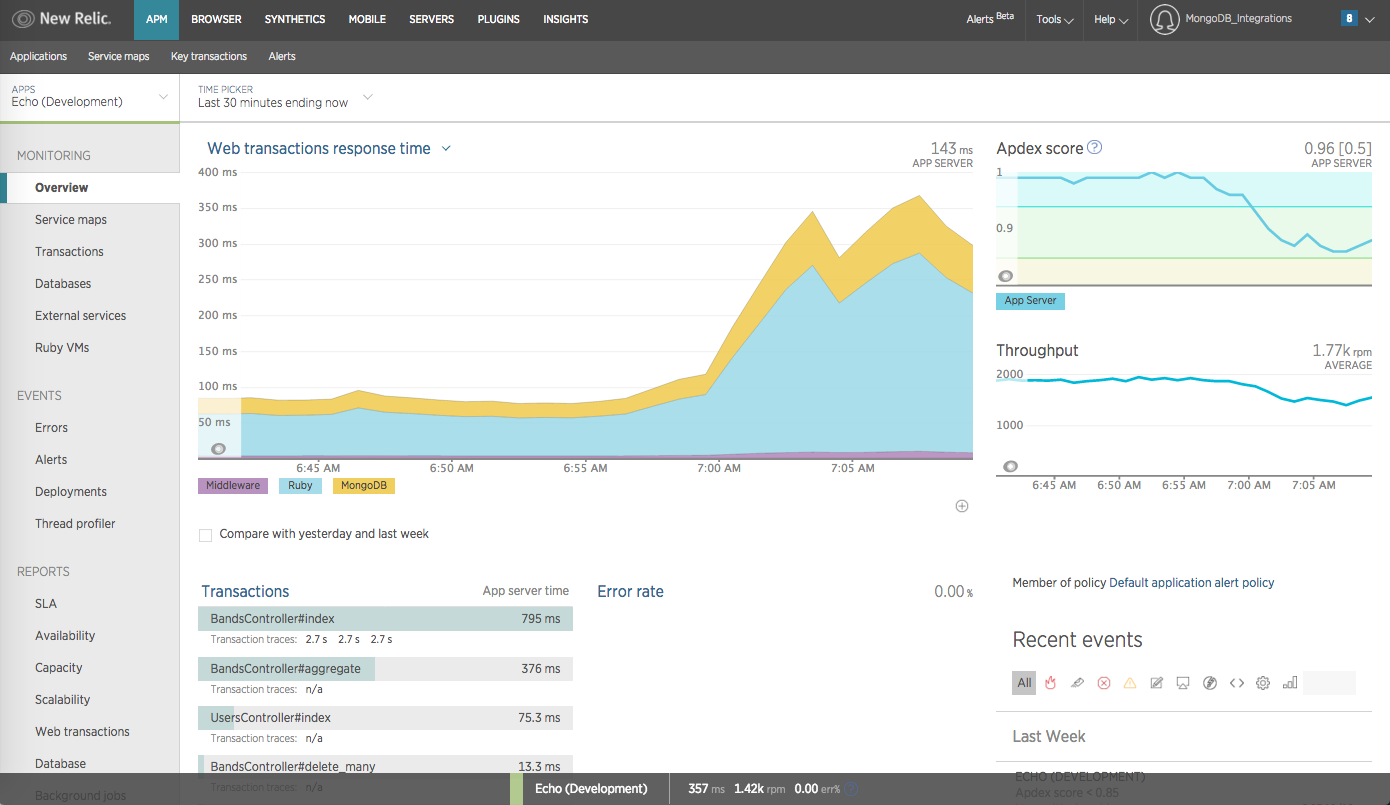 |