Gusto offers payroll, benefits and compliance capabilities. Gusto is scaled for small to mid-sized businesses, and emphasizes an easy to use interface.
$49
per month
HotSchedules
Score8 out of 10
N/A
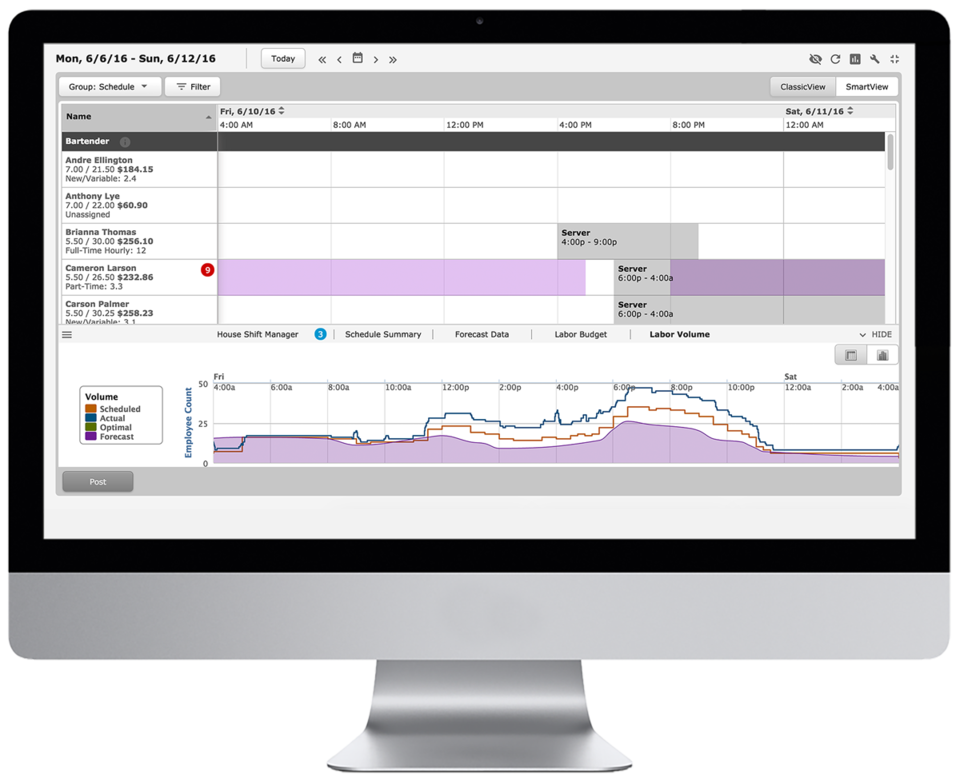
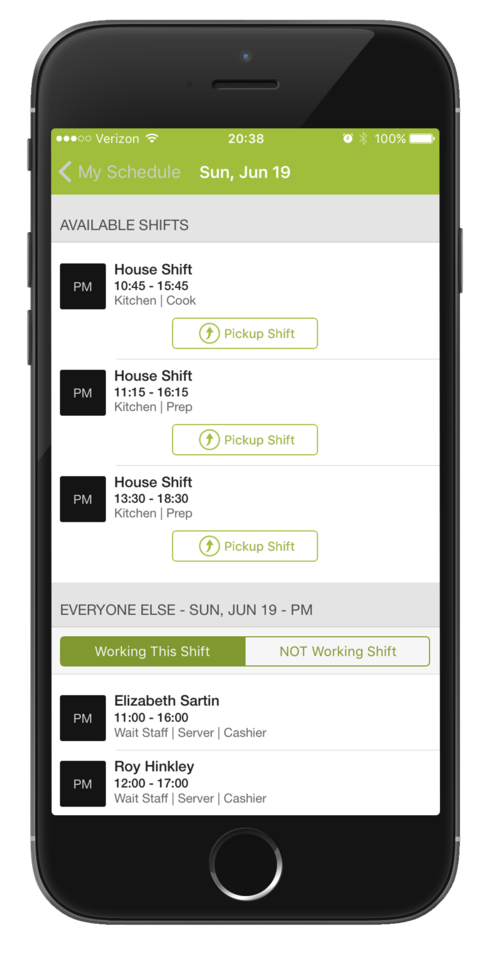
HotSchedules is a cloud-based scheduling, labor and communication management software solution serving the restaurant and hospitality industry. According to the vendor, key benefits include: Build & Communicate Schedules The scheduling and labor management software reduces the time it takes managers to create and communicate schedules. All scheduling and employee information is stored in one central location, so managers have access to time-off requests,…
$2
per month per employee
Pricing
Gusto
HotSchedules
Editions & Modules
Simple: A streamlined set of automatic payroll features and benefits integrations
$49/month + $6/mo per person
per month
Plus: Comprehensive payroll, benefits, and HR tools for employers building a great place to work
$80/month + $12/mo per person
per month
Premium: Scalable payroll and benefits, expert HR, and dedicated support for the complex needs of growing teams
$180/month + $22/mo per person
per month
Essentials
$2
per month per employee
Plus
$4
per month per employee
Quote-Based
Quote-based pricing
Offerings
Pricing Offerings
Gusto
HotSchedules
Free Trial
Yes
Yes
Free/Freemium Version
No
No
Premium Consulting/Integration Services
Yes
No
Entry-level Setup Fee
No setup fee
No setup fee
Additional Details
Gusto offers three pricing plans for payroll, benefits, and HR.
I think Gusto is well-suited for any business, big or small, to use for accounting purposes. It makes it easy to keep track of many things, such as pay stubs, benefits, paid time off, and much more. Where I could see it being less useful is maybe for enterprise businesses with way more employees.
A de minimis incentive was given to thank the reviewer for their time. The incentive was not used to bias or drive a particular response, nor was the incentive contingent on a positive endorsement. More Info
For small to medium-sized companies HotSchedules works great when business is very static. If you are simply using HotSchedules for a schedule writing tool, it is phenomenal. However, it does miss the mark as a labor control software. Needs more controls to keep managers aware of spending versus historical sales data.
A de minimis incentive was given to thank the reviewer for their time. The incentive was not used to bias or drive a particular response, nor was the incentive contingent on a positive endorsement. More Info
A de minimis incentive was given to thank the reviewer for their time. The incentive was not used to bias or drive a particular response, nor was the incentive contingent on a positive endorsement. More Info
Communication is so simple on HotSchedules. Whether it is communicating a new schedule release, or a quick note about tonight's shift we as managers are able to easily communicate and know that it will reach our team through text notifications, or email notifications.
The Meal Break planning tool is very useful in being able to help our floor leaders clearly understand and plan for what breaks are needed throughout the shift. This allows them to come up with a strategic game plan quickly and spend more time with our guests.
Shift Swaps and Releases are so seamless. This is our favorite tool as it makes helping our team cover shifts extremely easy and painless. On the flip side it also makes staff who want more hours be able to find what is available in real time.
A de minimis incentive was given to thank the reviewer for their time. The incentive was not used to bias or drive a particular response, nor was the incentive contingent on a positive endorsement. More Info
Gusto upsold us labor law posters, but I later found them available for free online. Since we’re a fully remote team, I had to manually download and distribute them digitally. It would be much more efficient if Gusto offered free, auto-distributed digital posters tailored to remote compliance.
Benefits setup is unintuitive for startups
While our rep was helpful, navigating the benefits system felt complex and not tailored to early-stage companies. More guided flows or simplified options for small, remote startups would be a big help.
Limited dashboard customization for remote workflows
As a fully online company, we’d benefit from dashboard options that highlight relevant tools for remote operations—like compliance tracking, digital communications, or onboarding checklists.
A de minimis incentive was given to thank the reviewer for their time. The incentive was not used to bias or drive a particular response, nor was the incentive contingent on a positive endorsement. More Info
Clocking In and out can be a little slow. It takes longer to clock in then our previous method. Before we just had a card you swiped and it would clock you in. Took 2 seconds. Now with the Hotschdules method we use it take 30 seconds or so. Not a huge issue but it can add up if you have one computer and a line of employees waiting to clock in.
Time Cards. It does not allow you to view someones current time until the "punch" has ended. If the manager would like to check what time the employee clocked in/out from lunch they have to wait until the employee has clocked out for the day before the record is generated. As a shift lead you may send and employee to lunch but forget to note what time you sent them. Awhile passes and you feel like they should be back by now, so you want to go in and see what time they left for lunch but it does not show you that punch record because the employee is still "clocked in" they are just on their "Meal Break"
The ability to customize the restrictions for Clocking in and out. You can set it up so that employees can only clock in from a specific location, however if you have a manager who is allowed to work from home they would not be able to clock in without being at the same location as set in the software. It would be nice to see it able to be customized per user.
A de minimis incentive was given to thank the reviewer for their time. The incentive was not used to bias or drive a particular response, nor was the incentive contingent on a positive endorsement. More Info
Unless they break it, I'm never leaving. It's just too easy. Gusto is also really affordable, and for what I pay, it's worth having the historical record within the system. I like that I can go back and pull up W2's for year's past. This sort of easy access reporting, has been helpful especially when getting reports for PPP loans.
A de minimis incentive was given to thank the reviewer for their time. The incentive was not used to bias or drive a particular response, nor was the incentive contingent on a positive endorsement. More Info
Gusto is pretty user-friendly, and the website is easy to navigate overall. They also offer good, responsive customer support and have helpful articles available when needed. So far, I have not had any major issues with the platform and am overall very happy with it.
A de minimis incentive was given to thank the reviewer for their time. The incentive was not used to bias or drive a particular response, nor was the incentive contingent on a positive endorsement. More Info
6 Years of Experience provides me the insight on the upgrades and changes that HotSchedules has done to improve the experience of its users. There are so many features that we still have not started or used to the fullest, but we believe that we are currently getting a strong value out of the money that is paid for this product.
A de minimis incentive was given to thank the reviewer for their time. The incentive was not used to bias or drive a particular response, nor was the incentive contingent on a positive endorsement. More Info
Gusto's customer service has really deteriorated lately and they seem to have really changed their focus. It used to be when you called you were routed to an individual who knew about payroll, benefits, reporting, etc. but now you get someone who seems to have not received the correct training. My last call about a dismissal payroll took me over an hour of my time and the person still could not help me and finally transferred me to someone else.
A de minimis incentive was given to thank the reviewer for their time. The incentive was not used to bias or drive a particular response, nor was the incentive contingent on a positive endorsement. More Info
On rare occasions a phone call has been required to find the solution to a problem, the HotSchedules response staff have been helpful, courteous, and genuinely seem to care for their clients and take pride in what they do. The consistent development and fine tuning of the platform, interface, and mobile environment shows that this is not a program full of people who rest on their laurels.
A de minimis incentive was given to thank the reviewer for their time. The incentive was not used to bias or drive a particular response, nor was the incentive contingent on a positive endorsement. More Info
Reach out to support immediately if you are having trouble setting up Gusto. Rather than being confused and trying to figure it out yourself, it's much better to talk to someone who knows what they are doing. Save yourself time and frustration and reach out to support
A de minimis incentive was given to thank the reviewer for their time. The incentive was not used to bias or drive a particular response, nor was the incentive contingent on a positive endorsement. More Info
While I never actually got to the point of trying out ADP, I had several conversations with an ADP representative, and it seemed that they would be able to provide the same (if not less) level of service for a significantly higher price
A de minimis incentive was given to thank the reviewer for their time. The incentive was not used to bias or drive a particular response, nor was the incentive contingent on a positive endorsement. More Info
I have not used any other Scheduling software for employees. As a campground manager in the summer season, we are using campground master for reservations. it is very similar in process to employee scheduling. the ability to the user of that program to set up their own parameters for time and reservations is something that would benefit the employee scheduling software.
A de minimis incentive was given to thank the reviewer for their time. The incentive was not used to bias or drive a particular response, nor was the incentive contingent on a positive endorsement. More Info
A de minimis incentive was given to thank the reviewer for their time. The incentive was not used to bias or drive a particular response, nor was the incentive contingent on a positive endorsement. More Info
Saving time on scheduling means our managers can focus more on guest experience, managing the floor and other areas that contribute to the success of our business.
A de minimis incentive was given to thank the reviewer for their time. The incentive was not used to bias or drive a particular response, nor was the incentive contingent on a positive endorsement. More Info