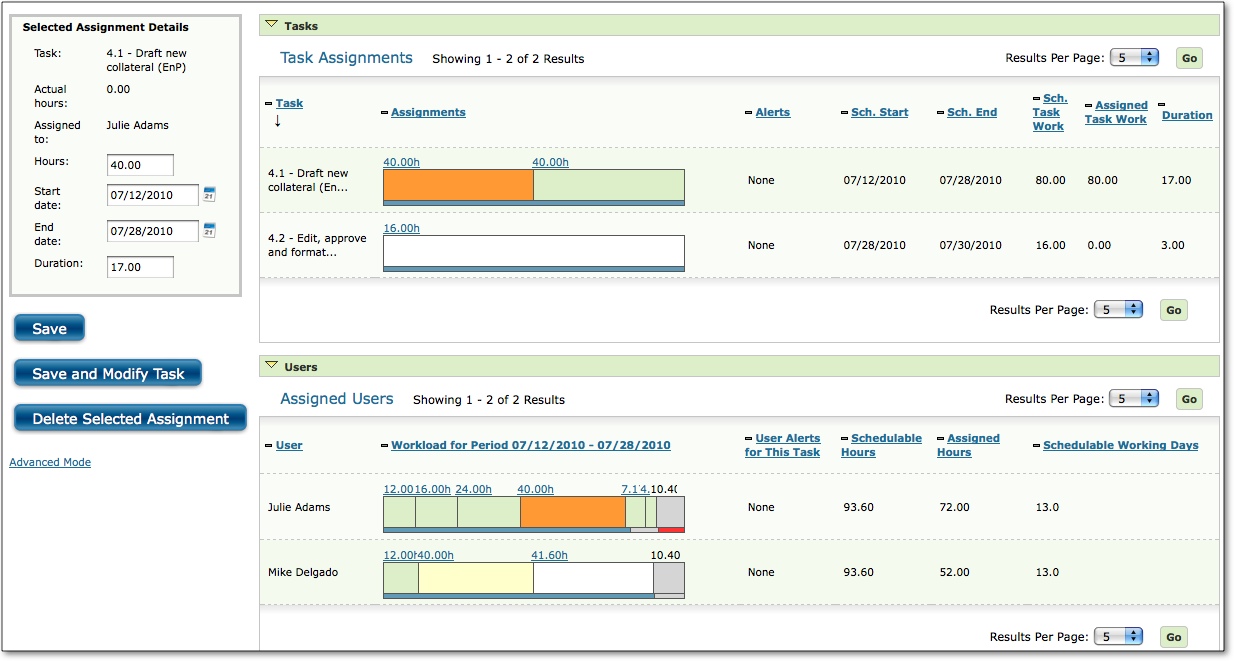
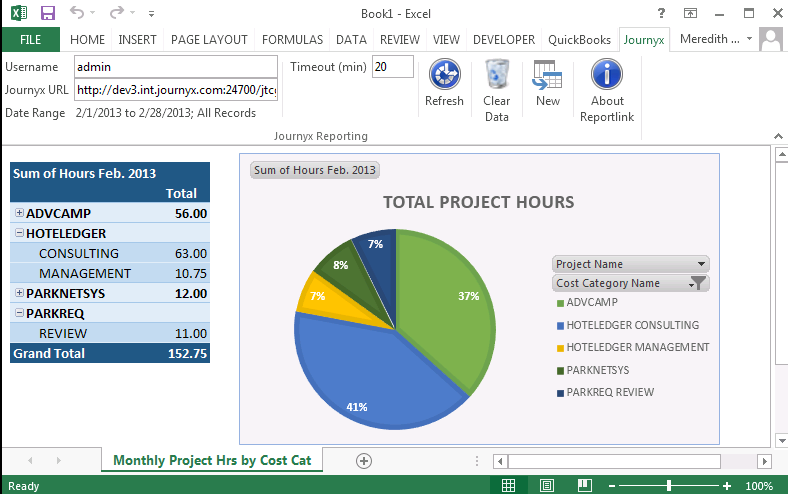
Journyx's time and expense tracking software aims to streamline the collection and processing of timesheets – reducing payroll time, growing client billings, and increasing project profitability. The vendor says Journyx helps you collect better time and expense data for better, more informed decisions. Key benefits include:
Integrate Journyx time and expense tracking with existing business systems, including Microsoft Dynamics GP, NAV, SL, and AX, QuickBooks, MS Project,…
N/A
TimeClock Plus
Score9.5 out of 10
N/A
TimeClock Plus is a time tracking and attendance solution from Data Management Incorporated (DMI) in San Angelo, Texas. The Express edition is targeted at small businesses, Standard and Pro at larger businesses, and finally TimeClock Plus OnDemand is a complete cloud-based solution.
N/A
Pricing
Journyx
TimeClock Plus
Editions & Modules
No answers on this topic
No answers on this topic
Offerings
Pricing Offerings
Journyx
TimeClock Plus
Free Trial
Yes
No
Free/Freemium Version
No
No
Premium Consulting/Integration Services
Yes
No
Entry-level Setup Fee
Optional
No setup fee
Additional Details
Both our hosted and on-premise solutions are priced on a per license, per month basis. We have a base solution, Journyx, with additional products and add-ons that we offer based on your specific requirements.
Pricing is highly dependent on your business requirements. We're happy to discuss your needs in detail so we can provide you with a solution that meets those needs.
Hawaii / Guam Regional Manager in Engineering at Corrpro Companies, Inc. (Construction, 5001-10,000 employees)
Chose Journyx
This would be good for a small company who does not want to build their own time submission system. The interface is fairly dated, but we are quite familiar with it, so that is not really a negative for our company. The primary feature we struggle with most is the inability to …
A de minimis incentive was given to thank the reviewer for their time. The incentive was not used to bias or drive a particular response, nor was the incentive contingent on a positive endorsement. More Info
Users cannot update their own time sheet if mistakes are made or things change after submitting. The time sheet must be rejected by the reviewer before the user can update the time sheet. It would be much better for the user to be able to update the time sheet and resubmit, barring approval, instead of the upfront action of the reviewer rejecting the time sheet.
A de minimis incentive was given to thank the reviewer for their time. The incentive was not used to bias or drive a particular response, nor was the incentive contingent on a positive endorsement. More Info
I think the best place for TimeClock Plus to work would be at a restaurant or a busy business that has a lot of people to track and needs a robust dashboard to keep things in order. For my organization, we only have around 10 people max per location and it was a bit too expensive and complex for our needs. We could use a simpler system.
A de minimis incentive was given to thank the reviewer for their time. The incentive was not used to bias or drive a particular response, nor was the incentive contingent on a positive endorsement. More Info
A de minimis incentive was given to thank the reviewer for their time. The incentive was not used to bias or drive a particular response, nor was the incentive contingent on a positive endorsement. TR verified that a representative sample of customers was invited. More Info
A de minimis incentive was given to thank the reviewer for their time. The incentive was not used to bias or drive a particular response, nor was the incentive contingent on a positive endorsement. More Info
A de minimis incentive was given to thank the reviewer for their time. The incentive was not used to bias or drive a particular response, nor was the incentive contingent on a positive endorsement. TR verified that a representative sample of customers was invited. More Info
A de minimis incentive was given to thank the reviewer for their time. The incentive was not used to bias or drive a particular response, nor was the incentive contingent on a positive endorsement. More Info
A de minimis incentive was given to thank the reviewer for their time. The incentive was not used to bias or drive a particular response, nor was the incentive contingent on a positive endorsement. TR verified that a representative sample of customers was invited. More Info
It's robust and does what we need it to do in terms of tracking worked time, also unworked time. It has a detailed Employee Profiles section but mostly it's because it keeps track of hours
A de minimis incentive was given to thank the reviewer for their time. The incentive was not used to bias or drive a particular response, nor was the incentive contingent on a positive endorsement. More Info
A de minimis incentive was given to thank the reviewer for their time. The incentive was not used to bias or drive a particular response, nor was the incentive contingent on a positive endorsement. TR verified that a representative sample of customers was invited. More Info
I absolutely love the ability to customize TCP to what you need it to be. There's lots of settings and areas where you get to decide how to want the system to operate. For every situation our team has said "I wish TCP would do it this way" we have been able to find a setting to adjust to make it do that. There are very minor adjustments I would like to make like hiding drop down menu items that we won't ever use.
A de minimis incentive was given to thank the reviewer for their time. The incentive was not used to bias or drive a particular response, nor was the incentive contingent on a positive endorsement. More Info
A de minimis incentive was given to thank the reviewer for their time. The incentive was not used to bias or drive a particular response, nor was the incentive contingent on a positive endorsement. TR verified that a representative sample of customers was invited. More Info
A de minimis incentive was given to thank the reviewer for their time. The incentive was not used to bias or drive a particular response, nor was the incentive contingent on a positive endorsement. More Info
A de minimis incentive was given to thank the reviewer for their time. The incentive was not used to bias or drive a particular response, nor was the incentive contingent on a positive endorsement. TR verified that a representative sample of customers was invited. More Info
Great performance, pages load quickly and reports generate quickly. They do take some time to complete if they're covering a large Start - Stop date, eg months but that's not an issue, they still complete fairly quickly.
A de minimis incentive was given to thank the reviewer for their time. The incentive was not used to bias or drive a particular response, nor was the incentive contingent on a positive endorsement. More Info
A de minimis incentive was given to thank the reviewer for their time. The incentive was not used to bias or drive a particular response, nor was the incentive contingent on a positive endorsement. More Info
A de minimis incentive was given to thank the reviewer for their time. The incentive was not used to bias or drive a particular response, nor was the incentive contingent on a positive endorsement. TR verified that a representative sample of customers was invited. More Info
A de minimis incentive was given to thank the reviewer for their time. The incentive was not used to bias or drive a particular response, nor was the incentive contingent on a positive endorsement. TR verified that a representative sample of customers was invited. More Info
A de minimis incentive was given to thank the reviewer for their time. The incentive was not used to bias or drive a particular response, nor was the incentive contingent on a positive endorsement. TR verified that a representative sample of customers was invited. More Info
TimeClock Plus is extremely easy to use for all employees!!! We want platforms that every employee feels comfortable using. Again, it is effortless to log hours on a day-to-day basis. I love that our employees have the ability to keep track of their hour details, such as paid time off, volunteerism, holiday, etc. This portal helps our team to stay compliant!!!
A de minimis incentive was given to thank the reviewer for their time. The incentive was not used to bias or drive a particular response, nor was the incentive contingent on a positive endorsement. More Info
A de minimis incentive was given to thank the reviewer for their time. The incentive was not used to bias or drive a particular response, nor was the incentive contingent on a positive endorsement. TR verified that a representative sample of customers was invited. More Info
A de minimis incentive was given to thank the reviewer for their time. The incentive was not used to bias or drive a particular response, nor was the incentive contingent on a positive endorsement. More Info
A de minimis incentive was given to thank the reviewer for their time. The incentive was not used to bias or drive a particular response, nor was the incentive contingent on a positive endorsement. TR verified that a representative sample of customers was invited. More Info
A de minimis incentive was given to thank the reviewer for their time. The incentive was not used to bias or drive a particular response, nor was the incentive contingent on a positive endorsement. More Info