Lightning Tools Lightning Conductor vs. Miro vs. Stormboard

Overview
ProductRatingMost Used ByProduct SummaryStarting Price
Lightning Tools Lightning Conductor
Score 9.0 out of 10
Mid-Size Companies (51-1,000 employees)
The Lightning Conductor is a content aggregation tool for Microsoft SharePoint Online and Microsoft Teams. Users can build rich, modern content reports based upon SharePoint lists, SharePoint Search, Microsoft Graph or Microsoft 365 Groups. Content can be aggregated from lists and libraries, and other applications such as Planner, To Do, OneDrive, and Teams.
$2,200
per year per installation
Miro
Score 9.1 out of 10
N/A
Miro is the AI Innovation Workspace that brings teams and AI together to plan, co-create, and build the next big thing, faster. With the canvas as the prompt, Miro's collaborative AI workflows keep teams in the flow of work, scale shifts in ways of working, and drive organization-wide transformation.
$10
per month per user
Stormboard
Score 7.7 out of 10
N/A
Work better together. Stormboard enables users to set up meetings beforehand, capture, organize, and discuss ideas in real-time, and then assign tasks and monitor progress in a digital workspace that can be returned to again and again. Built-in templates for Agile, Project Management, and more help streamline business processes, and work can be exported into one of many dynamic reporting options. Stormboard works on any device from a 4" phone to an 85" Microsoft…N/A
Pricing
Lightning Tools Lightning ConductorMiroStormboard
Editions & Modules
Lightning Conductor WSP
From 1950
per year One WFE
Lightning Conductor Enterprise Edition
POA
per year Four or more WFE
Lightning Conductor Online
From 2200
per year per installation
Lightning Conductor Plus (Includes Data Viewer)
From 2500
per year per installation
Lightning Conductor Online Enterprise Edition (>10,000 users)
POA
per year per installation
1. Free - To discover what Miro can do. Always free
$0
2. Starter - Unlimited and private boards with essential features
$8
per month (billed annually) per user
3. Business - Scales collaboration with advanced features and security
$16
per month (billed annually) per user
4. Enterprise - For work across the entire organization, with support, security and control, to scale
contact sales
annual billing per user
No answers on this topic
Offerings
Pricing Offerings
Lightning Tools Lightning ConductorMiroStormboard
Free Trial
YesYesYes
Free/Freemium Version
NoYesYes
Premium Consulting/Integration Services
YesNoYes
Entry-level Setup FeeNo setup feeOptionalOptional
Additional DetailsPrices stated are minimum per installation for "stock" products. $2.20 per user/year on top of base price. Enterprise editions can be amended to suit business needs if deemed necessary, additional costs incurred and TBD. All packages include free technical support. Free upgrades available to latest versions of tool as they are released. (online version)Monthly billing also available at $10 per month for the Starter plan, or $20 for the Business plan.
More Pricing Information
Community Pulse
Lightning Tools Lightning ConductorMiroStormboard
Considered Multiple Products
Lightning Tools Lightning Conductor

No answer on this topic

Miro
Chose Miro
We did some initial testing on Stormboard, We found that Miro had many more features and we also had brand awareness from the design school for Miro that helped with the initial use
Chose Miro
We assessed these tools to gain a better understanding because they are excellent and have certain unique features. But in the end, we chose Miro since it offers all the features that ClickUp, Stormboard, and Conceptboard do. Additionally, it has a special feature that lets you …
Chose Miro
We tested every product, but the biggest problem we encountered was that most of them required plugins in order to centralize all of our work. Other problems included the products' excessive price, which was higher than Miro's. Last but not least, Miro offered us an all-in-one …
Chose Miro
I also tried Microsoft Whiteboard. Miro's quality far surpasses ANY other product in its category in terms of robust features, ease of including board collaborators, and the vast collection of available templates.
Chose Miro
Miro allows for non-organizational members to participate.
Chose Miro
Easier to use, simpler, but some of these alternatives are better designed for educational contexts
Chose Miro
Miro provides a larger number of templates and integration options if compared to these products. I would say it presents the highest cost-benefit ratio in the market.
Stormboard
Chose Stormboard
I use Stormboard for coordination because it seems easier to use than the rest. In terms of courses, we choose the software depending on our course objectives and how tech-savvy we believe the prof and audience are. Miro is more complete, I believe, it has a ton of features and …
Chose Stormboard
I think the number one argument for Stormboard is the reporting functionality. These various ways of exporting the results of the collaboration in the desired format are something that I have not seen from other tools yet. It really helps to sort and gather the different …
Features
Lightning Tools Lightning ConductorMiroStormboard
Project Management
Comparison of Project Management features of Product A and Product B
Lightning Tools Lightning Conductor
8.6
2 Ratings
10% above category average
Miro
-
Ratings
Stormboard
-
Ratings
Task Management8.82 Ratings00 Ratings00 Ratings
Search8.42 Ratings00 Ratings00 Ratings
Best Alternatives
Lightning Tools Lightning ConductorMiroStormboard
Small Businesses
Stackby
Stackby
Score 8.9 out of 10
Lucid Visual Collaboration Suite
Score 8.9 out of 10
Canva
Canva
Score 9.1 out of 10
Medium-sized Companies
Troop Messenger
Troop Messenger
Score 9.8 out of 10
Lucid Visual Collaboration Suite
Score 8.9 out of 10
Canva
Canva
Score 9.1 out of 10
Enterprises
HCL Connections
HCL Connections
Score 9.0 out of 10
Lucid Visual Collaboration Suite
Score 8.9 out of 10
Whimsical
Whimsical
Score 9.3 out of 10
All AlternativesView all alternativesView all alternativesView all alternatives
User Ratings
Lightning Tools Lightning ConductorMiroStormboard
Likelihood to Recommend
9.0
(4 ratings)
9.1
(6063 ratings)
7.7
(7 ratings)
Likelihood to Renew
9.1
(1 ratings)
9.4
(185 ratings)
-
(0 ratings)
Usability
-
(0 ratings)
8.6
(449 ratings)
-
(0 ratings)
Availability
-
(0 ratings)
9.5
(20 ratings)
-
(0 ratings)
Performance
-
(0 ratings)
9.0
(19 ratings)
-
(0 ratings)
Support Rating
9.1
(1 ratings)
7.7
(63 ratings)
-
(0 ratings)
In-Person Training
-
(0 ratings)
1.0
(1 ratings)
-
(0 ratings)
Online Training
-
(0 ratings)
9.0
(7 ratings)
-
(0 ratings)
Implementation Rating
-
(0 ratings)
9.0
(3657 ratings)
-
(0 ratings)
Configurability
-
(0 ratings)
8.7
(14 ratings)
-
(0 ratings)
Ease of integration
-
(0 ratings)
8.0
(3999 ratings)
-
(0 ratings)
Product Scalability
-
(0 ratings)
8.7
(19 ratings)
-
(0 ratings)
Vendor post-sale
-
(0 ratings)
6.3
(7 ratings)
-
(0 ratings)
Vendor pre-sale
-
(0 ratings)
5.9
(8 ratings)
-
(0 ratings)
User Testimonials
Lightning Tools Lightning ConductorMiroStormboard
Likelihood to Recommend
Lightning Tools
Having experience of SharePoint On Premise and also SharePoint Online, there isn't an out of the box app/webpart that enables you to 'roll up content' from a variety of source's (in my case SP Lists, but there are many other data sources it works with) across site collections with an easy to use and intuitive interface which is what Lightning tools excels at.
Read full review
Miro
Actually I answered this question on the first step. Detailing it I’d say that it’s comfortable to use for company education or brainstorm sessions, but I lack of flexibility to use it for operations quick stuff cuz team plans are limited
Read full review
Stormboard
Ready to use template makes Stormboard very easy to use and gives a seamless experience to the user. It is very useful when brainstorming ideas, and solutions for a particular use case. It sometimes gives solutions to the problems we might not have thought about yet. The on-the-go whiteboard gives us a blank slate for new ideas and more collaborations.
Read full review
Pros
Lightning Tools
  • Aggregate documents across SharePoint site & libraries
  • Filtering for owner/person responsible & due dates
  • Ease of end-user filtering on columns
  • Color-coding & other formatting
Read full review
Miro
  • Makes internal coordination between admin team and tutors extremely painless. It's like a single place where everyone can drop ideas, get updates and notes without loss of context which usually happens in long email threads.
  • Versioning and board history are handled very well, which drastically reduces the workload. They help me track how a policy or math guideline has evolved, and also make it easy to revert changes if something doesn't work.
  • Comments stick exactly where they are meant to, making internal reviews much clearer. Admins don't have to guess which note refers to which rule or section.
  • Exports are clean, so even non-Miro teammates get it instantly.
Read full review
Stormboard
  • Manage Key Assets for Each Meeting
  • Visually present the stakeholders and requirements
  • Embed multimedia in all sections
  • Present a clear layout of the meeting
  • Inform everyone involved of their responsibilities
  • Great interfase and easy to export
  • Quickly make changes to the structure of the meeting
  • The mobile app is easy to use
Read full review
Cons
Lightning Tools
  • Mobile Friendly
  • Calendar/Gantt views
  • Complex/Custom Logic
Read full review
Miro
  • As a designer, I miss some more creative features. I can't even get really into designing small things (like paths). Many of my colleagues have already switched to the Figma board because it is possible there.
  • Things often get lost in the workflow, especially in teams. Working on the same file often leads to misunderstandings and can be frustrating. For example, if text is accidentally deleted and cannot be recovered, or if images become distorted.
  • The scale on the board is missing, which often leads to size differences.
Read full review
Stormboard
  • Sometimes difficult to find items on the board if they're not in the centre
  • Zooming in and out can often mean things get overlooked
  • Occasionally uploaded documents vanish
Read full review
Likelihood to Renew
Lightning Tools
No answers on this topic
Miro
Miro saves my day. I would spend at least 4x more time on documenting my projects and work without this tool. It support my day to day role and helps me be successful while saving my capacity. It is not only very easy to start working on it without additional training required, but also adapts to any use case that I might need to implement
Read full review
Stormboard
No answers on this topic
Usability
Lightning Tools
No answers on this topic
Miro
There are some features that I think could be smoother or more dynamic in the free version; for instance, the connection of graphics/text boxes with lines can get a bit messy and a bit limited if you want to do something specific with the line, like a free-drawn element. But this is really minor!
Read full review
Stormboard
No answers on this topic
Reliability and Availability
Lightning Tools
No answers on this topic
Miro
I have not encountered events where Miro is not available. It is quite nice and reliable to be fair, even on my freemium version (startup) I don't have reliability issues. It does have sometimes where the screen refresh or "freezes" or "consumes a lot of data" and we have to rewind windows and the likes, this instances are very less
Read full review
Stormboard
No answers on this topic
Performance
Lightning Tools
No answers on this topic
Miro
I took the loading quickly to be related to availability which I commented on before, so ditto with those comment on load time here. Although to reemphasize, Miro doesn't crash or just refuse to load like some other programs. The weak point of Miro for me is integration of files like Word, Excel, or PowerPoint (especially the later two). When you embed these, it gets slow, and complicated to bring them up while you're in the application.
Read full review
Stormboard
No answers on this topic
Support Rating
Lightning Tools
The Lightning Tools support team responds quickly, and team members are very friendly and helpful.
Read full review
Miro
We have never reached out to or contacted support because Miro's platform has been incredibly intuitive and user-friendly. The comprehensive resources available, such as tutorials, documentation, and community forums, have provided all the guidance we needed. The seamless integration with our existing tools and the reliability of the platform have ensured that we rarely encounter issues that require external assistance. This self-sufficiency has allowed us to focus more on our projects and collaboration without interruptions. Overall, our experience with Miro has been smooth and efficient, eliminating the need for additional support
Read full review
Stormboard
No answers on this topic
Online Training
Lightning Tools
No answers on this topic
Miro
There was a series of webinars which Miro hosted with our organization that went over the basics, then progressively became more advanced with additional sections. The instructors were knowledgeable, and provided examples throughout the sessions, as well as answered peoples' questions. There was ample time and experience on the calls to cover a range of topics. The instructors were also very friendly and sociable, as well as honest. Of course Miro isn't a "God-tool" that does absolutely everything, but the instructors were aware and emphasized the strengths where Miro had them and sincerely accepted feedback.
Read full review
Stormboard
No answers on this topic
Implementation Rating
Lightning Tools
No answers on this topic
Miro
Easy to learn, Miro has a series of videos on YouTube that effectively taught this program to my team members and me. The program is drag-and-drop and works excellently. People pick up on how to use it efficiently, and it's great for organizing ideas more freely. This product is more challenging for some older audiences who are not accustomed to using a touchpad, but for most, it was very easy to use.
Read full review
Stormboard
No answers on this topic
Alternatives Considered
Lightning Tools
I haven't found another product to compare this one to. Only in SharePoint Online which has a similar App 'Highlight Webpart' ... it's far too complicated to set up and requires learning yet another language and exporting and importing via PowerShell to get any real results that would be useful.
Read full review
Miro
Both FigJam and Canva have infinite whiteboarding, but Miro is a much more complete package. FigJam is very fast, but it's also very simplistic in its features. Canva has other qualities, like being more design-heavy, but its whiteboarding feature set is not on par with Miro's. Miro is the only platform that lets a user start a project from a messy brainstorm and bring it to full completion, along with all tasks and deliverables, all on one board.
Read full review
Stormboard
I use Stormboard for coordination because it seems easier to use than the rest. In terms of courses, we choose the software depending on our course objectives and how tech-savvy we believe the prof and audience are. Miro is more complete, I believe, it has a ton of features and templates.
Read full review
Scalability
Lightning Tools
No answers on this topic
Miro
Maybe is possible now so... Could be useful to manage in some way source code for the projects? not to edit so when we make solutions with different components in MIro, maybe each component could redirect to the source code of this component
Read full review
Stormboard
No answers on this topic
Return on Investment
Lightning Tools
  • Policies easier to portray
Read full review
Miro
  • This is one of those platforms where the entire team needs to be bought into it, or it doesn't function as intended. Once we achieved that, it's been a wonderful tool for brainstorming and project management internally.
  • Surprisingly, Miro has not allowed us to reduce software; however, it's a worthwhile addition to our tech stack.
  • Our team has Miro boards bookmarked, and we know exactly where to go when we have ideas or things that we want to add. It's great to know that we will receive notifications when that happens.
Read full review
Stormboard
  • + affordable collaboration tool
  • - not intuitive enough --> other tools were preferred
  • - not flexible enough (section feature was a bummer)
Read full review
ScreenShots

Lightning Tools Lightning Conductor Screenshots

Screenshot of MODERN SHAREPOINT LIST ROLLUP
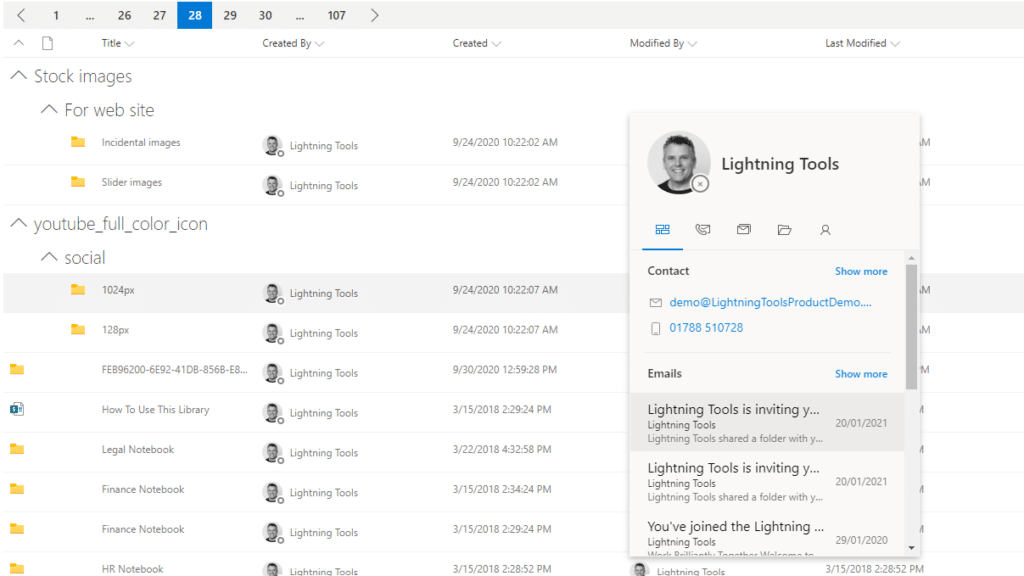
The Lightning Conductor is a SharePoint Content Aggregator that can be configured quickly by business users. The Lightning Conductor can be used to aggregate content from SharePoint Lists such as Tasks, Document Libraries, Contact Lists, and Custom Lists making it easy to view content in one place even if it is distributed across many sites and site collections. Key data can be highlighted using conditional formatting and data-bars as shown. Content from Search and Microsoft Graph can also be aggregated with the Lightning Conductor.Screenshot of CONTENT AGGREGATION WITHIN MICROSOFT TEAMS
The Lightning Conductor Web Part can be used within Microsoft SharePoint or Microsoft Teams. Even if content is stored within SharePoint sites, it is useful to have aggregated Documents, Tasks, Announcements, Calendars or Custom Lists from multiple sites displayed in a single handy view in Microsoft Teams. The Lightning Conductor can be added as a Teams Tab in any Microsoft Teams Channel.Screenshot of BUILDING REPORTS ON MICROSOFT GRAPH
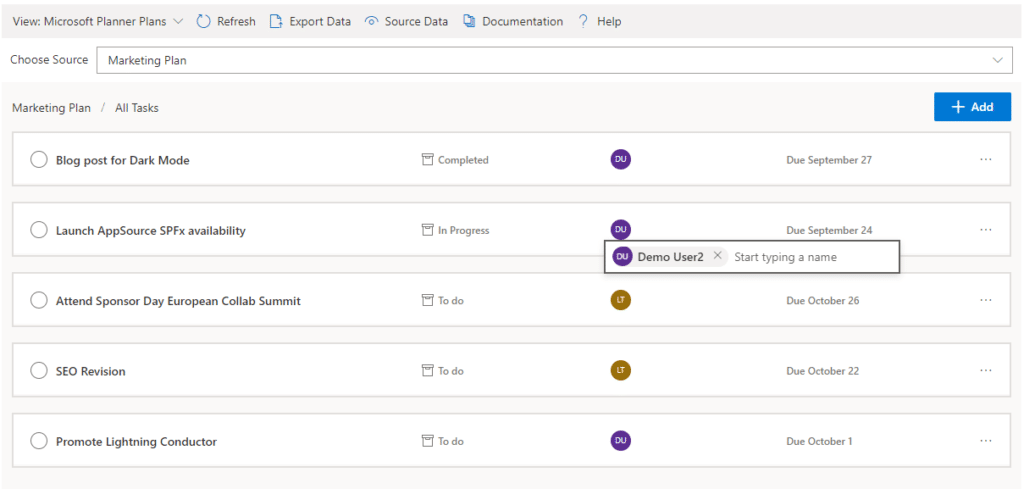
The Lightning Conductor can be used (without code) to aggregate content from Microsoft Graph as well as Search and SharePoint Lists. This example displays Microsoft Planner Plans and Microsoft Planner Tasks where users can Add new Tasks, Assign Users to Planner Tasks, Delete Tasks, and Complete Tasks. The same can be performed on Microsoft To Do items and displayed within Modern SharePoint pages or Microsoft Teams Tabs. The Lighting Conductor can also contain multiple views of content, making it ideal to display all of your tasks from SharePoint Task lists, Microsoft To Do and Microsoft Planner in a single web part or Teams Tab.

*Microsoft Graph Reports are only available for SharePoint Online and not SharePoint 2019.Screenshot of BUILDING REPORTS ON MICROSOFT 365 GROUPS
Powered by Microsoft Graph, the Microsoft 365 Group Rollup Provider enables users to aggregate content by browsing and selecting Microsoft 365 Groups. Within Microsoft 365 Groups, you’ll be able to select entities such as Drive Items, Owners, Members, Planner Plans, Planner Tasks, Events, Posts,  Sites, Lists, and Calendars.

*Microsoft Graph Reports are only available for SharePoint Online and not SharePoint 2019.Screenshot of AGGREGATING USING SEARCH
When performance is critical, search can be used for rollups. The Lightning Conductor offers three data source configurations to get to content. Object Model (Real Time Aggregation from SharePoint Lists), Microsoft Graph (Aggregation from Graph Entities such as Planner, OneDrive, Outlook), and Search. The Search Data Source enables the aggregation of content from large SharePoint lists and libraries when performance is critical. Thousands of documents can be displayed in under a second using Search.Screenshot of HIGHLIGHTING KEY BUSINESS DATA WITHIN VIEWS
End users and Site Owners can highlight the data that is important to them, the data that they need to prioritize. Using conditional formatting, data bars, and icons, conditions can be configured to highlight the data that is most important. Icons and Data Bars can be any color or size desired. Examples include highlighting High Priority tasks, Showing data bars for the completion progress of Tasks, or indicating which tasks are assigned to any particular user.

Miro Screenshots

Screenshot of Miro's design sprint templates, used to solve big challenges, create new products or improve existing ones.Screenshot of the Sprint Planning features in Miro, that assists Development Teams in creating a transparent understanding of what can be built and how. Users can run sprints and turn a team into creative and active participants. Today, many organizations use Agile tools to manage software development and other non-IT projects.Screenshot of the PI Planning Template that brings teams toward one vision of what stories to develop. Used to manage a backlog, increase productivity, and build the foundation for a successful PI Planning event. Miro’s PI Planning Template helps to get an overview of any PI Planning event, with step-by-step frames to guide the process.Screenshot of diagrams, concept maps, and system mapping templates used to communicate complex flows and create a shared understanding. Users can check off all the essential steps of the diagramming process and gain a complete overview of operations with Miro's diagramming templates collection.

Stormboard Screenshots

Screenshot of Screenshot of Screenshot of Screenshot of Screenshot of