Lytho Workflow is a creative project management software built specifically for the needs of creative and marketing teams. Combining elements of task and workflow management with the collaborative features of online proofing, Lytho Workflow helps teams get more content produced - faster. The key components of Lytho Workflow are Request Intake, Project Management, Review & Approval, and Reporting. From the initial creative brief, Lytho Workflow's request forms ensure…
N/A
Nuclino
Score 7.1 out of 10
N/A
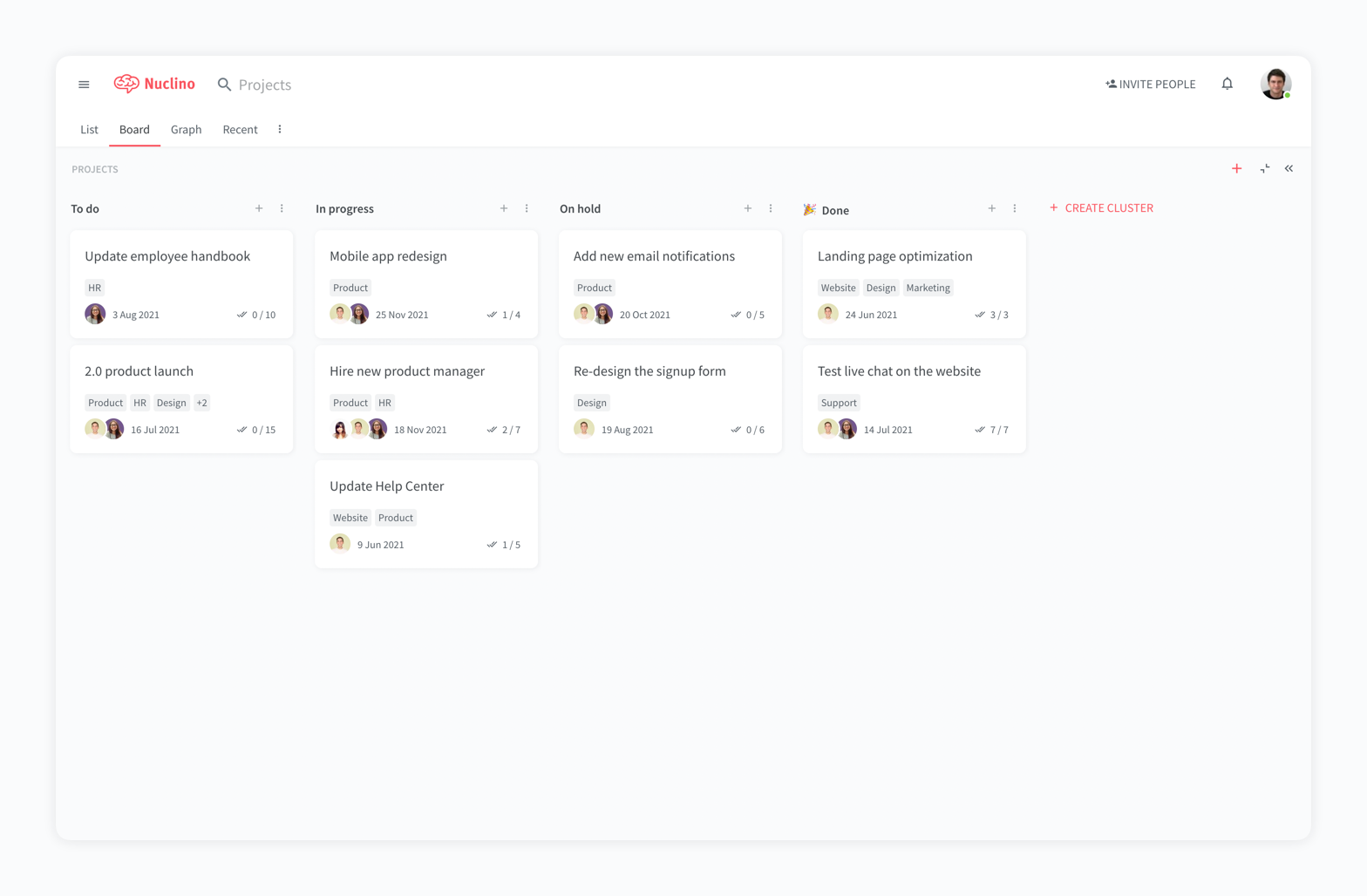
Nuclino is a unified workspace where teams can organize knowledge, manage projects, and share ideas. Progress can be tracked in a Kanban board, work structured in a hierarchical list, or data organized in a visual graph — Nuclino adapts to a team's workflow. Presented as simple and lightweight by design, Nuclino focuses on the essentials, doing away with clunky menus and rarely-used settings, to minimize the learning curve for new users. Teams from across the globe can use Nuclino…
$0
Slite
Score 6.6 out of 10
N/A
Slite is a knowledge base designed to provide teams with needed answers even without searching. From onboarding guides to all hands notes, Slite keeps all types of company information centralised.
$10
per month per member
Pricing
Lytho Workflow
Nuclino
Slite
Editions & Modules
No answers on this topic
Free
$0
per month per user
Starter
$8
per month per user
Business
$12
per month per user
Standard
$10
per month per member
Premium
$15
per month per member
Enterprise
Contact Sales
Offerings
Pricing Offerings
Lytho Workflow
Nuclino
Slite
Free Trial
No
Yes
Yes
Free/Freemium Version
No
Yes
No
Premium Consulting/Integration Services
No
No
No
Entry-level Setup Fee
No setup fee
No setup fee
No setup fee
Additional Details
No two teams are alike. So why offer “one size fits all” pricing plans? They just don’t work – teams are locked out of features they need while they get features they don’t need. We do things differently. We create individual pricing based on your team’s specific needs and budget.
Nuclino offers a free plan for up to 50 items and 2GB total storage. Commercial plans support unlimited items, advanced features, and 10GB storage per user. 25% discount for annual pricing.
Discount available for annual pricing.
More Pricing Information
Community Pulse
Lytho Workflow
Nuclino
Slite
Features
Lytho Workflow
Nuclino
Slite
Project Management
Comparison of Project Management features of Product A and Product B
Lytho Workflow
8.4
3 Ratings
9% above category average
Nuclino
8.3
13 Ratings
7% above category average
Slite
-
Ratings
Task Management
9.53 Ratings
7.69 Ratings
00 Ratings
Resource Management
7.02 Ratings
00 Ratings
00 Ratings
Scheduling
9.02 Ratings
9.01 Ratings
00 Ratings
Workflow Automation
7.43 Ratings
10.01 Ratings
00 Ratings
Team Collaboration
10.02 Ratings
00 Ratings
00 Ratings
Mobile Access
8.02 Ratings
8.010 Ratings
00 Ratings
Timesheet Tracking
7.01 Ratings
00 Ratings
00 Ratings
Change request and Case Management
9.53 Ratings
00 Ratings
00 Ratings
Gantt Charts
00 Ratings
8.01 Ratings
00 Ratings
Search
00 Ratings
8.012 Ratings
00 Ratings
Visual planning tools
00 Ratings
7.511 Ratings
00 Ratings
Communication
Comparison of Communication features of Product A and Product B
Lytho Workflow
-
Ratings
Nuclino
8.4
12 Ratings
5% above category average
Slite
-
Ratings
Chat
00 Ratings
8.01 Ratings
00 Ratings
Notifications
00 Ratings
7.59 Ratings
00 Ratings
Discussions
00 Ratings
7.98 Ratings
00 Ratings
Surveys
00 Ratings
9.01 Ratings
00 Ratings
Internal knowledgebase
00 Ratings
8.512 Ratings
00 Ratings
Integrates with GoToMeeting
00 Ratings
9.01 Ratings
00 Ratings
Integrates with Gmail and Google Hangouts
00 Ratings
9.01 Ratings
00 Ratings
Integrates with Outlook
00 Ratings
8.01 Ratings
00 Ratings
File Sharing & Management
Comparison of File Sharing & Management features of Product A and Product B
It's a flexible program that can be molded to fit most businesses. It's geared towards agencies but we've been able to use it successfully as an in-house solution. It's pretty intuitive for the most part and is easy for new hires or clients to get up and running pretty quickly.
For game design - Perfect for personal notes, recipes, snippets - Perfect for storing some organized data (for example, links to resources) - Perfect for a content playground powered by AI - Very good for diagrams - Very good. Don't know any bad examples. Tool really great. Rich functionality. Especially love different views (table, graph).
It is well suited for entire companies to use not just small teams because you can create so many workspaces and folders which allow better organization for a centralized space. For example, if you want to create for one team a folder thats a Social Media Marketing Hub you can have that with supportive resources, documents, meet the team section, and so much more. You can have another folder for other teams like HR and HR Resources where everyone has visibility into the documents and anything added under that section. It's super helpful.
Requests - Request forms are set up so that certain fields are required and there's a minimum turnaround time. This prevents others from submitting an incomplete request or requesting things last minute.
Proofing - Chasing after people to approve a proof is always a pain, but the simplicity of Lytho Workflow makes it less of a pain. I can quickly remind people in the route to review the proof by clicking a button.
Templates - I use templates so that a list of tasks is created for me when I accept a job. It also creates a timeline for when each task needs to be done.
The system is extremely fast. The application loads and displays data in milliseconds. This makes the system easy to work with.
It's also easy to edit documentation and information, as information can be editing directly without the use of an "edit" button.
Pricing: Loading speed, ease of use and quick editing are its main advantage that makes it stand out from competitors. Having said that, the pricing is very good as well.
I don't love that it doesn't integrate easily with the other tools we use, at least it doesn't as far as I know.
Since there is not an Excel sort of capability there is no way it could ever replace Google, so it is sometimes easier to just use Word docs instead of Slite since everything is in one place.
I think if Slite extended their product line up, it would be more attractive to use exclusively, instead of just using it for documentation.
It has a very clean UI for me, the multiple views are so so useful, we can collaborate freely, and fast. This app helped us to grow because now we are giving our time more on generating ideas and of course getting more projects and clients giving real ROI instead of focusing on organizing files. But just like all apps out there, it has some room for improvement
Very clean interface however editing can be a challenge which is a big part of using it so I can't give a 10 until the editing and customization for editing is improved. I love how minimal the look and feel is though and how easy it is to organize different pages and folders.
My team has an individual dedicated to content management and Nuclino is one of her job descriptions. It's nice knowing she is able to handle any issues that arise before we even realize they exist. We haven't had any technical issues since implementation so that's been a very pleasant experience.
By consolidating the requests, project management, and proofing without features we didn't need like invoicing it was an easy fit for us. We were able to quickly develop a comprehensive workflow and the gains to efficiency were immediate. Pricing was competitive (at least at the time) and the implementation was very good as well.
Nuclino is the clear winner when it comes to ease of use for both the administrator and user. Less setup time and less "training" time. The streamlined interface is quick and intuitive to learn and is not cluttered as compared to Confluence. Every tool you need to use to create a page or administer the workspace is available immediately on screen or by right-clicking. In contrast, Confluence buries many tools in administrative interfaces and only allows use of some features once you make several clicks to include a "macro" or "plug-in". We use both tools and I get complaints constantly from my team about how complicated Confluence can get just to author a quick page.
[In my opinion,] Slite is cheaper but less mature and feature full. Notion is a much more mature solution, so I'd recommend it for teams who want to be at the front and don't care about cost.
I wasn't working for the company when they first started using Lytho Workflow workflow, so I can't say what impact it has had. However, I do see the product as a necessity in the fast-paced environment that is retail marketing. The introduction of the new "change request" feature has saved countless hours of miscommunication and confusion when project objectives change.