Microsoft Access is a database management system from Microsoft that combines the relational Microsoft Jet Database Engine with a graphical user interface and software-development tools.
$139.99
per PC
MySQL
Score 8.3 out of 10
N/A
MySQL is a popular open-source relational and embedded database, now owned by Oracle.
N/A
OCI
Score 8.1 out of 10
N/A
Oracle Cloud Infrastructure (OCI) is Oracles's infrastructure-as-a-service (IaaS) platform which combines the utility of public cloud with the granular control, security, and predictability of on-premises infrastructure.
N/A
Pricing
Microsoft Access
MySQL
Oracle Cloud Infrastructure
Editions & Modules
Microsoft Access
$139.99
per PC
No answers on this topic
Offerings
Pricing Offerings
Microsoft Access
MySQL
OCI
Free Trial
No
No
Yes
Free/Freemium Version
No
No
Yes
Premium Consulting/Integration Services
No
No
Yes
Entry-level Setup Fee
No setup fee
No setup fee
Optional
Additional Details
—
—
—
More Pricing Information
Community Pulse
Microsoft Access
MySQL
Oracle Cloud Infrastructure
Considered Multiple Products
Microsoft Access
Verified User
Analyst
Chose Microsoft Access
Microsoft Access is better for novice users. It is very user-friendly and helps beginners learn data base rather than MySQL. MySQL is for more advanced users which have more experience. Access is also good for smaller organizations. It saves money rather than spending more on …
Microsoft Access databases are more suitable for us because we are a smaller team. It's easy for us to export the reporting. It's also easy for people to create their own databases as well! Microsoft Access is honestly a one-stop-shop for us, and we figured we were not at a …
Tableau is not even a 'switch-out' tool, it's for visualization so it's not a fair comparison. Against other databasing tools, MySQL is still my favorite may be simply due to being a creature of comfort because that's where I first learned to manage DB. However, Microsoft …
[Selected Microsoft Access for] employee learning simplicity, attractive graphical environment and features of Microsoft 365 with responsive Microsoft support.
Microsoft Access is a bit dated compared to other database tools. It is slower, not able to handle quantities of data that are as large as the other tools, and a bit more finicky. However, it is sometimes the preferred tool for some clients. It also has a lower barrier to entry …
Verified User
Employee
Chose Microsoft Access
MS Access is the little brother to all these products. In no way is it as feature-rich as the competition I have selected. It is, however, great when used properly. It does not have the same level of security, availability, access, or recoverability as anything listed above. …
Access should be relatively cost effective because it is included in the MS office 365. But it is not suitable for larger organization due to lack of work sharing environment.
We selected Microsoft Access for its lower price and because it is easy to use for any user. Previously in the company, because we were small, Excel was used and I can migrate my data from Excel to Access in a fast and simple way. Besides that, it has organized information that …
Verified User
Analyst
Chose Microsoft Access
Microsoft Access is a good data management tool. and it excels in that area, which is what we needed the most. It was simple to use and easy to learn. Database management can be done with multiple users in Access. And we can have reports for data summaries, or for any specific …
I find access easier to use than base or thunderbird but if you are familiar with Microsoft Office products, the learning curve is lessened by that. There is no comparision to SQL or MySql, but these are meant for larger more robust database applications. Access was actually in …
Microsoft Access can be used on the Windows platform, which most organizations use, especially our own, which is one of the reasons why we selected Microsoft Access. Access was also part of the standard Windows image that our company uses when imaging desktops and laptops so …
MySQL
Verified User
Manager
Chose MySQL
We use Oracle Database for another business unit and in the recent past I’ve used Microsoft Access. While every relational database has its positives and negatives, MySQL has proven to be the fastest and most reliable. Its automated backups have saved us time in redoing mass …
It would be hard to make a case for the use of Microsoft Access for any but the most simple of internal business applications at this stage, not because it is a bad product but it falls well short of the power and scalability of MySQL and almost any other databse solution out …
Our original implementation of MySQL was to replace an Access database that had unfortunately been able to grow beyond its abilities and scope. MySQL seemed to offer all the benefits of Access (easy to set up, use and administer) with none of the downsides (reliability, …
MySQL has a GUI which makes it easy for developers to work upon. It has all features like replication, backup and crash recovery. Also since it is freely available it becomes commercially feasible for people to use this DB. Also MySQL can be easily used as a back end for the …
Verified User
Engineer
Chose MySQL
Familiarity: With MySQL, I know what to expect, and that goes a long way. Also, since it adheres fairly close to SQL '92, It's relatively easy to construct queries, views, etc. without a steep learning curve. Also, RAM usage is important (this is true of any RDBMS …
SQLLite was not a choice on Trust Radius, and it is the only tool that I have used similar to MySQL and the use was several years ago, so I do not remember the exact reason but there was some function that I needed that SQLite could not perform, and I had to download MySQL to …
Cuts down seperate charges for additional databases as in Microsoft SQL Server. It is an open source software compared to other database management systems.
Compared to Oracle MySQL is lacking some of the advanced features Oracle provides but through a detailed business and technical requirements capture process it became clear we would not need these very advanced features. Oracle is stronger on the backup and restore side of …
OCI was the ideal place for our MySQL database and storage solutions due to customer requirements.One of the primary reasons we selected Oracle Cloud Infrastructure was due to its great monitoring abilities. It allows us to do extensive log analysis for auditing purposes, view …
Oracle Cloud Infrastructure is very similar to other providers and I like to use them next to the others. This helps with redundancy and gives me a good way of having my cloud instances spread. Others can be a bit more configurable, but overall it works well and I can do what I …
As a Material Purchasing/Planning/inventory tracking application, Microsoft Access serves its purpose well. It's presentation is clean, data entry is simple and the ability to customize search fields is welcome. It does, however, come with some caveats; namely, when setting search filters and the need arises to back up a step or two, with Microsoft Access you have to reset, or "clear all", adding extra steps/time to a query.
MySQL is best suited for applications on platform like high-traffic content-driven websites, small-scale web apps, data warehouses which regards light analytical workloads. However its less suited for areas like enterprise data warehouse, OLAP cubes, large-scale reporting, applications requiring flexible or semi-structured data like event logging systems, product configurations, dynamic forms.
As per our usage Oracle Cloud Infrastructure for almost 6 years hosting 500 + customers I can say its well suited application for any small scale to larger scale application as it can handle that capacity and provide more reliable cloud service only if you need any messaging service like pub/sub or sqs better to consider other services.
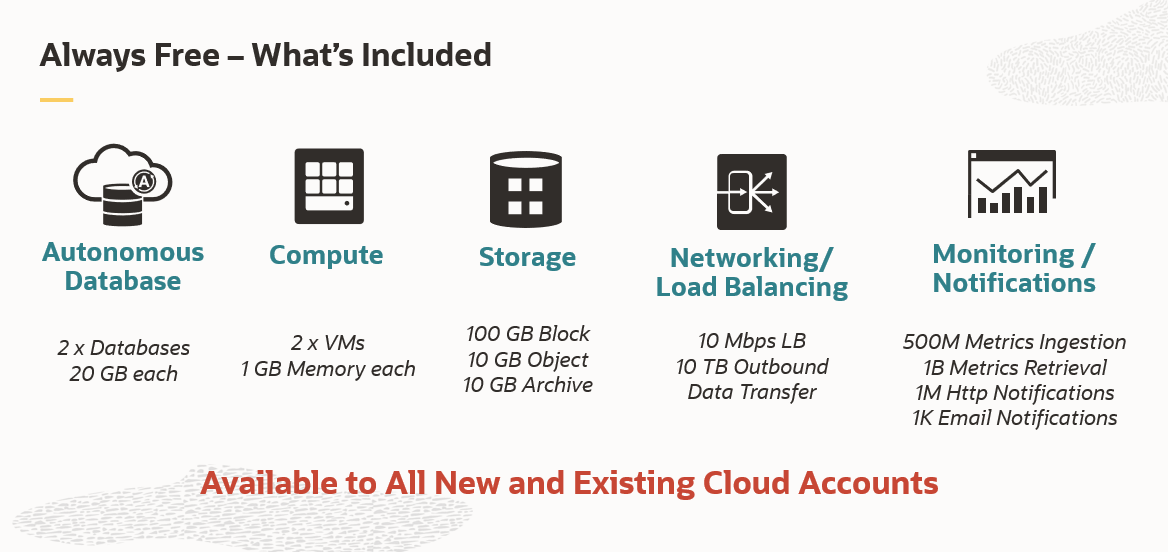
Oracle Cloud Infrastructure has a generous free tier, moreso than other hyperscalers, with an always-free tier that guarantees certain products are always free
Oracle Cloud Infrastructure allows you to size VMs with differing combinations of CPU and RAM, which is contrary to other hyperscalers that have specific pre-defined combinations only
Microsoft Access has not really changed at all for several years. It might be nice to see some upgrades and changes.
The help info is often not helpful. Need more tutorials for Microsoft Access to show how to do specific things.
Be careful naming objects such as tables, forms, etc. Names that are too long can get cut off in dialog boxes to choose a table, form, report, etc. So, I wish they would have resizable dialog boxes to allow you to see objects with long names.
I wish it could show me objects that are not in use in the database for current queries, tables, reports, forms, and macros. That way unused objects can be deleted without worrying about losing a report or query because you deleted the underlying object.
Learning curve: is big. Newbies will face problems in understanding the platform initially. However, with plenty of online resources, one can easily find solutions to problems and learn on the go.
Backup and restore: MySQL is not very seamless. Although the data is never ruptured or missed, the process involved is not very much user-friendly. Maybe, a new command-line interface for only the backup-restore functionality shall be set up again to make this very important step much easier to perform and maintain.
Navigating the UI takes lots of getting used to. It reminds me of older GCP (just to get used to where everything is).
Permission for different things always seemed to be more difficult than it really needed to be. Once you got them set up you were good but updating anything or creating new permissions for just about anything took longer than I thought it should.
Based on how the buttons were laid out, it was pretty easy to delete all of your DNS records, and backing them up was not as intuitive as I'd like with the UI, but it was easy to do using a script.
I and the rest of my team will renew our Microsoft Access in the future because we use and maintain many different applications and databases created using Microsoft Access so we will need to maintain them in the future. Additionally, it is a standard at our place of work so it is at $0 cost to us to use. Another reason for renewing Microsoft Access is that we just don' t have the resources needed to extend into a network of users so we need to remain a single-desktop application at this time.
For teaching Databases and SQL, I would definitely continue to use MySQL. It provides a good, solid foundation to learn about databases. Also to learn about the SQL language and how it works with the creation, insertion, deletion, updating, and manipulation of data, tables, and databases. This SQL language is a foundation and can be used to learn many other database related concepts.
Reliability: Very dependable and stable OCI services have been for the business operations.Performance: The speed and efficiency of OCI in meeting their computing and storage needs.Scalability: The ease and effectiveness of scaling resources up or down to accommodate changing demands.Security: The robustness and effectiveness of OCI's security features in protecting their data and applications.
Microsoft Access is easy to use. It is compatible with spreadsheets. It is a very good data management tool. There is scope to save a large amount of data in one place. For using this database, one does not need much training, can be shared among multiple users. This database has to sort and filtering features which seem to be very useful.
I give MySQL a 9/10 overall because I really like it but I feel like there are a lot of tech people who would hate it if I gave it a 10/10. I've never had any problems with it or reached any of its limitations but I know a few people who have so I can't give it a 10/10 based on those complaints.
The services & products in Oracle Cloud Infrastructure needs more improvement to beat other Cloud service providers. The price is good & Security processes are good. We are requiring to put more effort in supporting this Oracle Cloud Infrastructure than other Cloud service providers. Probably better ways are there but is not super easy to find or not super available
Yeah sometimes we had to face unplanned outages due to underlying infrastructure issues, so not every time,e but once in a while we face issues with availability. But the good thing is we have redundancy with DR setup and multi region so we can manage.
From the start, I was surprised by response times and image quality accessing windows VMs with RDP. GCP, Azure and -many offerings in AWS- don't perform this speed. Also, that's evident in the quality of Infrastructure Management Team, because I just received one warning regarding a region failure, what confirms that's a mature platform.
While I have never contacted Microsoft directly for product support, for some reason there's a real prejudice against MS Access among most IT support professionals. They are usually discouraging when it comes to using MS Access. Most of this is due to their lack of understanding of MS Access and how it can improve one's productivity. If Microsoft invested more resources towards enhancing and promoting the use of MS Access then maybe things would be different.
We have never contacted MySQL enterprise support team for any issues related to MySQL. This is because we have been using primarily the MySQL Server community edition and have been using the MySQL support forums for any questions and practical guidance that we needed before and during the technical implementations. Overall, the support community has been very helpful and allowed us to make the most out of the community edition.
Overall it is amazing, there is always room for improvement. We have weekly updates that tend to slow the program used more and more. We had to change some reports within Oracle because the others wouldn’t load. This is tied to our payroll and the delays are causing many time constraint issues and panic. We have to create a new report when one breaks. Otherwise awesome!
Excel is a fantastic - robust application that can do so much so easily. Its easy to train and understand. However - excel does not provide a reporting function and that is typically where we will suggest a move to [Microsoft] Access. [Microsoft] Access requires a little more knowledge of data manipulation.
MongoDB has a dynamic schema for how data is stored in 'documents' whereas MySQL is more structured with tables, columns, and rows. MongoDB was built for high availability whereas MySQL can be a challenge when it comes to replication of the data and making everything redundant in the event of a DR or outage.
We used Microsoft Azure and Docker earlier and faced some difficulties like Microsoft Azure and Docker. Occasionally, the generation of large images can delay deployment. It is also necessary for me to admit that Microsoft Azure and Docker have a somewhat steep learning curve. Proper paperwork needs to be there. Docker has issues with performance on a number of platforms. On the other hand, OCI is easy to deploy and easy to understand.
was not part of initial purchase team. Anyways, i think unit pricing and billing frequency is good compared to other Cloud service providers, when it comes to Cloud Capital expenditure & Operational expenditure. Would be more interested in exploring more options where customers can get more cost relaxations on trying out new cloud services in Oracle Cloud Infrastructure for example a new App or a feature
We have hosted around 500 + customers on this cloud so till day not faced any major issues, so we can use it for any kind of products and it can hold the load and easily scale based on need.
Services & Infra wise is ok to use & host applications & services. Security wise also good for a Cloud service provider. It is a interesting area to explore & using it for day to day needs can be further improvised in future probably. Modern day Services like AI and Machine learning could be improved