Microsoft Excel is a spreadsheet application available as part of Microsoft 365 (Office 365), or standalone, in cloud-based and on-premise editions.
$6.99
per month
Planview ChangePoint
Score 7.0 out of 10
N/A
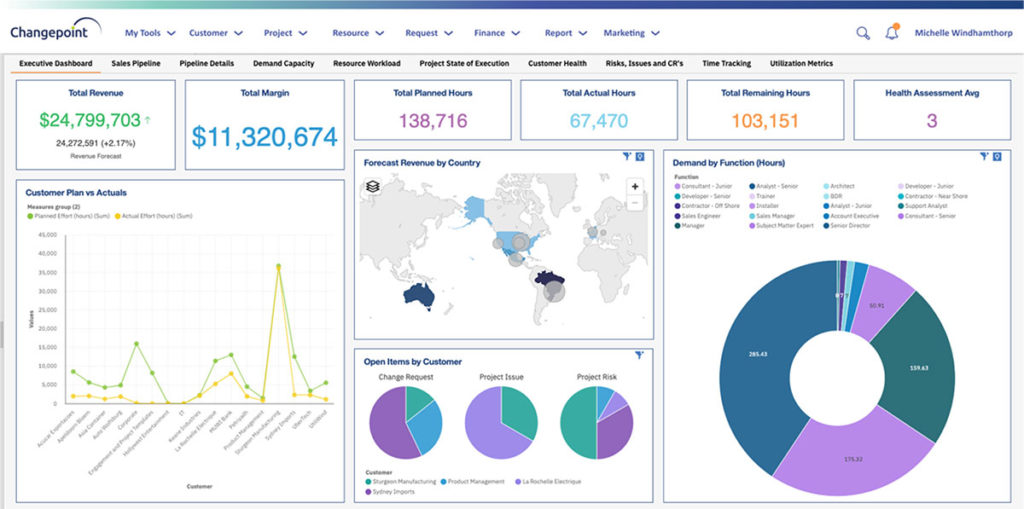
Planview Changepoint is a platform that marries professional services automation (PSA), project portfolio management (PPM) and business analytics to provide managers broad operational visibility and control over their strategic business portfolios.
N/A
Stackby
Score 8.9 out of 10
N/A
Stackby is designed to bring together the simplicity of spreadsheets, the functionality of databases and integrations with best business APIs to let anyone build their own tools, the way they want. No coding needed. Users can build a database from scratch, import data from pre-existing sources like spreadsheets or Google Sheets, or choose from over 100 pre-built templates across multiple categories. Stackby offers over 25 unique column types like text,…
I don't really know another program as powerful as Excel. I've used Google Doc programs but do not feel they come close. So far, anytime I've needed a table of some sort for data, whether it's budget oriented or information off a survey, the best system has been Excel. We do web audits on occasion and we create an Excel worksheet featuring every URL of the pages we're auditing, notes, data about the content, information about files attached to the page and other information to help us determine what pages need updating, deleting or otherwise. We also use Excel primarily to export our Google Analytics to in order for us to create reports for clients that need to see specific information about their traffic.
Changepoint is basic and would, therefore, work for businesses with uncomplicated requests, pretty straightforward workflows and willingness to work with an unsightly solution. It is basic, from the UI to the search option and the way the information is captured, which can be frustrating and counter-intuitive at times. It is relatively robust (i.e. I have been using it for almost 2 years and have not seen it crash once) but it does log me out when the system has been inactive for about 30 minutes - and I am only notified about being logged out upon clicking the Submit button, meaning many a line of text have been typed more than once!
Based on my experience, I can provide specific scenarios where Stackby is well suited and others where it may be less appropriate: Project Management: Stackby is an excellent choice for project management scenarios. Its ability to create custom databases, track tasks, assign responsibilities, and collaborate in real-time makes it highly effective for managing and monitoring project progress. CRM and Sales: Stackby is well suited for managing customer relationships and sales processes. Its customizable database structure allows for organizing customer information, tracking leads, managing deals, and generating reports. The ability to integrate with other tools further enhances its usefulness in CRM and sales workflows. Content Planning: Stackby is a great fit for content planning scenarios. Users can create databases to manage editorial calendars, track content ideas, assign tasks to team members, and monitor content performance. Collaboration features facilitate seamless content collaboration and ensure timely publishing.
It is very good at embedded formulas and tying cells to one another
It allows me to compare deals terms on a side-by-side basis and talk my clients through it easily.
It is very helpful as well in terms of allowing me to filter/sort results in many different ways depending on what specific information I am most interested in prioritizing.
Changepoint has significant reporting capabilities, though of course, the data that comes out is only as good as the data that goes in. I enjoy being able to use the standard reports to understand exactly how much a project has cost us and to compare it to how much we are charging. This allows us to more accurately set our prices. Though we have not used the report designer capability, I understand that custom reports can be designed with relative ease.
Changepoint has a versioning capability for changes made to user profiles in the system manager, which I find particularly helpful. As a non-power user, it is valuable to be able to see what changes I have made to various profiles so that I can troubleshoot a problem down the line.
Changepoint has significant functionality well beyond the features that we are currently using, and for this reason, I think it is affordable and a good deal. Particularly if your organization is interested in dedicating the time and resources into using all of the features around project planning, resource allocation, etc., the price is well worth the value.
Excel offers collaboration features that allow multiple users to work on the same spreadsheet, but managing changes made by different users can be challenging. Excel could improve its features by offering more granular control, better tracking of changes, and more robust conflict resolution tools.
Itcan be a barrier to productivity when importing and exporting data from other applications or file formats. To improve its features, it should offer better support for standard file formats and more robust error handling and reporting tools.
Excel can be challenging for finance students and working professionals, but it can be improved by offering more robust tutorials, better documentation, and more user communities and support forums.
We use Changepoint to manage the IS organization. I would like to see more advancement in order to do benefits management.
I would like to see a capability where a project manager can build a very detailed work breakdown structure, but only require project resources to charge time and provide a task status at a higher level.
Implement the same views available on desktop into the mobile app
Internal automations (like Airtable)
Ability to implement and display info as a dashboard (like Airtable)
Polish up the formatting of formulas, inputting them causes user frustration due to the formula input cursor jumping around
Better intelligence and ease of inputting data in bulk i.e have the fields automatically identify what data is being input and format appropriately (like Airtable does)
Excel remains the industry standard for spreadsheets and has maintained simple and straight-forward formula writing methods. Although there is a learning curve to do more complex calculations, there are countless help sites and videos on the Internet for almost any need.
Sometimes the decision to renew boils down to an old adage "if it isn't broken don't fix it". Previous to moving to Changepoint, it was obvious that we needed a better project management tool. Projects we completed on time but the time zone difference between the teams and several iterations of back and forth caused a number of communication issues with projects. The difference is night and day.
I'm giving it a 7 because it is my go to. But the fact other prefer Google Sheets when working with a team does get irritating. I've used the online version of Microsoft Excel that other teams can get into and it still seems behind Google Sheets. It's a little clanky and slow? If that's even a term.
Stackby is overall pretty easy to use, especially if you're used to something like Airtable or SmartSuite. Some of the pages seem like near exact clones (though they put their own creative spin on things). I'd prefer a slighty fresher interface (like SmartSuite), but I'm willing to sacrifice that for the better price and great customer service.
Out of Microsoft Excel, Microsoft Power BI, IBM SPSS, and Google Sheets, Microsoft Excel is by far the most common tool used for anything data-related across organizations. Accordingly, our organization has also implemented Microsoft Excel as a first-step tool. We recently adopted Microsoft Power BI (the free version), and use it occasionally (mostly for creating dashboards), but it is less commonly understood by stakeholders across our organization and by our clients. Accordingly, Microsoft Excel is more user-friendly and because of its popularity, we can easily look up how to do things in the program online. Google Sheets is a comparable alternative to Microsoft Excel, but because it's cloud-based and we have sensitive data that needs to be protected, we chose against using this software. Finally, a few users (including myself) have access to and utilize IBM's SPSS. For my role, it's a helpful tool to do more rigorous analyses. However, because of its cost and limited functionality as a simple spreadsheet, we only use it for more complex analyses.
Planview Changepoint helps us to understand our key customers enabling us to capitalize on every financial opportunity and helps us to forecast demand against the capacities required for new opportunities, and also it automates and monitors contractual terms and conditions. It gives us visibility into our employees' skills and helps to optimize resource allocation.
I have also tried Ora.Pm. Infinity has better graphical interface, but nowhere near as many features and the UI isn't as effective (i.e, moving around with keys). Grist has a much more technical interface and it comes from being more of a database/interactive spreadsheet vs Stackby. Grist has much more functionality in terms of formulas, but is much harder to learn to use and less other functionalities. Ora.PM is more of a test at a task management app, and doesn't compare - Stackby is much better.
Each user can use it to whatever level of expertise they have. It remains the same so users can contribute to another's work regardless of whether they have more or less expertise
Employee efficiency has decreased significantly within our Project MAnagement team. The main causes are lack of logical steps/not user-friendly and the slowness of the entire program.
Changepoint PSA has greatly improved being able to track budgets for all projects. Before this software, budgets were done manually by hand and cross-referenced with Accounting. Now, we can pull a report out of the system, as long as all parties entered their time and data correctly.