Microsoft Power Automate is an advanced automation platform offering a range of features, including AI-powered automation, robotic process automation (RPA), business process automation (BPA), digital process automation (DPA), and process/task mining. The platform aims to empower organizations to securely automate their operations at scale by leveraging low-code and AI technologies.
$15
per month per user
airSlate SignNow
Score8.5 out of 10
N/A
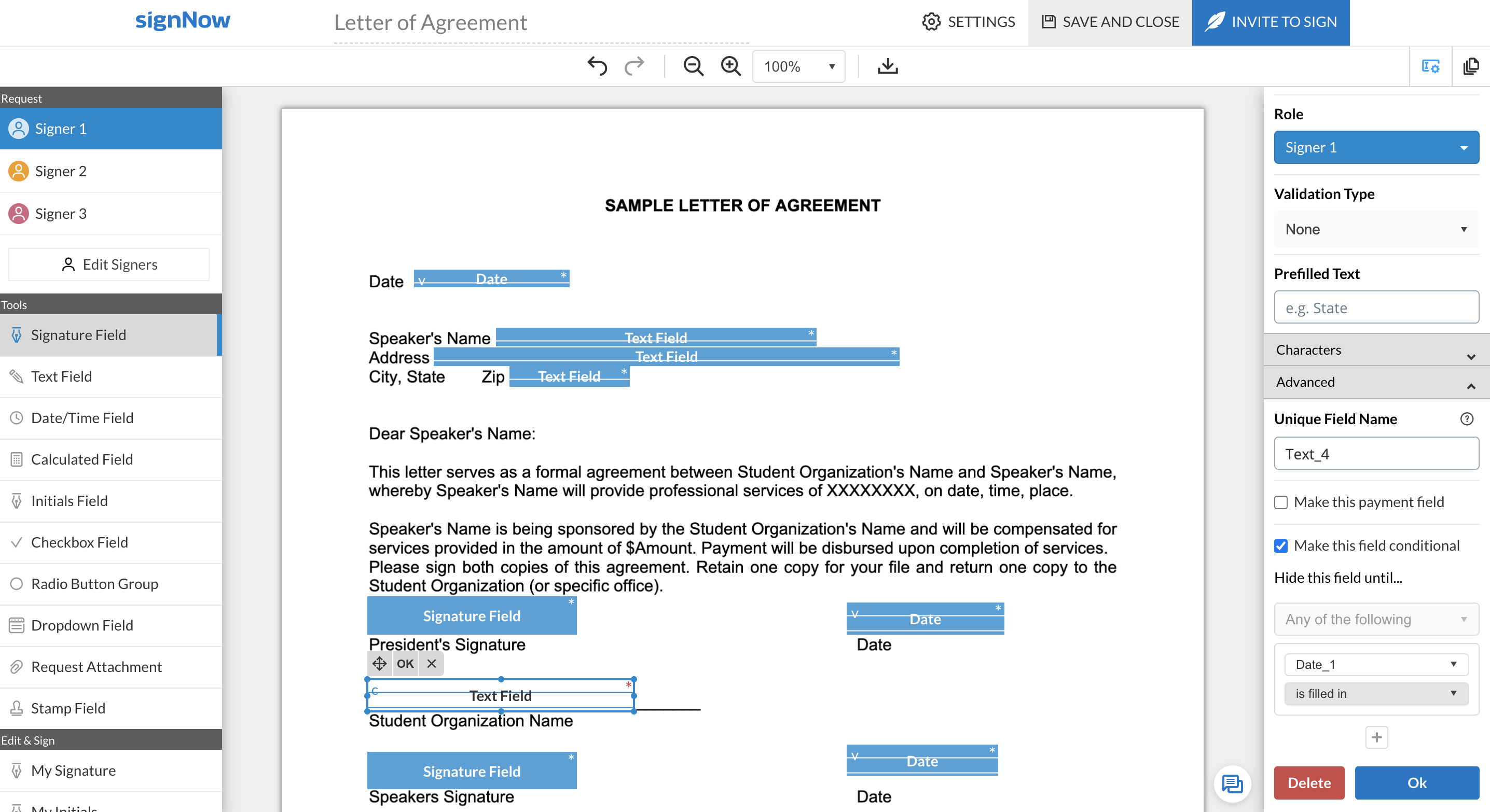
signNow is an eSignature solution with mobile apps for iOS and Android. signNow can be integrated into popular platforms and offers SaaS, public cloud, and private cloud deployment options with the same underlying API. This enables customers to leverage the power and usability of the signNow eSignature platform, while meeting their particular security and compliance requirements.
$1.50
one-time fee per signature invite
Pricing
Microsoft Power Automate
airSlate SignNow
Editions & Modules
Power Automate Premium
$15
per month per user
Power Automate Process
$150
per month per bot
Hosted RPA add-on
$215
per month per bot
Process Mining add-on
$5,000
per month per tenant
Site License
$1.50
one-time fee per signature invite
Business
$20
per month
Business Premium
$30
per month
Enterprise
$50
per month
Offerings
Pricing Offerings
Microsoft Power Automate
airSlate SignNow
Free Trial
Yes
Yes
Free/Freemium Version
Yes
No
Premium Consulting/Integration Services
No
Yes
Entry-level Setup Fee
No setup fee
-$8 per user/month
Additional Details
—
All subscriptions include unlimited number of users. Up to a 60% discount available for annual pricing.
Very useful RPA tools for automating processes with minimal coding and drag-and-drop functionality, with a wide variety of triggers, including scheduled time-based triggers and activity-based triggers, such as modifying a file/list in SharePoint to run a Power Automate flow. Very easy-to-use UI with native integration with every Microsoft product, and a very low automation failure rate for deployed workflows.
A de minimis incentive was given to thank the reviewer for their time. The incentive was not used to bias or drive a particular response, nor was the incentive contingent on a positive endorsement. More Info
SignNow is particularly useful for simple documents, forms and contracts where there the fields are pretty standards- names, signature block, title. It would be helpful to have features that allow substitution of certain fill in the blanks such that allow you to use the same template but first have a dialog to integrate language for a person, corporation, partnership or LLP. I'm a lawyer and having the ability to assemble variation of this nature into one template would be helpful. Also (and it may do this) the ability to change the actual form/document within the a template would be useful.
A de minimis incentive was given to thank the reviewer for their time. The incentive was not used to bias or drive a particular response, nor was the incentive contingent on a positive endorsement. More Info
A de minimis incentive was given to thank the reviewer for their time. The incentive was not used to bias or drive a particular response, nor was the incentive contingent on a positive endorsement. More Info
A de minimis incentive was given to thank the reviewer for their time. The incentive was not used to bias or drive a particular response, nor was the incentive contingent on a positive endorsement. More Info
A de minimis incentive was given to thank the reviewer for their time. The incentive was not used to bias or drive a particular response, nor was the incentive contingent on a positive endorsement. TR verified that a representative sample of customers was invited. More Info
When using shared templates, the option to rename the document is at the bottom of the signatures page. I would like that to be visible sooner as some of my team misses it and sends documents to clients with the templated name instead of the correct name because they forgot to scroll down far enough to see it.
CC'ed contacts used to show suggestions as you typed the email if you've sent that person a document before, but that functionality no longer shows on our account. I'd like to see that brought back.
It would be nice if we could add folders to our documents page so that we could sort sent and signed documents into individual client folders. The search feature works fine, but folders would help clean up the view for my team.
A de minimis incentive was given to thank the reviewer for their time. The incentive was not used to bias or drive a particular response, nor was the incentive contingent on a positive endorsement. More Info
The tool is very useful when used with its various native connectors, taking great advantage of the integration between the components and systems of the Office365 universe. However, its cost is still high, and automation using more advanced components containing AI resources becomes unfeasible for some companies. Due to the financial crisis that many companies are currently experiencing, investment in automation systems or tools is taking a back seat.
A de minimis incentive was given to thank the reviewer for their time. The incentive was not used to bias or drive a particular response, nor was the incentive contingent on a positive endorsement. More Info
The features are too limited. The biggest issue though is the flexibility for editing existing forms without having to create a whole new form. The other issues are its payment partner options, lack of automation, and logic flow. We plan to quit this software and use other software in its place.
A de minimis incentive was given to thank the reviewer for their time. The incentive was not used to bias or drive a particular response, nor was the incentive contingent on a positive endorsement. TR verified that a representative sample of customers was invited. More Info
Power Automate features a clean and intuitive user interface that allows users to create, manage, and monitor workflows easily. The UI is designed to be accessible to both technical and non-technical users, with drag-and-drop functionality for building workflows. Power Automate supports integration with a wide range of Microsoft and third-party applications. This flexibility in integration allows users to automate workflows across various systems, enhancing overall productivity and efficiency.
A de minimis incentive was given to thank the reviewer for their time. The incentive was not used to bias or drive a particular response, nor was the incentive contingent on a positive endorsement. TR verified that a representative sample of customers was invited. More Info
In terms of core functionality - adding options for signatures, text, dates, check boxes, etc., as well as customising the body of the request, the title of the request, follow-ups / reminders for signature, etc., SignNow is great. It's really easy to navigate and use in this regard. SignNow loses points when it comes to the end-user who needs to sign. There's an option for them to either use the app (which is most prominent in the page that shows when they open the request) or to sign using their browser (which is much smaller). I had my assistant create this step by step guide for our clients, so they can complete the request the way we need them to:https://docs.google.com/presentation/d/1FopYjlykHMFjIAQjgaNLtNIvSCQND_kb86-U9bA5M2A/edit?usp=sharing As far as I'm aware, you can't make it mandatory for them to draw their signature, and there's no option to remove the prompt for them to download the app when signing on their mobile device. I really wish these were options, but they don't take away from the fact it does what it is intended to do, and it does it well.
A de minimis incentive was given to thank the reviewer for their time. The incentive was not used to bias or drive a particular response, nor was the incentive contingent on a positive endorsement. More Info
SignNow is always available when I need it. It seems that most updates occur outside of business hours so I have full functionality when I need it most between the hours of 8am-6pm EST. There has only been I time when I experience application errors when I need to use the system but it did not last long and the issue was resolved within a few hours.
A de minimis incentive was given to thank the reviewer for their time. The incentive was not used to bias or drive a particular response, nor was the incentive contingent on a positive endorsement. More Info
both Community support and Microsoft official support typically respond to (and resolve) reported issues in a VERY expedient manner, usually going above and beyond for education and bugfixing. I have been thoroughly impressed with the level of support I had been provided in the past.
A de minimis incentive was given to thank the reviewer for their time. The incentive was not used to bias or drive a particular response, nor was the incentive contingent on a positive endorsement. More Info
781 / 5,000Translation resultsTranslation resultMy experience with airSlate SignNow support has been super ok so far. I only had to contact them once because a document got stuck when I was signing it, so I sent them an email and they responded the next day. They solved the problem, but I found it a bit slow... They could have more direct support, like live chat or even WhatsApp. I believe that if there was a subscription plan for dedicated support it would also be very interesting. For example, a large company with several signature routines, including important signatures that block important workflow processes and sometimes with high added value, these companies, due to the risks, do not want to stop a process because of a signature, so they would not mind investing a little more in dedicated support. Minha experiência com o suporte do airSlate SignNow foi super ok até agora. Só precisei entrar em contato uma vez porque um documento travou na hora de assinar, aí mandei um e-mail e eles responderam no dia seguinte. Resolveram o problema, mas achei meio demorado... podia ter um suporte mais direto, tipo chat ao vivo ou até WhatsApp, acredito que se houvesse um plano de assinatura para suporte dedicado também seria bem interessante, por exemplo uma empresa grande com varias rotinas de assinaturas, entre elas temos assinaturas importantes que travem procesos de Workflow importantes e as vezes de alto valor agregrado, essas empresas devido as riscos não querem parar um processo por conta de um assinatura, por isso não ligariam de investir um pouco mais em suporte dedicado.
A de minimis incentive was given to thank the reviewer for their time. The incentive was not used to bias or drive a particular response, nor was the incentive contingent on a positive endorsement. TR verified that a representative sample of customers was invited. More Info
after reviewing the main features of Power Automate, the Microsoft trainer focused on some of our real life use cases implementation, from simple to more advanced.
A de minimis incentive was given to thank the reviewer for their time. The incentive was not used to bias or drive a particular response, nor was the incentive contingent on a positive endorsement. TR verified that a representative sample of customers was invited. More Info
although it was productive, it is more difficult to stay focused and in a 7 hours a day online training (including screen share issues and the fact that the trainer just can't precisely show the exact location of your mistake)
A de minimis incentive was given to thank the reviewer for their time. The incentive was not used to bias or drive a particular response, nor was the incentive contingent on a positive endorsement. TR verified that a representative sample of customers was invited. More Info
It was nice to be shown the basics of the system and be able to see or understand the specific functions our company would need to use, such as the template creation, document grouping and document group templates. Being taught on how to use these functions, made learning them much easier.
A de minimis incentive was given to thank the reviewer for their time. The incentive was not used to bias or drive a particular response, nor was the incentive contingent on a positive endorsement. More Info
Overall, our experience implementing Microsoft Power Automate has been positive, with a relatively low barrier to entry and a fast time-to-value—especially because it integrates natively with Microsoft 365, which we were already using extensively. With Respect to migration, I had a very good experience where existing workflows were reviewed and simplified. Unnecessary steps were removed. Business rules were reimplemented using Power Automate logic. We migrated Approval workflows, email-based notifications, SharePoint-centric processes, and simple integrations.
A de minimis incentive was given to thank the reviewer for their time. The incentive was not used to bias or drive a particular response, nor was the incentive contingent on a positive endorsement. More Info
Make sure you know exactly what you need before implementation and be sure to ask how to use the most important functions of the system that you will be using.
A de minimis incentive was given to thank the reviewer for their time. The incentive was not used to bias or drive a particular response, nor was the incentive contingent on a positive endorsement. More Info
Microsoft Power Automate is worlds ahead of Zapier in so many ways. The looping, DOM access, and flow controls are much better. I feel that accessing different data within previous connectors used in a flow is much easier in Microsoft Power Automate as well. The custom connector creation process is a lot more pleasant in Microsoft Power Automate. The DateTime data type is handles MUCH better in Microsoft Power Automate, which is reason enough to use it.
A de minimis incentive was given to thank the reviewer for their time. The incentive was not used to bias or drive a particular response, nor was the incentive contingent on a positive endorsement. TR verified that a representative sample of customers was invited. More Info
I chose airSlate SignNow over DocuSign primarily due to the superior ease of use and a more intuitive user interface (UI). airSlate SignNow's UI stood out with its simplicity and well-thought-out design, making the entire process of signing and managing documents much more straightforward.The drag-and-drop functionality and the ability to customize signature fields in airSlate SignNow were additional factors that tipped the scale in its favor. These features not only streamlined the signing process but also allowed for a more personalized and efficient document management experience.
A de minimis incentive was given to thank the reviewer for their time. The incentive was not used to bias or drive a particular response, nor was the incentive contingent on a positive endorsement. More Info
A de minimis incentive was given to thank the reviewer for their time. The incentive was not used to bias or drive a particular response, nor was the incentive contingent on a positive endorsement. TR verified that a representative sample of customers was invited. More Info
Microsoft's professional services provide hands-on support throughout the implementation lifecycle of Power Automate.This includes initial setup, configuration, integration with existing systems, testing, and deployment. They ensure that workflows are correctly designed, optimized for performance, and aligned with security best practices.
A de minimis incentive was given to thank the reviewer for their time. The incentive was not used to bias or drive a particular response, nor was the incentive contingent on a positive endorsement. TR verified that a representative sample of customers was invited. More Info
You can automate a lot of process very easy like automatic mails for status updates and such. This will save a lot of time and is more accurate, faster and up-to-date than a user can be.
Task approval is centralized and automatic reminders save us a lot of time.
The ROI is good if you have a lot of use cases and things to automate
A de minimis incentive was given to thank the reviewer for their time. The incentive was not used to bias or drive a particular response, nor was the incentive contingent on a positive endorsement. TR verified that a representative sample of customers was invited. More Info
A de minimis incentive was given to thank the reviewer for their time. The incentive was not used to bias or drive a particular response, nor was the incentive contingent on a positive endorsement. More Info