Microsoft Project is a project management software. It provides core PM functionality, including agile workflow support and resource management. Project can be deployed in the cloud or on-premise.
$120
per year per user
Planview ChangePoint
Score 7.0 out of 10
N/A
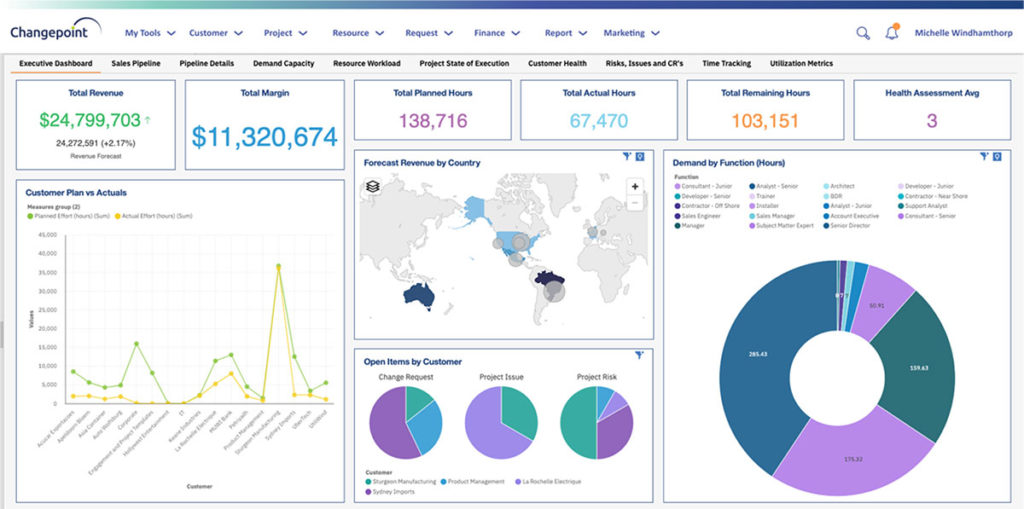
Planview Changepoint is a platform that marries professional services automation (PSA), project portfolio management (PPM) and business analytics to provide managers broad operational visibility and control over their strategic business portfolios.
N/A
TeamGantt
Score 8.1 out of 10
N/A
TeamGantt is a project management solution built to provide users with gantt chart software through online deployment.
MS Project was superior to Proventia. Much more intuitive tool. MS Project was more robust, offered more functionality, and offered better reporting options. As noted earlier, MS Project was more flexible as it can manage the full portfolio of projects from small to large …
In all cases where I didn't use Project, i used an application given by Excel freely as a template, when you open Excel 2013 or higher. It is basically a Gantt chart, with several capabilities built in. All what is necessary for you to do in order to quickly get a basic Gantt …
Changepoint was selected for its cost and what it can do. I was not involved in the decision to purchase Changepoint, but it appears to be a good decision.
We believed that Changepoint matched up well, had better support and provided a better pricing structure that worked better for our budget constraints over time. The team was willing to work with us on the design of the tool for our needs and it wasn't going to break the bank …
TeamGantt was the most familiar name amongst them all. Because I had also used TeamGantt before, it was easier to bring this one is above the others. They all have their perks, but I felt that TeamGantt had that ease of use and familiarity which gave them the edge over the …
Microsoft Project Online is suited to Turnkey Projects where more Collaboration is required in Project Progress monitoring, risk assessment and conveying, issue recording and tracking. It is less appropriate when ERP Suites other than MS Dynamics are used, i.e when Enterprises need to integrate Finance / Accounting with It and having straight project management workflow
Changepoint is basic and would, therefore, work for businesses with uncomplicated requests, pretty straightforward workflows and willingness to work with an unsightly solution. It is basic, from the UI to the search option and the way the information is captured, which can be frustrating and counter-intuitive at times. It is relatively robust (i.e. I have been using it for almost 2 years and have not seen it crash once) but it does log me out when the system has been inactive for about 30 minutes - and I am only notified about being logged out upon clicking the Submit button, meaning many a line of text have been typed more than once!
TeamGantt is wonderful for organizing long and short term projects that have lots of tasks and or people involved. I love that it's "in the cloud" so I can manage no matter where I am or what device I'm using. There is a mobile app that is quite easy to use and sized nicely for people who have trouble reading small/fine print. I find it to be a well-suited tool for ongoing projects where the tasks change weekly - I use it for my newsletter planning. You can assign and label tasks which is super convenient for me and my Team. All through the week we are making changes and suggestions in TeamGantt and as we get closer to publication day we mark the stories and objects as done so we know we will finish everything before our deadline.
I love the Gantt Chart that Microsoft Project offers me, because it provides me with a view from various aspects, it provides me with exact details about the fulfillment of tasks over a period of time, it also allows me to make comparisons with the necessary data and the fulfilled data. by the employees, in order to know exactly if the project's expectations have been met.
I love the Gantt Chart that Microsoft Project offers me, because it provides me with a view from various aspects, it provides me with exact details about the fulfillment of tasks over a period of time, it also allows me to make comparisons with the necessary data and the fulfilled data by the employees, in order to know exactly if the project's expectations have been met.
The alert system for the fulfillment and delay of assignments is perfect. Microsoft Project allows me to configure the task system, I can assign the necessary tasks to fulfill the project, and the software alerts me immediately if the managers are fulfilling the assignments.
Changepoint has significant reporting capabilities, though of course, the data that comes out is only as good as the data that goes in. I enjoy being able to use the standard reports to understand exactly how much a project has cost us and to compare it to how much we are charging. This allows us to more accurately set our prices. Though we have not used the report designer capability, I understand that custom reports can be designed with relative ease.
Changepoint has a versioning capability for changes made to user profiles in the system manager, which I find particularly helpful. As a non-power user, it is valuable to be able to see what changes I have made to various profiles so that I can troubleshoot a problem down the line.
Changepoint has significant functionality well beyond the features that we are currently using, and for this reason, I think it is affordable and a good deal. Particularly if your organization is interested in dedicating the time and resources into using all of the features around project planning, resource allocation, etc., the price is well worth the value.
In TeamGantt, clients can remark on any undertaking and keep their visits inside the errands.
Reports can likewise be connected to any undertaking. Clients can channel the errands by the due date and what their identity is relegated to, and they can change over Gantt graphs into PDFs.
The arrangement is accessible for each client each month's membership premise and offers support using telephone and email.
We use Changepoint to manage the IS organization. I would like to see more advancement in order to do benefits management.
I would like to see a capability where a project manager can build a very detailed work breakdown structure, but only require project resources to charge time and provide a task status at a higher level.
Sometimes the decision to renew boils down to an old adage "if it isn't broken don't fix it". Previous to moving to Changepoint, it was obvious that we needed a better project management tool. Projects we completed on time but the time zone difference between the teams and several iterations of back and forth caused a number of communication issues with projects. The difference is night and day.
Microsoft Project is easy to operate because data could be inserted, changed and deleted like you are in an Excel timesheet. Besides, it provides a great level of automation beween his fields allowing few data changes. Also, its funcionalities are well defined and grouped in upper menus, so you can find a funcionality quickly
Microsoft in recent years has transformed itself and gives a positive feeling when one interacts with the company. The company is focusing on its customers and willing to go extra mile to make customers happy.The company continues to invest in its products and bringing new features from time to time. Overall it is a positive feeling to be associated with such an iconic company.
I never interacted with them. That, in itself, I feel represents their quality. They made the resources available to me so that when I started to have a question, the answer was either right there for me, or easy to figure out without any trouble. So, I never felt the need!
While many of the above tools are extremely well-versed, Microsoft Project's largest advantage comes from it being related to the largest business productivity company in the world. Project does have its sharing limitations - but regardless, offers one of the most robust tools in the market today. Microsoft Project is built with large-scale projects in mind but is more than up to the task for smaller projects as well. However, there are options available (especially cloud-based options) that may be more fitting for higher-level projects that do not require going into the weeds.
Planview Changepoint helps us to understand our key customers enabling us to capitalize on every financial opportunity and helps us to forecast demand against the capacities required for new opportunities, and also it automates and monitors contractual terms and conditions. It gives us visibility into our employees' skills and helps to optimize resource allocation.
Our team uses ClickUp for task management. ClickUp has a Gantt chart feature, but it's based solely on the tasks we create in ClickUp, so in order to create a client-facing chart, we'd have to completely change the way we assign tasks to our internal team. We use TeamGantt for the sole purpose of creating project plans and viewing project statuses at-a-glance. You might be able to use it for task management, but we don't.
Project saved me, as the project manager, countless hours of digging through tickets and schedules to plan everything out. It also saved me time in adjusting the project triangle as needed, since it does so much automatically.
It is costly, and since it requires extensive training to master, it's not just the high licensing cost that you need to take into account.
The reporting features - even just printing out Gantt charts - makes it far easier to communicate with stakeholders. That means less time for PMs doing all of this manually, and it means less follow-up questions and delays moving forward.
Employee efficiency has decreased significantly within our Project MAnagement team. The main causes are lack of logical steps/not user-friendly and the slowness of the entire program.
Changepoint PSA has greatly improved being able to track budgets for all projects. Before this software, budgets were done manually by hand and cross-referenced with Accounting. Now, we can pull a report out of the system, as long as all parties entered their time and data correctly.