monday CRM vs. OnePageCRM

Overview
ProductRatingMost Used ByProduct SummaryStarting Price
monday CRM
Score 8.2 out of 10
N/A
monday CRM provides control over the entire sales funnel and helps users close deals faster by automating manual work and streamlining sales activities from A-Z.
$45
per month 3 seats (minimum)
OnePageCRM
Score 10.0 out of 10
N/A
OnePageCRM aims to turn the complexity of a CRM into a simple to-do list. This action-focused CRM helps users interact with contacts by setting simple follow-up tasks. Just out of a promising sales call? Type the next action to "Send a quote", set a date, and move on to the next contact. Contacts will be sorted by task priority so the user can sell with focused attention to each prospect and client. OnePageCRM can be tried with a 21-day free trial today.
$9.95
per month per user
Pricing
monday CRMOnePageCRM
Editions & Modules
Basic
$15
per month per seat
Standard
$20
per month per seat
Pro
$33
per month per seat
Ultimate
Contact Sales
Professional Plan (Annually)
$9.95
per month per user
Professional Plan (Monthly)
$15
per month per user
Business Plan (Annually)
$19.95
per month per user
Business Plan (Monthly)
$29
per month per user
Offerings
Pricing Offerings
monday CRMOnePageCRM
Free Trial
YesYes
Free/Freemium Version
NoNo
Premium Consulting/Integration Services
NoNo
Entry-level Setup FeeOptionalNo setup fee
Additional DetailsPlans start with 3 seats. Yearly save 33%OnePageCRM offers 4 months free in annual subscriptions.
More Pricing Information
Community Pulse
monday CRMOnePageCRM
Features
monday CRMOnePageCRM
Sales Force Automation
Comparison of Sales Force Automation features of Product A and Product B
monday CRM
7.1
76 Ratings
10% below category average
OnePageCRM
9.3
4 Ratings
17% above category average
Customer data management / contact management7.869 Ratings9.94 Ratings
Workflow management8.374 Ratings10.04 Ratings
Territory management6.741 Ratings10.02 Ratings
Opportunity management7.067 Ratings10.03 Ratings
Integration with email client (e.g., Outlook or Gmail)6.860 Ratings10.02 Ratings
Contract management6.851 Ratings5.43 Ratings
Interaction tracking6.755 Ratings9.53 Ratings
Quote & order management00 Ratings10.02 Ratings
Channel / partner relationship management00 Ratings9.22 Ratings
Marketing Automation
Comparison of Marketing Automation features of Product A and Product B
monday CRM
7.2
57 Ratings
8% below category average
OnePageCRM
10.0
4 Ratings
25% above category average
Lead management7.257 Ratings10.04 Ratings
Email marketing00 Ratings10.03 Ratings
CRM Project Management
Comparison of CRM Project Management features of Product A and Product B
monday CRM
7.7
72 Ratings
0% above category average
OnePageCRM
10.0
4 Ratings
26% above category average
Task management8.271 Ratings10.04 Ratings
Billing and invoicing management7.349 Ratings00 Ratings
Reporting7.561 Ratings10.03 Ratings
CRM Reporting & Analytics
Comparison of CRM Reporting & Analytics features of Product A and Product B
monday CRM
6.8
70 Ratings
12% below category average
OnePageCRM
10.0
4 Ratings
26% above category average
Forecasting5.757 Ratings10.02 Ratings
Pipeline visualization7.366 Ratings9.94 Ratings
Customizable reports7.461 Ratings10.02 Ratings
Customization
Comparison of Customization features of Product A and Product B
monday CRM
6.8
69 Ratings
12% below category average
OnePageCRM
10.0
3 Ratings
26% above category average
Custom fields6.769 Ratings9.83 Ratings
Custom objects6.661 Ratings10.02 Ratings
Scripting environment7.242 Ratings10.02 Ratings
API for custom integration6.543 Ratings10.01 Ratings
Security
Comparison of Security features of Product A and Product B
monday CRM
8.2
63 Ratings
3% below category average
OnePageCRM
10.0
4 Ratings
17% above category average
Single sign-on capability8.356 Ratings9.94 Ratings
Role-based user permissions8.163 Ratings10.02 Ratings
Integrations with 3rd-party Software
Comparison of Integrations with 3rd-party Software features of Product A and Product B
monday CRM
8.4
41 Ratings
11% above category average
OnePageCRM
10.0
1 Ratings
29% above category average
Marketing automation8.441 Ratings10.01 Ratings
Platform
Comparison of Platform features of Product A and Product B
monday CRM
8.1
65 Ratings
7% above category average
OnePageCRM
10.0
3 Ratings
27% above category average
Mobile access8.165 Ratings10.03 Ratings
Customer Service & Support
Comparison of Customer Service & Support features of Product A and Product B
monday CRM
-
Ratings
OnePageCRM
9.9
3 Ratings
25% above category average
Case management00 Ratings9.93 Ratings
Call center management00 Ratings9.93 Ratings
Help desk management00 Ratings9.93 Ratings
Best Alternatives
monday CRMOnePageCRM
Small Businesses
Salesmate
Salesmate
Score 10.0 out of 10
Salesmate
Salesmate
Score 10.0 out of 10
Medium-sized Companies
Creatio
Creatio
Score 9.1 out of 10
Creatio
Creatio
Score 9.1 out of 10
Enterprises
Creatio
Creatio
Score 9.1 out of 10
Creatio
Creatio
Score 9.1 out of 10
All AlternativesView all alternativesView all alternatives
User Ratings
monday CRMOnePageCRM
Likelihood to Recommend
8.6
(85 ratings)
7.6
(4 ratings)
Likelihood to Renew
9.8
(5 ratings)
-
(0 ratings)
Usability
8.6
(82 ratings)
-
(0 ratings)
Support Rating
7.3
(57 ratings)
-
(0 ratings)
Implementation Rating
8.2
(1 ratings)
-
(0 ratings)
User Testimonials
monday CRMOnePageCRM
Likelihood to Recommend
monday.com
Our Integrated/brand marketing and Lifecycle marketing teams find monday CRM to be particularly useful for project management. Integrated marketing uses monday to build out our yearly promotional calendar, which keeps the entire company informed on all the launch and sale details for the year, across both retail and digital channels. The Lifecycle marketing team uses monday CRM to track individual campaign projects, mainly consisting of email asset creation. There are times when monday is not the preferred CRM platform, such as data and analytics tracking, project performance tracking, or scenarios when immediate feedback is required.
Read full review
OnePageCRM
OnePage is great for any company with a sales team. Onepage is great for lead tracking, and showing all communication in one place. Its timeline is easy to use and understand. OnePage also makes it easy to manage a sales team. Their reporting capabilities are excellent and it is a great way to track deals.
Read full review
Pros
monday.com
  • It is very easy to use and logical. Teams and departments can collaborate together to work as one team.
  • It is very useful in automating the processes of relevant departments.
  • The field names, types, and data you enter can be customized as per your organization's requirements.
Read full review
OnePageCRM
  • It uses a split screen: one half is your action stream, the other is for a selected contact. This is really helpful.
  • You can do mass actions-- like rescheduling a group of actions for another day.
  • "Tags" are a handy feature... it's sophisticated enough to trigger automated follow-ups in our mail service, Klaviyo
Read full review
Cons
monday.com
  • It takes a while to get used to the UX if you are used to Hubspot or another CRM
  • We are still testing mass email functionality, it's a little less intuitive vs Hubspot
  • The quote/invoice forms are not pre-built into the CRM the way they are in Hubspot, so you have to manually set those up. Some might see that as a positive thing because it's more flexible with your respective tech stack, but it required more research on our end to make sure we set it up to flow efficiently.
Read full review
OnePageCRM
  • The ability to interface with all or many VoIP services would be top of my priority list
  • Skype is not a favourite of mine, but Google hangouts is which is now included with OnePageCRM
  • The ability to create email templates would be good. I have a separate app for that, but it would be good to have it on board
Read full review
Likelihood to Renew
monday.com
It is the best tool we have found as a small business to be able to track our bookings, tasks and income.
Read full review
OnePageCRM
No answers on this topic
Usability
monday.com
It's a really easy to use and improve tool, that helps you to quickly master its functions and then helps you to improve the features usage as quickly as you learned the basis. Any doubts you have are easily solved by the contents and tutorials it provides, and if it doesn't solve it, the team is always quick to reply and help you.
Read full review
OnePageCRM
No answers on this topic
Support Rating
monday.com
When I have requested customer service from monday.com account the person who I spoke with was really helpful but the set up to get a hold of someone in customer service was a little complicated and time-consuming. I had to get a ticket in an email and then wait for a specific person to call me back at a certain time, that's why I gave a six.
Read full review
OnePageCRM
No answers on this topic
Implementation Rating
monday.com
It was very easy to start using. It is also safe to use lots of trial and error whilst setting up.
Read full review
OnePageCRM
No answers on this topic
Alternatives Considered
monday.com
Monday is significantly better. Not only is it more aesthetically pleasing it is just better overall. I feel as if Monday has a better system in regard to keeping track of all the files we have. Moreover, I also feel like the fact that it allows me to tag my other coworkers enables me to have better communication in the office.
Read full review
OnePageCRM
We use all these software for task management and email marketing. OnePage doesn't send out mass emails and we needed a more robust task management system, so we use SharpSpring and Asana as well.
Read full review
Return on Investment
monday.com
  • I feel since we integrated to monday CRM, that the speed of our invoicing rate has increased, due to the easier navigation monday CRM provides.
  • Communication with other peers & departments has become easier to reach out since we all share this platform and able to tag the needed person.
  • We are also able to view and give reports easier to our VP's/ higher up, providing visibility and graphs of our trending sales numbers categorized by each store with different sales type.
Read full review
OnePageCRM
  • OnePage has helped with time efficiency for the sales team. Because OnePage is so easy to use and manage, our sales team can spend more time selling and less time working with the system.
  • OnePage is great for organization. It helps us track our daily schedules/tasks and shows all communication clearly in one place.
Read full review
ScreenShots

monday CRM Screenshots

Screenshot of Sales Pipeline - Ensuring leads do not slip through the cracks.Screenshot of Sales Analytics - Used to build dashboards in real time with no development help, to gain insights into where deals stand, expected revenue, team performance, etc.Screenshot of Automations - Automates sales processes including automatic assignment of leads to reps, reminders for upcoming activities,  and notifications when a lead opens an email.Screenshot of Email Capabilities - Automatically logs sent emails, keeps track of interactions, and enables mass emails with personalized email templates.Screenshot of Activities Logging & Tracking - Displays all past and upcoming sales activities in one organized timeline.Screenshot of Post-sales Management - To help users build lasting customer relationships once the deal is done or stay on top of client projects, with collection tracking.

OnePageCRM Screenshots

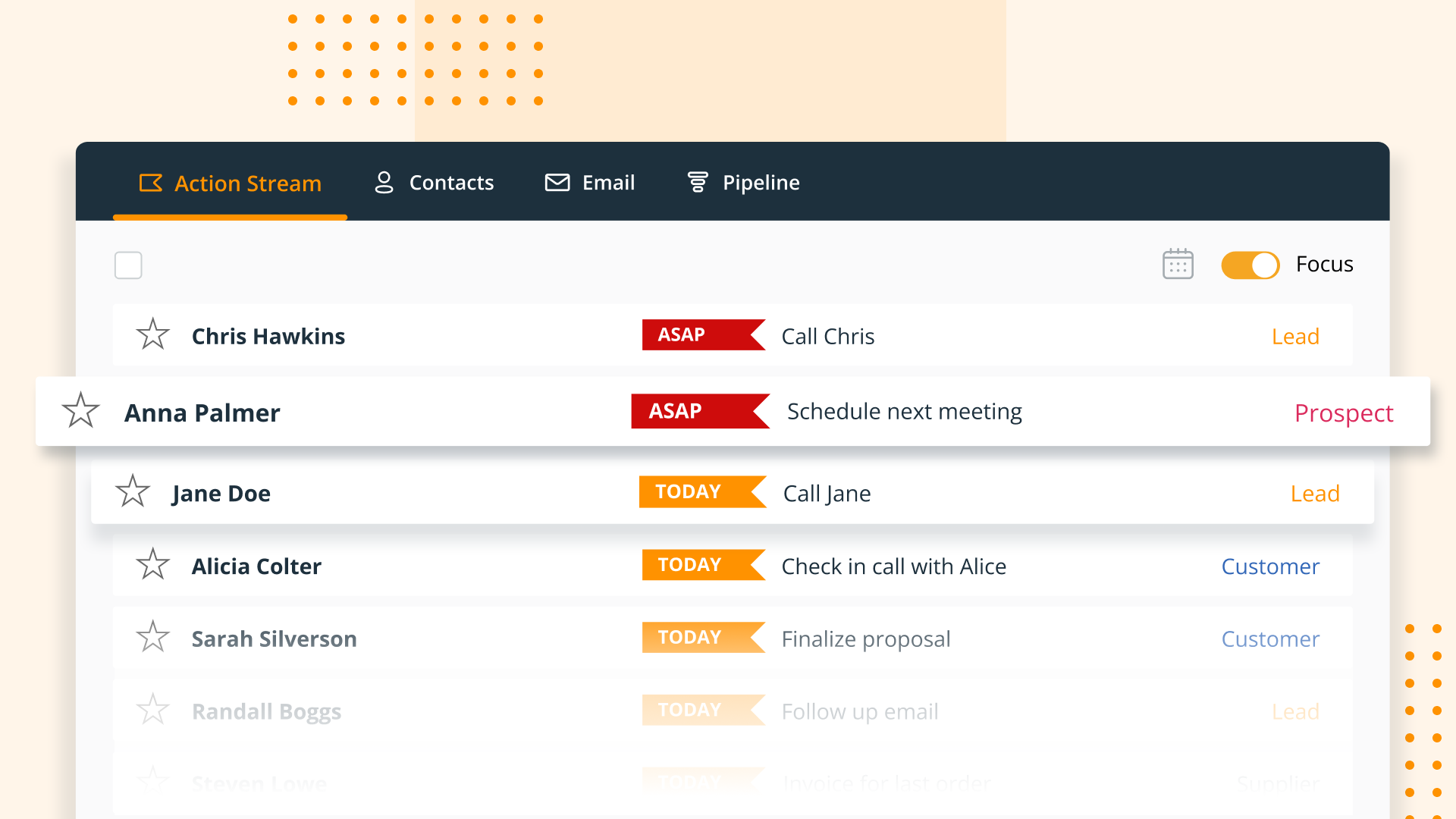
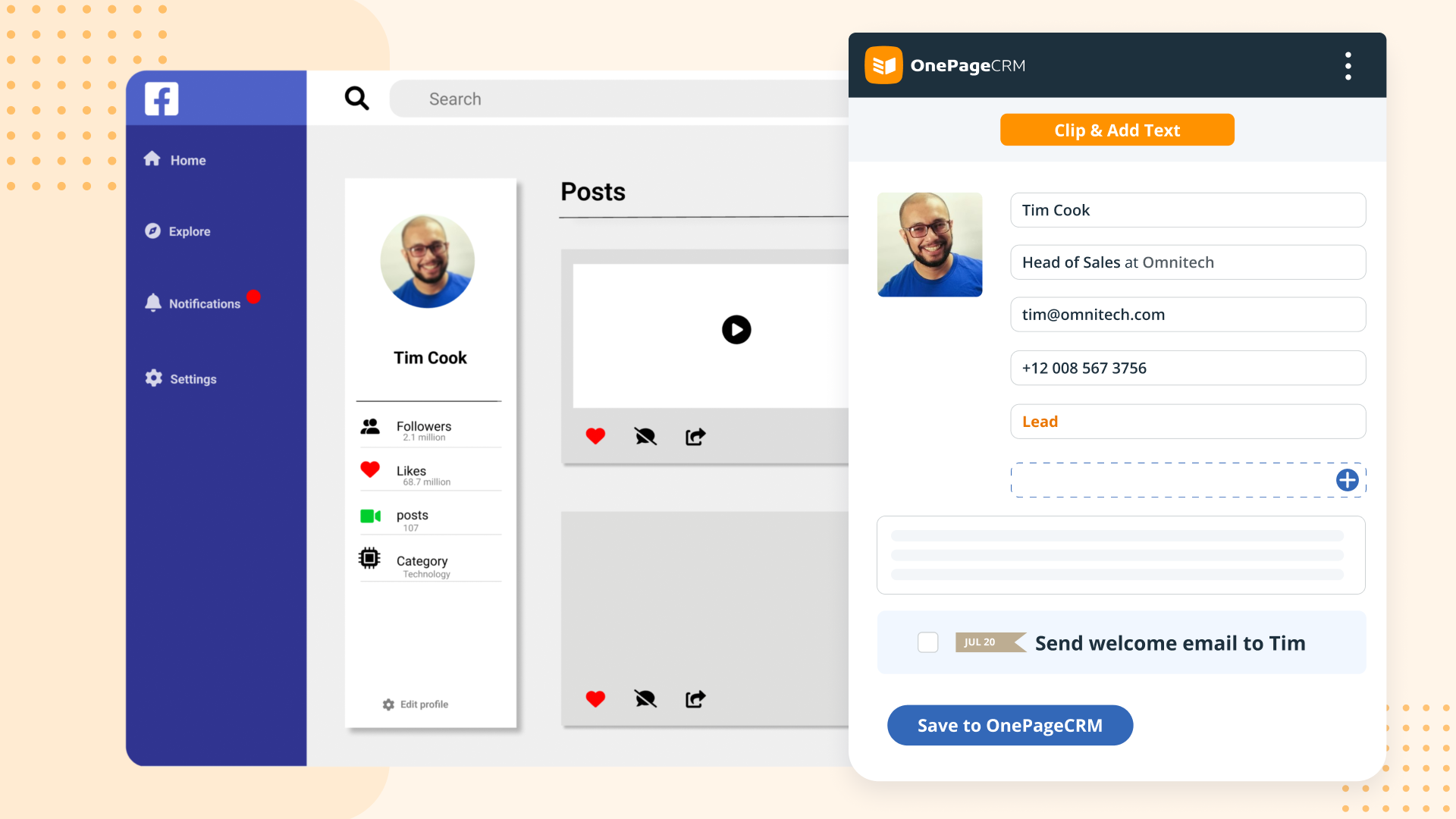
Screenshot of OnePageCRM transforms the user's database into an actionable to-do list. Contacts are sorted into Action Stream by task priority so users know what to do next.Screenshot of OnePageCRM displays relevant calls, notes, deals, and golden nuggets about a contact in one place.Screenshot of OnePageCRM's email integration allows users to send emails in bulk, create templates, and track opens.Screenshot of For lead generation, OnePageCRM's browser extension lets users add leads to a CRM from any webpage in one click.Screenshot of For sales on the go, download the OnePageCRM mobile app (iOS & Android). Log calls and update deals.Screenshot of Manage deals with OnePageCRM's drag-and-drop feature and keep track of goals with a live KPI dashboard.