Chose Nintex
Apryse PDF SDK

| Product | Rating | Most Used By | Product Summary | Starting Price |
|---|---|---|---|---|
 Nintex | N/A | Nintex offers a platform that helps companies discover, automate, and optimize business processes. | $480 Minimum 1,000 users per user | |
 Oracle BPM Suite | N/A | The Oracle Business Process Management Suite is an integrated environment for developing, administering, and using business applications centered around business processes. | N/A | |
 Mitratech TAP Workflow Automation | N/A | TAP Workflow Automation is a business process automation solution, enabling clients to digitize any workflow. The solution aims to improve efficiency, productivity, standardization, and compliance, as well as drive cost savings and time-to-value. TAP's drag-and-drop UI lets users build and deploy workflows without coding or IT involvement. TAP's open API enables clients to integrate into existing tools to drive automation across the organization. | N/A |
| Nintex | Oracle BPM Suite | Mitratech TAP Workflow Automation | ||||||||||||||||||||||
|---|---|---|---|---|---|---|---|---|---|---|---|---|---|---|---|---|---|---|---|---|---|---|---|---|
| Editions & Modules |
| No answers on this topic | No answers on this topic | |||||||||||||||||||||
| Offerings |
| |||||||||||||||||||||||
| Entry-level Setup Fee | Optional | No setup fee | No setup fee | |||||||||||||||||||||
| Additional Details | — | — | — | |||||||||||||||||||||
| More Pricing Information | ||||||||||||||||||||||||
| Nintex | Oracle BPM Suite | Mitratech TAP Workflow Automation | |
|---|---|---|---|
| Considered Multiple Products |  Nintex  Aftab Ahmad Azure, Power Platform & SharePoint Architect Chose Nintex Nintex is easier than Visual Studio and richer than SharePoint Designer, chosen for accessibility, scalability, and faster business process automation.  Matt Aldridge Knowledge Lead Chose Nintex We selected Nintex because Process Manager is a purpose designed platform for knowledge management. However, what we discovered is that there are significant limitations, which has lead us to now explore developing a knowledge management platoform in sharepoint. this is a much …  Julio Magana CTO Chose Nintex Microsoft environment does not have the scalability of Nintex; it is perfect for small and medium-sized companies, especially in environments where Microsoft environment is almost entirely used. Although Microsoft offers options to connect to other applications, its platform …  David Hofmann, MSMOT Senior Advisor Chose Nintex Not as useful as Power Automate  Kathy Mark, PMP ITT Project Director Chose Nintex Each has their purpose and function -- Nintex stacks high among the tools available | Oracle BPM Suite  Cristian Bodnarasec Senior Software Development Manager Chose Oracle BPM Suite The competition for Oracle BPM Suite is far ahead. With a more modern user-interface, very well thought out usability, integration with virtually everything, any new tool for business processes will be better. The biggest difference is, in my opinion, being able to target the …  Miguel Angel Merino Vega Analista de Sistemas Chose Oracle BPM Suite The presentation of the diagrams that the tool can generate is ostentatious and very striking. If you are going to work with Oracle database, the tool allows you great integration capabilities. Bizagi is a very good alternative, although in simulation and in final results …  Galen Mosier Business Analyst Chose Oracle BPM Suite Oracle BPM is the first and only product of its kind that we have used. I am, unfortunately, not able to compare it to any similar product.  Shawn Ruff Director, Fusion Middleware Practice Chose Oracle BPM Suite All are fairly similar in capabilities, but the Oracle BPM Suite has good support for BPMN 2.0, integrates well with open standards and has an excellent design/development platform when compared to the other BPM vendors. The Oracle BPM Suite integrates well with the …  Shouvik Das Student Chose Oracle BPM Suite Because of its powerful features and ability to be flexible designing complex processes |  Mitratech TAP Workflow Automation |
| Nintex | Oracle BPM Suite | Mitratech TAP Workflow Automation | |||||||||||||||||||||||||||||||||||
|---|---|---|---|---|---|---|---|---|---|---|---|---|---|---|---|---|---|---|---|---|---|---|---|---|---|---|---|---|---|---|---|---|---|---|---|---|---|
| Reporting & Analytics |
| ||||||||||||||||||||||||||||||||||||
| Process Engine |
| ||||||||||||||||||||||||||||||||||||
| Collaboration |
| ||||||||||||||||||||||||||||||||||||
| Content Management Capabilties |
|
| Nintex | Oracle BPM Suite | Mitratech TAP Workflow Automation | |
|---|---|---|---|
| Small Businesses |  Square 9 Softworks Score 9.3 out of 10 | Square 9 Softworks Score 9.3 out of 10 |  Stackby Score 8.9 out of 10 |
| Medium-sized Companies | Square 9 Softworks Score 9.3 out of 10 | Square 9 Softworks Score 9.3 out of 10 |  CMW Platform Score 9.4 out of 10 |
| Enterprises | CMW Platform Score 9.4 out of 10 | CMW Platform Score 9.4 out of 10 | CMW Platform Score 9.4 out of 10 |
| All Alternatives | View all alternatives | View all alternatives | View all alternatives |
| Nintex | Oracle BPM Suite | Mitratech TAP Workflow Automation | |
|---|---|---|---|
| Likelihood to Recommend | 7.6 (0 ratings) | 8.0 (0 ratings) | 7.3 (0 ratings) |
| Likelihood to Renew | 2.7 (0 ratings) | 6.0 (0 ratings) | - (0 ratings) |
| Usability | 7.7 (0 ratings) | 6.0 (0 ratings) | - (0 ratings) |
| Availability | 8.9 (0 ratings) | - (0 ratings) | - (0 ratings) |
| Performance | 9.7 (0 ratings) | - (0 ratings) | - (0 ratings) |
| Support Rating | 8.6 (0 ratings) | - (0 ratings) | - (0 ratings) |
| In-Person Training | 7.0 (0 ratings) | - (0 ratings) | - (0 ratings) |
| Online Training | 8.8 (0 ratings) | - (0 ratings) | - (0 ratings) |
| Implementation Rating | 8.0 (0 ratings) | 6.0 (0 ratings) | - (0 ratings) |
| Configurability | 8.8 (0 ratings) | - (0 ratings) | - (0 ratings) |
| Ease of integration | 9.8 (0 ratings) | - (0 ratings) | 5.5 (0 ratings) |
| Product Scalability | 9.8 (0 ratings) | - (0 ratings) | - (0 ratings) |
| Vendor post-sale | 9.7 (0 ratings) | - (0 ratings) | - (0 ratings) |
| Vendor pre-sale | 9.7 (0 ratings) | - (0 ratings) | - (0 ratings) |
| Nintex | Oracle BPM Suite | Mitratech TAP Workflow Automation | |
|---|---|---|---|
| Likelihood to Recommend |
|
|
|
| Pros |
|
|
|
| Cons |
|
|
|
| Likelihood to Renew |
|
Shouvik Das Student | No answers on this topic |
| Usability |
 Justin Antczak Business Analyst |
Shouvik Das Student | No answers on this topic |
| Reliability and Availability |
| No answers on this topic | No answers on this topic |
| Performance |
 Shivani Pandey Manager | No answers on this topic | No answers on this topic |
| Support Rating |
| No answers on this topic | No answers on this topic |
| In-Person Training |
Shivani Pandey Manager | No answers on this topic | No answers on this topic |
| Online Training |
| No answers on this topic | No answers on this topic |
| Implementation Rating |
|
Shouvik Das Student | No answers on this topic |
| Alternatives Considered |
|
Shawn Ruff Director, Fusion Middleware Practice |
|
| Scalability |
| No answers on this topic | No answers on this topic |
| Return on Investment |
|
Cristian Bodnarasec Senior Software Development Manager |
|
| ScreenShots | Nintex Screenshots 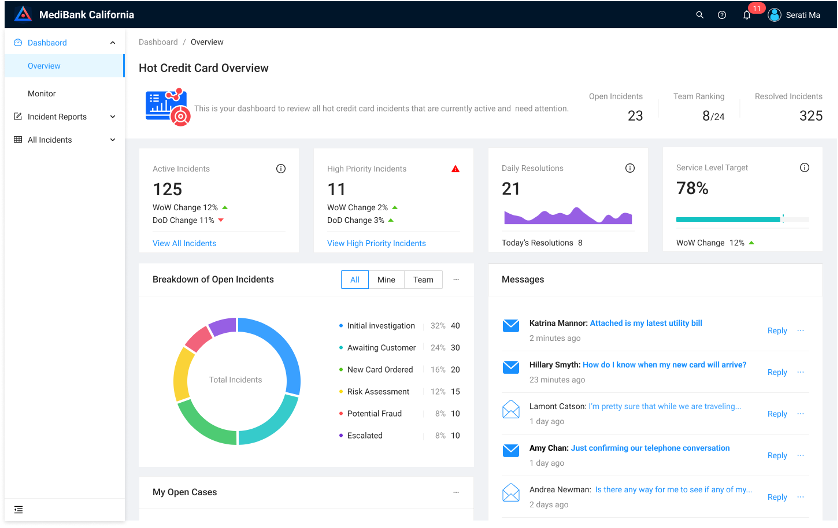 |