PDF Xchange Viewer and Editor vs. Tungsten Power PDF

Overview
ProductRatingMost Used ByProduct SummaryStarting Price
PDF Xchange Viewer and Editor
Score 9.2 out of 10
N/A
PDF Xchange Viewer and Editor is a pdf editing and conversion software offering from Tracker Software Products. It includes features such as create pdf and convert to pdf.N/A
Tungsten Power PDF
Score 9.7 out of 10
Small Businesses (1-50 employees)
Tungsten Power PDF (formerly Kofax) is an easy-to-use, secure and inexpensive solution to manage PDFs for businesses and individuals. Benefits: Ease of Use: Works like Office desktop products, so it's easier to learn Compatibility: Works across devices and platforms, share documents in a storage cloud …
$129
one-time fee per license
Pricing
PDF Xchange Viewer and EditorTungsten Power PDF
Editions & Modules
No answers on this topic
Power PDF Standard
$129
one-time fee per license
Power PDF for Mac
$129
one-time fee per license
Power PDF Advanced
$179
one-time fee per license
Power PDF Business
Get a Quote: Subscription and Perpetual available
per year per seat
Offerings
Pricing Offerings
PDF Xchange Viewer and EditorTungsten Power PDF
Free Trial
NoYes
Free/Freemium Version
NoNo
Premium Consulting/Integration Services
NoYes
Entry-level Setup FeeNo setup feeNo setup fee
Additional DetailsDesktop licenses are buy once, own forever. No subscription fees. Business server licenses are term-based or perpetual with optional maintenance & support contract. Volume and upgrade discounts available.
More Pricing Information
Community Pulse
PDF Xchange Viewer and EditorTungsten Power PDF
Considered Both Products
PDF Xchange Viewer and Editor
Chose PDF Xchange Viewer and Editor
Better price for single licenses and user packs.
Tungsten Power PDF
Chose Tungsten Power PDF
PDF exchange is much better because it includes more professional features needed for engineers And professionals. It also has a lot of features that makes the interface much more easy to use such as the ability to copy the file directly into your clipboard from the PDF …
Chose Tungsten Power PDF
Hands down one of the best PDF programs out there. I selected Kofax because I have used it in the past and remembered how easy it was to use. I also like the drag and drop features to combined documents, the ability to sign and stamp a document, and the ability to convert …
Chose Tungsten Power PDF
I like Xchange for day to day, but Power PDF provides capabilities not present in PDF Xchange. Both are preferable to Adobe.
Chose Tungsten Power PDF
I have found Power PDF a much more powerful program than the commonly available shareware PDF editors and readers and it is much more affordable than Adobe products and easier to use. I also enjoy that I do not have to constantly update the program to correct bugs and security …
Chose Tungsten Power PDF
Power PDF has nearly all or perhaps more options than Adobe Acrobat Full version at a much lower cost. Adobe Reader DC does some things very well but is severely limited in most aspects. My experience with PDF exchange is that it seems rather disjointed and was harder to …
Features
PDF Xchange Viewer and EditorTungsten Power PDF
PDF Editors
Comparison of PDF Editors features of Product A and Product B
PDF Xchange Viewer and Editor
9.0
1 Ratings
3% above category average
Tungsten Power PDF
8.8
28 Ratings
1% above category average
Edit Text and Images9.01 Ratings6.426 Ratings
Merge or Split PDFs9.01 Ratings9.728 Ratings
Add Annotations9.01 Ratings9.326 Ratings
Text Recognition (OCR)9.01 Ratings7.322 Ratings
Page Management9.01 Ratings7.526 Ratings
Form Creation and Editing9.01 Ratings9.520 Ratings
Secure PDFs9.01 Ratings9.720 Ratings
Convert to Different Formats8.01 Ratings9.523 Ratings
Comment and Review Tools9.01 Ratings9.423 Ratings
Undo and Redo Actions10.01 Ratings9.623 Ratings
Best Alternatives
PDF Xchange Viewer and EditorTungsten Power PDF
Small Businesses
Tungsten Power PDF
Tungsten Power PDF
Score 9.7 out of 10
pdfFiller
pdfFiller
Score 9.0 out of 10
Medium-sized Companies
pdfFiller
pdfFiller
Score 9.0 out of 10
pdfFiller
pdfFiller
Score 9.0 out of 10
Enterprises
Bluebeam
Bluebeam
Score 9.3 out of 10
Bluebeam
Bluebeam
Score 9.3 out of 10
All AlternativesView all alternativesView all alternatives
User Ratings
PDF Xchange Viewer and EditorTungsten Power PDF
Likelihood to Recommend
8.0
(4 ratings)
9.6
(599 ratings)
Likelihood to Renew
-
(0 ratings)
9.9
(112 ratings)
Usability
9.0
(2 ratings)
9.8
(46 ratings)
Availability
-
(0 ratings)
9.1
(13 ratings)
Performance
10.0
(1 ratings)
9.1
(13 ratings)
Support Rating
10.0
(1 ratings)
9.9
(435 ratings)
In-Person Training
-
(0 ratings)
3.6
(1 ratings)
Online Training
-
(0 ratings)
8.2
(1 ratings)
Implementation Rating
-
(0 ratings)
9.1
(33 ratings)
Configurability
-
(0 ratings)
9.1
(9 ratings)
Ease of integration
10.0
(1 ratings)
9.1
(10 ratings)
Product Scalability
-
(0 ratings)
9.1
(12 ratings)
Vendor post-sale
-
(0 ratings)
9.1
(7 ratings)
Vendor pre-sale
-
(0 ratings)
9.1
(7 ratings)
User Testimonials
PDF Xchange Viewer and EditorTungsten Power PDF
Likelihood to Recommend
Tracker Software Products
This software handles large PDF files and has not crashed for me, unlike some other PDF software. It does what I need very well, although it has a lot of features beyond what I need. It extracts and adds documents easily and certainly does well with its search function after applying optical character recognition.
Read full review
Tungsten Automation (formerly Kofax)
GREAT for combining documents into a single PDF. Great for working with a PDF. Not so great converting PDF to Word format. Would like to see more effort put into that development. Would like to see more effective testing of updates prior to pushing them out as well. Otherwise it is awesome.
Read full review
Pros
Tracker Software Products
  • Intuitive an easy to understand interface
  • Fast
  • Good value for the price
Read full review
Tungsten Automation (formerly Kofax)
  • Typewriter functionality is great, although can take some time to load. This allows you to fill in text wherever applicable without turning the rest of the pdf into editable text.
  • Fast load times
  • Has autogenerated text feature so anything in the pdf can become editable
Read full review
Cons
Tracker Software Products
  • Have the ability to add a little more customization (like font sizes in Typewriter tool, etc).
  • Have the ability to export individual pages into separate PDFs.
  • Have the ability to easily resize.
Read full review
Tungsten Automation (formerly Kofax)
  • I find that quickly editing text within a document or adding a line of text is clunky and can snowball into things popping out of place. I prefer to export text, and then work on it elsewhere.
  • Sometimes it seems that text recognition is trying too hard and throws me paper punches as "O"s and wrinkles as shapes, so I have to get rid of those artifacts.
  • The "Update Available" popup which is usually not an actual update announcement but rather an offer to sell me something is annoying.
Read full review
Likelihood to Renew
Tracker Software Products
No answers on this topic
Tungsten Automation (formerly Kofax)
Tungsten Power PDF is easy to use, the staff all like it, and there are no issues with it on any level. It is a more cost-effective solution to our PDF needs than other products currently available on the market. This product works as intended and it fits our business needs perfectly.
Read full review
Usability
Tracker Software Products
It does everything I need, such as OCR, redaction, Bates stamping, bookmarking, and handling large PDF files without crashing. It also does well with the extraction and addition of documents.
Read full review
Tungsten Automation (formerly Kofax)
It is fast and easy to get the hang of. It really didn't take a lot of effort to learn how to use this program and I appreciated that it was pretty "plug and play" and there wasn't a long learning curve.
Read full review
Reliability and Availability
Tracker Software Products
No answers on this topic
Tungsten Automation (formerly Kofax)
Other that a PDF partially disappearing if left up for a long period of time - no issues. (If you close it and reopen it, it is all there. We have some PDFs that are 400-600 pages long.)
Read full review
Performance
Tracker Software Products
Performance wise, PDF Xchange Viewer and Editor is flawless. It runs fast, and I haven't experienced any immediately crashing. The reports save quickly, and the document size is never an issue. It saves into a regular PDF, and we're able to open it on any other program or computer. All text boxes, features, and headers show up flawlessly on other programs.
Read full review
Tungsten Automation (formerly Kofax)
Pages nearly always load at the expected rapid speed. Some documents that print quickly from Adobe Reader print much more slowly from Power PDF. I have never generated a report - that's a feature I didn't know existed until now and do not know what it's for
Read full review
Support Rating
Tracker Software Products
The application had no issues (we did not contact support) and that's why I give a 10.
Read full review
Tungsten Automation (formerly Kofax)
I have used it for 15 years and have only needed support once: a simple update that allowed me to use the software as intended. The support team was attentive and responsive, and I was on my way very quickly.
Read full review
In-Person Training
Tracker Software Products
No answers on this topic
Tungsten Automation (formerly Kofax)
I got an overview of the product from my predecessor who was about to retire from the job I now hold. He did not go into very many of the features and probably only knew about the ones he used most frequently.
Read full review
Online Training
Tracker Software Products
No answers on this topic
Tungsten Automation (formerly Kofax)
We watched the training videos and tested out the features and functionality side by side. Some features are not used on a regular basis is it is convenient to go back and review training on that particular functionality when needed.
Read full review
Implementation Rating
Tracker Software Products
No answers on this topic
Tungsten Automation (formerly Kofax)
Easy and quick, with no problems or support needed. Worked as intended right out of the box. E-signing was the only area that implementation was dificult and required support
Read full review
Alternatives Considered
Tracker Software Products
PDF Xchange hits a sweet spot for me and my users. It is powerful, includes a full suite of creation, markup, and management tools. It is very affordable.
Bluebeam is too much that isn't print and PDF related. It is EXPENSIVE ... more than $300 per person before almost mandatory additional training.
PDF Creator is good for PDF creation. It doesn't include markup and management tools.
Read full review
Tungsten Automation (formerly Kofax)
There is nothing to compare it to. Tungsten Power PDF is by far an easier and more efficient option. The one advantage of CutePDF is the functionality of overlay and underlay with headers and footers. The other functions in Tungsten Power PDF are much easier to use. Pricing is also an attractive option.
Read full review
Scalability
Tracker Software Products
No answers on this topic
Tungsten Automation (formerly Kofax)
Not really familiar since I'm the only person who uses it. But in the past it has been my understanding that Power PDF was offered only on a single-license basis, so it's been expensive for me to use it at home and at work because I had to pay for it on my own. In my current position management supports it so I at least only have to pay for it once.
Read full review
Return on Investment
Tracker Software Products
  • PDF XChange costs around $50-75 per person depending on the version.
Read full review
Tungsten Automation (formerly Kofax)
  • Although it was expensive to get the program (just under $200), I found that it was nice that there was only that one time charge. If there were updating or annual fees, I think that would be a deal breaker. Thankfully there isn't, though!
Read full review
ScreenShots

Tungsten Power PDF Screenshots

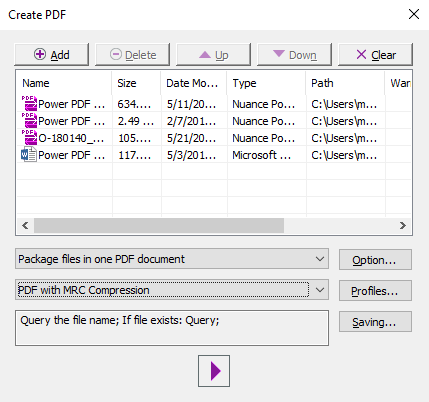
Screenshot of the PDF Create Assistant, which can be used to create multiple PDFs at the same time from a variety of source formats. Create individual PDFs, or combine into one PDF package.Screenshot of PDF Profiles that can be created to apply commonly desired settings to new PDF documents created in Power PDF.Screenshot of the application's color, changed from purple to blue, light gray or dark gray.Screenshot of some lightweight document automation that can also be achieved with the Watched Folder and Sequence features.Screenshot of where packages can be signed with pre built templates using Kofax Sign Doc or other integrating e-signersScreenshot of PDFs that can be navigated with a thumbnail view