PMAPS is a proposal management platform and is available as installed software or in a cloud-based version.
N/A
VanillaSoft
Score 4.3 out of 10
Small Businesses (1-50 employees)
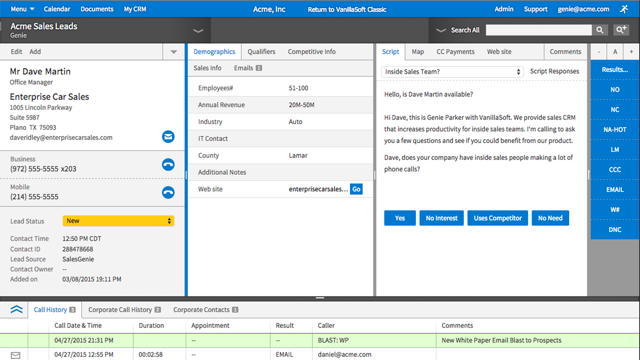
VanillaSoft is a lead optimization platform designed to assist fast-response sales teams in maximizing their conversion rates. By providing a structured and efficient approach to lead management, VanillaSoft aims to ensure that every potential customer receives the attention they deserve. This platform is beneficial for sales teams that operate in high-pressure environments where timely follow-ups can significantly impact sales outcomes. The primary audience for VanillaSoft…
N/A
Pricing
Proposal Management and Production System (PMAPS)
VanillaSoft
Editions & Modules
No answers on this topic
No answers on this topic
Offerings
Pricing Offerings
PMAPS
VanillaSoft
Free Trial
No
No
Free/Freemium Version
No
No
Premium Consulting/Integration Services
No
Yes
Entry-level Setup Fee
No setup fee
No setup fee
Additional Details
—
VanillaSoft offers several add-ons to use in conjunction with our base platforms including:
Auto Dialing
Call Recording
VoIP
SmartCaller ID
SMS
Do you need consistency of messaging across multiple countries/products/divisions/languages? Do you want to be able to tailor content access per team/division/country? Do you want to be able to report on/track use by user, document, searches, compliance, etc.? If so, PMAPS is the most versatile proposal management tool I've come across so far.
VanillaSoft is well suited for any marketing operations or sales operations team looking for a tool to help them efficiently reach prospects and engage with them through a streamlined method. This can be a great way to manage that engagement, measure it, and keep track of various aspects of prospects.
Searching for boilerplate material--PMAPS allows you to search by keywords, as well as filter by categories (e.g., implementation, training, company information, etc.) I set up all the categories, subcategories, audience types, etc. We used to spend a significant amount of time searching for previously written information, but now we can find it within seconds. I only use it to search for information stored within PMAPS, but you can also set it up to point at other places to search for information as well.
Manage proposals--PMAPS has a dashboard that lists all of the proposals I'm working on as well as key information that I want to have available for each of them. You can decide what information you want to show on your dashboard (I use mine to show due date, production date, review date, salesperson for proposal, etc.) It is very convenient to have all of that information available at a glance. PMAPS also has a built-in calendar that will show you key dates for all of your proposals.
Generate custom documents--PMAPS allows you to set up templates that you can use to generate documents. You can set up forms that allow yourself or other users to specify what information should be included in that document, and then PMAPS will generate the document based on how users respond to the questions (e.g., what references to include, what products to list, etc.).
Word Replacement--PMAPS allows you to set up codes that will automatically be replaced with the correct term when you generate the proposal. For example, in our boilerplate information, any place where I would want the final proposal to say the prospect's name, I use the code <>. Those codes are automatically replaced with the prospect's name for that proposal when either I generate a document or when I simply select the icon that searches for and replaces codes.
Easily edit boilerplate documents--PMAPS allows you to easily edit boilerplate information. You can select a document one at a time, or you can select a whole bunch of documents at once (simply by doing a search and/or filter to limit the results to the documents you want to edit) and download them onto your computer, edit, and then re-upload.
Store material--PMAPS allows you to store Word, Excel, PowerPoint, and PDF documents.
Our employees love it - very user friendly, easy to grasp, very little down time to learn it. They feel very confident immediately.
Great technical support - I can get solutions to customer problems that make our company look more responsive to our clients. Our clients appreciate our solving their problems immediately.
Because of the real time analytics - we can address immediate issues with marketing campaigns to make our client's personnel look great to their superiors.
Because of all the functionality - we can provide a turnkey approach from a small company with big company capabilities.
There are times when I'm having a problem and I call the general line and have to leave a message and then wait for someone to call me back. I'd like to be able to speak with a live person every time.
I'd like to see the program handle Excel documents with the ease that it handles a Word document.
It really needs an "undo" button. I can't tell you how many times I was typing notes etc and hit a wrong button and all was gone so I had to start over.
This may be the way we have it set up....we have term codes which are how the callers terminate a call they were on. They finish the call, then type notes in the notepad section of what happened, then they terminate the call. But there are times that I need to go onto a record and just leave a note but don't need to terminate it as anything. If there is a way to do that, it would make my life a lot easier.
I have been a PMAPS user for over 5 years. I started on their client/server version and renewed/upgraded this past year to their cloud version, WebPro. When you have a good product that delivers all the bells and whistles you need, there is no need to go searching anywhere else. We have a great partnership with the PMAPS staff and find them very resourceful and appreciative of our business
We have no reason not to renew. VanillaSoft has been the best CRM (for us) that we have ever used. The value is great, we love the system, and it's easy to get assistance from VanillaSoft team when needed. Our team is so used to the calling and admin functions there is no desire to change.
The entire system is set up so perfectly. It makes training callers much quicker, and admin tools are so easy to navigate when you get used to using it. Also, if there is ever something I cannot figure out, I can get support from VanillaSoft very quickly to resolve and get my task accomplished.
It is very rare that we have system issues. Maybe a handful of times over the years, we had to contact support about being unable to access. It was always a quick response from the VanillaSoft team, and they would clearly explain the issue and usually give time frame on fixing, or have it fixed immediately.
I work on all aspects for VanillaSoft for our company. The pages overall do load very quickly. Reports are amazing, I can get quick report, customized reports, and anything I may need to present to client in very little time. It has made my job so much simpler. As far as I know, integration goes smoothly as well.
It was very thorough. VanillaSoft team did not rush us. They explained the various functions clearly and were open to any and all questions we had as we began to learn the system. Also, once training completed, if we encountered anything we could not figure out, the support team was fantastic in helping us out.
I did the vendor analysis and narrowed my selection to Qvidian (which I had used before) and PMAPS (which I had not). I've never regretted my choice. In ease of use alone, PMAPS wins hands down. We're able to use PMAPS when collecting intelligence from our Subject Matter Experts in ways that weren't possible with other tools.
VanillaSoft stacks up against Microsoft Power BI very well by allowing the data visualization in a more effective way, Power BI has positioned itself as one of the more robust and intuitive tools for business intelligence and data presentation. VanillaSoft and Microsoft Power BI are a great bundle for the report and analytics team.
VanillaSoft has been great. The flexibility of the system is wonderful. The scalable software options are impressive as well. I would strongly support VanillaSoft's capabilities in this area. You really can do just about anything to get the setup and or integrations you may desire for your company needs.
I don't have any actual ROI numbers readily available but I will say that compared to our last solution (a home-grown document repository), PMAPS has made every aspect of our business more efficient.
One of our primary goals in procuring a vendor to provide a better solution was our increased need to become more consistent in our messaging, more relevant as things change, and more efficient in getting our user's the answers they need quicker. We accomplished all three.
The ability to save my correspondence and notes on each interaction allowing for the appearance to the customer that I am very engaged when we are speaking.
Increased sales from the calendar setting and saving my notes.