Priority Rerun vs. QuickBooks Online

Overview
ProductRatingMost Used ByProduct SummaryStarting Price
Priority Rerun
Score 8.4 out of 10
Small Businesses (1-50 employees)
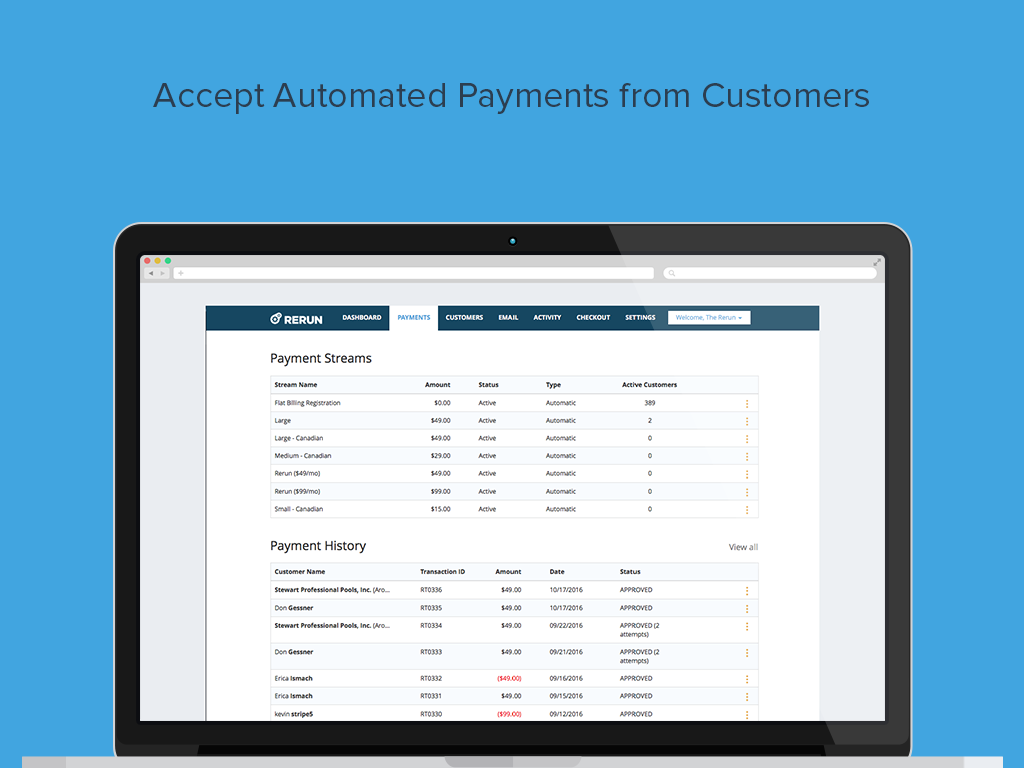
Rerun allows users to automate recurring payments from customers and clients by credit card or bank transfer (ACH). Set up is minimal: users can create payment streams based on how they want to accept payment for products or services. Payment streams can charge customers one time, or users can set up a recurring stream that repeatedly charges on a cycle chosen by the user: daily, weekly, monthly, yearly and so on. Users can automatically charge customers or send them an invoice for click-to…N/A
QuickBooks Online
Score 8.1 out of 10
N/A
QuickBooks Online is a SaaS version of the QuickBooks product. It contains all of the features found in the local version. Higher-priced plans include greater automation, payment management, inventory and time tracking, and analytics features.
$38
per month
Pricing
Priority RerunQuickBooks Online
Editions & Modules
No answers on this topic
Simple Start
$38
per month
Essentials
$75
per month
Plus
$115
per month
Advanced
$275
per month
Offerings
Pricing Offerings
Priority RerunQuickBooks Online
Free Trial
YesYes
Free/Freemium Version
YesNo
Premium Consulting/Integration Services
NoYes
Entry-level Setup FeeNo setup feeNo setup fee
Additional DetailsPay only for what you process. 2.90% + $0.30 per transaction for credit cards. $1.49 per bank transfer (ACH). No monthly fees. No application fees. No hidden fees.
More Pricing Information
Community Pulse
Priority RerunQuickBooks Online
Features
Priority RerunQuickBooks Online
Payroll Management
Comparison of Payroll Management features of Product A and Product B
Priority Rerun
-
Ratings
QuickBooks Online
8.1
121 Ratings
7% above category average
Pay calculation00 Ratings8.4110 Ratings
Benefit plan administration00 Ratings7.260 Ratings
Direct deposit files00 Ratings8.5101 Ratings
Salary revision and increment management00 Ratings8.274 Ratings
Reimbursement management00 Ratings7.981 Ratings
Customization
Comparison of Customization features of Product A and Product B
Priority Rerun
-
Ratings
QuickBooks Online
7.0
113 Ratings
8% below category average
API for custom integration00 Ratings7.194 Ratings
Plug-ins00 Ratings7.095 Ratings
Security
Comparison of Security features of Product A and Product B
Priority Rerun
-
Ratings
QuickBooks Online
8.4
186 Ratings
2% above category average
Single sign-on capability00 Ratings8.5151 Ratings
Role-based user permissions00 Ratings8.3176 Ratings
Reporting & Analytics
Comparison of Reporting & Analytics features of Product A and Product B
Priority Rerun
-
Ratings
QuickBooks Online
8.2
212 Ratings
5% above category average
Dashboards00 Ratings8.3199 Ratings
Standard reports00 Ratings8.4206 Ratings
Custom reports00 Ratings7.9190 Ratings
General Ledger and Configurable Accounting
Comparison of General Ledger and Configurable Accounting features of Product A and Product B
Priority Rerun
-
Ratings
QuickBooks Online
8.0
229 Ratings
5% above category average
Accounts payable00 Ratings8.8195 Ratings
Accounts receivable00 Ratings8.8212 Ratings
Cash management00 Ratings8.1194 Ratings
Bank reconciliation00 Ratings9.0218 Ratings
Expense management00 Ratings8.4202 Ratings
Time tracking00 Ratings7.095 Ratings
Fixed asset management00 Ratings8.094 Ratings
Multi-currency support00 Ratings7.548 Ratings
Multi-division support00 Ratings7.379 Ratings
Regulations compliance00 Ratings7.978 Ratings
Electronic tax filing00 Ratings8.1113 Ratings
Self-service portal00 Ratings7.4124 Ratings
Global Financial Support00 Ratings6.840 Ratings
Primary and Secondary Ledgers00 Ratings8.170 Ratings
Intercompany Accounting00 Ratings7.970 Ratings
Localizations00 Ratings7.954 Ratings
Journals and Reconciliations00 Ratings8.5141 Ratings
Enterprise Accounting00 Ratings7.160 Ratings
Configurable Accounting00 Ratings7.986 Ratings
Centralized Rules Framework00 Ratings7.757 Ratings
Standardized Processes00 Ratings8.8105 Ratings
Inventory Management
Comparison of Inventory Management features of Product A and Product B
Priority Rerun
-
Ratings
QuickBooks Online
6.9
88 Ratings
6% below category average
Inventory tracking00 Ratings6.783 Ratings
Automatic reordering00 Ratings7.146 Ratings
Location management00 Ratings7.353 Ratings
Manufacturing module00 Ratings6.636 Ratings
Order Management
Comparison of Order Management features of Product A and Product B
Priority Rerun
-
Ratings
QuickBooks Online
7.9
141 Ratings
5% above category average
Pricing00 Ratings8.090 Ratings
Order entry00 Ratings7.886 Ratings
Credit card processing00 Ratings8.4109 Ratings
Cost of goods sold00 Ratings8.3107 Ratings
Order Orchestration00 Ratings7.446 Ratings
End-to-end order visibility00 Ratings7.949 Ratings
Order exception Resolution00 Ratings7.542 Ratings
Best Alternatives
Priority RerunQuickBooks Online
Small Businesses
WooCommerce Subscriptions
Score 8.6 out of 10
QuickBooks Self-Employed (discontinued)
Score 5.9 out of 10
Medium-sized Companies
Sage Intacct
Sage Intacct
Score 8.6 out of 10
Zoho Books
Zoho Books
Score 9.1 out of 10
Enterprises
Agentforce Revenue Management
Score 8.8 out of 10
SAP Cloud ERP
SAP Cloud ERP
Score 8.6 out of 10
All AlternativesView all alternativesView all alternatives
User Ratings
Priority RerunQuickBooks Online
Likelihood to Recommend
8.4
(2 ratings)
8.3
(230 ratings)
Likelihood to Renew
-
(0 ratings)
9.5
(27 ratings)
Usability
-
(0 ratings)
8.3
(146 ratings)
Availability
-
(0 ratings)
9.0
(6 ratings)
Performance
-
(0 ratings)
1.0
(5 ratings)
Support Rating
-
(0 ratings)
9.8
(70 ratings)
Implementation Rating
-
(0 ratings)
9.9
(7 ratings)
Configurability
-
(0 ratings)
1.0
(2 ratings)
Contract Terms and Pricing Model
-
(0 ratings)
5.0
(1 ratings)
Ease of integration
-
(0 ratings)
1.3
(2 ratings)
Product Scalability
-
(0 ratings)
2.0
(3 ratings)
Professional Services
-
(0 ratings)
5.0
(1 ratings)
Vendor post-sale
-
(0 ratings)
5.0
(3 ratings)
Vendor pre-sale
-
(0 ratings)
5.0
(3 ratings)
User Testimonials
Priority RerunQuickBooks Online
Likelihood to Recommend
Priority Software
Rerun is great for any business that invoices or bills clients on a recurring schedule of any sort, whether that be daily, weekly, monthly, annually, and so forth. I wouldn't recommend it for businesses that just want to run a credit card now and then. This is made to assist with subscriptions, memberships, or any recurring service types. This also works well for delinquent accounts, you can get them set up on an automatic payment plan they can afford to pay down outstanding invoices.
Read full review
Intuit
QBO is a great solution for small and midsize companies. If the goal is to record all transactions and pull reliable financial reports, QBO is a great option. QBO is also a great solution if most operations are run in a system like Ramp. It syncs well with systems like that and turns the data into something management can use to make decisions. QBO is great because so many people use it. It is easy to find training online, and many people have experience with it.
Read full review
Pros
Priority Software
  • Automatic debits of payments on the schedule that I want.
  • Handling one time payments with ease
  • Being able to the payments either by ACH or credit card
Read full review
Intuit
  • Workflows for accounts payable invoice review are terrific.
  • Bill payment allows you to pay vendors online via ACH or check without having to write a physical check, which reduces admin time.
  • The cloud based login lends well to a remote or hybrid work environment for staff.
  • QuickBooks Online allows you to pre-configure vendors' general ledger expense accounts. This helps with general ledger coding accuracy and consistency.
  • QuickBooks Online integrates with Rippling HRIS, Coast, Capital One, JPMorgan Chase, etc., which lends well to an efficient month-end closing and reduced administrative time.
Read full review
Cons
Priority Software
  • Honestly, this is the only software I have used for automation of recurring payments. So far, I haven't had any issues for how I use it. Others who use it more in-depth may find areas for improvement.
Read full review
Intuit
  • I dislike that the online bill pay option through QuickBooks is required for their invoicing.
  • The auto-fill portion of the customer setup, specifically the company name, is listed, but it also auto-fills in the name portion, which is inconvenient and time-consuming to remove.
Read full review
Likelihood to Renew
Priority Software
No answers on this topic
Intuit
It like the product 'right out of the box' and I trust Intuit will continually improve it over the years based on my experience with their desktop products. The large providers of Apps makes customizing the entire package relatively easy and seamless for a wide variety of business types.
Read full review
Usability
Priority Software
No answers on this topic
Intuit
Beyond being overkill for a small org's needs, QBO is constantly stealing screen real estate and attention by hammering users for account upgrades, connecting to one of their approved consultants or buying add-ons. The idea of using a simple configurable bookeeping and light accounting interface is completely missing. At the very least, we should be able to hide functions like inventory that we will never use.
Read full review
Reliability and Availability
Priority Software
No answers on this topic
Intuit
We have rarely had outages in the last 10 years. I can only recall 2 times in the last 10 years where we were not able to access our client files.
Read full review
Performance
Priority Software
No answers on this topic
Intuit
Everything process has its bugs lately with the new interface. Nothing has worked smoothly since this all began last month.
Read full review
Support Rating
Priority Software
No answers on this topic
Intuit
In my experience, most representatives keep me on the phone for hours, literally, for a single issue and then usually cannot resolve it satisfactorily. I have 10 open cases that need resolution and, in my experience, there has been NO follow-up communication on any of them.
Read full review
Implementation Rating
Priority Software
No answers on this topic
Intuit
The person in charge of QB needs to be very accurate with record keeping and is recommended to stay on top of tasks. The biggest issue we have is reconciliation, and those issues occur only when too much time has occurred between reconciliations
Read full review
Alternatives Considered
Priority Software
We selected Rerun over Bill.com as it was less expensive and has a much better interface than Bill.com. There are no per user fees like Bill.com, which allows me to invite team members in to help with managing the payments. The interface is much easier to work with and manage vs Bill.com.
Read full review
Intuit
As a freelance bookkeeper, the Desktop version of QuickBooks Online doesn't allow for ease of access from any device. Having to be on a computer with the software downloaded creates additional work to gain access to all required filings etc. Also, I personally find the linking functionality on the Online version to be much more streamlined and user friendly.
Read full review
Scalability
Priority Software
No answers on this topic
Intuit
As we have grown along our professional path, we have also expanded our use of QB. The scalability is easy and features seem to be waiting for you until you need them. We have increased profits by over 10x from our first year in business to the current and have yet to find a reason to look elsewhere
Read full review
Return on Investment
Priority Software
  • It's been amazing! I started using it for delinquent accounts and it worked so nicely that I decided to start billing my clients monthly vs hourly. The software itself doesn't cost anything, they only charge merchant fees and per-transaction fees. I would be paying these to accept credit cards anyway, so it is 100% worth it. Plus, it has saved me time on bookkeeping and collections, which allows me to have more billable time. It has helped me take my business from a time-based billing system to a value-based billing system.
Read full review
Intuit
  • QuickBooks has given us a useful portal by which to get an overview of our financials.
  • QuickBooks has given us a relatively easy way to send out invoices quickly and efficiently.
  • Due to the customization limitations on QuickBooks, we've had to get creative in third-party implementations to better represent our brand and to track financials.
Read full review
ScreenShots

Priority Rerun Screenshots

Screenshot of Automate your email communication with customersScreenshot of Handle voids and invalid credit cardsScreenshot of Automate invoices and payments with customersScreenshot of Track account activity and generate reportsScreenshot of Create a customizable checkout process for your products or services

QuickBooks Online Screenshots

Screenshot of the accounting and bank transactions interfaceScreenshot of an overview of the accounting inventoryScreenshot of book marksScreenshot of the business tax overviewScreenshot of the customer hubScreenshot of the dashboard