Projector's cloud-based Professional Services Automation (PSA) software helps project-based services organizations track time and expenses, invoice clients, schedule resources, and manage projects. Its three modules span a more comprehensive set of uses than typical project management software. The Accounting module helps the user track time and expenses and manage invoices and billing. Also it syncs with the company's accounting systems as a sub-ledger. The Resource Scheduling module matches…
$15
per user
ProContractor
Score2.6 out of 10
N/A
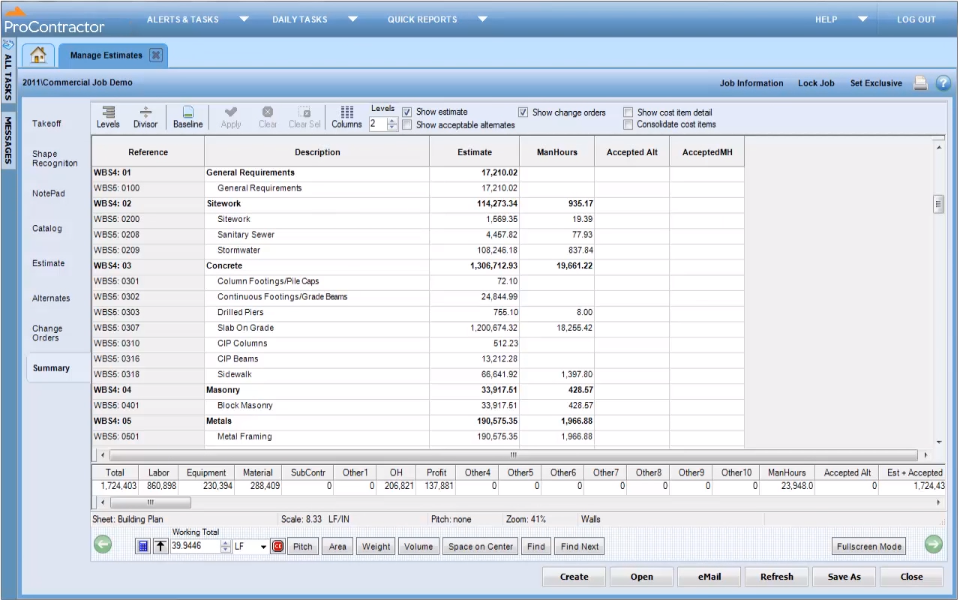
ProContractor is a Cloud-Based Solution for Estimating, Project Management, and Accounting. Designed to improve visibility and profitability across construction businesses, ProContractor™ by Viewpoint is a cloud-based software solution for estimating, project management, and accounting. The user can manage the entire project lifecycle from bid to cash in a single solution. Built to be flexible and scalable, ProContractor allows users to go all-in-one, or build a complete solution…
We think Projector PSA is a great tool to track and manage people in a professional service environment like management consulting. This system is easy to set up, easy to understand and should easily suit the needs of smaller and medium sized firms. It may be less appropriate for firms that rely very heavily on project management through another system (like MS Project) or firms that rely very heavily on a sales pipeline tracking system. While still very much possible to use, you would (I believe) have to do some re-keying between systems
It is appropriate for the size and scale of my company - 150 projects a year that has a lot going on a multiple lines with each project. However there are many features and things that go unused with the software, because of how tinkery it can be. For example - our company needs a positive pay file, however we had to employ an outside service provide to create the file within the system. Same with a Backlog - the system kind of has a report but then again it has to be manipulated in order for it be of use. It gets the job done and has the reports needed to submit for certified payroll to the state, which was why we purchased Viewpoint ProContractor, however its ease of use is one of its biggest downfalls.
A de minimis incentive was given to thank the reviewer for their time. The incentive was not used to bias or drive a particular response, nor was the incentive contingent on a positive endorsement. More Info
Projector is a very well designed tool for project management. It has allowed us to eliminate a number of auxiliary tools for project timelines and WBS for the vast majority of our projects.
Time and expense entry is intuitive and quick for our staff.
Our forecasting and resource management capability has improved greatly with Projector and allows us to grow our team efficiently with minimal additional administrative burden.
Reporting is extremely robust. It does require some time to really get a handle on the full functionality of the reporting tool, but once you do, you can get almost any kind of report you want out of the system!
A de minimis incentive was given to thank the reviewer for their time. The incentive was not used to bias or drive a particular response, nor was the incentive contingent on a positive endorsement. More Info
Release management process needs to be improved. Currently no facility is provided to test the impact of new releases in a sand-box. This introduces business risk if there are interfaces into Projector PSA as part of it's use in the business.
A de minimis incentive was given to thank the reviewer for their time. The incentive was not used to bias or drive a particular response, nor was the incentive contingent on a positive endorsement. More Info
We have been using this tool for a year now and find our use of it continually evolves and broadens. We are also very excited about the overhaul that's under way and feel many of the improvements being put in place will help make us that much more effective and efficient. The Projector team is also very responsive and collaborative in terms of user feedback and improvement suggestions, which helps us know they will work hard to help us get what we need out of the tool.
I give Viewpoint ProContractor a 10 out of 10. This system is user friendly to help keep me organized on a daily basis. I can find everything I need daily with this system. I am able to look up our subcontactors, vendors and clients I need to find quickly. I am able to see bills that I need to pay as well as invoices that I need to send out.
When something isn't working, you can contact support who will gladly remote into your system and try and work out a solution. Though several of the issues we encountered, they were not able to fix and had to submit for further review. While some were eventually rectified in updates, it takes time for these to be addressed and implemented.
A de minimis incentive was given to thank the reviewer for their time. The incentive was not used to bias or drive a particular response, nor was the incentive contingent on a positive endorsement. More Info
We did pursue Quick Arrow another tool that was similar. We found that be in inflexible in use. Projector allows a lot of flexibility in setup. Our organization has very specific business processes and we were able to set up Projector to work with those processes. Several other systems we tried were not as flexible in allowing set up to our needs.
Procore beats Viewpoint hands down but can integrate well with Viewpoint Vista accounting software. I think that if the Viewpoint software was more flexible if they were more interested in patches, updates, and hearing customer feedback in the way the Procore does, that they would actually have the opportunity to corner the market.
A de minimis incentive was given to thank the reviewer for their time. The incentive was not used to bias or drive a particular response, nor was the incentive contingent on a positive endorsement. More Info
Even in the small time that I stayed to see Projector PSA reporting I saw ROI projections become more realistic. There was real data to analyze that proved we were spending way too much and charging way too less on some projects.
Although employees were not used at entering their hours, this single reporting improved operations management and validated employees concerns that more people were needed to manage workload
Project proposals were more realistic because they were driven by real data.
Decision making overall for the department became more efficient and effective
A de minimis incentive was given to thank the reviewer for their time. The incentive was not used to bias or drive a particular response, nor was the incentive contingent on a positive endorsement. More Info
Overall it allowed us to go electronic for certified payroll allowing us to be more accurate in reporting which was a giant win for the company
It's viewable pay estimates with dates and records of payment are crucial to a company like ours that relies on a general contractor and the state for payment of EADA quantites
Negatively training is not the easiest for the company and therefore onboarding new employees with no experience with the software is time consuming and difficult.
A de minimis incentive was given to thank the reviewer for their time. The incentive was not used to bias or drive a particular response, nor was the incentive contingent on a positive endorsement. More Info