SAS 360 Plan vs. Webtrends Optimize

Overview
ProductRatingMost Used ByProduct SummaryStarting Price
SAS 360 Plan
Score 8.9 out of 10
N/A
Formerly SAS Marketing Operations Management, a solution to integrate and manage all marketing processes for greater consistency, efficiency and effectiveness – from marketing strategy development and planning to content creation, campaign execution and post-campaign analysis.N/A
Webtrends Optimize
Score 9.7 out of 10
N/A
Webtrends Optimize is a web optimization platform and is offered by the company of the same name. The product competes most often with Adobe Test and Target, Maxymiser, SiteSpect, and Optimizely.N/A
Pricing
SAS 360 PlanWebtrends Optimize
Editions & Modules
No answers on this topic
Offerings
Pricing Offerings
SAS 360 PlanWebtrends Optimize
Free Trial
NoYes
Free/Freemium Version
NoNo
Premium Consulting/Integration Services
NoYes
Entry-level Setup FeeNo setup feeNo setup fee
Additional DetailsThere is no tiering and no different prices for different tools. The entire feature set is available to all users as standard at one price, agreed up front.
More Pricing Information
Community Pulse
SAS 360 PlanWebtrends Optimize
Features
SAS 360 PlanWebtrends Optimize
Testing and Experimentation
Comparison of Testing and Experimentation features of Product A and Product B
SAS 360 Plan
-
Ratings
Webtrends Optimize
8.3
1 Ratings
1% below category average
a/b experiment testing00 Ratings9.11 Ratings
Split URL testing00 Ratings8.21 Ratings
Multivariate testing00 Ratings8.21 Ratings
Multi-page/funnel testing00 Ratings8.21 Ratings
Cross-browser testing00 Ratings8.21 Ratings
Mobile app testing00 Ratings8.21 Ratings
Test significance00 Ratings8.21 Ratings
Visual / WYSIWYG editor00 Ratings8.21 Ratings
Advanced code editor00 Ratings8.21 Ratings
Page surveys00 Ratings8.21 Ratings
Visitor recordings00 Ratings8.21 Ratings
Preview mode00 Ratings8.21 Ratings
Test duration calculator00 Ratings8.21 Ratings
Experiment scheduler00 Ratings8.21 Ratings
Experiment workflow and approval00 Ratings8.21 Ratings
Dynamic experiment activation00 Ratings8.21 Ratings
Client-side tests00 Ratings9.11 Ratings
Server-side tests00 Ratings8.21 Ratings
Mutually exclusive tests00 Ratings8.21 Ratings
Audience Segmentation & Targeting
Comparison of Audience Segmentation & Targeting features of Product A and Product B
SAS 360 Plan
-
Ratings
Webtrends Optimize
8.2
1 Ratings
7% below category average
Standard visitor segmentation00 Ratings9.11 Ratings
Behavioral visitor segmentation00 Ratings8.21 Ratings
Traffic allocation control00 Ratings7.31 Ratings
Website personalization00 Ratings8.21 Ratings
Results and Analysis
Comparison of Results and Analysis features of Product A and Product B
SAS 360 Plan
-
Ratings
Webtrends Optimize
8.1
1 Ratings
6% below category average
Click analytics00 Ratings9.11 Ratings
Scroll maps00 Ratings7.31 Ratings
Form fill analysis00 Ratings7.31 Ratings
Conversion tracking00 Ratings8.21 Ratings
Goal tracking00 Ratings8.21 Ratings
Test reporting00 Ratings8.21 Ratings
Results segmentation00 Ratings8.21 Ratings
CSV export00 Ratings8.21 Ratings
Experiments results dashboard00 Ratings8.21 Ratings
Best Alternatives
SAS 360 PlanWebtrends Optimize
Small Businesses
Adobe Marketing Cloud
Score 9.2 out of 10
Convert Experiences
Convert Experiences
Score 9.9 out of 10
Medium-sized Companies
Brandfolder
Brandfolder
Score 7.8 out of 10
Dynamic Yield
Dynamic Yield
Score 9.0 out of 10
Enterprises
Adobe Marketing Cloud
Score 9.2 out of 10
Dynamic Yield
Dynamic Yield
Score 9.0 out of 10
All AlternativesView all alternativesView all alternatives
User Ratings
SAS 360 PlanWebtrends Optimize
Likelihood to Recommend
8.0
(1 ratings)
7.4
(17 ratings)
Likelihood to Renew
-
(0 ratings)
5.3
(5 ratings)
Usability
-
(0 ratings)
7.0
(2 ratings)
Availability
-
(0 ratings)
10.0
(1 ratings)
Performance
-
(0 ratings)
10.0
(1 ratings)
Support Rating
-
(0 ratings)
9.1
(2 ratings)
Online Training
-
(0 ratings)
6.0
(1 ratings)
Implementation Rating
-
(0 ratings)
7.0
(1 ratings)
User Testimonials
SAS 360 PlanWebtrends Optimize
Likelihood to Recommend
SAS
No answers on this topic
Webtrends Optimize
Webtrends optimize is a marketing solution aimed squarely at transactional and eCom based websites. I would only recommend a colleague to engage with the solution once the marketing dept is at a point where their website is fully optimized in regards to SEO and all the other fundamentals in order to truly build upon what Webtrends can offer. This shows you an easier way of measuring your ROI and the money you will invest with the tool-moving forward.
Read full review
Pros
SAS
  • Create and manage a detailed plan for a marketing campaign: when you create detailed project plans and then task and role levels, SAS Marketing Operations Management (SAS MOM) makes it easier to coordinate between projects with very little, if any, issues.
  • Share, reuse and leverage existing marketing assets: Like some marketing tools, SAS MOM allows you to create and reuse assets across various channels.
  • Manage project collaboration and execution: You are allowed to set up a workflow that helps move processes along without having to manage each step of the project.
Read full review
Webtrends Optimize
  • Intuitive test set-up makes for a low learning curve.
  • Ability to create custom data tables which enable exporting of visitor level data for more in-depth analysis outside of the Webtrends Optimize platform.
  • Visual Editor WYSIWYG interface enables non-technical users to easily execute basic tests.
Read full review
Cons
SAS
  • It would be good to have a Storyboard feature to summarize and tie together some of the dashboard metrics.
  • Missing feature: Hubspot CRM integration.
Read full review
Webtrends Optimize
  • The cost is a factor. When you're trying to save money, particularly as a startup (a lot of our clients are up-and-comers) it has to be seen as an investment...but the cost to implement the system is fairly large.
  • There's a bit of a steep learning curve, you can't just dive into the program.
  • It's not impossible but it's not as easy as snapping your fingers to easily implement the program cross-platform.
Read full review
Likelihood to Renew
SAS
No answers on this topic
Webtrends Optimize
Difficulty was getting business units to take the time and spend the money to test, and then implement, best options.
Read full review
Usability
SAS
No answers on this topic
Webtrends Optimize
Set up of basic tests that do not use segmentation or targeting is an intuitive experience that can be learned quickly by new users. However, as the need for segmentation and other more advanced capabilities arise, the experience begins to degrade.
Read full review
Reliability and Availability
SAS
No answers on this topic
Webtrends Optimize
zero complaints. I'm not aware of it ever failing.
Read full review
Performance
SAS
No answers on this topic
Webtrends Optimize
Zero complaints. It seemed to do its job quickly and accurately.
Read full review
Support Rating
SAS
No answers on this topic
Webtrends Optimize
The support from the team at Webtrends Optimize is unparalleled. There is always someone to consult should there be any issues.
Read full review
Online Training
SAS
No answers on this topic
Webtrends Optimize
Online training was ok. Because every test is a custom test, there's only so much that can be covered in a generic lesson.
Read full review
Implementation Rating
SAS
No answers on this topic
Webtrends Optimize
Implementation was pretty straightforward
Read full review
Alternatives Considered
SAS
No answers on this topic
Webtrends Optimize
Webtrends Optimize can be used for much more complex tests, allows better conversion tracking and data collection. Visual Website Optimizer (VWO) is suitable for smaller, simple projects. Webtrends Optimize comes with an excellent consultancy that could save you a lot of time and resources
Read full review
Return on Investment
SAS
No answers on this topic
Webtrends Optimize
  • So far we haven't seen an ROI that we can accurately measure due to only running a couple of tests that haven't resulted in direct, site wide changes. However, we have learnt a lot about how to set up the right processes and documentation.
Read full review
ScreenShots

Webtrends Optimize Screenshots

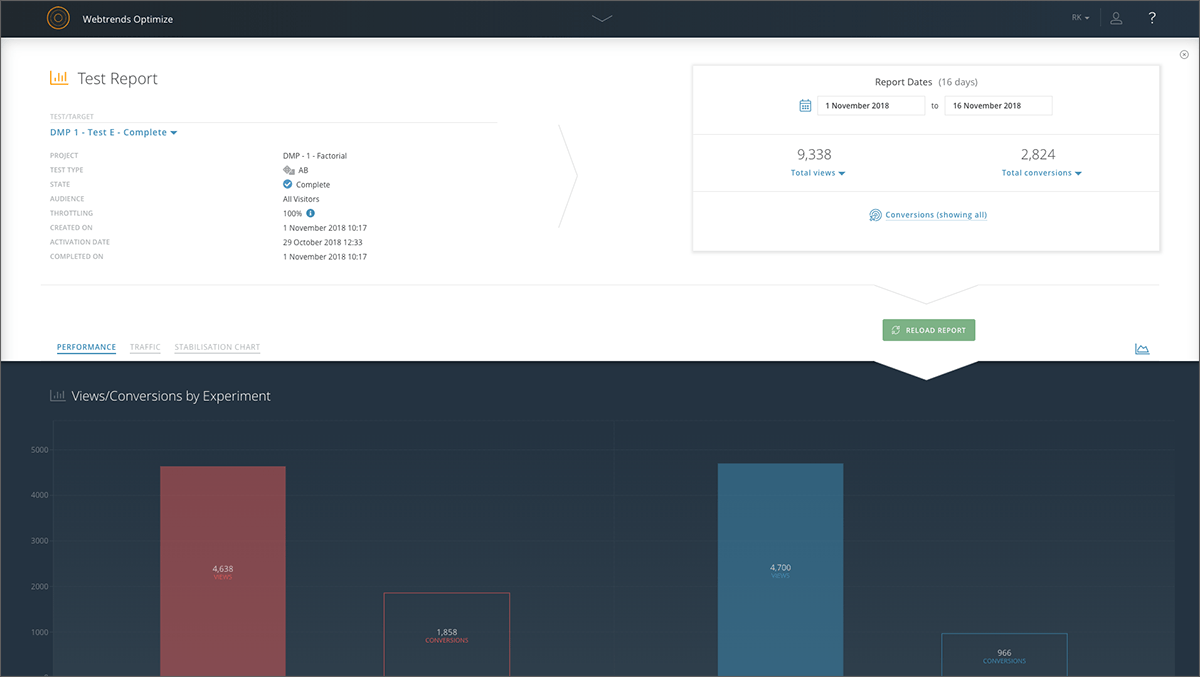
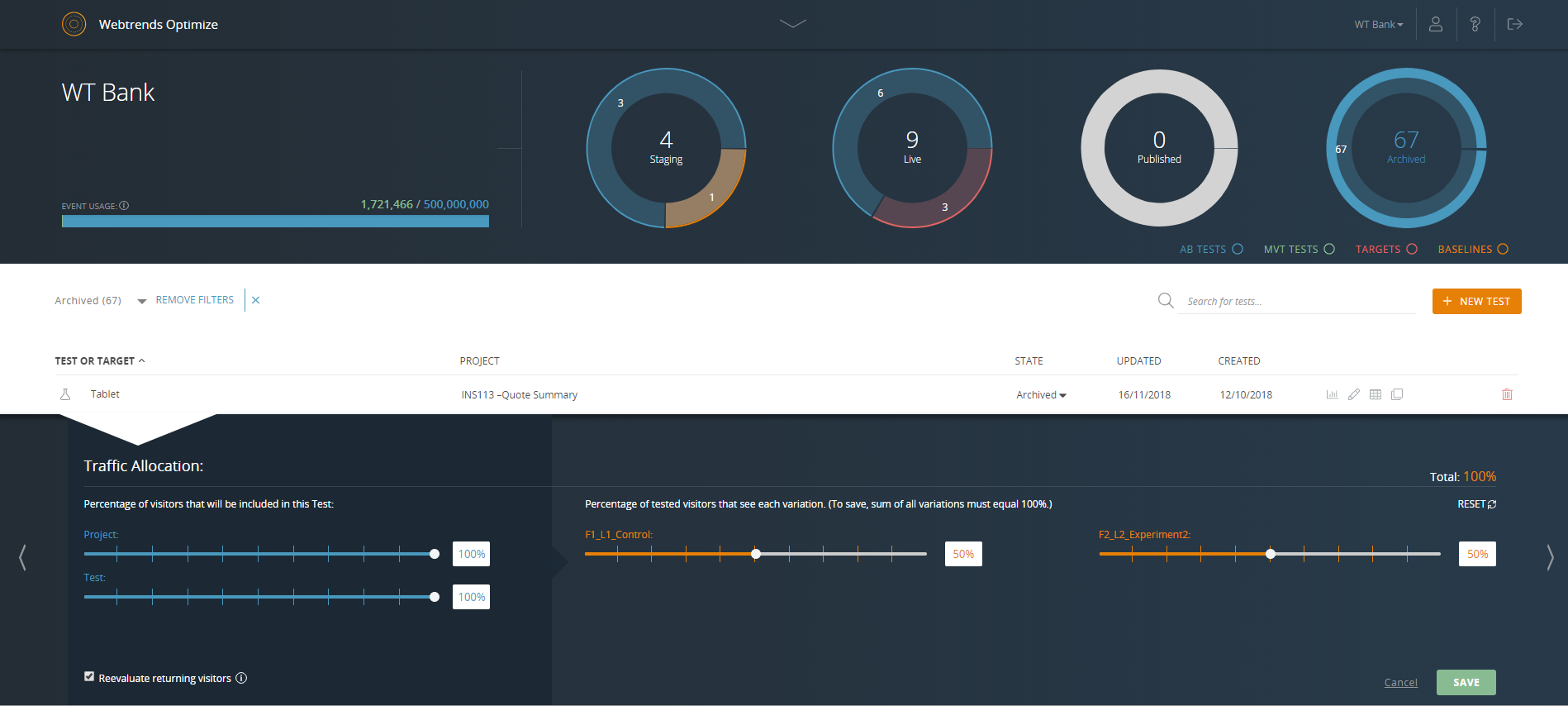
Screenshot of Reporting dashboard - default viewScreenshot of Specific experiment report - top level overviewScreenshot of Drag & drop segmentation moduleScreenshot of Point & click WYSIWYG Visual EditorScreenshot of Reporting dashboard - specific test or target overviewScreenshot of Reporting dashboard - specific test or target throttle settings