Scratchpad vs. Seismic Content

Overview
ProductRatingMost Used ByProduct SummaryStarting Price
Scratchpad
Score 9.7 out of 10
N/A
Scratchpad is a productivity tool for account executives, built for sales to update Salesforce, take sales notes, and daily todos. The software can be installed as a Google Chrome plugin or as a web application. It connects to Salesforce and provides an interface where sales professionals can keep all their notes, process workflows, spreadsheets, and tasks. Co-founders Pouyan Salehi and Cyrus Karbassiyoon started the company in San Francisco, California in 2019.
$0
user / month *up to five users per company
Seismic Content
Score 7.5 out of 10
Enterprise companies (1,001+ employees)
Seismic is a recognized leader in sales and marketing enablement. The vendor's value proposition is that their solution equips global sales teams with the knowledge, messaging, and automatically personalized content proven to be the most effective for any buyer interaction. Additionally, the vendor says powerful content intelligence and analytics enable marketers to prove and improve their impact on the bottom line, revealing what is really driving revenue and what needs to be…N/A
Pricing
ScratchpadSeismic Content
Editions & Modules
Free
$0
user / month *up to five users per company
Premium
$19
per user / month (billed annually)
Team
$39
user / month (billed annually)
Business
Custom pricing
No answers on this topic
Offerings
Pricing Offerings
ScratchpadSeismic Content
Free Trial
YesNo
Free/Freemium Version
YesNo
Premium Consulting/Integration Services
NoNo
Entry-level Setup FeeNo setup feeNo setup fee
Additional Details
More Pricing Information
Community Pulse
ScratchpadSeismic Content
Considered Both Products
Scratchpad
Chose Scratchpad
Gong is terrible compared to Scratchpad. I wish that Gong would buy Scratchpad so that everything would be in one place, but Gong's equivalent tool is as far away from easy and intuitive as possible. It's clunky, and I hate going in there and clicking around.
Chose Scratchpad
Only compared to Salesforce functionality
Chose Scratchpad
Scratchpad's pipeline views allow for better forecasting. This saves me time using multiple tools and views to get a better pulse of where I am at and where I need to be. I selected Scratchpad as it was recommended to me by a colleague, and once he showed me how he was using …
Chose Scratchpad
It doesn't. Scratchpad is more agile and much easier to use as a seller managing a large patch with lots of opportunities. SAP is robust but is far more complicated and involves a lot more inputs to get the same outputs that you can get with Scratchpad in half the time and …
Chose Scratchpad
I can't think of another tool similar to Scratchpad. The only other sales productivity tool that I've used in the past is Mixmax which is also an excellent tool. Mixmax has more features embedded in Gmail with the ability to view and edit Salesforce fields like Scratchpad, but …
Chose Scratchpad
Scratchpad is just a much more enjoyable way of interacting with Salesforce for the features it currently supports. It's not an alternative to Salesforce, it's an alternative UX for certain daily activities in SF, and it's great at that.
Chose Scratchpad
Before finding Scratchpad, logging account movements and mapping were done over OneNote (account management), Excel (pricing), and Word (call notes). Now I can get rid of the OneNote and Word aspects as they both sit on Scratchpad that links directly back to SF. This has helped …
Chose Scratchpad
I prefer the usage and benefit of Scratchpad over Coda, and easier & faster to use than Salesforce. I feel Coda has very little benefit (basically google page), but Scratchpad helps me stay organized for opportunities & discovery notes which is crucial. I highly suggest …
Chose Scratchpad
Scratchpad is far better and has way more ability to make changes than IQ does.
Chose Scratchpad
Scratchpad has more out-of-the-box features like centralized note-taking and the ability to pull in reports.
Chose Scratchpad
Scratchpad customizations stay within the margins of rules set by our organization. We didn't do a deep dive of Dooly and can mainly speak to the quality and effectiveness within Scratchpad. Currently, my entire team of 10 reps is using it, and we all have found usefulness. …
Chose Scratchpad
Before Scratchpad, I made all updates through Salesforce. Reports don't load super quickly and can be tough to change. Scratchpad makes this much easier.
Chose Scratchpad
I haven't ever used anything else other than your typical pen and paper or notes section on my Mac. I wouldn't have any info on how they stack up compared to the competition. I would venture to say they are the only ones trying to change sales reps' lives. It's just what they …
Chose Scratchpad
I selected Scratchpad because the depth of integration within Salesforce is very useful; I don't have to use a separate application than what I'm already using, Scratchpad is imbued within my Chrome and SFDC instances. Their free capabilities don't block you from viewing notes …
Seismic Content
Chose Seismic Content
Highspot was used at a different organization and seems to me to be superior in user interface, tracking metrics, and efficiency. Seismic was purchased for our current organization with no solution previously in place. In my experience, Seismic lacks features for guiding and …
Chose Seismic Content
Seismic is very similar to high spot but it a bit more user friendly and intuitive. Guru would be great for a small company who just needs to organize assets. But Seismic is the best option if you also utilize their ai capabilities which heavily impacts search in a positive way
Chose Seismic Content
Seismic is the go to platform for content creation, sharing, and collaboration between customers and colleagues. It's saves you time having to look for information when it's a tool with everything in one unified place. We don't have to ask anyone else for slides, brochures, …
Chose Seismic Content
Seismic is much more high level compared to the free tools as far as features. Competitors likely just house files whereas Seismic does this along with a lot more. In my opinion, also has a cleaner layout.
Chose Seismic Content
Both Highspot and Seismic are great tools. They each provide an extensive library that can be easily customized based on the rep/team/deal cycle stage etc. Seismic has a much cleaner look and feel. As a rep, I felt it was much easier to navigate the tool and organize my content …
Chose Seismic Content
Personally I think Seismic is more built for Sales enablement whereas Brainshark is a good education/knowledge development platform.
Chose Seismic Content
I haven't used similar tools.
Chose Seismic Content
The ease of use with Seismic versus Confluence is night and day! Confluence is not a very user-friendly program and what you can find is basically by luck. In Seismic it is accessible to everyone that has the permission to view whatever it is they are trying to view or follow …
Chose Seismic Content
Seismic is very similar to most content management systems and integrates less easily than the Salesforce CMS (not surprising), but it is more powerful than Salesforce CMS and Highspot. Highspot is less refined and less user-friendly than Seismic but I feel it also has more …
Chose Seismic Content
I am still learning how to maximize the potential using Seismic, so I'm getting more and more savvy with its potential.
Chose Seismic Content
I honestly, personally, haven't looked into other options very much besides Google Drive. I think for this purpose, Seismic does a better job because it holds everything we need without having to share files or give people access. It is just a site where we all have a log-in …
Chose Seismic Content
Seismic offers a more personalized user experience, with more analytics, a cleaner interface, and more responsive customer support.
Chose Seismic Content
Seismic is designed for salespeople - whereas Adobe Experience Manager (Assets and Sites) were both designed for Marketing teams to use. I think Seismic is more valuable for customer interactions than Adobe Experience Manager because it allows you to measure the amount of time …
Chose Seismic Content
We used to use Callidus Cloud, but honestly nobody was utilizing the platform, nor were we using it to the most potential. Seismic allowed for us to customize and have partner licenses.
Chose Seismic Content
Seismic has a robust amount of features, LiveSend is fantastic, and the analytics for our sales and marketing team to make better informed decisions.
Chose Seismic Content
Seismic and Hubspot were the top two finalists and ultimately we chose Seismic because its integration with Dynamics CRM was already ready to go. Hubspot was working on their integration but we knew from experience how difficult working with Microsoft could be, so we went with …
Chose Seismic Content
We selected Seismic because of cost, capabilities and support.
Chose Seismic Content
Prior to Seismic, we used SAVO. SAVO's user interface wasn't as visually pleasing as Seismic's, but we found it much easier to edit/update our master content within SAVO.
Chose Seismic Content
The user experience was better.
Chose Seismic Content
We're only using LiveDocs in Seismic and it's way better than Highspot's 3rd party solution.
Chose Seismic Content
The only other sales enablement tool that I've used personally was SAVO, which was acquired by Seismic.
Chose Seismic Content
Seismic is very similar to Showpad and Highspot and I'm sure they are great products too. What we were really impressed by was their ability to speak to our requirements and helped us build a strong business case for implementing this platform. We felt confident moving forward …
Chose Seismic Content
Seismic is our first sales enablement tool and we didn't really research others. They hit the ball out of the park with their initial presentation and we didn't look back.
Best Alternatives
ScratchpadSeismic Content
Small Businesses
Lead411
Lead411
Score 8.3 out of 10
Lead411
Lead411
Score 8.3 out of 10
Medium-sized Companies
Paperflite
Paperflite
Score 8.0 out of 10
Paperflite
Paperflite
Score 8.0 out of 10
Enterprises
Paperflite
Paperflite
Score 8.0 out of 10
Paperflite
Paperflite
Score 8.0 out of 10
All AlternativesView all alternativesView all alternatives
User Ratings
ScratchpadSeismic Content
Likelihood to Recommend
9.5
(0 ratings)
6.4
(0 ratings)
Usability
9.5
(0 ratings)
5.8
(0 ratings)
Support Rating
-
(0 ratings)
7.5
(0 ratings)
User Testimonials
ScratchpadSeismic Content
Likelihood to Recommend
I have over 250 accounts in my name, and it can be difficult to prioritize and find notes on past conversations my colleagues may have had. Scratchpad makes it super easy to reference past notes and add new ones to organize my book of business and make the best use of my time.
Read full review
It is excellent for a cloud-based workspace between you and your customers. I find the chat feature to be a cool and underutilized tool. I appreciate how you can consolidate all your information on one page, rather than having multiple attachments. Easy to clone DSRs (Digital Sales Rooms), which saves a significant amount of time. Especially when all you have to do is make minor changes between customers.
Read full review
Pros
  • Scratchpad notes are super easy to use and link to Salesforce Opportunities.
  • Allows you to update all the necessary Salesforce opportunity fields without going into Salesforce.
  • Easy to use Task manager that helps you stay on track through the day.
  • Extremely easy to use and their CS team is always willing to provide training and help.
Read full review
  • Seismic allows for one location to store all relevant content so that associates are not having to spend as much time searching for what they need.
  • Seismic provides the ability to fully customize content such that one template can serve many needs with the simple ability to answer questions that drive the customization in the content. This customization can range from simple to quite complex depending on your level of expertise with the tool.
  • Seismic provides a lot of flexibility when it comes to organizing your content and how to make the experience of accessing that content unique to the needs of each user in the system.
Read full review
Cons
  • When pulling in Salesforce reports, it doesn't have full ability to do grouping/sorting.
  • When looking at pipeline view there's not an ability to expand the default view to see more than 5 people per group.
  • It'd be nice if comments would go as a task rather than a buzz.
Read full review
  • There have been a few times where issues with a server leads to a slow user experience or users are unable to use the platform for a small period of time. Bringing these to a minimum would greatly enhance the user experience.
Read full review
Usability
Great functionality and a great intuitive tool
Read full review
Seismic is super easy to use and has so many different features and functionality to take advantage of. But being a company who utilizes Google platform a lot we have some issues with the api connections and integrations across the board. But all in all it is not a huge issue, I would just like to see them improve the integration more
Read full review
Support Rating
No answers on this topic
I have never tried chatting/calling with Support for Seismic. However, from others that I have talked to that use Seismic in more of an administrative role, they have been easy to work with and are of great assistance. I think it's a good thing I've never needed to talk to support, as it means I haven't had any issues to this point.
Read full review
Alternatives Considered
Scratchpad is just a much more enjoyable way of interacting with Salesforce for the features it currently supports. It's not an alternative to Salesforce, it's an alternative UX for certain daily activities in SF, and it's great at that.
Read full review
Both Highspot and Seismic are great tools. They each provide an extensive library that can be easily customized based on the rep/team/deal cycle stage etc. Seismic has a much cleaner look and feel. As a rep, I felt it was much easier to navigate the tool and organize my content the way I wanted to. Highspot tended to feel cluttered and even overwhelming at times. Along with that, the AI and saved search feature ran smoother in Seismic. I could easily find the document or sales deck I was looking for, whereas in Highspot I felt I had to look around longer than I would have liked.
Read full review
Return on Investment
  • I'm using the free version and unfortunately our organization as a whole doesn't use it because we now use Gong. My manager has complimented me many times as always having an updated pipe compared to my other team members. It helps me be on top of it.
Read full review
  • The bespoke resources we have created and implemented in Seismic have increased our reps efficiency and effectiveness and ultimately increased their confidence with our prospects.
  • Better time management as connecting different lines of businesses and/or functions like Marketing with Compliance allows for a smoother workflow and less time consumption.
  • Improved workflows as Seismic allows the distribution of resources either internally or externally quickly with links & PDF files directly into email correspondence or Slack messages.
Read full review
ScreenShots

Seismic Content Screenshots

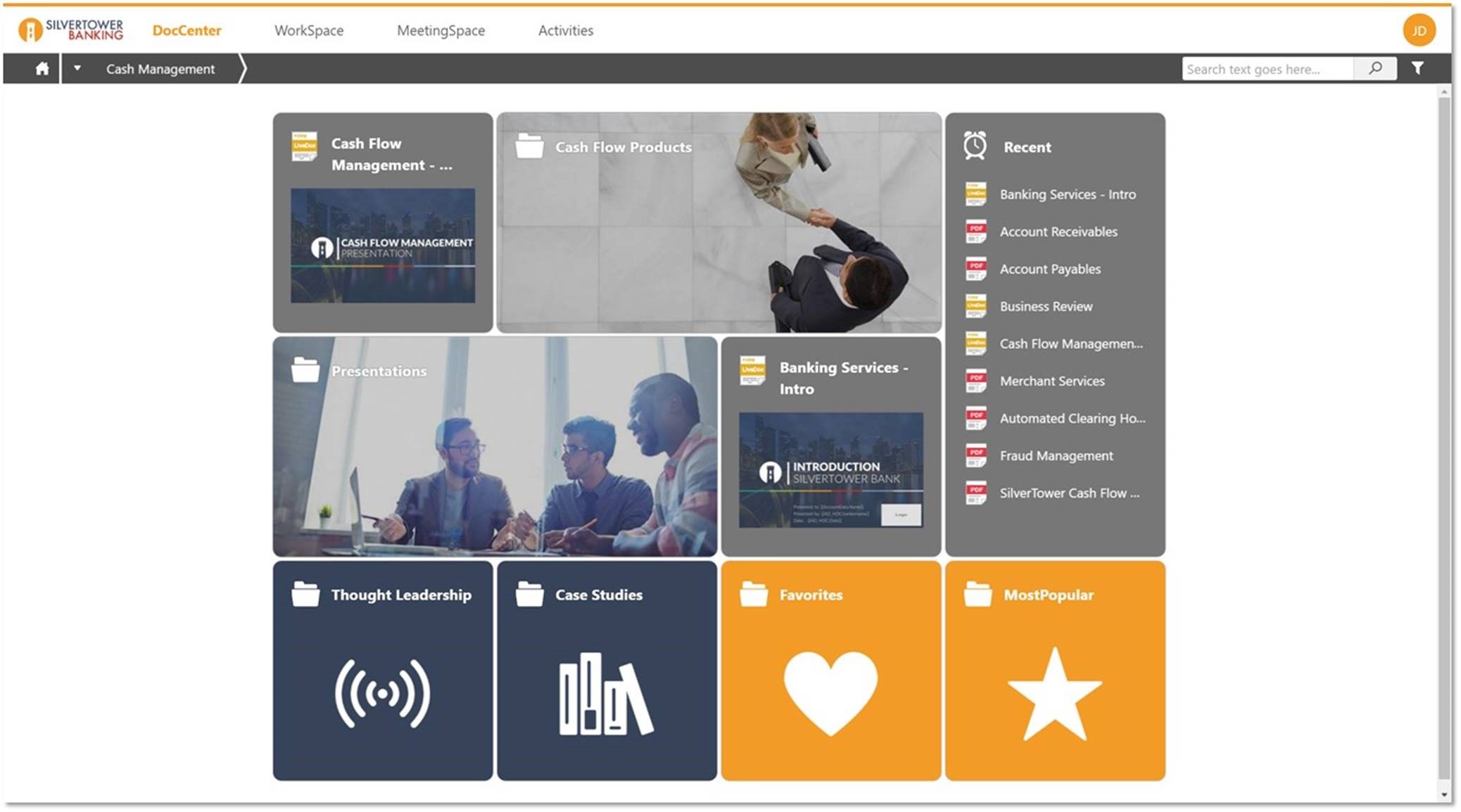
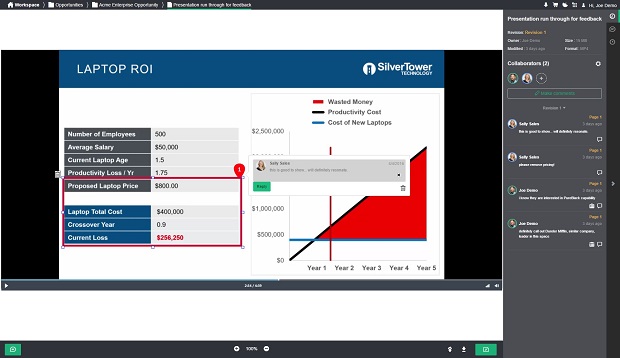
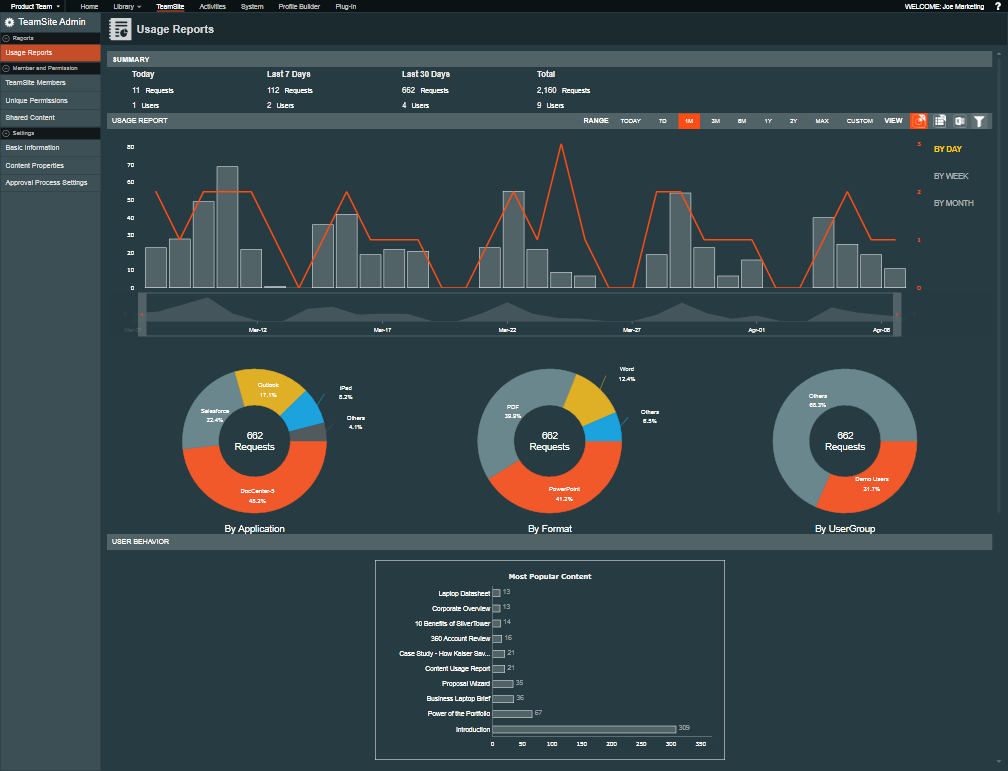
Screenshot of Seismic's interface can be customized for every sales team.Screenshot of Content can be organized and displayed in a host of ways, such as Most Popular, Favorites, or divided by content type or opportunity stage.Screenshot of Seismic's LiveDocs Technology facilitates personalization at scale and has been shown to save clients upwards of 98 percent in time spent creating content.Screenshot of WorkSpace, Seismic's virtual forum for sales, allows sales teams to come together and perfect content for those most important meetings.Screenshot of Real-time analytics allow sales reps to see which pieces of content have been engaged with by which prospects and for how long.