SketchUp vs. Viewpoint Vista

Overview
ProductRatingMost Used ByProduct SummaryStarting Price
SketchUp
Score 8.3 out of 10
N/A
SketchUp is 3D modeling software with an emphasis on usability. SketchUp is a Trimble product.
$0
per year
Vista
Score 8.2 out of 10
N/A
Viewpoint’s Vista is a construction accounting software. Vista’s core accounting features include accounts receivable and payable, general ledger, payroll and time management, and cash management. It also provides tools for document management, including document templates and reporting.N/A
Pricing
SketchUpViewpoint Vista
Editions & Modules
Free
$0.00
per year
For Schools (free with G Suite or Microsoft education account)
$0
For Students
$55.00
per year
For Educators
$55.00
per year
Studio for Students / Educators (Desktop version)
$55
per year
Shop
$119.00
per year
Pro
$299.00
per year
Professional
$299.00
per year
Studio (Windows only)
$699
per year
Studio
$1199.00
per year
No answers on this topic
Offerings
Pricing Offerings
SketchUpVista
Free Trial
NoNo
Free/Freemium Version
YesNo
Premium Consulting/Integration Services
NoNo
Entry-level Setup FeeNo setup feeNo setup fee
Additional DetailsProspective buyers may contact Viewpoint directly for a price quote.
More Pricing Information
Community Pulse
SketchUpViewpoint Vista
Considered Both Products
SketchUp
Chose SketchUp
To me, SketchUp is better to study designs because it is easier to manipulate than Revit. Revit has each part of the model connected so it is great to "keep your design honest" however, in trying to be creative, you are often inhibited. It is not as easy to push/pull and …
Chose SketchUp
It is easier to orient surfaces and mass models in SketchUp.
Chose SketchUp
SketchUp, Revit, Autocad, and Rhino are COMPLETELY different programs. It's important to know the benefits of each, and how to work between all of them. SketchUp is the best to produce visually appealing graphics, however when it comes to construction documents, it is not going …
Chose SketchUp
SketchUp makes 3D models much quicker, and is easier to modify. ArchiCAD however changes with 2D CAD drawing changes, so they both have their benefits.
Chose SketchUp
We didn't want to pay for Visio's extra features in mapping/diagramming (SketchUp's features are more limited, but fine for what we needed). Be able to also model in 3D was value-added in certain situations for us.
Chose SketchUp
I did not personally select SketchUp. If it was up to me, I would only recommend it to legacy users who know/love it. Please don't take that as a shot at it, just my personal preference to use Rhino for similar functions. I think SketchUp is much cheaper than Revit for sure and …
Chose SketchUp
I haven't used any other products aside from SketchUp.
Chose SketchUp
Making a model can be bulky in Revit, especially if you are in a design phase where you are still playing around with options. The benefit to Revit is that it is easier to then work those models into CDs. Sketchup is more friendly when you are exploring or using the model as a …
Chose SketchUp
We have not evaluated any other competing software to this one. I heard about this software from a friend who teaches how to use it. She showed me in just a few minutes and I was HOOKED. I saw immediately the possible help it would be to my business. Thank you.
Chose SketchUp
SketchUp is much easier to teach and troubleshoot than alternative 3D modeling programs like Rhino and Revit. SketchUp and Rhino are used for similar purposes in architecture, firms tend to prefer one or the other based on the types of geometry being created (rectilinear vs …
Chose SketchUp
Sketchup serves a very specific function in my office and fits somewhere between Rhino and Revit in our workflow. It is useful for early design studies and clear graphic diagrams for large-scale urban projects. Only up to a certain level of complexity, at which point Rhino or …
Chose SketchUp
We have also used the pro version of Live Home 3D (https://www.livehome3d.com/), which is also easy to use and is well-suited to creating architectural models of buildings. It also has access to the same or similar library of 3D models that SketchUp has. For creating interior …
Chose SketchUp
Revit takes more time to learn and use, and it requires technical skills from the users. The course for leaning Revit is pretty high. However, SketchUp is very easy to learn and use. When working with urgent projects or idea concept projects, SketchUp works better and faster. …
Chose SketchUp
We use all three programs in our office, primarily based on client needs and final deliverables, but in general, we'll use MicroStation for highway projects, AutoCAD for water/sewer projects, and SketchUp for environmental projects. MicroStation tends to be more focused on the …
Chose SketchUp
Main other tool that I looked at is AutoCAD. I think AutoCAD has probably a richer set of features. It's so hard to learn and rather than intuitive controls using the mouse, there are a ton of key commands that there's no way I'm going to remember unless I'm in the software …
Chose SketchUp
SketchUp has a simple interface that is easy for the staff to get used to. It also is more common in architecture schools, so entry level staff is already well versed in it by the time they start. It also has been really the only product we have used, and are very comfortable …
Chose SketchUp
No other 3d software is as easy to use as SketchUp.
Chose SketchUp
When it comes to easy development of the design and sketches SketchUp is a great tool, but in case you require complex design and more specific details I would like to go for Solidworks. I used this as my secondary design tool but it solves the purpose of basic prototyping of …
Chose SketchUp
Fusion 360 and OnShape are much more suitable for 3D printing. These tools were not available at the beginning, but SketchUp was. SketchUp's 3D repositories, 3Dwarehouse was bigger than the Thingiverse.com. I used to get 3D files from 3Dwarehouse for my 3D printers on those …
Chose SketchUp
SketchUp is far easier to use, has faster modeling, and is more affordable to operate than the aforementioned options.
Chose SketchUp
SketchUp can be widely used in different design disciplines while some programs such as Revit and SOLIDWORKS are specifically designed for making 3D or 2D drawings related to structures, mechanical components, and building elements. The interface of SketchUp is intuitive, all …
Chose SketchUp
SketchUp offers a more strings-free set up than its counterparts, such as Vectorworks, Revit, or AutoCAD. These other competing software also tend to be overshadowed by extraneous functions that may end up confusing you and distracting you more than they end up helping you. …
Chose SketchUp
Rhino is more suited for organic shapes/structures
Vista
Chose Vista
We choose to go with Viewpoint Vista, because it was a great option that allowed complete connection from the Project Managers to the Accounting Team. It allowed us to have one platform or links into the platform from ProjectSight to ensure all of us stay connected without …
Chose Vista
I haven't used any other products for Construction Accounting Software. I've heard of many but don't have any experience reviewing Construction Accounting Software.
Chose Vista
It's been a while since I've used this, but I found JD Edwards completely cumbersome and like a database that hadn't been updated in 10-15 years. I much prefer Viewpoint and I think that Viewpoint still has the ability to improve on its user interface.
Chose Vista
It doesn't COINS was a DOS program and VP is a windows program.
Chose Vista
Vista is made for a specific size company with limited customization needed. It is a great tool until you get to the much bigger size companies.
Chose Vista
Viewpoint is everything from A-Z not only for finance and accounting functions but for project managers as well. Epicor did not have as many functions.
Chose Vista
Vista works with every department linking all data together for everyone to access. The network and portal provide more support than I have ever experienced before.
Chose Vista
There are more options and data kept in Vista that allows us to work on data-driven business decisions. Vista is flexible - we've had to create work arounds in some situations and we've been able to identify those quickly and easily.
Chose Vista
I didn't choose any of these products, they were all in place when I started. Spreadsheet server is easier than creating and manipulating reports in Vista. B2W is used for field logs, equipment management, and bids/estimates. B2W Track and Maintain are easier to configure, is …
Chose Vista
The other softwares didn't have the integration components that Vista had. Vista had a better RoadMap for improvements.
Chose Vista
Many programs have changed since we evaluated others.
Chose Vista
I personally have not used another ERP system other than Viewpoint Vista. I am sure there are others out there, but from listening to my managers experiences before Great Basin Industrial implemented Viewpoint, the other options were less superior to what Viewpoint offers. I …
Chose Vista
Vista is way worse. We didn't select Vista, both companies that I have worked for now use Procore. Vista is terrible.
Chose Vista
We chose Procore after trying Viewpoint Field and Team and found it much more user-friendly, although it was in the early stages of rollout and may have gotten better since then. We also evaluated Timberline but chose Vista as it was more scalable for future use and has …
Chose Vista
We evaluated a few different software options [including] Procore and Trimble ProjectSight and decided Vista by Viewpoint best suited our needs and the price was good.
Features
SketchUpViewpoint Vista
Payroll Management
Comparison of Payroll Management features of Product A and Product B
SketchUp
-
Ratings
Viewpoint Vista
8.0
Ratings
8% above category average
Pay calculation00 Ratings8.10 Ratings
Benefit plan administration00 Ratings7.30 Ratings
Direct deposit files00 Ratings8.10 Ratings
Customization
Comparison of Customization features of Product A and Product B
SketchUp
-
Ratings
Viewpoint Vista
7.6
Ratings
1% above category average
API for custom integration00 Ratings7.70 Ratings
Plug-ins00 Ratings7.50 Ratings
Security
Comparison of Security features of Product A and Product B
SketchUp
-
Ratings
Viewpoint Vista
8.3
Ratings
1% below category average
Single sign-on capability00 Ratings8.00 Ratings
Role-based user permissions00 Ratings8.50 Ratings
Reporting & Analytics
Comparison of Reporting & Analytics features of Product A and Product B
SketchUp
-
Ratings
Viewpoint Vista
8.3
Ratings
11% above category average
Dashboards00 Ratings8.10 Ratings
Standard reports00 Ratings8.00 Ratings
Custom reports00 Ratings8.00 Ratings
General Ledger and Configurable Accounting
Comparison of General Ledger and Configurable Accounting features of Product A and Product B
SketchUp
-
Ratings
Viewpoint Vista
8.0
Ratings
4% above category average
Accounts payable00 Ratings8.40 Ratings
Accounts receivable00 Ratings8.20 Ratings
Global Financial Support00 Ratings7.30 Ratings
Primary and Secondary Ledgers00 Ratings8.20 Ratings
Journals and Reconciliations00 Ratings8.20 Ratings
Configurable Accounting00 Ratings8.50 Ratings
Standardized Processes00 Ratings7.30 Ratings
Inventory Management
Comparison of Inventory Management features of Product A and Product B
SketchUp
-
Ratings
Viewpoint Vista
7.3
Ratings
9% below category average
Inventory tracking00 Ratings7.30 Ratings
Automatic reordering00 Ratings7.30 Ratings
Location management00 Ratings7.30 Ratings
Order Management
Comparison of Order Management features of Product A and Product B
SketchUp
-
Ratings
Viewpoint Vista
7.8
Ratings
1% below category average
Pricing00 Ratings7.70 Ratings
Order entry00 Ratings7.70 Ratings
Cost of goods sold00 Ratings7.70 Ratings
Order Orchestration00 Ratings7.90 Ratings
Subledger and Financial Process
Comparison of Subledger and Financial Process features of Product A and Product B
SketchUp
-
Ratings
Viewpoint Vista
7.6
Ratings
1% above category average
Billing Management00 Ratings7.80 Ratings
Cash and Asset Management00 Ratings7.50 Ratings
Travel & Expense Management00 Ratings6.60 Ratings
Budgetary Control & Encumbrance Accounting00 Ratings7.00 Ratings
Period Close00 Ratings7.70 Ratings
Project Financial Management
Comparison of Project Financial Management features of Product A and Product B
SketchUp
-
Ratings
Viewpoint Vista
8.0
Ratings
5% above category average
Budgeting and Forecasting00 Ratings7.30 Ratings
Project Costing00 Ratings9.10 Ratings
Cost Capture00 Ratings9.10 Ratings
Customer Contract Compliance00 Ratings7.30 Ratings
Project Revenue Recognition00 Ratings7.30 Ratings
Project Execution Management
Comparison of Project Execution Management features of Product A and Product B
SketchUp
-
Ratings
Viewpoint Vista
7.1
Ratings
1% above category average
Task Insight for Project Managers00 Ratings7.90 Ratings
Project Mobile Functionality00 Ratings7.80 Ratings
Procurement
Comparison of Procurement features of Product A and Product B
SketchUp
-
Ratings
Viewpoint Vista
7.5
Ratings
6% above category average
Contract Authoring00 Ratings7.60 Ratings
Contract Repository00 Ratings7.90 Ratings
Requisitions-to-Purchase Orders Integrated00 Ratings7.20 Ratings
Supplier Management00 Ratings7.40 Ratings
Supply Chain
Comparison of Supply Chain features of Product A and Product B
SketchUp
-
Ratings
Viewpoint Vista
7.4
Ratings
2% above category average
Inventory Planning00 Ratings7.40 Ratings
Best Alternatives
SketchUpViewpoint Vista
Small Businesses
Onshape
Onshape
Score 6.4 out of 10
Zoho One
Zoho One
Score 9.3 out of 10
Medium-sized Companies
Onshape
Onshape
Score 6.4 out of 10
Infor VISUAL
Infor VISUAL
Score 7.3 out of 10
Enterprises
Rhino
Rhino
Score 8.4 out of 10
24SevenOffice
24SevenOffice
Score 9.0 out of 10
All AlternativesView all alternativesView all alternatives
User Ratings
SketchUpViewpoint Vista
Likelihood to Recommend
8.0
(0 ratings)
8.6
(0 ratings)
Likelihood to Renew
9.0
(0 ratings)
6.9
(0 ratings)
Usability
7.0
(0 ratings)
8.1
(0 ratings)
Availability
-
(0 ratings)
10.0
(0 ratings)
Performance
-
(0 ratings)
9.0
(0 ratings)
Support Rating
8.5
(0 ratings)
7.1
(0 ratings)
In-Person Training
-
(0 ratings)
9.0
(0 ratings)
Online Training
-
(0 ratings)
8.7
(0 ratings)
Implementation Rating
-
(0 ratings)
8.0
(0 ratings)
Configurability
-
(0 ratings)
9.0
(0 ratings)
Ease of integration
-
(0 ratings)
7.7
(0 ratings)
Product Scalability
-
(0 ratings)
7.0
(0 ratings)
Vendor post-sale
-
(0 ratings)
10.0
(0 ratings)
Vendor pre-sale
-
(0 ratings)
10.0
(0 ratings)
User Testimonials
SketchUpViewpoint Vista
Likelihood to Recommend
Real estate is not really the most likely use for Sketchup, since it has so many choices and possibilities. But, it is an innovative way to differentiate yourself from the competition. The program is very well-suited to the myopic seller or buyer who can't visualize future changes and their effect on value.
Read full review
The company has made a commitment to the use of the Vista products and continue to move forward trying to implement more with the Vista HR Management. From timekeeping to onboarding in the near future we strive to look for better ways to utilize the products for our accounting and payroll purposes.
Read full review
Pros
  • Quickly exploring solutions in 3D: We get a lot of "what if" and "what would that look like" questions. While hand-sketching and hand-drafting can be fairly quick, SketchUp allows me to quickly create 3D and 2D views of a detail or solution, change dimensions and materials in a flash, and show a client or installer the plan in minutes.
  • Creating professional design documents in LayOut: Projects of any scale need good documentation. Using a combination of SketchUp and LayOut, I can create a Design Intent Set, plans for permitting, a set for mechanical trades to mark-up, etc. Having clear, appropriately-scaled drawings with dimensions or notations is a must, and we don't always have the time or budget to get an architect involved!
  • Using live files to guide discussions: Not all clients are "visual" people, so opening their model and orbiting around their space in real time has been extremely helpful. Clients and trades enjoy the perspective views so much that we often include them in the full-sized drawing sets to give a good "overall" view of the project intent. For complex or tight spaces, sometimes un-rendered plans and elevations just aren't enough!
Read full review
  • Being on a Microsoft SQL platform enables easier development and integration with 3rd party software.
  • It has a very flexible User Defined fields and tables system to allow customizing to the user's needs without breaking standard features.
  • Security management is very granular.
Read full review
Cons
  • Exporting/importing files from other programs may not always be compatible.
  • I'm an engineer and I feel SketchUp is more geared towards architects. However, I still find it useful for certain aspects of my job such as creating renderings.
  • Has a tendency to slow down as the file size gets larger. Apparently, it runs on an outdated engine that has trouble with very heavy models.
Read full review
  • Their payroll module is terribly slow and very clunky.
  • Job costing parameters are very strict and limited.
  • Each module interface has too many forms and screens.
  • There is too much flexibility regarding where to put information into the system. There isn't one place to do anything, which creates confusion for staff.
Read full review
Likelihood to Renew
We typically wait a few years in between renewing, as even older versions are powerful tools for modeling, and we make sure the amount of feature changes are worth the re-investment.
Read full review
It is extremely customizable and tracks so many complicated costs very well, more-so than other construction software programs out there that we've used in the past. It is also not an easy program to use for those even slightly not comfortable with a computer. The help sections/knowledge base could be better organized and updated more. It is a very powerful software program for our business and we rely on it hugely to see how our projects are running in real-time.
Read full review
Usability
It is very user friendly and easy to learn. It's simplicity allows for a low learning curve so more people can learn it faster. The downside is that most schools are no longer teaching it, so many younger professionals come out of school not knowing it and knowing more complex software and they have a hard time "dumbing down" their skillsets
Read full review
I think that Vista's is an easy program to use very user friendly with lots of help features to allow the user to fix an issue without having to put a support call into Vista. The reporting and exporting capability's are strong.
Read full review
Reliability and Availability
No answers on this topic
Only issue is when there is an upgrade - it takes several times to get back logged in. Otherwise no issues with getting on to the program. We are set up on lap top or on the remote desk top. Works 90% of the time
Read full review
Performance
No answers on this topic
No issue downloading the reports - I do find sometimes it is easier to export and save than it is to print to a pdf. Options on the different reports not consistent. You can print a couple projects on the JC Contract Status Report - but you have to do each project for the JC Cost by contract item - when neither one is a drill down - not a big deal
Read full review
Support Rating
Sketchup is so intuitive; I can't recall ever looking for official support. However, there are many user forums online that can answer more questions. The usefulness of the online forums is, however, tempered by the fact that there have been many versions of the software under different ownership and support regimes, and thus finding the right information for the right version of the software can be a challenge.
Read full review
Support has deteriorated greatly than what it was years ago when we joined. We always used to get a call back same day and within an hour or so for critical issues. Sometimes now it's no response or very delayed. Knowledge of the support team is also lacking. Many issues we figure out workarounds ourselves instead of calling
Read full review
In-Person Training
No answers on this topic
I was not part of the in person training. I am assuming the training went well - but I did all my training through viewpoint academy.
Read full review
Online Training
No answers on this topic
Excellent training! They keep you on track to insure your implementation is going as planned. There are ample ways to receive additional training and training can be provided by position type. If you put on the effort, the training is there.
Read full review
Implementation Rating
No answers on this topic
The trainer Viewpoint sent did not understand the processes, he only knew where the modules were located. He had no understanding of the actual process itself.
Read full review
Alternatives Considered
To me, SketchUp is better to study designs because it is easier to manipulate than Revit. Revit has each part of the model connected so it is great to "keep your design honest" however, in trying to be creative, you are often inhibited. It is not as easy to push/pull and manipulate quickly to see if an idea works. You also have so many people working in a model and each view impacts one another, so if you are in the middle of studying one area, another person cannot work on that same area
Read full review
I personally have not used another ERP system other than Viewpoint Vista. I am sure there are others out there, but from listening to my managers experiences before Great Basin Industrial implemented Viewpoint, the other options were less superior to what Viewpoint offers. I think if you are looking for an ERP system in the construction industry, then Viewpoint is the way to go
Read full review
Scalability
No answers on this topic
For a small business - this program is well used in the accounting and operations. The two different work plans are set up for success. Alot of the programs we do not use - but like the reports that are generated - one disadvantage if you do not know crystal reports you cannot edit your form to meet your needs so there is a lot of printing different several forms to get all the information you need.
Read full review
Return on Investment
  • Increased revenue by allowing our customers to see the final products faster, input comments and finalize design decisions.
  • We develop furniture and the rendering capabilities and graphics found in the basic package allow the fabricators a broader understanding of what is being created.
  • We develop all of our work in SketchUp. I initially felt it was a simplistic cadd software. By re-tooling my thinking I have found fantastic results with the program. I must admit that I learn something new every day. There is a wealth of information on how to do and create things on YouTube. It has a very large community of supporters.
Read full review
  • Not sure I can speak to this as the company moved to Viewpoint before I began here. I think it is helpful for the Project Management and Superintendent staff to easily review how specific job items went, which we do in the PM contract drilldown analysis
Read full review
ScreenShots

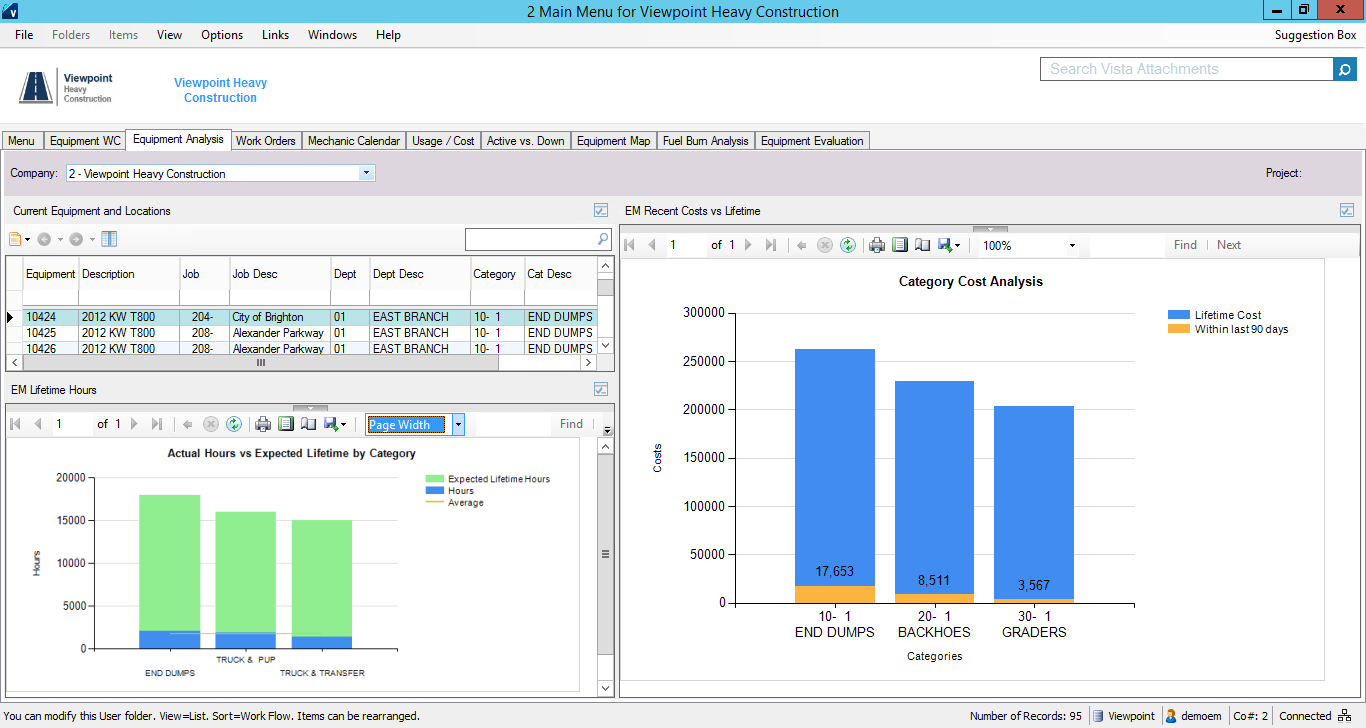
Vista Screenshots

Screenshot of Job Cost AccountingScreenshot of Equipment ManagementScreenshot of Service ManagementScreenshot of Service Management Dispatch Board