
Tungsten Power PDF vs. zeroheight
Tungsten Power PDF vs. zeroheight
| Product | Rating | Most Used By | Product Summary | Starting Price |
|---|---|---|---|---|
 Tungsten Power PDF | Small Businesses (1-50 employees) | Tungsten Power PDF (formerly Kofax) is an easy-to-use, secure and inexpensive solution to manage PDFs for businesses and individuals. Benefits: Ease of Use: Works like Office desktop products, so it's easier to learn Compatibility: Works across devices and platforms, share documents in a storage cloud … | $129 one-time fee per license | |
 zeroheight | N/A | zeroheight helps teams create, manage and maintain their design systems. Using zeroheight, designers, engineers, and product teams can collaborate and build design systems that can be easily shared across teams. | $49 month |
| Tungsten Power PDF | zeroheight | |||||||||||||||
|---|---|---|---|---|---|---|---|---|---|---|---|---|---|---|---|---|
| Editions & Modules |
|
| ||||||||||||||
| Offerings |
| |||||||||||||||
| Entry-level Setup Fee | No setup fee | Optional | ||||||||||||||
| Additional Details | Desktop licenses are buy once, own forever. No subscription fees. Business server licenses are term-based or perpetual with optional maintenance & support contract. Volume and upgrade discounts available. | — | ||||||||||||||
| More Pricing Information | ||||||||||||||||
| Tungsten Power PDF | zeroheight |
|---|
| Tungsten Power PDF | zeroheight | |||||||||||||||||||||||||||||||||
|---|---|---|---|---|---|---|---|---|---|---|---|---|---|---|---|---|---|---|---|---|---|---|---|---|---|---|---|---|---|---|---|---|---|---|
| PDF Editors |
|
| Tungsten Power PDF | zeroheight | |
|---|---|---|
| Small Businesses |  PDF Xchange Viewer and Editor Score 9.3 out of 10 | Tungsten Power PDF Score 9.8 out of 10 |
| Medium-sized Companies | PDF Xchange Viewer and Editor Score 9.3 out of 10 |  MSB Docs Score 9.4 out of 10 |
| Enterprises |  Bluebeam Score 8.9 out of 10 |  Tungsten Capture Score 9.4 out of 10 |
| All Alternatives | View all alternatives | View all alternatives |
| Tungsten Power PDF | zeroheight | |
|---|---|---|
| Likelihood to Recommend | 9.9 (599 ratings) | 9.0 (1 ratings) |
| Likelihood to Renew | 9.3 (112 ratings) | - (0 ratings) |
| Usability | 9.8 (46 ratings) | - (0 ratings) |
| Availability | 9.1 (13 ratings) | - (0 ratings) |
| Performance | 9.1 (13 ratings) | - (0 ratings) |
| Support Rating | 9.9 (435 ratings) | - (0 ratings) |
| In-Person Training | 3.6 (1 ratings) | - (0 ratings) |
| Online Training | 8.2 (1 ratings) | - (0 ratings) |
| Implementation Rating | 9.1 (33 ratings) | - (0 ratings) |
| Configurability | 9.1 (9 ratings) | - (0 ratings) |
| Ease of integration | 9.1 (10 ratings) | - (0 ratings) |
| Product Scalability | 9.1 (12 ratings) | - (0 ratings) |
| Vendor post-sale | 9.1 (7 ratings) | - (0 ratings) |
| Vendor pre-sale | 9.1 (7 ratings) | - (0 ratings) |
| Tungsten Power PDF | zeroheight | |
|---|---|---|
| Likelihood to Recommend | Tungsten Automation formerly Kofax
| zeroheight
 Colin Finger UX Engineer |
| Pros | Tungsten Automation formerly Kofax
| zeroheight
Colin Finger UX Engineer |
| Cons | Tungsten Automation formerly Kofax
| zeroheight
Colin Finger UX Engineer |
| Likelihood to Renew | Tungsten Automation formerly Kofax
| zeroheight No answers on this topic |
| Usability | Tungsten Automation formerly Kofax
| zeroheight No answers on this topic |
| Reliability and Availability | Tungsten Automation formerly Kofax
| zeroheight No answers on this topic |
| Performance | Tungsten Automation formerly Kofax
| zeroheight No answers on this topic |
| Support Rating | Tungsten Automation formerly Kofax
| zeroheight No answers on this topic |
| In-Person Training | Tungsten Automation formerly Kofax
| zeroheight No answers on this topic |
| Online Training | Tungsten Automation formerly Kofax
| zeroheight No answers on this topic |
| Implementation Rating | Tungsten Automation formerly Kofax
 Scott Lawson Owner | zeroheight No answers on this topic |
| Alternatives Considered | Tungsten Automation formerly Kofax
| zeroheight
Colin Finger UX Engineer |
| Scalability | Tungsten Automation formerly Kofax
| zeroheight No answers on this topic |
| Return on Investment | Tungsten Automation formerly Kofax
| zeroheight
Colin Finger UX Engineer |
| ScreenShots | Tungsten Power PDF Screenshots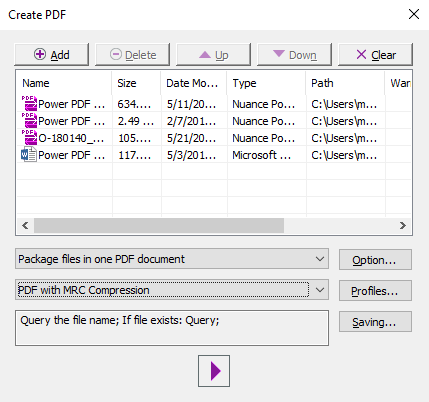      |