RealVNC Connect vs. webinar.net

Overview
ProductRatingMost Used ByProduct SummaryStarting Price
RealVNC Connect
Score 8.4 out of 10
N/A
RealVNC® Connect is a secure remote access solution from RealVNC. It can be used to connect to a remote device anywhere in the world to view its desktop in real-time and take control as though sitting in front of it.
$99
per year (one concurrent session)
webinar.net
Score 9.7 out of 10
N/A
Webinar.net launched in 2019, designed to be a modern alternative to the dated Meeting tools that are often used for marketing and training applications, presented as a powerful, easy-to-use online presentation platform with polished user interfaces. Webinar.net is fully hosted in the cloud. The vendor states this architecture allows users to reach very large audiences without capacity concerns, and enjoy simple, cost-effective pricing. With it, brands are fully represented when…N/A
Pricing
RealVNC Connectwebinar.net
Editions & Modules
Essentials
$8.25
per month (billed annually) per concurrent session
Plus
$16.50
per month (billed annually) per concurrent session (add up to 3)
Premium
$29.75
per month (billed annually) per concurrent session (add up to 5)
Enterprise
Custom Pricing
per year
Enterprise
Custom Pricing
No answers on this topic
Offerings
Pricing Offerings
RealVNC Connectwebinar.net
Free Trial
YesYes
Free/Freemium Version
YesNo
Premium Consulting/Integration Services
NoYes
Entry-level Setup FeeNo setup fee$329 per account
Additional DetailsPlans work on a Per Concurrent Session basis. Each plan gives access to a bundled number of devices, but limits apply to the amount of devices that can be connected at any given time. The Premium plan includes On-Demand Assist, a useful tool for providing just-in-time remote support to end-users without them needing RealVNC Connect installed on their device.
More Pricing Information
Community Pulse
RealVNC Connectwebinar.net
Features
RealVNC Connectwebinar.net
Remote Administration
Comparison of Remote Administration features of Product A and Product B
RealVNC Connect
7.3
32 Ratings
8% below category average
webinar.net
-
Ratings
Screen sharing9.128 Ratings00 Ratings
File transfer8.015 Ratings00 Ratings
Instant message6.119 Ratings00 Ratings
Secure remote access with Smart Card authentication7.05 Ratings00 Ratings
Access to sleeping/powered-off computers6.09 Ratings00 Ratings
Over-the-Internet remote session9.030 Ratings00 Ratings
Initiate remote control from mobile8.919 Ratings00 Ratings
Remote management of servers & workstations4.76 Ratings00 Ratings
Centralized management dashboard7.116 Ratings00 Ratings
Session record8.02 Ratings00 Ratings
Annotations5.36 Ratings00 Ratings
Monitoring and Alerts7.03 Ratings00 Ratings
Multi-platform remote control9.011 Ratings00 Ratings
Reporting & Analytics
Comparison of Reporting & Analytics features of Product A and Product B
RealVNC Connect
-
Ratings
webinar.net
4.5
1 Ratings
52% below category average
Dashboards00 Ratings6.01 Ratings
Data exportability00 Ratings3.01 Ratings
Performance & Compatibility of Online Events Software
Comparison of Performance & Compatibility of Online Events Software features of Product A and Product B
RealVNC Connect
-
Ratings
webinar.net
7.0
1 Ratings
15% below category average
High quality audio00 Ratings8.01 Ratings
Mobile support00 Ratings6.01 Ratings
Online Meetings / Events
Comparison of Online Meetings / Events features of Product A and Product B
RealVNC Connect
-
Ratings
webinar.net
8.8
1 Ratings
8% above category average
Calendar integration00 Ratings9.01 Ratings
Record meetings / events00 Ratings8.01 Ratings
Slideshows00 Ratings10.01 Ratings
Event registration00 Ratings8.01 Ratings
Online Events Collaboration
Comparison of Online Events Collaboration features of Product A and Product B
RealVNC Connect
-
Ratings
webinar.net
8.5
1 Ratings
0% above category average
Audience polling00 Ratings9.01 Ratings
Q&A00 Ratings8.01 Ratings
Online Events Security
Comparison of Online Events Security features of Product A and Product B
RealVNC Connect
-
Ratings
webinar.net
8.0
1 Ratings
4% below category average
Participant roles & permissions00 Ratings6.01 Ratings
Confidential attendee list00 Ratings10.01 Ratings
Online Events Marketing
Comparison of Online Events Marketing features of Product A and Product B
RealVNC Connect
-
Ratings
webinar.net
7.0
1 Ratings
12% below category average
Branding options00 Ratings7.01 Ratings
Best Alternatives
RealVNC Connectwebinar.net
Small Businesses
Getscreen.me
Getscreen.me
Score 9.6 out of 10
BigMarker
BigMarker
Score 6.0 out of 10
Medium-sized Companies
Remote Desktop Manager
Score 9.5 out of 10
Zoho Meeting
Zoho Meeting
Score 8.8 out of 10
Enterprises
Remote Desktop Manager
Score 9.5 out of 10
ON24
ON24
Score 7.6 out of 10
All AlternativesView all alternativesView all alternatives
User Ratings
RealVNC Connectwebinar.net
Likelihood to Recommend
8.0
(37 ratings)
5.0
(1 ratings)
Likelihood to Renew
8.0
(8 ratings)
-
(0 ratings)
Usability
8.0
(4 ratings)
5.0
(1 ratings)
Support Rating
8.0
(2 ratings)
7.0
(1 ratings)
Online Training
7.0
(2 ratings)
-
(0 ratings)
Implementation Rating
8.0
(2 ratings)
-
(0 ratings)
User Testimonials
RealVNC Connectwebinar.net
Likelihood to Recommend
RealVNC
It is very easy to use if the remote device is already set up to receive connections, so if you are setting up devices before deploying them, it is a great tool to have. It is well-suited to use when shadowing users or using it as a teaching tool. There are other products that are better if you are trying to help someone on a one-use basis.
Read full review
webinar.net
If price is not an object, I would always prefer ON24 rather than webinar.net. However, ON24 is much more expensive. Webinar.net is owned by 6Connex, so the integration of webinar.net in 6Connex is recommended if you need to host a webinar in a 6Connex environment. Support staff is nice, but not knowledgeable enough and takes too long. When a presenter plays a video they get muted automatically, even if the video has no sound! So you then have to either unmute the speaker yourself or having him/her doing it which adds to the stress of the moment. We have had a few cases when email reminders didn't go out, even if programmed and saved correctly.
Read full review
Pros
RealVNC
  • VNC Connect does an excellent job in remotely connecting to a computer through either your local area network or even another computer on the internet. As long as the VNC Connect services is installed and the client is running in the background.
  • VNC Connect provides password protection to prevent unauthorized users from attempting to remotely access your computer. There's an option to have a separate password to remotely view vs view & access a computer. You can even add an additional level of security by turning on the feature to require Windows login credentials.
  • VNC Connect provides an additional set of controls after a remote connection has been established with another computer. You can have special keystrokes like Ctrl+Alt+Del sent as a command sequence to the other computer as well as access more than a single screen when in use at the remote computer location.
Read full review
webinar.net
  • calendar tool on the registration page
  • being able to embed videos on the registration page
  • note tool for presenters
  • large number of attendees allowed
Read full review
Cons
RealVNC
  • Its a pretty straight forward product - I would like to see more tools with a "wow" factor.
  • Panel colors are blah - I would like more eye-catching colors.
  • A more consistent look with all platforms - like Mac & PC.
Read full review
webinar.net
  • connectivity for presenters is not easy and not user friendly enough
  • you can't just choose CET time, you need to display a city in CET time
  • no blurred background
  • no virtual background
Read full review
Likelihood to Renew
RealVNC
VNC is a solid product for the price. It simply works and its reliable across different platforms. Some products state they work well in the Mac environment but don't deliver. This one does what it says. Connections are reliable, but of course, this depends on internet connections. The product works well over wireless connections as well. It delivers on what a remote tool should deliver on. My technicians are happy with the product and customers appreciate the ease of use when letting us connect to their systems. Some also appreciate the remote support while they are multi-task.
Read full review
webinar.net
No answers on this topic
Usability
RealVNC
It's a niche product and in that niche they try to cater to as many use cases as they can. Other as a TCO aspect i don't see many use cases where you can't use this product as the one tool for all remote session use cases in your company
Read full review
webinar.net
The audience screen doesn't adjust automatically, not even on mobile phones; connection for presenters is difficult, taking time to support them and many times leaving them a bit frustrated. For us, it is not ideal the time it takes to publish content and also the time and quality of the support team replies. However, it has great potential for improvement.
Read full review
Support Rating
RealVNC
VNC Connect is a reliable product that has been around for a long time. It is reasonably priced and works well in the Mac & PC environment. When you have a small team that supports many users we need tools that we can rely upon and that will get the job done on the first try. Many customers appreciate the quick assistance and can multi-task while our team works on their computer issues remotely. From a customer service point of view, this tool gives us transparency and efficient effectiveness.
Read full review
webinar.net
They are very kind and readily available online and off-line; however they hardly know the answers and always need to check, making it very lengthy process and sometimes it feels like a bit of a waste of time too. I would suggest they are given more training to start with
Read full review
Online Training
RealVNC
The training is very informative, quick and to the point. All of the details one would need are present so the user doesn't have to go searching for additional information just to use the application. The layout of the training was also neat and concise, some of the other training sessions for other companies I've done in the past were confusing and not well thought out, this one is much more superior
Read full review
webinar.net
No answers on this topic
Implementation Rating
RealVNC
No problem at all, love the product.
Read full review
webinar.net
No answers on this topic
Alternatives Considered
RealVNC
VNC is light and sleek with the quick setup, was impressed with the quick setup despite poor Internet connection outdoor. TeamViewer is good, but the pricing is not as good as VNC. Both do the basic job, but VNC still outperform TeamViewer in terms of performance and ease of use.
Read full review
webinar.net
webinar.net was adopted by our company to replace ON24 since it is much cheaper. We use it in combination with Slido, sometimes. It serves large one-way webinars (up to 1,000 attendees) with limited interaction (polls and Q&A), while for smaller and more interactive online events we keep using Microsoft Teams Meetings or Webinars and Zoom Meetings.
Read full review
Return on Investment
RealVNC
  • I have just used the software for about 1 month and so far so god. I am saving time whenever I can access my client's computers from my desk as opposed to having to leave my office to go to their offices. Saves me time and the client money.
Read full review
webinar.net
  • higher number of attendees
  • repeating clients
  • more likelihood to create a series of events vs a standalone event
Read full review
ScreenShots

RealVNC Connect Screenshots

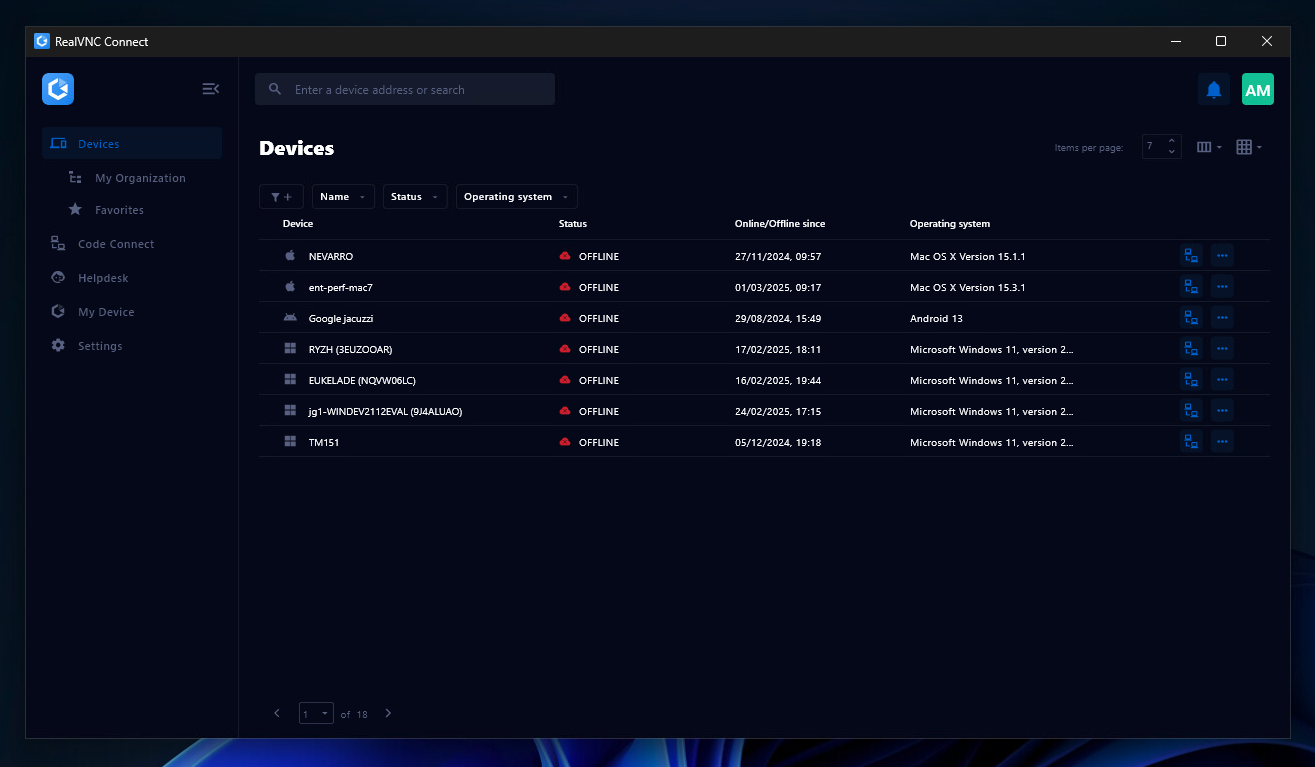
Screenshot of the Device List in the Connect v8 desktop appScreenshot of On-Demand Assist, which can be used to start a remote support session using a single-use code.