
TrustRadius: an HG Insights company

Read&Write

Score8.7 out of 10

222 Reviews and Ratings

What is Read&Write?

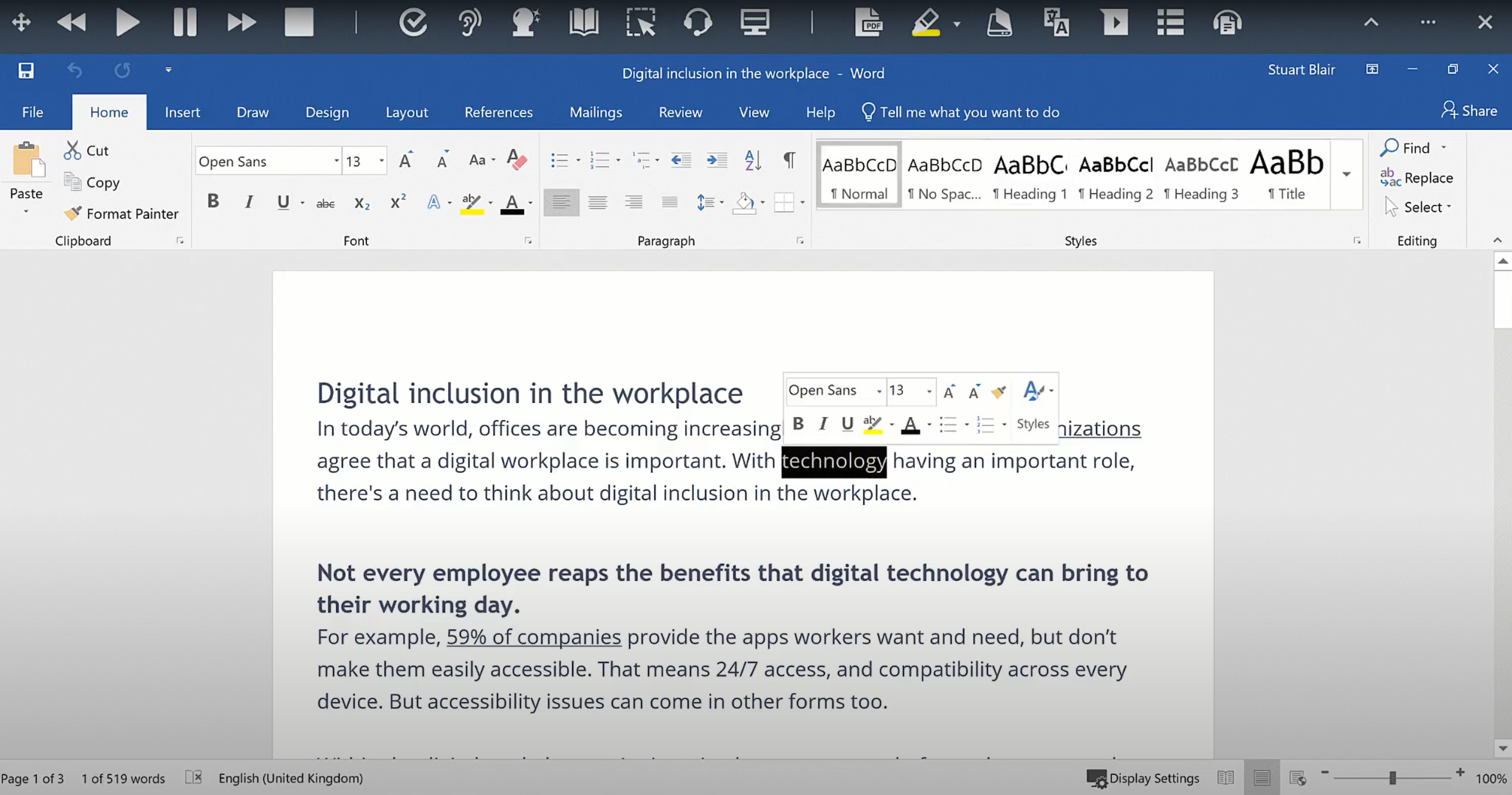
Read&Write is a literacy support tool that helps individuals of all abilities read, write, and express themselves with confidence. For education and the workplace, its assistive features include text-to-speech, word prediction, and research tools for users with diverse learning needs.

Media

Screenshot of the translator
Screenshot of the text-to-speech functionality
Screenshot of the Similar Word Checker
Screenshot of Screen Masking
Screenshot of a scan
Screenshot of the PDF Reader
Screenshot of the dictionary
Screenshot of the Check It feature

1 / 8

Screenshot of the translator

Top Performing Features

  • Highlighters

    A tool that enables users to highlight sections of text for future reference or citation.

    Category average: 8

  • Speech-to-Text

    Automated text production based on speech.

    Category average: 8

  • Dictionary

    Built-in dictionary tool that enables users to visualize the meaning of specific words.

    Category average: 7.7

Areas for Improvement

  • Machine translation

    The software can automatically translate writing into other languages.

    Category average: 6.9

  • Integrations

    Integrations are available with software users might write with, such as word processors, email clients, and content management systems.

    Category average: 6.8

  • Audio maker

    Converts text to audio files that can be shared and accessed remotely.

    Category average: 6.1

Read&Write works well for us

Use Cases and Deployment Scope

As an assistive technology consultant I use Read&Write when I have students that are struggling with reading as their focus or writing difficulty

Pros

  • Read&Write is easy to use
  • I like how it pops up and prompts the student if they are having difficulty with accessing the tools

Cons

  • The cost can be a little confusing for some of our districts and multiple students how to add it on
  • there was an issue with a size of a laptop screen, and a touchscreen access affected the pinpoint of the system for select/direct selection

Return on Investment

  • I would say increased engagement
  • Removing barriers for some of our students, which is priceless

Classroom Equalizer

Use Cases and Deployment Scope

Our district is very diverse. Our students varying in reading abilities and language abilities. Because I teach upper elementary, those students can sometimes be left our of research projects due to the level of written materials. Read&Write makes these materials, whether it is a website or a teacher created material.

Pros

  • It gives lower readers access to higher-level written websites.
  • It allows every student to take notes and organize those notes during research projects.
  • It can translate for students who speak other languages other than English.
  • It can collect highlighted sentences for students to use in note taking.

Cons

  • I would love the "dashboard" to look sleeker.
  • I wish the free version could do more (the paid version is amazing)
  • Not every PDF or website can use Read&Write (some instances were district-created materials and the format they chose)

Return on Investment

  • increased engagement from struggling learners
  • students produce more writing
  • Students have access to higher-level materials

10/10 for Student Support

Use Cases and Deployment Scope

I am a school-based occupational therapy assistant. I use Read&Write with some of my students. One particular student uses the talk-to-text feature, as they struggle greatly with spelling. We have used other programs in the past, but they do not start sentences with capital letters. This is very important to the student, as they don't always recognize the need or placement of capitals. I find that Read&Write sets my students up for success, where other programs often set them up for failure.

Pros

  • Easy to install
  • Many features to choose from
  • LOVE that it starts sentences with capital letters!!
  • It is easy to use, so students can easily navigate the program.

Cons

  • I currently have none

Return on Investment

  • Decreased student time in class & at home
  • Improved student grades
  • Improved student engagement
  • Improved students' awareness to errors in print

Other Software Used

Google Assistant

Review.

Use Cases and Deployment Scope

Our students with documented disabilities (like dyslexia) use Read&Write daily. This allows each student to work at their own pace instead of waiting for a teacher to assist. It allows the students to be more independent by taking the initiative to meet their needs.

Pros

  • It is easy to use.
  • It works across multiple programs.
  • It is easy to understand what is being said.

Cons

  • I have not had any issues with it.
  • I can't think of an improvement.

Return on Investment

  • This helps our students who need material read aloud to have control of exactly what needs to be read aloud to assist.
  • This program provides students who need support to perform speech-to-text independent of any additional assistance.

Alternatives Considered

Amplify

Other Software Used

IXL Learning, Lexia Core5 Reading, Kahoot!

Assisting students with special needs.

Use Cases and Deployment Scope

I use Read&Write with my SPED students who need assistive technology support to complete writing assignments. Usually, they use speech-to-text, text-to-speech, and word prediction features. Other features are explored and have been used with the dictionaries. The program addresses spelling and text composition (students with dysgraphia or dyslexia). and editing. It also assists those with disabilities in completing their assigned work and gives them access to educational opportunities alongside their age-level peers. The overall scope is to provide alternate ways of writing so the student can show their true capacity for knowledge and not be restricted by the writing process.

Pros

  • Word Prediction.
  • Text to speech.
  • Speech to Text.
  • Dictionary

Cons

  • Grammar check seems finicky and does not always point out simple corrections to punctuation and capitalization.
  • At times the word prediction takes time to pop up.
  • Also text to speech is not always accurate.

Return on Investment

  • Increased student's engagement with writing.
  • Improved students' learning goals by showing a truer picture of their knowledge.
  • Helps a student save time and frustration especially if handwriting is a struggle.
  • Improved inclusion because the program was available to all students.