TrustRadius: an HG Insights company

Parallels RAS

Score9.3 out of 10

264 Reviews and Ratings

Try Now

Contact about Parallels Remote Application Server (Parallels RAS)

Please fill out the form below to get in touch.

Parallels

Connect with Parallels

What are you interested in?

Already have an account?

You hereby consent to have TrustRadius share the information supplied on this form with Parallels so that Parallels and TrustRadius may contact you in regard to the information requested.

What is Parallels RAS?

Parallels Remote Application Server (Parallels RAS, formerly 2X RAS), is application virtualization technology, billed as a solution to extend the life of legacy OS (like Windows XP) with its virtual desktop for any device. Maltese company 2X Software developed the technology, but was acquired by Parallels (in Seattle, WA) in February, 2015 to extend their cross-platform support solutions.

Media

the console interface, showing Parallels RAS' support for on-premises, private and public cloud providers, including Azure and AWS.
the Parallels Web Client, which is accessible from any HTML5 browser or choose one of the many local clients.
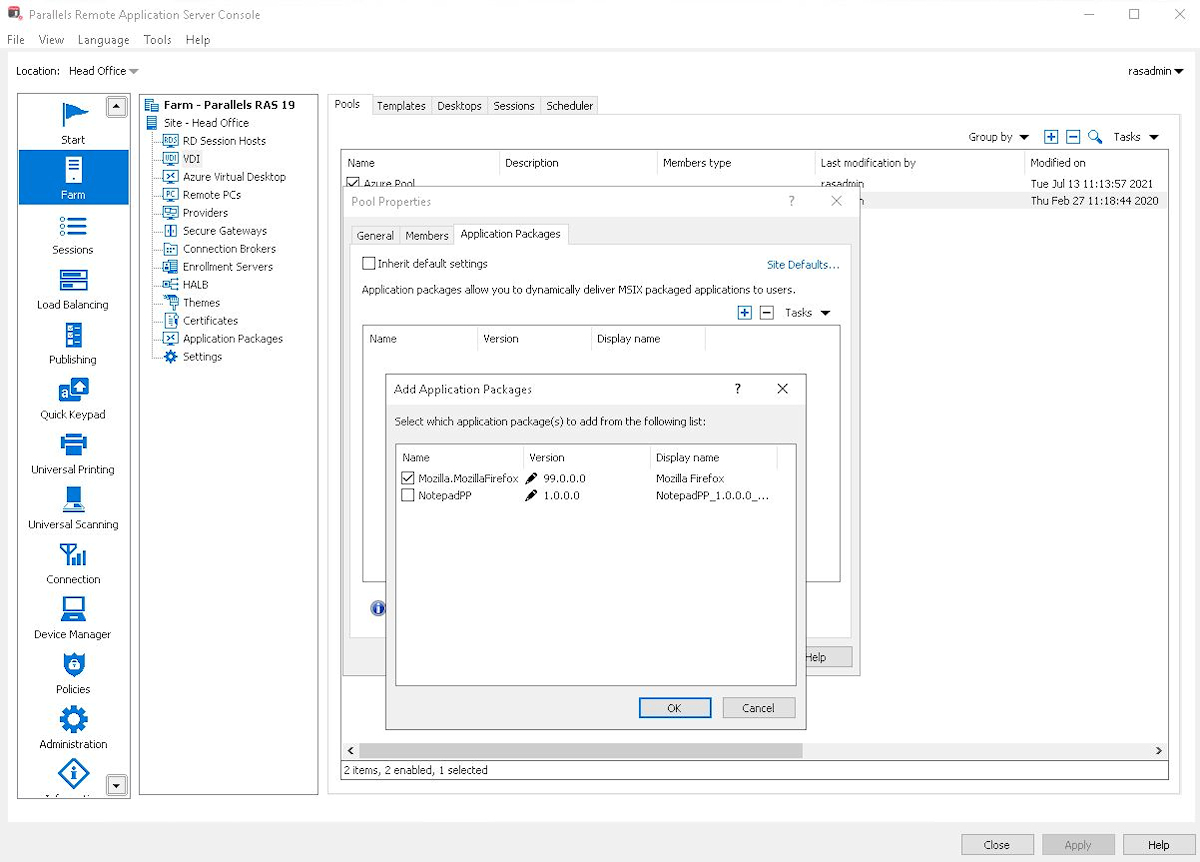
Parallels RAS' integration with MSIX app attach for modern, dynamic app delivery.
Parallels RAS' support for multiple MFAs for security and flexibility.
the integrated Let's Encrypt security certificates, to issue and manage certificates in Parallels RAS.
expression-based filtering which makes it easier to set policies in the Parallels RAS.
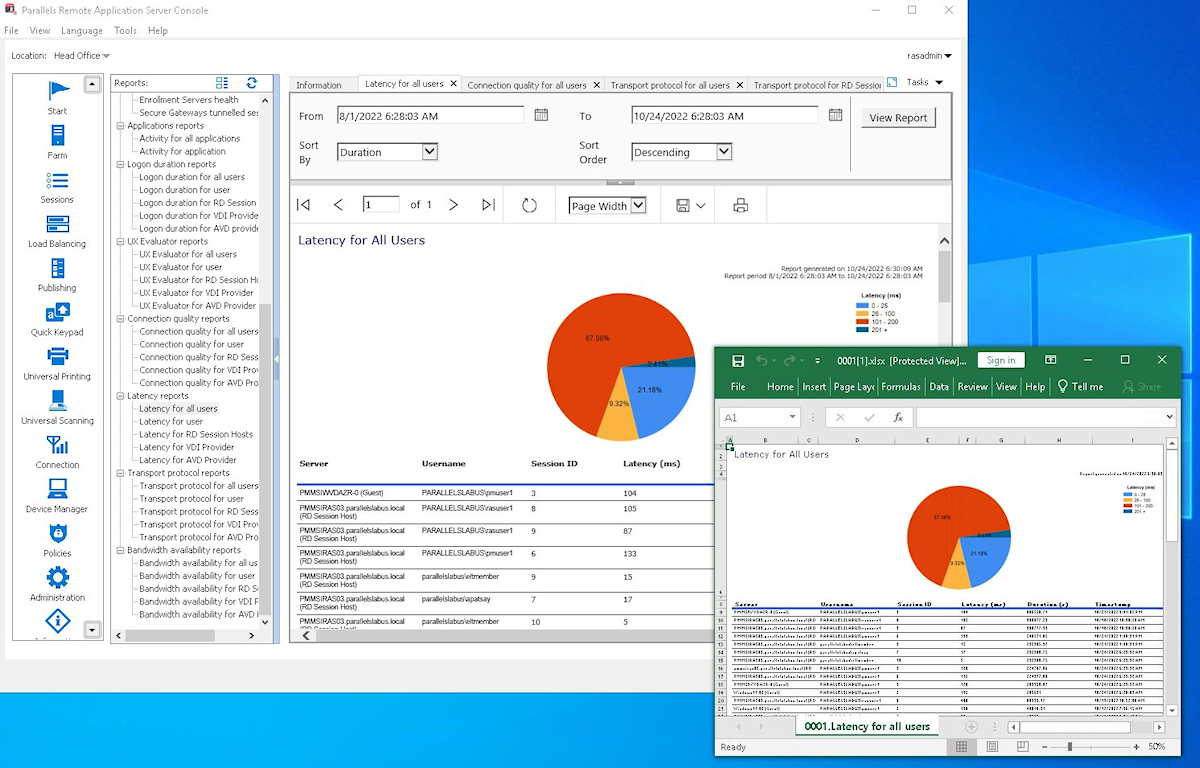
the visual reporting in the Parallels RAS Management Console which is used to monitor and troubleshoot issues.

1 / 7

Parallels delivers on our remote access needs

Use Cases and Deployment Scope

Remote access to legacy server based applications is a real challenge that we were able to securely address using Parallels Remote Application Server (Parallels RAS). The performance was great and our user base appreciates the ease of use. For the investment, Parallels has completely met our needs and we would enthusiastically recommend Parallels for any organization who needs to securely provide remote access to applications. We have also used Parallels Remote Applications Server (Parrallels RAS) to run Windows based apps on Apple laptops.

Pros

  • allows remote access to legacy applications
  • allows access to applications built for one operating system from a different operating system
  • Increases performance for applications which struggle to perform properly over network hops

Cons

  • Parallels Remote Application Servers (Parallels RAS) does what we need in the way we need it so we see no need for improvement.

Return on Investment

  • Addressed the need to remotely access legacy systems without having to migrate to new systems
  • allowed or organization to access Windows based applications on Apple laptops removing the need to migrate to a new application
  • One of our internal applications experiences slow performance when the application had to traverse several network hops. We used Parallels to run the application directly on the sever, which addressed the issue and removed the need to migrate to a new application.

Usability

Other Software Used

Microsoft 365

Parallels Remote Application Server is our go-to Citrix replacement because of it's easy implementation and security options (SAML)

Use Cases and Deployment Scope

We are an MSP Provider, we use Parallels Remote Application Server in our own Workload but also provide it to customers. Ranging from small use cases up to 200+ user deployments. The main reason we switched to Parallels Remote Application Server coming from its competitor was its ease of deployment and its security options. Especially when SAML MFA came into the picture we increased our deployments.

Pros

  • SAML Integration
  • Customization
  • High Availability

Cons

  • We had a bug present for many months before a fix was implemented
  • Better integration with Azure functionality would be a plus

Return on Investment

  • We were able to providde a customer with a PaaS solution for their software
  • This made this a lucrative solution for us.
  • The lingering software bug we had did cause a negative effect on deployments and cost us a lot more time and money in support-related questions.

Usability

Alternatives Considered

Awingu

Return on Investment

While the added HTML5 functionality is a bonus when quick access is needed, in our configurations we mainly rely on the full client solution to provide a seamless deployment of the applications. On mobile devices, the HTML5 option does provide a quick solution to work "on the go". If the HTML5 option ever supports more hardware passthrough option we will probably use it more extensively

Other Software Used

Azure Virtual Desktop, Awingu

Easy to deploy and manage. Good end-user experience.

Use Cases and Deployment Scope

We use Parallels Remote Application Server (Parallels RAS) for remote access to LOB applications for our customers. We found that it's simple enough to easily deploy/manage, but has enough options to provide for a quick/seamless remote experience for our customers. We manage systems with typically under 50 users each. We moved to Parallels Remote Application Server from Citrix and have never looked back.

Pros

  • ease of deployment
  • ease of management
  • simple client/install for users
  • responsive

Cons

  • We had one instance of the Parallels Remote Application Server server corrupting without any clear indication as to why, but a simple restore of the RAS server resolved the issue

Return on Investment

  • low support costs as we don't need to have 'hands on' with the product very often once deployed

Usability

Alternatives Considered

NetScaler ADC

Other Software Used

Windows Server, Sage 100

easy and cost effective Solution for Home Office activities

Use Cases and Deployment Scope

We use Parallels Remote Application Server (Parallels RAS) to easily connect from internal or external to our server farm. We had to make a decision because of the corona crisis and we had to look for a easy solution for home office activities. So we decided to work with Parallels RAS because it has a good pricing and it is easy to configure.

Pros

  • secure connection
  • multiscreen
  • connect policies for different departments

Cons

  • configuring multi factor authentication for third party products was a little bit difficult
  • teams integration
  • redirection of camera and microphone from applications

Return on Investment

  • lower it budget for new computers

Usability

Alternatives Considered

VMware Horizon and Citrix Workspace

Likes and dislikes about Parallels Remote Application Server (Parallels RAS)

Use Cases and Deployment Scope

Parallels Remote Application Server (Parallels RAS) has been something we have used for at least 5 years, but I think probably more than that. Parallels Remote Application Server (Parallels RAS) allows for us to publish Windows desktop applications as if they are web applications without many of our users knowing this.The simplicity of setup and the speed at which the system runs for the end user.

Pros

  • Printer integration makes easy
  • Solid connection that does not drop unexpectedly like other
  • Easy to publish appls
  • Easy to troubleshoot issues

Cons

  • Configuration
  • Set it up
  • Troubleshooting

Return on Investment

  • Upgrades interface change to much
  • Make easy to updates

Usability

Alternatives Considered

Parallels Desktop for Mac