accessiBe is a fully automated, AI-powered, web accessibility solution for ADA and WCAG compliance.
$49
per month
FirstSpirit DQM
Score7.3 out of 10
N/A
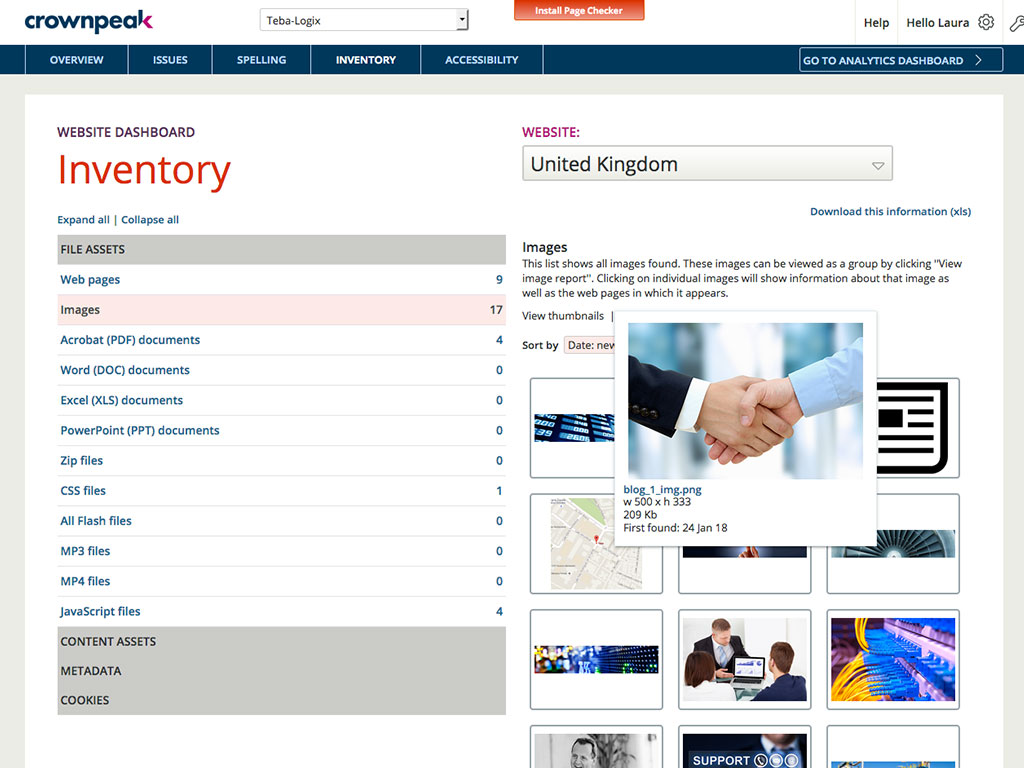
FirstSpirit DQM is a digital quality and Accessibility Testing platform for monitoring, assessing, and improving the accessibility, usability, search readiness, and brand consistency of websites. It is separate from FirstSpirit CMS, though it can integrate with CMS and development workflows.
I have found this tool on many sites and offers solutions for people to have options to change the style of the website even if they are not disabled. Today everyone is looking for a personal experience and this tool can offer that to all, this is really evident when you read terminology on a website that you might not understand. The user interface has a search web option so you can find the meaning of items that you may not have understood by only being on the website.
A de minimis incentive was given to thank the reviewer for their time. The incentive was not used to bias or drive a particular response, nor was the incentive contingent on a positive endorsement. More Info
If you have a fully customized cms and have people working on the site with html and css knowledge this is the best tool ever, all specifics can be checked. Using ab tests and optimization services we identify best practices of the website and everywhere the best practices aren't implemented we find using the custom checkpoints. Aspects that cannot be automated via a quick IT solution is turned into a checkpoint and that's great!
A de minimis incentive was given to thank the reviewer for their time. The incentive was not used to bias or drive a particular response, nor was the incentive contingent on a positive endorsement. TR verified that a representative sample of customers was invited. More Info
Automate alt text image descriptions. Makes websites more accessible to people with visual disabilities. Makes websites more accessible to people with other physical disabilities. Enhances SEO possibilities for websites by implementing alt text for all images. Very user-friendly and plug-and-play for website admins.
A de minimis incentive was given to thank the reviewer for their time. The incentive was not used to bias or drive a particular response, nor was the incentive contingent on a positive endorsement. More Info
A de minimis incentive was given to thank the reviewer for their time. The incentive was not used to bias or drive a particular response, nor was the incentive contingent on a positive endorsement. More Info
Adding a font changer especially for people with Dyslexia.
ability to gather Closed Captions or Read video transcripts.
ability to control videos from the user interface, some embedded videos do not have the option to pause or rewind video.
When viewing video not to be taken away from the site or offer alternatives that are not relevant to the site. Website owners often use embedded videos from YouTube which then offers other videos that are not related. AccessiBe should be able to play the embed link in a separate iframe which can auto-close once the video is over.
A de minimis incentive was given to thank the reviewer for their time. The incentive was not used to bias or drive a particular response, nor was the incentive contingent on a positive endorsement. More Info
It would be helpful if the Issues page under Website showed the WCAG level for each issue (A, AA, AAA). You currently have to look up the guideline to find the level.
There is no indicator that a page is currently being scanned. During a website scan, some of the reports are blank or missing information. Having a notification on the main page showing which websites are being scanned would be helpful.
Some ADA compliance items are left off, such as keyboard navigation, tabbing, etc.
It doesn't view the websites on mobile devices or if using a screen reader. Some pages or formatting changes depending on resolution. The DQM, from what I have seen, doesn't account for that.
A de minimis incentive was given to thank the reviewer for their time. The incentive was not used to bias or drive a particular response, nor was the incentive contingent on a positive endorsement. More Info
A de minimis incentive was given to thank the reviewer for their time. The incentive was not used to bias or drive a particular response, nor was the incentive contingent on a positive endorsement. TR verified that a representative sample of customers was invited. More Info
I had a small learning curve in order to become fluent with the platform as it doesn't work like the other automated accessibility tools that I've used. However, once I was up to speed, I like it better than any of the other tools and find the data more useful, digestible, and relevant.
A de minimis incentive was given to thank the reviewer for their time. The incentive was not used to bias or drive a particular response, nor was the incentive contingent on a positive endorsement. More Info
DQM support teams are responsive and knowledgeable, and will spend time working directly with client and agency teams to ensure the best outcomes are achieved. I can't fault the level of input and engagement from Crownpeak support teams across the board.
A de minimis incentive was given to thank the reviewer for their time. The incentive was not used to bias or drive a particular response, nor was the incentive contingent on a positive endorsement. More Info
We have not used any other ADA plugins. We did evaluate what was available from custom coding - which would have been far too expensive to WordPress plugins that were not fully supported. When you see what is available and weigh the pros/cons of other service providers there are really no other options out there that stack up to their product.
A de minimis incentive was given to thank the reviewer for their time. The incentive was not used to bias or drive a particular response, nor was the incentive contingent on a positive endorsement. More Info
One of the most similar solutions to Crownpeak is the Yext tool because it has a good set of functions that can be managed from content to customer experiences, it is fascinating to be able to track all user interactions through users, in the same way as in Crownpeak that allows all users to create digital experiences.
When driving Customer Care, it was great to be able to add the Autofix tool to the web estate - a quick-win that really drives the accessibility agenda.
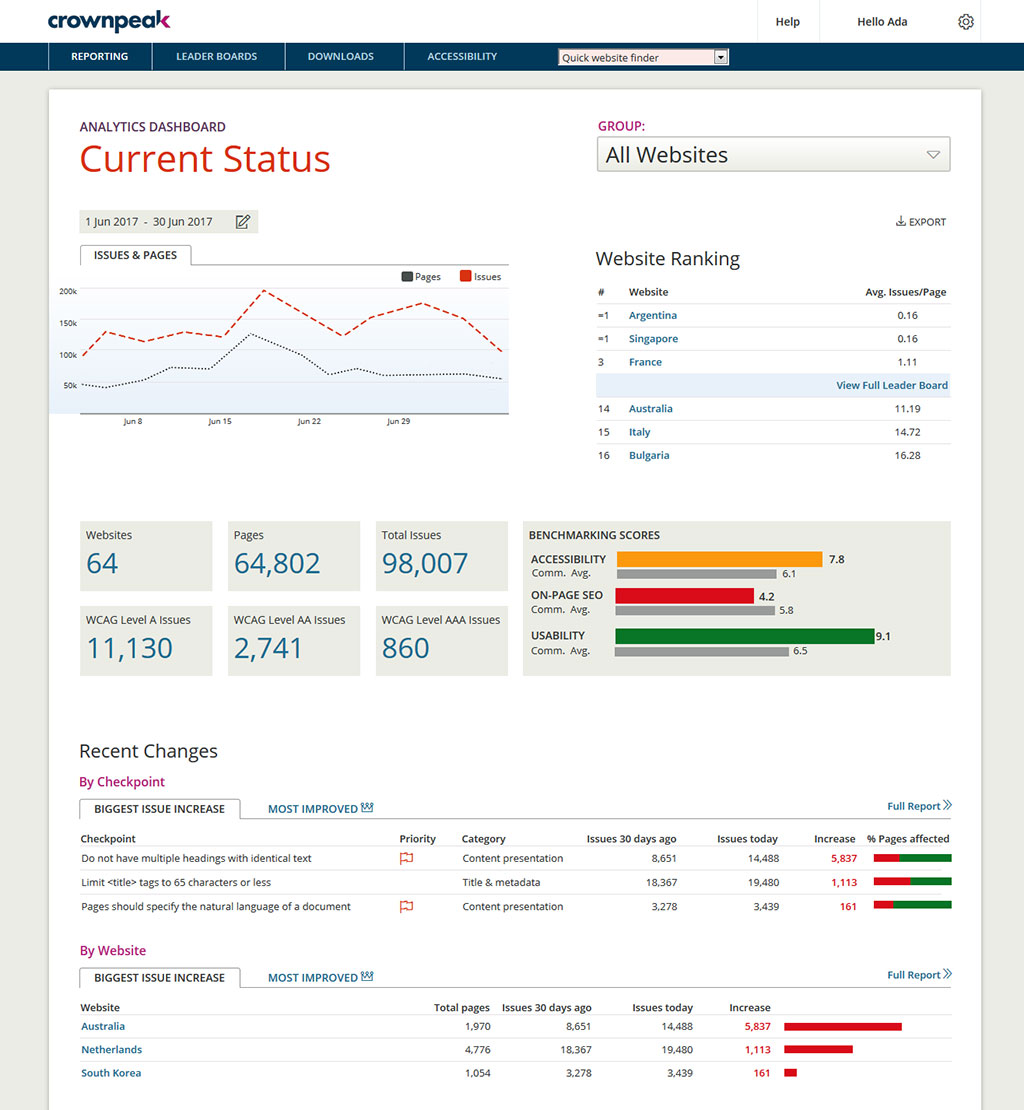
Building reports off the back of DQM gives senior stakeholders an understanding of the importance of usability and accessibility.
The gamification of league tables highlights to stakeholders the areas that need focus and budget in order to improve.
A de minimis incentive was given to thank the reviewer for their time. The incentive was not used to bias or drive a particular response, nor was the incentive contingent on a positive endorsement. TR verified that a representative sample of customers was invited. More Info