Action1 is an autonomous endpoint management platform that is cloud-native, scalable, and configurable in 5 minutes. It is free for the first 200 endpoints, with no functional limits. By pioneering autonomous OS and third-party patching - AEM’s foundational use case - through peer-to-peer patch distribution and real-time vulnerability assessment without needing a VPN, it eliminates costly, time-consuming routine labor, preempts ransomware and security risks, and protects the digital…
N/A
HCL BigFix
Score8.3 out of 10
N/A
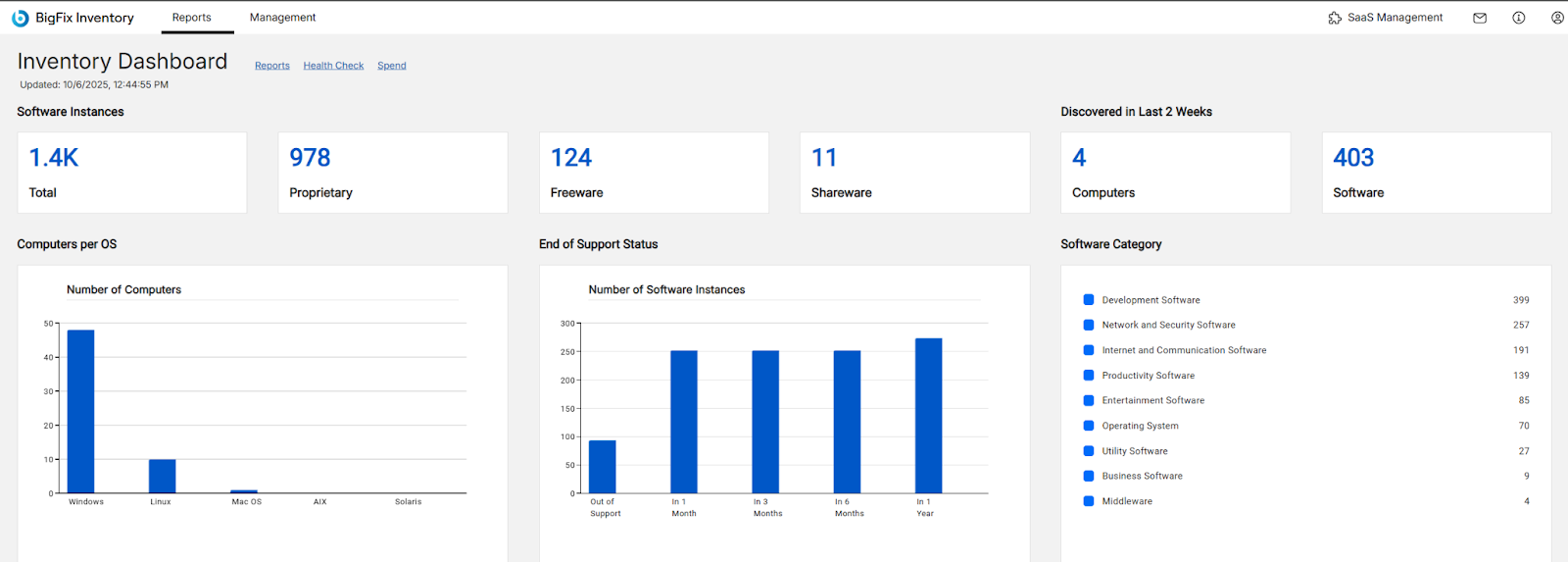
BigFix, now supported by HCL Technologies since the acquisition of BigFix from IBM in 2018, is an endpoint management solution providing endpoint visibility and IT asset discovery, automated endpoint patching (BigFix Lifecycle and BigFix Patch) policy enforcement (BigFix Compliance), and software asset discovery for licensed and unlicensed software (BigFix Inventory).
If your organization is like mine (nonprofit and tight budget) this product is for you. The first 200 endpoints are free and being we are a small organization, this product is perfect for us. I was able to use Action1 to upgrade all my endpoints from Windows 10 to 11 pretty much effortlessly. If you are not a nonprofit and have more endpoints over 200, this is still a great product to use as I don't find it very expensive to incorporate into your infrastructure.
A de minimis incentive was given to thank the reviewer for their time. The incentive was not used to bias or drive a particular response, nor was the incentive contingent on a positive endorsement. More Info
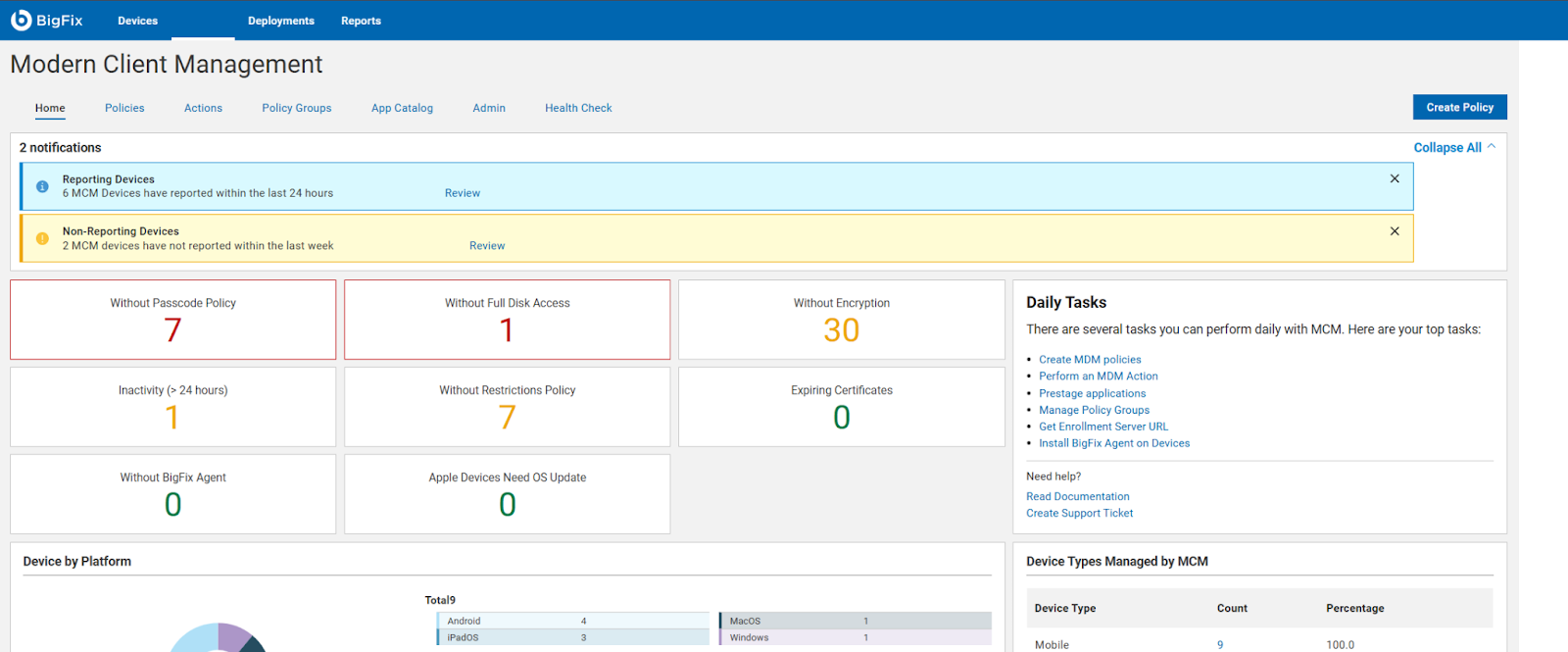
Patch Management for Diverse Devices: HCL BigFix is ideal for organizations with a diverse range of devices, including laptops, desktops, cloud, virtual machines, and mobile devices. Its endpoint management functionality enables seamless patching across various operating systems such as Windows, MacOS, ChromeOS, and Linux.
Comprehensive Patch Management: With HCL BigFix, organizations can achieve comprehensive patch management across their IT infrastructures. It ensures that all endpoints, regardless of the operating system, receive timely and secure patches, reducing vulnerabilities and enhancing overall security.
Troubleshooting and Monitoring: HCL BigFix excels in providing a dashboard that effectively displays problematic and functional machines. This feature allows IT teams to quickly identify and address issues, improving overall troubleshooting efficiency. However, there are some scenarios where HCL BigFix may be less appropriate or areas for improvement: 1. Coverage Expansion: It is important for HCL BigFix to continue expanding its coverage to include all possible resources installed within the IT infrastructure. Ensuring comprehensive coverage can enhance its effectiveness. 2.On-Site and OS Upgrades: Optimizing the process of on-site and operating system upgrades can help streamline the deployment process further. Improvements in this area would contribute to a smoother and more efficient upgrade experience. 3.Communication Speed: Enhancing the speed of communication between the HCL BigFix agent and the server can help improve the overall responsiveness and efficiency of the solution.
Pricing Optimization: Adjusting the pricing of HCL BigFix to be more cost-effective would make it more accessible and attractive to organizations of different sizes and budgets.
Easy remote access to devices. That simple. We have some very unskilled users in the field where asking them to access their PC via conventional remote tools like TeamViewer, Anydesk, etc. was always a pain. Now, all they have to do is ensure their PC is online, and we can connect to them.
Remote software deploy. Before Action1, we did have some GPOs and scripts, but again - being able to deploy to PCs outside of our office/LAN, is just beautiful. On top of the standard repository, being able to create new packages is very useful for our scenario.
Inventory Reporting. Recently we had to identify PCs running old versions of Windows. Can't highlight enough how easy it is.
A de minimis incentive was given to thank the reviewer for their time. The incentive was not used to bias or drive a particular response, nor was the incentive contingent on a positive endorsement. More Info
A de minimis incentive was given to thank the reviewer for their time. The incentive was not used to bias or drive a particular response, nor was the incentive contingent on a positive endorsement. More Info
The deployment screens for update deferrals can be hard to understand at first and easy to skip since it carries some default info when you create a new automation rather than a more conspicuous prompt to update.
A de minimis incentive was given to thank the reviewer for their time. The incentive was not used to bias or drive a particular response, nor was the incentive contingent on a positive endorsement. More Info
A de minimis incentive was given to thank the reviewer for their time. The incentive was not used to bias or drive a particular response, nor was the incentive contingent on a positive endorsement. More Info
A de minimis incentive was given to thank the reviewer for their time. The incentive was not used to bias or drive a particular response, nor was the incentive contingent on a positive endorsement. More Info
Action1 has taken many of the tasks that are time consuming and made them simple automated tasks that can be run on a schedule. I can schedule tasks to run off-hours and know that they will be done and I no longer have worry about it. As someone who does IT support for a living, it just makes my job so much simpler with less stress.
A de minimis incentive was given to thank the reviewer for their time. The incentive was not used to bias or drive a particular response, nor was the incentive contingent on a positive endorsement. More Info
A de minimis incentive was given to thank the reviewer for their time. The incentive was not used to bias or drive a particular response, nor was the incentive contingent on a positive endorsement. More Info
A de minimis incentive was given to thank the reviewer for their time. The incentive was not used to bias or drive a particular response, nor was the incentive contingent on a positive endorsement. More Info
After looking at different solutions, Action1 [Cloud Remote Monitoring and Management Solution] was the perfect fit for us that delivered all of the features we wanted without being as costly as some of the others alternatives we've looked at. There was no minimum endpoint count and they even offer up to 50 endpoints for free, which is really great for a small organization like us to help us lower our starting costs and still allows us to grow at our pace without having to commit to a defined amount of endpoints to start.
We have significantly enhanced our ability to patch desktops, including laptops, desktop, cloud, virtual machines and other mobile devices used by end-users. BigFix's endpoint management functionality allows us to seamlessly patch a wide range of operating systems, such as Windows, MacOS, ChromeOS, and Linux systems, ensuring comprehensive patch management across IT infrastructures. We have established a track record of delivering secure and hassle-free patching solutions to our clients
Saved hours per week on patching and able to ensure a 100% patching success rate.
Able to create custom alerting on potential problems as well as able to create some automation to automatically address problems.
Improved support to our remote locations and users.
Custom deployments allow us to have a mechanism to deploy custom applications we build as well as other third party applications we need to distribute.
A de minimis incentive was given to thank the reviewer for their time. The incentive was not used to bias or drive a particular response, nor was the incentive contingent on a positive endorsement. More Info
A de minimis incentive was given to thank the reviewer for their time. The incentive was not used to bias or drive a particular response, nor was the incentive contingent on a positive endorsement. More Info