Email automation software with optimized personalization to drive engagement.
N/A
Intuit Mailchimp
Score 8.3 out of 10
N/A
Mailchimp is an email marketing and marketing automation platform. Beyond just tracking how campaigns perform, Mailchimp takes it a step further by analyzing data from over half a billion emails to show why campaigns perform, driving informed decisions.
$0
per month
PostUp
Score 2.6 out of 10
N/A
Email marketing and audience development solution to grow, engage and monetize audiences
For medium and large sized businesses, Adestra competes well with dotMailer. While many of the functions are available through either provider, creating campaigns, managing lists and reviewing metrics are somewhat different.
As of this writing, dotMailer's drag-and-drop editor …
The difference between Mailchimp and the other email marketing applications we've used is that Mailchimp is a more convenient and affordable application that is meant to give the user the ability to execute a full email campaign from start to finish completely on their own - …
I recommend MailChimp because of its solid and growing market share. In some cases, small and medium-sized businesses may find the same solutions within Constant Contact, iContact, or MailChimp. It may be a simple matter of preferences that determine which email marketing …
Small businesses with even smaller marketing budgets and no email marketing experience would be better off selecting a lower-end email marketing provider. However, Adestra will provide a growing company with every email marketing tool along the way.
For any E-commerce related needs, like you need to see a list of customers who have added products to cart but did not purchase, this can be done really easily, but if your e-commerce provider provides integration, then it is best suited. Most of the systems in the Market provide out-of-the-box integration. Their API is also very easy it can be integrated to any language. You can integrate it into your custom developed system and use the features, like adding customers to specific lists. Also, if your lists become really big, then their system can get a bit slow to respond via API, so you might need a strategy for how you are gonna fetch the data using API.
For what we are using the service for, it accomplishes everything that we need. We use it across a couple departments and it is very easy to keep track of everything scheduled so there is no confusion. We started using it at the beginning of the year and it's become very simple to navigate, which is great. That makes it much easier for me to train people how to use it.
Adestra's "dynamic" list allows users to consolidate multiple lists in combination with data filters and exclusion lists. This implements segmentation and is a powerful marketing tool.
Adestra's MessageFocus API integration provides developer-tools for list, campaign or transactional automated requirements.
Campaigns can be sorted into project folders. This allows marketers to group campaigns together for management or reporting requirements. Moving or copying campaigns from one project to another is a simple process.
Data downloads via Reporting is available at every level, from overview to individual KPI.
Creating "core" tables helps marketers develop lists with similar attributes. Whether a list has many fields or simply the one required email address field, a "core" table helps to quickly map data labels from spreadsheet to online database. Creating data labels on the fly is a simple process, as well. The "core" table also groups similar contacts into one core database.
Any list can be quickly "emptied" for to manage refreshed data. The contacts within the "emptied" list would still be members of the "core" table and so the process does not negatively impact reporting.
Unsubscribes can be managed in one list (as a default) or individual lists. Creating individual unsubscribe lists -- dependent on business requirements -- would allow for a preference center, whereby recipients could be given a choice as to which campaigns they receive.
The Form tool creates signup forms, simple surveys and landing pages. These can be hosted via Adestra or otherwise on the web. The tool provides for branding and proprietary cascading stylesheets, with a number of actions available through a drag-and-drop interface.
Mailchimp allows you to manage your mailing list really well. You can subscribe people, unsubscribe people manage the mailing list directly into segments, and what not.
Mailchimp has features where you can create campaigns based on your mailing lists and send out newsletters to your subscribers based on a multitude of parameters that you can setup. Such as send email daily, weekly, monthly and they also have event based mails that you can send out.
Mailchimp also has a feature where you can design your emails. The look and aesthetics are very important when sending emails to your subscribers and all those needs are addressed here.
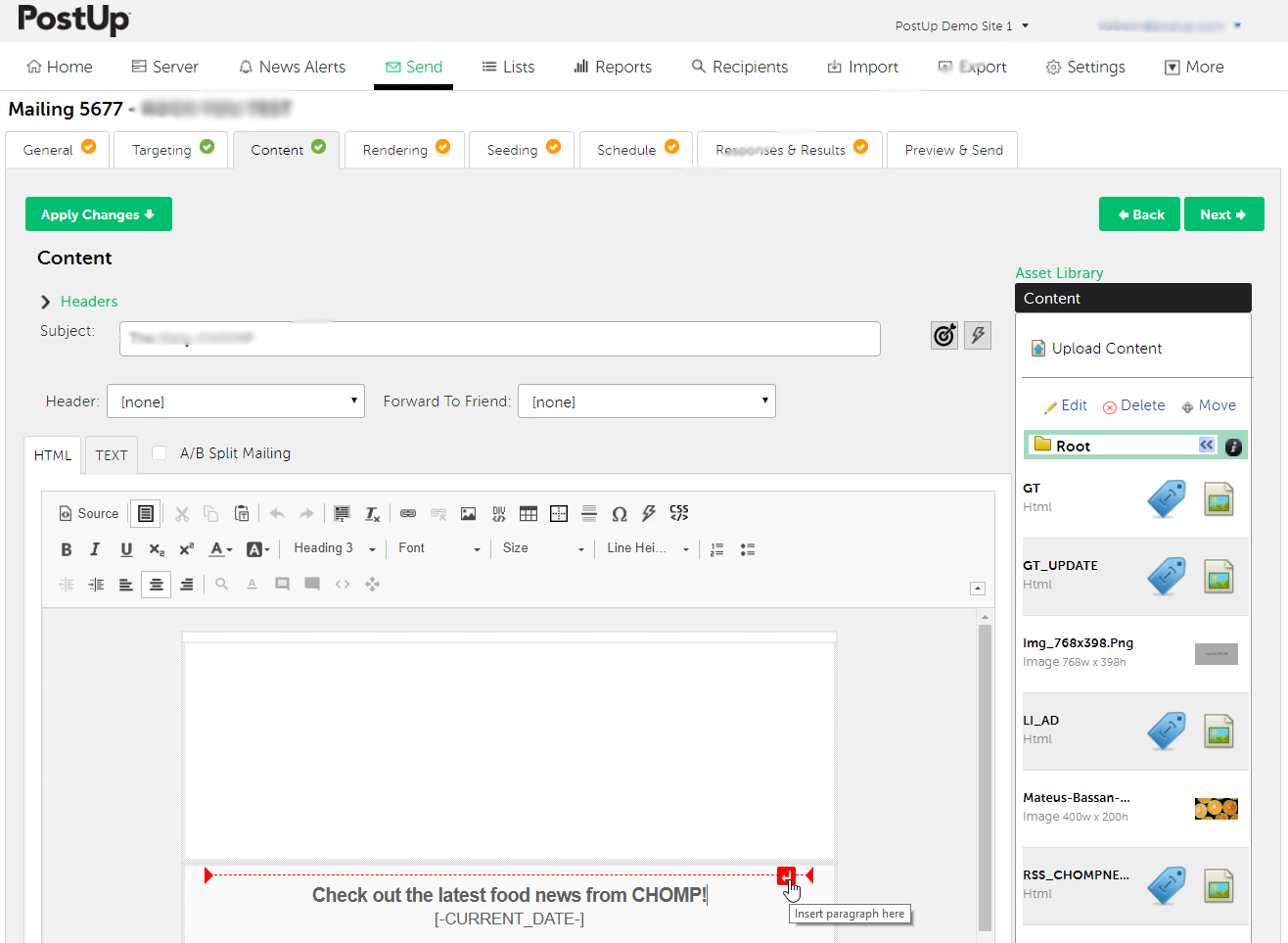
As of this writing, there are at least 3 different editors available (a drag-and-drop, a WYSIWYG and HTML). However, only a small template library is available if requested through support. Those expecting to find ready-built templates for re-branding would find them through the third-party EDM Designer drag-and-drop editor.
There was a recent update they did that was sort of hard to get adjusted to, things weren't in the same spot as normal and it was sort of difficult learning where things were located now.
It only shows you 7 mailings at a time by default, it would be nice to be able to change the default setting to whatever is preferred.
In the "server" I wish there was a way to filter by department, not just by users.
We've had Mailchimp for about ten years, I want to say. I started with the company about four years ago, and I don't see us ever diverting to another source. It's easy for us to use, and we have all our clients already built into the database. I imagine we'll use them for as long as we have the company.
I have been self-trained on different ESPs for over 10 years, so my experience isn't comparable to most users. However, I've trained people on various email marketing platforms, and with some training, clients have a positive user-experience with Adestra.
The interface is a bit complicated, and I need to spend some time to learn new functions and understanding how it works. I don't like working with email templates because of the limited customization options. However, functions like AI for generating emails, segmentation, and analytics still work well and are very useful.
I have, in the 4+ years that I've used Mailchimp, never seen an issue that restricted the use of their software/tools. I don't know of a single time when they're system crashed or went down. I could be wrong, but I honestly haven't experienced any issues with outages, errors or unplanned downtime
I haven't noticed any slow speeds from Mailchimp or their tools. I think the landing pages load quickly and look nice. The email reports and editing operates smoothly and doesn't take time to load. Additionally, when I use Mailchimp in conjunction with Zapier + Hubspot I don't notice any drag between any of these tools
I have had campaign related issues solved very quickly. When there are technical issues, that involve more than one departmental, it may involve a longer turn-around and management.
Website tools were easy to use and understand so a novice can easily meet or exceed their client's expectations! Loved that we were able to totally customize so that the e-mail we created conveyed our client's overall messaging consistent with their branding! Client love that we can provide turnkey services to support their sales and marketing teams!
It's pretty easy to get up and running! There's a slight learning curve on a few things, but once you find where everything is located, you can import your list and send your first email. It really makes our clients feel great to see how quickly they can get that first email out.
For medium and large sized businesses, Adestra competes well with dotMailer. While many of the functions are available through either provider, creating campaigns, managing lists and reviewing metrics are somewhat different. As of this writing, dotMailer's drag-and-drop editor dominates that platform and performs well for low-end users with little-to-no HTML experience. Even high-end users will appreciate how quickly campaigns can be built via the drag-and-drop editor. While Adestra utilizes the EDM Designer drag-and-drop, the third-party functionality is not completely cohesive and lack of a template library gives dotMailer a bit of an advantage.
I don't think they are comparable; we use Google Ads to put our website at the top of the list when someone googles certain words. We use meta business to manage our social media. Google aims to gain customers, while Mailchimp is used to interact with both existing and new customers.
Mailchimp over the years I've used it has grown in leaps and bounds. They have added so many additional features than were previously available. They are truly an all-in-one marketing platform now. If you're a small operation and just want to add email to your marketing efforts, they're there for you. If you're a larger operation and want to start sending postcard advertisements, they can do that. If you'd good with that and want to kick up your marketing by going social, you can do that on their platform. They are truly able to be as small as you need, but also get quite large in whatever it is you'd like to do through their system.
One of my retail web store clients was sending out email specials and notices about once a month. After clicking the send button, we would watch Google Analytics and the current site users would light up immediately. Often, the current site visitors would pop up to 20, 30 or more after the email was sent. On a normal day, seeing 1 or 2 online users would be OK.
Pretty much in all cases, we could see an uptick in positive activity after sending out a Intuit Mailchimp email to a list.